Even in 2026, Spotify remains the top free music app for Android and iPhone, followed by YouTube Music and Amazon Prime Music. But that is not to say that it is the only one that deserves this praise. But there are lesser-known services that also deserve a mention. If you are on the hunt for a new free app for all your musical needs, then you need to check out this list. We have tested the best free music apps in 2026 for your Android and iOS devices.
Overview of the Best Free Music Apps in 2026
Let’s begin with a quick overview of the best free music apps for Android and iOS. We have provided a detailed breakdown of each platform, based on its audio quality support, library size, and pricing.
Best Free Music App Audio Quality Support Library Size Pricing Spotify High fidelity 16-bit/44.1 kHz FLAC Over 100 million tracks Free, $12.99/month YouTube Music Supports 256kbps AAC and encoded in 320 kbps Over 100 million tracks Free, $10.99/month Amazon Prime Music Up to high-res lossless 24-bit/192 kHz FLAC support Over 100 million tracks Free, $11.99/month SoundCloud Supports 256kbps AAC and encoded in 320 kbps Over 300 million tracks Free, $10.99/month for GO+ ad-free plan Vox Music Player High-res lossless 24-bit/192 kHz FLAC support Based on locally stored music files Free, $4.99/month VLC Media Player High-res lossless 24-bit/192 kHz FLAC support Based on locally stored music files Completely free Musicolet Does not support lossless audio Based on locally stored music files Free, $15.49/month Deezer High fidelity 16-bit/44.1 kHz FLAC with limited support for 24-bit files Over 120 million tracks Free, $11.99/month TuneIn Radio Does not support lossless audio Over 100, 000 radio stations and 5.7 million podcasts Free, $9.99/month iHeartRadio Does not support lossless audio Thousands of live radio stations Free, $9.99/month
How We Tested the Best Free Music Apps in 2026
As a modest audiophile who has talked about the best headphones and reviewed popular audio accessories, I am always on the hunt for new music apps to explore new songs and extend my library. This has led me to look for the best free music app that includes not just the popular choices, but a few niche ones too.
To test these apps, I used my Tangzu Wan’er S.G. II IEMs for audio quality, checked for online and offline playback, and even tried out a huge library of FLAC files. I also checked for availability, as in which app is available for a particular platform, whether there were any exclusive features or pricing differences. With all these things considered, here are my suggestions for the best free music app.
Best Free Music Apps for iPhone and Android in 2026
I have handpicked the best free music apps: Spotify, YouTube Music, and Amazon Prime Music. Here’s a close look at each one of these apps.
Spotify
Without a doubt, Spotify is the overall best music app across any platform. It is extremely feature-rich, has a vast library of songs and podcasts, recently got support for lossless audio quality, and is available on every single platform. Not only can you explore popular hits, but also niche tracks from artists you might have never even heard of, across regions.
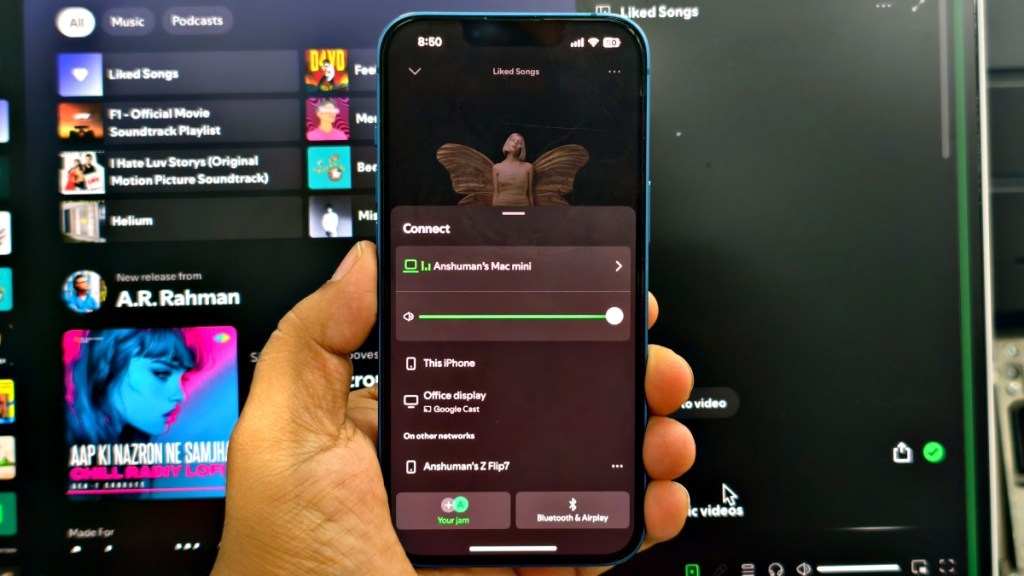

The app also packs a ton of social features to make listening fun with your friends, like Spotify Jam or Spotify Blend. It also integrates with apps like ChatGPT and Instagram, allowing you to do more with Spotify than just listening. Its cross-device sync lets you control music playing on one device from another. It is so addictive that I can’t think of quitting Spotify because of it.
However, its free tier constantly annoys you with ads, limits offline playback, has no hi-res audio, and even takes away song skipping. Even if you decide to upgrade to Spotify Premium, it regularly receives price hikes, which can be a turn-off for many looking for a perfect free music app. But everything considered, Spotify is still one of the best free music apps for iPhone and Android.
Pros Cons Vast library of over 100 million tracks Limited skips in the free-tier Excellent social and cross-platform features Plays unskippable Ads in the free plan Support for lossless audio Music recommendation algorithm needs improvement Free plan lets you listen to music in background
YouTube Music
YouTube Music is the offspring of YouTube, based solely on streaming music. It boasts an extensive library of songs, taken straight from YouTube. So, basically, every song that you can ask for is available there. Even tracks that are region-locked will be available to listen to on YouTube Music. And you can even enjoy official music videos if you are in the mood for it.


Having access to YouTube’s vast video library also lets you listen to different versions of a song and covers by other artists. Plus, delivers the most suitable recommendations as per several things, including your taste, location, and even mood. Unlike Spotify, it does not restrict song skipping in its free tier.
However, the free version of this music app bombards you with ads, and the worst part is that there is no background playback. So, you cannot listen to music with the screen off. If you are willing to pay a few bucks, you can unlock this feature, along with the ability to remove ads and download songs for offline listening.
Pros Cons Consistently growing library of songs borrowed from YouTube Free version does not allow background playback Access to official music videos within the app Mood based playlists are not good Can listen to different version and covers Does not offer any lossless audio support Excellent song recommendation algorithm
Amazon Music
Amazon Prime Music is often seen as a neglected add-on to your Amazon Prime membership. But over the years, the service has become one of the best free music apps that can take on the giants like Spotify and YouTube Music. It features over 100 million tracks, and even the interface has greatly improved lately.

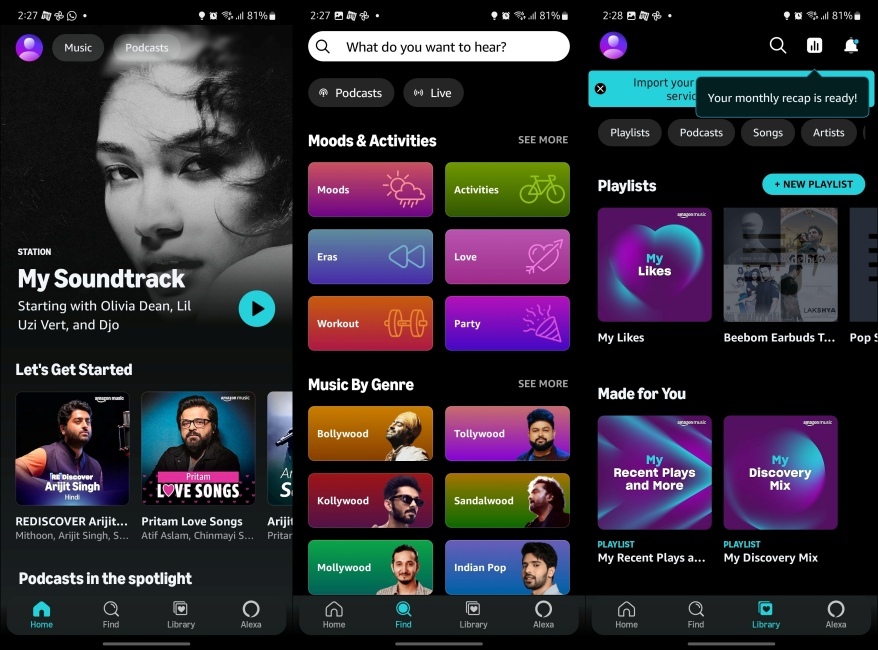
It works on both Android and iPhones, and comes as the default music streaming app if you have an Amazon Echo device. You can find popular music in some of the niche ones, but the library might not include some barely known artists or song covers. That said, in my testing, I was really impressed by its curation of daily music radio for me.
It suggested the songs that strongly match my taste, and I did find some new tracks that I actually liked a lot. However, since it is an add-on service, we can’t technically call it free. There is a free version of Prime Music, too, which is also riddled with ads after every two songs or so. It also does not offer any hi-res audio support, which is a bummer.
Pros Cons Boasts a wide library of songs and podcasts Does not provide hi-res audio support Easy to navigate interface Might not feature some very niche artists Great recommendations in daily radio Free version includes ads Offers offline and background listening options
SoundCloud
Now, here comes the world’s largest music and audio streaming platform. Loaded with over 300 million tracks, SoundCloud is the perfect destination to explore all sorts of music. Everything from jazz, hip hop, classical, podcasts, and audiobooks that you like to listen to or enjoy tuning into will be there on your radar.
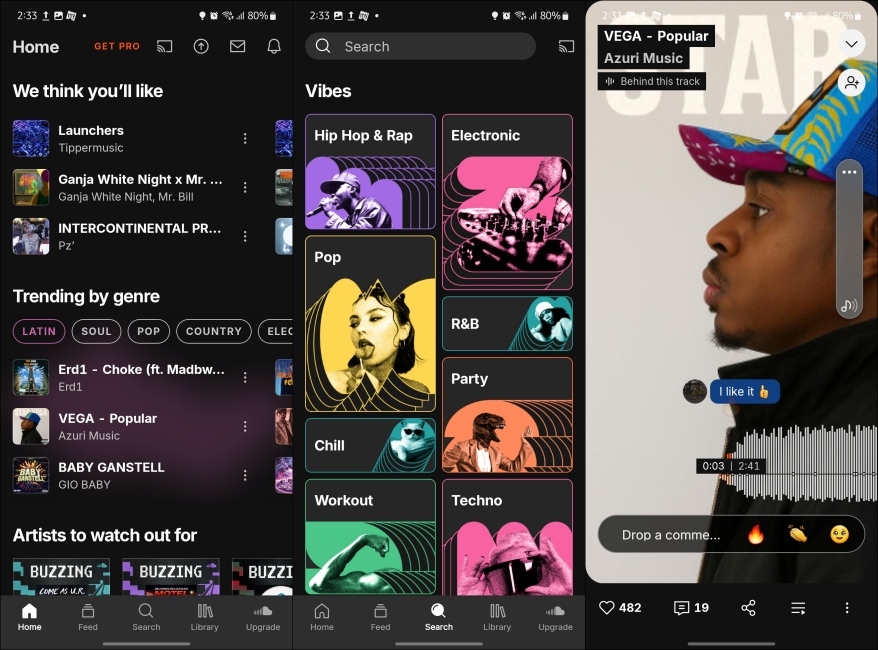
If you always want to keep yourself in sync with the latest offerings from top artists, the app will help you stay in the loop. There are also communities for a variety of music lovers on this free music app, where you can connect with the artists you admire and wish to follow. Furthermore, you will have easy access to mixes, chart-topping albums, and live sets.
With SoundCloud Go and Go+, you will get additional features like offline listening, just 30 seconds of preview, ad-free experience, and more. Given that it was the go-to app in my teens to explore music, I would want to keep SoundCloud much higher on this list. But other apps do offer more benefits and a better cross-device experience, which is why it is in the 4th place.
Pros Cons Mammoth library of over 300 million songs UI still needs some improvement Ability to connect directly to artists Freedom to create playlists for any occasion Can join communities and explore extremely unknown tracks
Best Free Offline Music Apps
Many music lovers like to carry their music with them, like in the old days, when ownership of their music used to be a thing. So, if you are old-school like that, then you might like some of the free offline music apps like Vox Music and VLC player.
Vox Music Player: Best Free Offline Music Player for iPhone
Unlike Android, iPhone users only have a limited number of good options to pick from when it comes to the best free music players. There aren’t many out there that deliver a full-fledged experience, while supporting the highest CD-quality audio, and feature an intuitive interface too.

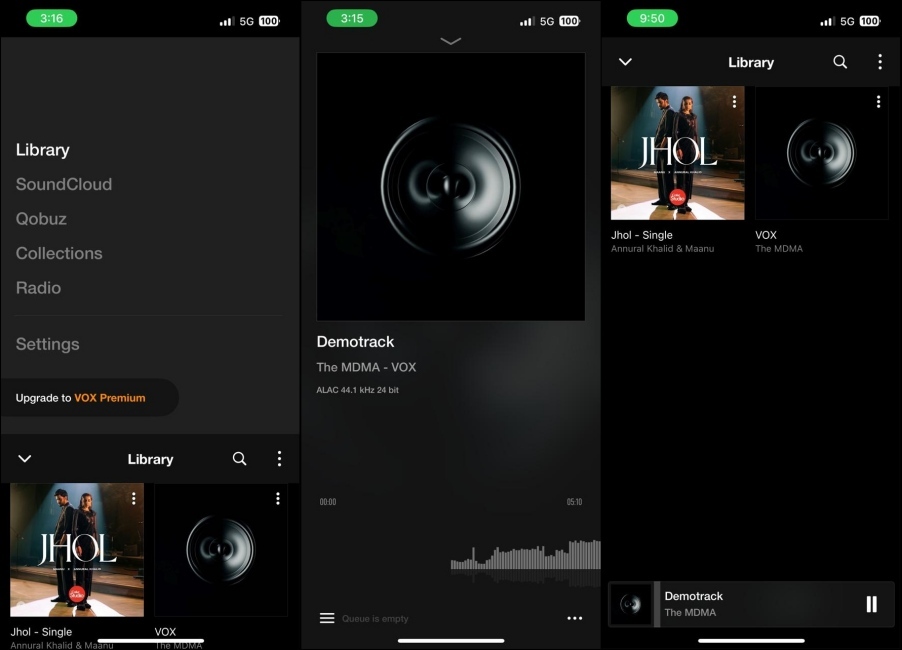
But I finally managed to find one app that does all that, and its name is Vox. It is a full-fledged music player app. Whether you want to store a lot of music or keep your entire playlists in the right order, it will stand up to your needs. It supports many audio formats (including hi-res) such as FLAC, APE, WAV, ALAC, MP3, WMA, OGG, and more.
Vox also ensures that managing and playing music always remains a convenient task for you. Better yet, it lets you stream music from Apple Music and SoundCloud. And with over 30’000 radio stations, you will be able to tune into your favorite radio programs as well. But you can always upgrade to its premium tier to enjoy more benefits.
Pros Cons Support for many audio formats, including Hi-res Unlimited storage and EQ settings locked in free tier Full-fledged music player app with lyrics support Features ads in the free plan Stream music from Apple Music and SoundCloud Original shows and podcasts
VLC Media Player: Best Free Overall Offline Player
You guys might already know about this one, but VLC Media Player has to be one of the best options for a free and offline music player. The fact that this is a no-nonsense free app without any hidden costs, and gets regularly updated instantly, makes it great in my books.
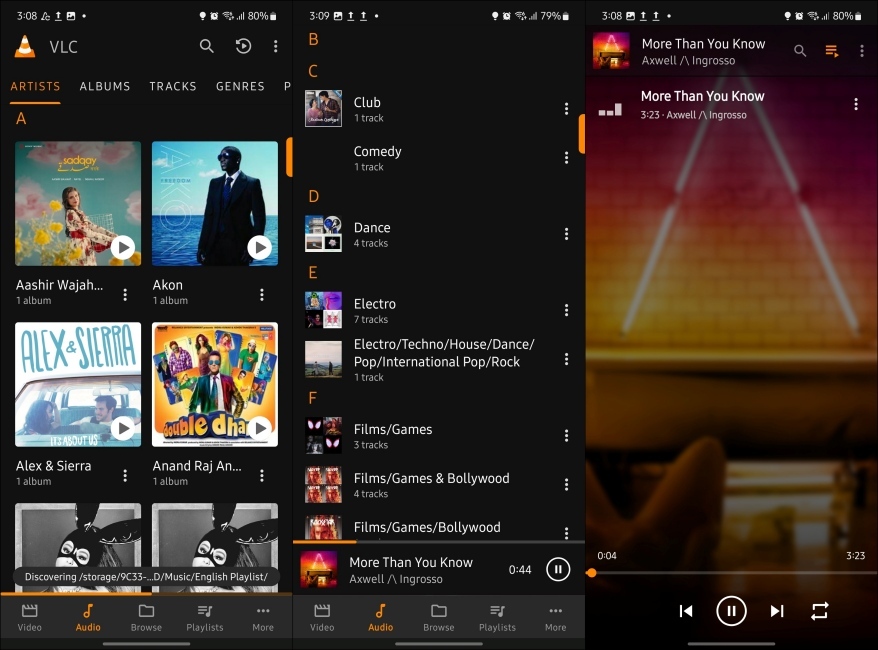
I have been using VLC for videos for a while now, and recently started using it for my offline library of FLAC files too. It supports hi-res codecs along with multiple other audio formats. The UI is simple to navigate and use, and the app is available on every platform imaginable.
The song management system is also decent, but what does bum me out about VLC is the lack of a parametric equalizer. I know this is not a full-fledged music player, but I would have loved to see one here, since it is my go-to option. But if that is something that does not bother you, I would highly suggest going with VLC any day.
Pros Cons Completely free media player app Does not feature any standout audio-centric options Supports a wide variety of audio formats, including hi-res 24-bit/192kHz or higher Basic EQ customizations Easy-to-navigate interface No ads or in-app purchases
Musicolet: Best Free Music Player for Android
There are very few Android music players in the market that provide as much flexibility as Musicolet. This is why I have picked it for this list. It lets you create up to 20 queues, which would be more than enough to keep your tracks perfectly in line.
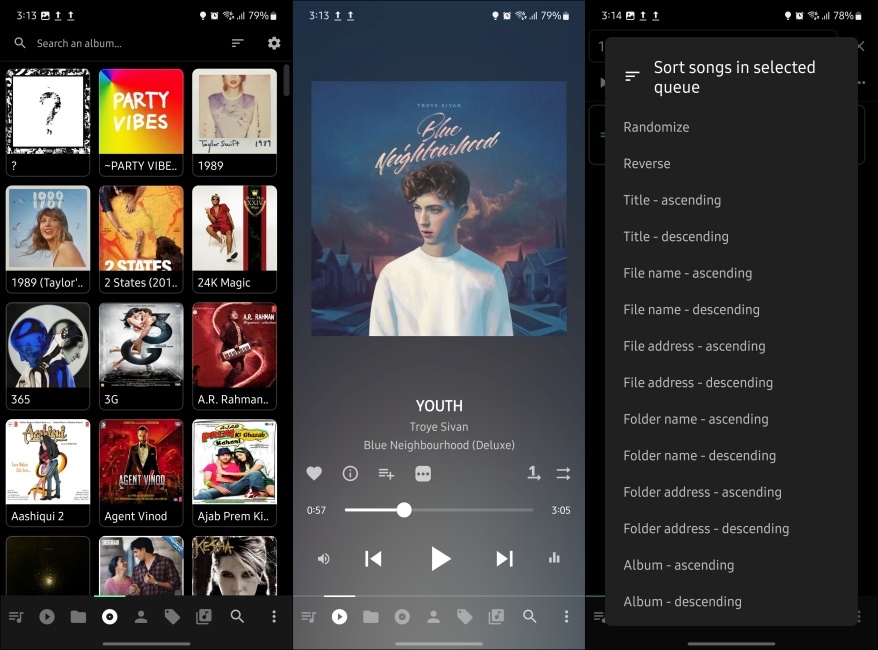
It is simple in its execution and might seem less fancy compared to some other open-source options as well. But its music management system is excellent, as it allows you to edit queues while catching up with other queues at the same time. Plus, you can also add custom tags to your songs and albums, which comes quite handy when creating playslists as I tried out in my time.
I wish Spotify could add the same feature. Moreover, it is mostly free and shows limited ads compared to some other free music apps I have discussed above.
Pros Cons Super handy tag editor Some aspects of the interface don’t work as smoothly A pretty minimalistic design Does not support hi-res codec Create up to 20 queues and support multiple queues Includes folder browsing options
Deezer
The only reason I have kept Deezer this low is because of its unavailability in my region. So I couldn’t test it out properly, but that doesn’t mean I am unaware of how popular it is. This free music app is perfect if you have a rich taste for audio quality or consider yourself an audiophile.


Deezer is packed with over 120 million songs, putting it as high as the top 3 contenders in this list. Regarding the interface, I find it up to the task (if not at par with the best in the business). It has a handy shuffle mode, which makes it pretty simple to find new tracks.
This app also offers many customization options, allowing you to organize your tracks based on artists and genres. Beyond music, you can also discover podcasts and radio stations to catch up with popular programs. The free tier features ads, but you can easily get rid of them if you upgrade to Deezer Premium.
| Pros | Cons |
|---|---|
| A huge library of over 120 million songs | The interface could do better with a facelift |
| Ability to organize music by artist and genre | Song recommendations is not as good as Spotify or YouTube Music |
| Its Hi-fi tier offers high fidelity 16-bit/44.1 kHz FLAC support | |
| Good selection of songs and podcasts |
Best Music App for Listening to Radio
If you listen to the radio often and are on the hunt for the perfect apps to enjoy your favorite regional or international radio stations, then you can’t go wrong with TuneIn Radio or iHeartRadio.
TuneIn Radio
This one is primed for the folks who enjoy listening to the radio. With TuneIn Radio, you have access to over 100,000 radio stations. From news, sports, music, to talk radio, you get plenty of options to explore and listen to your favorite content. It offers live commentary to every NFL, MLB, NBA, and NHL game. You can catch up with the trending top shows and famous podcasts on demand.


The app provides access to around 100,00 AM/FM music stations, which are ever ready to entice your music time. Besides, it keeps a tab on your taste and curates music stations that are more geared towards different moods. TuneIn Radio has also been doing audiobooks before Spotify, featuring a large library that would be more than enough to satiate your listening pleasure.
Lastly, only TuneIn Premium can allow you to take advantage of all the features without any restrictions. The free version of TuneIn Radio is available in most countries of the world.
Pros Cons Ability to stream over 100, 000 radio stations Not available in all global regions Live commentary to every NFL, MLB, NBA, and NHL games Some advanced features locked behind premium tier Also offers a vast library of audiobooks Songs/shows customization could be better
iHeartRadio
Though not as feature-packed as some of its noted counterparts, iHeartRadio has long been a good platform for music, radio, and podcasts. To ensure your music station delivers only what you wish, you have the option to create personalized radio stations based on your all-time favorite artists.


The music library has loads of tracks of several different genres like Top 40, Country, Rock, Pop, Hip Hop, EDM, R&B, and more. With this app, you can discover a lot of radio stations that are near you or from anywhere in the world. This liberty ensures you can listen to top radio stations, no matter where they exist.
Whether you would like to tune in to music, news, sports, a talk show, or comedy, it would allow you to follow your interests with the needed freedom. As a sports fan, you would be pleased to have popular stations like ESPN Radio and Fox Sports on your radar.
Pros Cons Option to listen to thousands of live radio stations Songs organization needs improvements Access to famous sports radio stations like ESPN Radio, Fox Sports Radio, FNTSY Sports Radio, and more Limited availability in many regions Ability to stream unlimited playlists Weekly Mixtape and Curated playlists
Which is Better? Spotify Free vs YouTube Music Free
I know most of you might be confused picking between Spotify and YouTube Music free tiers. Both the apps sport a vast library of songs, and happen to be the best place to dicover latest and trending tracks. So I have prepared a breakdown of the free version of both of these popular music apps so you can pick the one perfect for your needs by yourself.
Music App Free Features Limitations Library Pricing Spotify Access to full music + podcast library, personalized playlists, recommendations, cross-device sync Ads between songs, limited skips, no offline downloads, lower audio quality Over 100 million tracks and podcasts Free, Premium plan starts at $12.99/month YouTube Music Access to full YouTube Music catalog + official videos, ability to choose specific songs more freely than Spotify in some cases, and YouTube integration Ads, no background playback on mobile, screen must stay on, no offline downloads, occasional skip limits Over 100 million songs and official videos Free, Premium plan starts at $10.99/month
What to Look for in a Free Music App?
Remember, no music app is perfect. At the end of the day, everything boils down to what your needs demand or what suits your taste better. Here are some things to consider when choosing the best free music app for yourself:
- Music Library: Apps like Spotify and YouTube Music have large libraries, featuring songs from different genres, regions, and even young and coming artists. If your availability of songs is something that matters to you, then you should stick with popular options.
- Audio Quality: This is specific to audiophiles who want to enjoy the richest sound experience and hear each and every detail in the song. If this is you, go with an app that supports FLAC or lossless audio.
- Free features: Since we are on the topic of free apps, you obviously want to pick an app that offers the most in its free tier. You should also consider whether the music app is riddled with ads or not.
- Offline Playback: If you live in a remote area, or don’t want to depend on interent to enjoy your music, then you might want to favor apps that provide offline music support.
- Cross-platform accessibility: Some apps offer support to work across multiple devices. This gives you the independence to listen to music on whichever device you are using at that moment.
Time to Get the Most Out of Your Favorite Music App
That ends our article on the best free music apps that you can get for your iPhone and Android. In this article, we have assembled the list of the best free music streaming apps and offline music player apps for you. Do check them out and let us know which is your favorite among them all. Also, if we missed out on any app, drop its name in the comments section.
There are several music apps like Spotify and YouTube Music that you can use to get free music on your iPhone.
Going by the numbers, Spotify is by far the best app to get free music. Though YouTube Music and Deezer are no less impressive.
You can use Finder/iTunes to transfer locally stored music from your computer to the iPhone or iPad seamlessly.
There are several highly-efficient iTunes alternatives, such as DearMob and WinX MediaTrans, that can let you transfer music from your computer to your iPhone and iPad with ease.
Though Apple Music is not available for free, you can get a free trial of 3 months. During festive times, Apple also offers a free trial of up to 6 months.
Hi-Fi audio is basically high fidelity audio. It’s a term used to signify music that’s streaming at a higher quality, usually lossless or audiophile-grade streaming. A couple of apps offer Hi-Fi audio streaming, but none of them are free. You can get lossless streaming in Apple Music, Tidal, etc.