- Yes, Palworld supports crossplay between PC, Xbox, PlayStation 5, and Mac.
- Only the host needs to enable crossplay in the world settings before launching the game.
- Players can join friends using the invite codes for multiplayer worlds, while dedicated server support depends on the platform and server type.
If there’s one thing better than catching an army of adorable yet dangerous companions across the Palpagos islands, it’s doing the same with your buddies. Since Palworld’s first major content update is here, one of the biggest questions in the community has been: Is Palworld crossplay? The good news is that Pocketpair has spent the last year improving multiplayer in a massive way, and you can seamlessly enjoy exploring the islands with your friends, no matter what device you own.
Is Palworld Cross Platform?
Yes, Palworld is fully cross-platform. Players on Steam (PC), Xbox Series X/S, Xbox Game Pass for PC, PlayStation 5, and Mac can all play together in the same multiplayer world. This feature first arrived with the major v0.5.0 Crossplay Update and has continued to receive improvements through the later updates. Now, with the latest Palworld 1.0 update, the stability has been further improved for co-play across all these platforms.


This means that you can finally stop asking your friends what platform they own before inviting them. While Palworld has already crossed 40 million players, players have always looked forward to a separate multiplayer system instead of heading into the matchmaking pools.
The Palworld crossplay feature arrived alongside several other multiplayer improvements and some QoL upgrades. Combined with the newer game modes like Hardcore and Randomizer, Palworld crossplay and multiplayer now feel significantly more complete than they did almost a year ago. However, a few limitations include the difference in world experience that you can feel while joining a hosted multiplayer server and a dedicated community server.
How to Enable Crossplay on Palworld
Fortunately, learning how to enable crossplay on Palworld is incredibly simple. Unlike other multiplayer games, where every player must change their settings, here, only the host needs to enable crossplay. That said, here are the steps to enable crossplay on Palworld:
- Before launching your multiplayer world, select the saved file that you want to play.

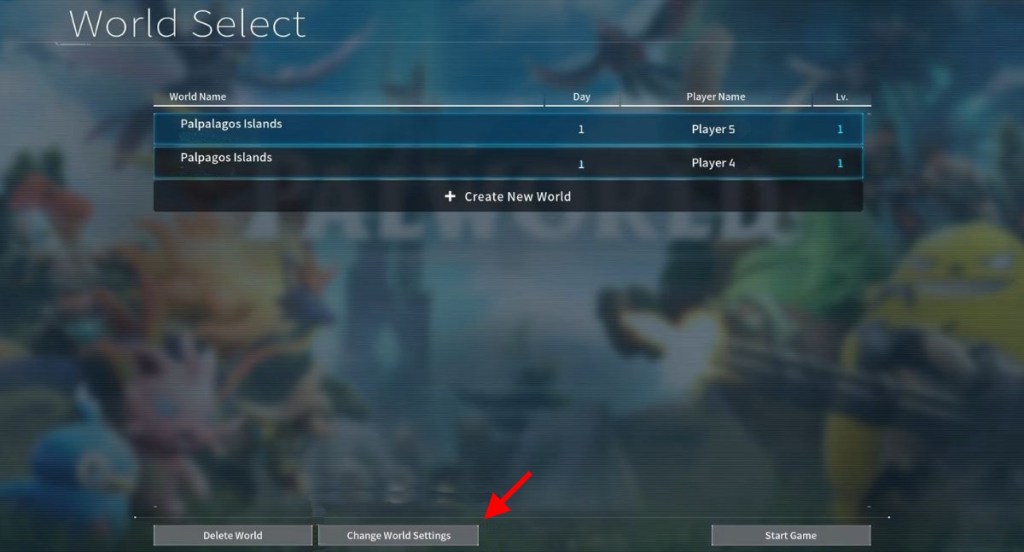
- Choose the World Settings and select the Cross-Play option.

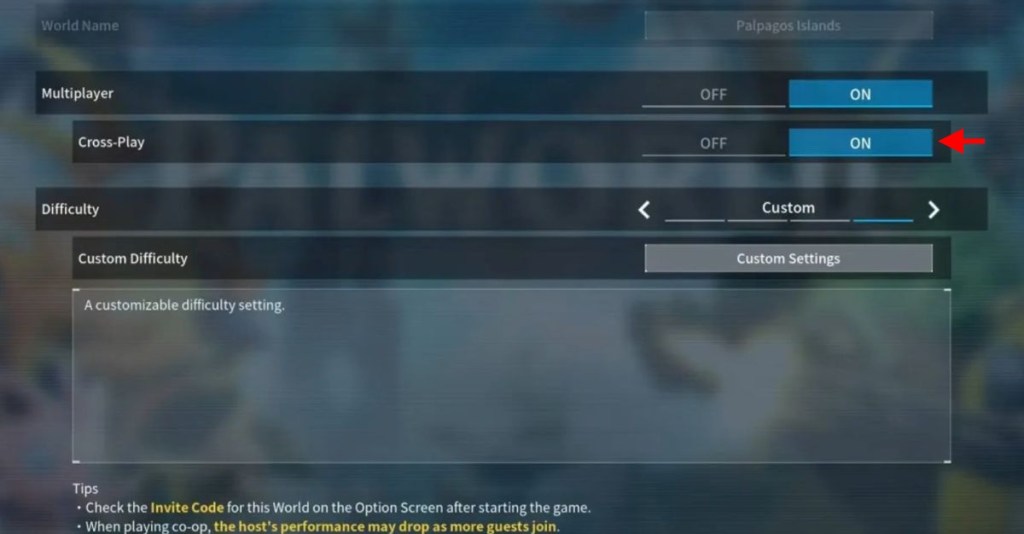
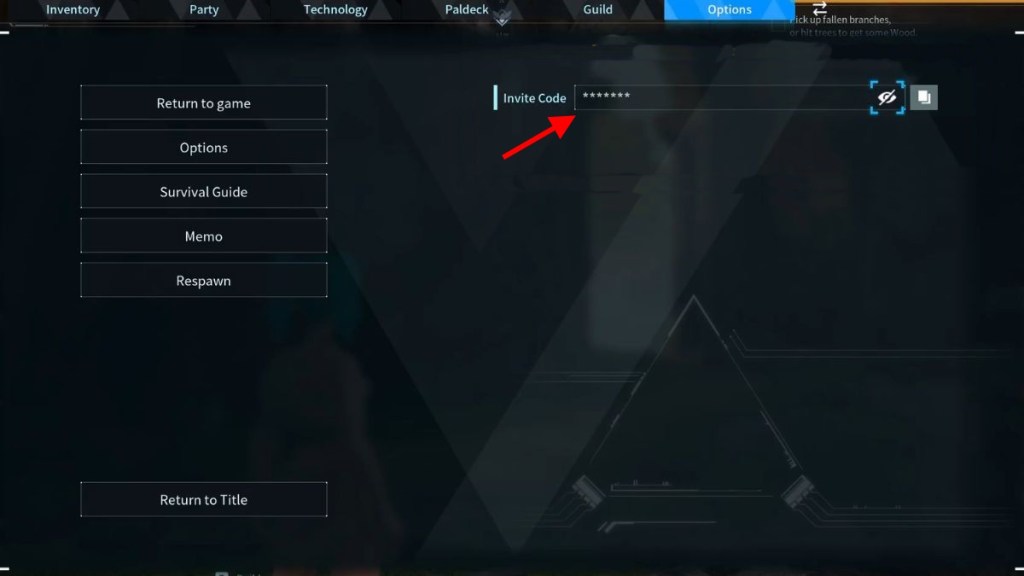
- Toggle it on and launch the world. Inside the world, open the Pause menu to find the world invite code.
- Copy the code and share it with your friends who wish to join the same world.
- The joining players don’t need to change anything. They can simply click on the Join Multiplayer Game (Invite Code) from the main menu and enter the code provided by the host.
- This will drop them in the same world regardless of what platform they’re playing on.
- Disabling crossplay in Palworld requires the host to return to the World Settings menu. Before launching the world, turn off the cross-play option, and you’re good to go.

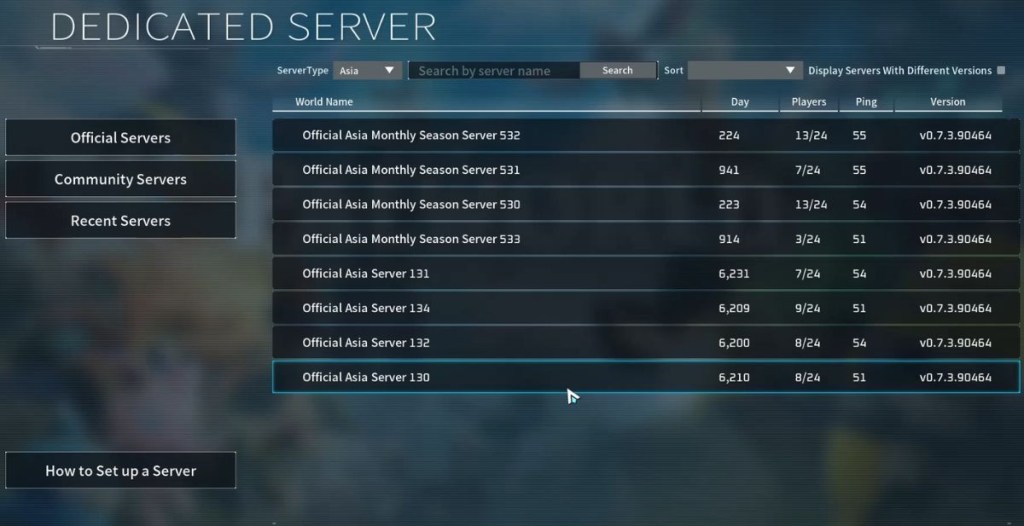
For the dedicated community servers, they have a slightly different method. Since they have crossplay enabled by default, you can simply choose Join Multiplayer Game and select the server you wish to join from the list shown on the screen. If your friends can’t see the server, it is usually worth checking with the community admins whether cross-play is enabled for them.
And that answers your question about whether Palworld is crossplay. Well, the Palworld 1.0 update doesn’t include a price hike, so it’s the best time to grab the game right now. So, have you started exploring the Palpagos Islands with your friends? Let us know in the comments below.
Yes, Steam, Xbox, PlayStation 5, and Mac players can all play together through Palworld’s crossplay system, provided that crossplay is enabled by the host.
No, only the player hosting the multiplayer world needs to enable the cross-play setting. While everyone else can simply join using the invite code.
Yes, open the Change World settings, toggle the Cross-Play option off, and launch the world again.