The AI boom has led to many AI-powered search engines for research, citation generation, and finding key insights, among other uses. They are not just transforming the Generative AI space; they are also used to discover and analyze academic papers. The AI tools for research can help you find relevant research papers and check emerging trends. On that note, find our list of the best AI tools for research.
Overview of the Best AI Tools for Research
Let’s start with a quick overview of all the best AI research tools that I have tested out over the past few weeks, look at their use case, limitations and pricing.
| AI Tool | Best suited for | Limitations | Pricing |
|---|---|---|---|
| ChatGPT Deep Research | Generates deep research reports with citations | May hallucinate, check citations and verify | Free, Paid plan starts at $20/month |
| Google NotebookLM | Built-in Deep Research, Understanding of topics with in-line citations | YouTube sources often fail | Free |
| Consensus | Citation first answers and evidence based data | Less flexible than common AI tools | Free, Paid plan starts at $8.99/month |
| Scite | Fact checking and doing serious literature reviews | Not helpful for general queries and trending news | 7-day free trial, Paid plan starts at $7.99/month |
| SciSpace | Understanding complex literature or research documents | Better at explaining topics than finding them | Free, Paid plan starts at $8/month |
| Semantic Scholar | Academic research and and discovering relevant papers | It’s great for data discovery but not for citations | Free |
| Elicit | Systematic literature reviews and organized research | Less useful for non-academic research | Free, Paid plan starts at $10/month |
| ScholarGPT | Students and researcher needing quick academic explainations | Can gloss over deeper analysis and other details | Free |
| ResearchRabbit | Tracking research and exploring new fields | Does not show whether citings are supported or contradicted by newer studies | Free |
| Perplexity | Quick sourced answers and research | Limited deep analysis on subjects | Free, Paid plan starts at $20/month |
Best AI Tools for Research Compared
A research tool is not just about fetching data from the internet; you can do that with Google Search or Wikipedia. It’s also about compiling sources in an easily understandable manner, to make researching easy for you. So, after trying several online options, these are the best ones I have found.
1. ChatGPT Deep Research
The ChatGPT Deep Research AI tool is designed for research and it’s great at synthesizing information from different sources. You can upload files and it also browses the web to find various sources and references. After a few minutes, it generates the final research report with citations.
And the best part is that now you can use all these features for free. It is extremely useful tool for students, and versatile in its nature. So not only you can use it for research, but also help you provide data in a structured manner, and assist you in your project as well.
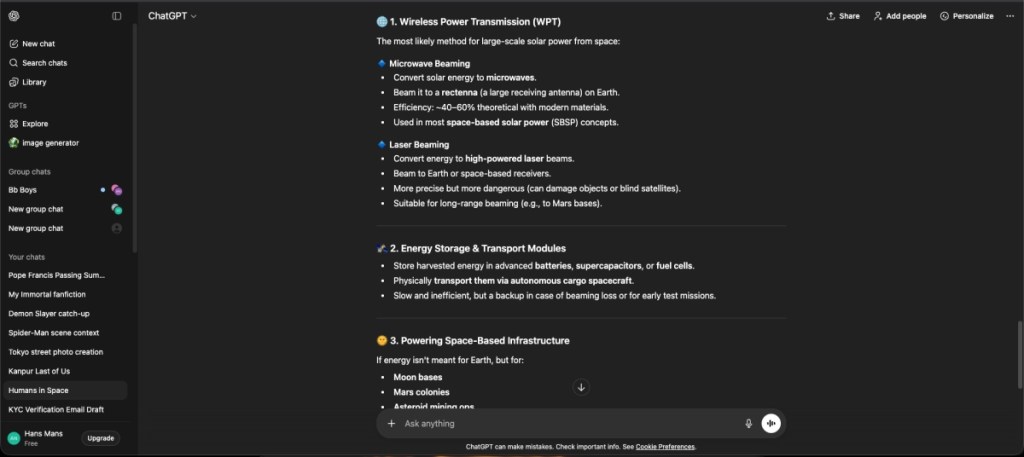
It’s the latest model, ChatGPT 5.2 is available to everyone for free, so there is no paywall restriction either to use the latest and best models. Having said that, it’s always better if you can verify the sources and citations from time to time.
| Pros | Cons |
|---|---|
| Great for research, summarization and writing | Research quality might vary based on prompt and model |
| Can perform real time research, citing latest sources | Not suited for academic backed research |
| Extremely versatile use case | |
| Beginner friendly, works well with other tools |
Pricing: Free, Paid plan starts at $20/month
2. Google NotebookLM
Google’s NotebookLM is an AI tool that helps you understand PDFs, study materials, etc., with Deep Research integration. It can break down most complex topics in simple terms, helping with learning and understanding the key details. You just have to upload, or share the link with it, and it will be able to provide summaries, and flash cards which is great for revision.
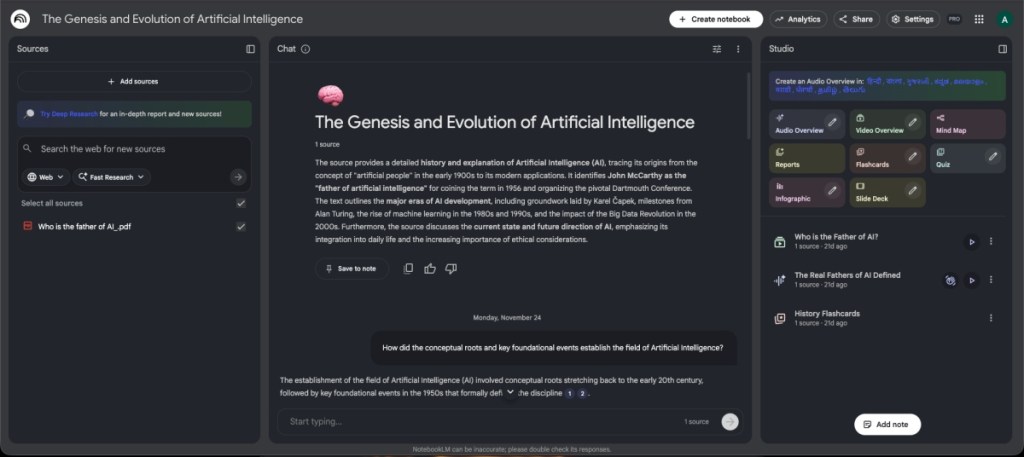
But the highlight of NotebookLM as an AI research tool, comes in the form of audio overview. This feature allows any uploaded data to be converted into an interactive podcast between 2 AI hosts which will go over the subject and help you understand about it better. And since it is available for Android and iOS too, you can study while on the go.
| Pros | Cons |
|---|---|
| Great for understanding and learning | Only works with user provided data |
| Excellent tool for students, and researchers | Not great for discovery and citation of sources |
| Can generate audio and video overviews | |
| Completely free to use tool |
Pricing: Free
3. Consensus
If you are doing research for academic work, Consensus is the best AI tool you can use. It’s an AI-powered academic search engine that collates millions of research papers from various fields. The best part about Consensus is that it has a Consensus Meter, which shows where the research leans for your question or research study. It shows ‘Yes’, ‘Possibly ‘, or ‘No’ based on published data from various papers. It can analyze up to 20 papers at once.

Apart from that, Consensus shows a quick AI-powered Study Snapshot from the scientific literature to show key information about the study. Not to mention, you get AI-powered summaries, key takeaways, and insights. Finally, you can chat with Copilot and ask questions or get assistance to draft your research. Simply put, to find relevant studies and aid in research work, Consensus is the best AI tool out there.
| Pros | Cons |
|---|---|
| Can analyze up to 20 papers at once | Summaries may sound too oversimplified |
| Consensus meter shows where the research leans towards | |
| Goes through millions of research papers | |
| Ask follow-up questions with Copilot |
Pricing: Free, Paid plan starts at $8.99/month
4. Scite
Scite is another powerful AI-powered tool that is ideal for students and researchers. It evaluates scientific studies to answer your questions, backed by real research and citations. Scite is widely used by universities, publishers, and corporations across the world. The feature called Smart Citations adds context to each citation and checks references to provide the reliability of studies.

For each topic, you can find research papers that support or dispute the claim. It helps researchers quickly find scientific literature relevant to their area of study. Moreover, for those unaware, Scite is funded by the National Institutes of Health (NIH) and the National Science Foundation (NSF).
| Pros | Cons |
|---|---|
| Smart Citation adds more context and analysis | Steep learning curve for new users |
| Great for checking research validation | Some features locked behind a paywall |
| Sources well-documented data and papers | |
| Shows links to original sources |
Pricing: 7-day free trial, Paid plan starts at $7.99/month
5. SciSpace
If you wish to understand research papers in simple words, I strongly recommend giving SciSpace a try. It offers a ‘Chat with PDF’ tool that explains and summarizes research papers. Next, you can ask questions, and it generates AI-powered insights from the top five research papers. SciSpace displays all the top papers with the journal name, key findings, PDF access, external links, and more.

Tons of filter options can help you narrow down recent publications, find papers based on citation count, and more. What I find interesting is that you can add multiple columns to display results, summarized abstracts, limitations, and much more next to research papers.
| Pros | Cons |
|---|---|
| Helps easily understand complex topics | Not very useful for researching available data |
| Numerous filters to make research easier | Tends to oversimplify some data |
| AI insights on top papers and documents |
Pricing: Free, Paid plan starts at $8/month
6. Semantic Scholar
Next, we have Semantic Scholar, a free AI-powered research tool to find scientific literature and academic research papers to back your claim. It has a vast database of more than 200 million papers from various fields. It offers a deep search functionality and shows the citation count below every research paper, which makes it a reliable AI tool for research.

You can further filter out the field of study and find papers based on journals, publication dates, authors, and more. Furthermore, you can check out all the references and move to the DOI link to find the paper. The standout feature of Semantic Scholar is that it can perform advanced citation analysis across its large library of databases to provide relevant papers. If you want to discover scientific literature, Semantic Scholar is a great free AI tool.
| Pros | Cons |
|---|---|
| Powerful AI tool for academic research | Summaries can be inconsistent |
| Smarter insights and summaries | Information dense, can feel overwhelming |
| Completely free to use | |
| Can do advanced citation analysis |
Pricing: Free
7. Elicit
In academic research, the process of literature review takes up a lot of time. This is why I picked Elicit, because this AI tool for research automates summarizing papers, extracting data, and evaluating new findings seamlessly. You can search, ask research questions, and get relevant papers from its massive library of 125 million research papers. The best part about Elicit is that you can extract details in a tabular format.

Next, you can choose a relevant paper and find more papers like it. Not to mention, Elicit can generate AI-powered abstract summaries to quickly get the gist of the paper. Apart from that, it can connect concepts across various domains and show papers backing the claim. Finally, you can also upload your PDF research papers and chat with them.
| Pros | Cons |
|---|---|
| Excellent for structured research analysis | Not ideal for deep reading or nuanced topics |
| Highlights important points and findings | Does not help with news and trendy topics |
| Beginner-friendly and easy to use | |
| Ask about uploaded PDF documents |
Pricing: Free, Paid plan starts at $10/month
8. ScholarGPT
ScholarGPT is one of the best custom GPTs for ChatGPT that you can use for research purposes. It’s the top-ranking GPT on OpenAI’s GPT store. It researches on your behalf and answers questions backed by various research papers from leading journals and publications. The GPT connects to the internet to find high-quality sources to generate a response.

And now that OpenAI has opened access to GPTs for all, free ChatGPT users can also chat with ScholarGPT or any other GPT without subscribing to the paid plan. So to find answers to your research questions, you must check out ScholarGPT.
| Pros | Cons |
|---|---|
| Good at summarizing multiple papers | Does not provide context about citings |
| Easy to interact with, great for students | Accuracy of replies might defer based on prompt |
| Find high quality sources for its responses | |
| Free to use for everyone |
Pricing: Free
9. ResearchRabbit
ResearchRabbit is heavily used by researchers for literature search and review. It allows you to search through papers and visualize them interactively. You can visualize citations among networks of papers, and find authors neatly.

You can create a collection of research papers, and ResearchRabbit learns from your preferences and improves its recommendation engine. Not only that, but it also has Zotero integration, which means you can easily manage your existing research materials.
| Pros | Cons |
|---|---|
| Interactive AI research tool | Not designed for summarizations |
| Helps you visualize citations and papers | Could feel overwheleming for new users |
| Can follow topics and get notified for new findings | |
| Accessible tool, free for everyone |
Pricing: Free
10. Perplexity
Perplexity is a very good AI research tool, as it combs through the internet and finds relevant information on any subject. It cites sources from which it collates the information, which can be pretty useful for researchers. It stands a notch above ChatGPT since it is great for doing online research, cites sources correctly, and most accurate with its information.

I would suggest getting the paid Perplexity Pro subscription if you intend to do heavy research. The free plan tends to hallucinate a bit. Still, if you are a student, a researcher, or someone interested to learn more about a topic, Perplexity is a great starting point for anyone.
| Pros | Cons |
|---|---|
| Fast responses and mostly accurate research | Not designed for academic research |
| Offers real time web search for latest data | Research quality cpuld varu based on prompt and model |
| Can ask follow up questions for detailed insights | |
| Beginner friendly, and easy to use |
Pricing: Free, Paid plan starts at $20/month
So these are the best AI tools for research that students and researchers can check out. Most of the tools are free, while some are paid ones. If you want to check out more free AI tools for various use cases, go through our linked article. And if we have missed out on your favorite AI tool for research work, let us know in the comments below.






 Anshuman Jain