- Some GTA 6 players are experiencing repeated crashes with PS5 error code CE-108255-1.
- The crashes occur during opening cutscenes, story missions, or after several minutes of gameplay.
- The exact cause remains unknown, and common troubleshooting methods haven't provided a reliable fix.
The 13-year wait for GTA 6 finally ended this week, but it seems some PlayStation 5 players aren’t getting the experience they had hoped for. Several GTA 6 players are reporting repeated crashes that prevent them from progressing through the game. These crashes are accompanied by PS5 error code CE-108255-1.
While players have tried several troubleshooting methods, the exact cause remains unclear. The issue has been reported across the original PS5 and PS5 Slim consoles, with some players unable to get past the opening moments of the game. According to multiple Reddit reports, GTA 6 crashes during the opening cutscene, or sometimes just seconds after starting.
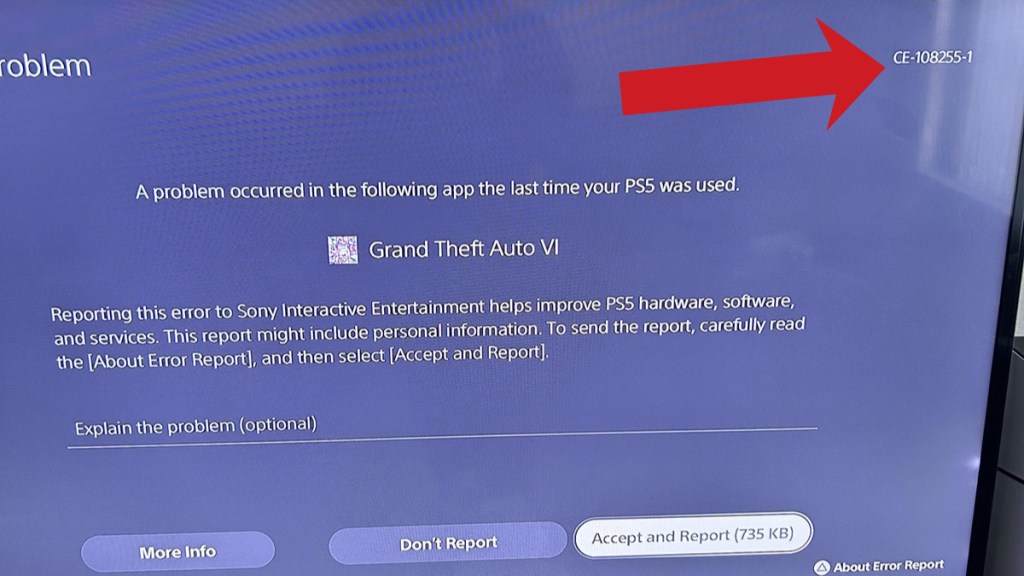

Others say that even skipping the cutscene in GTA 6 doesn’t help, as the game crashes again during Lucia’s prison sequence. Some players have also encountered crashes during Jason’s section near the boat. Meanwhile, others can progress normally through several missions before the game suddenly crashes and sends them back to the PS5 home screen.
There is speculation that the crashes could be related to overheating caused by dust buildup or deteriorating liquid metal cooling in older PS5 consoles. However, players with newly purchased consoles are also reporting the same error, and there is no confirmed evidence linking these GTA 6 crashes to overheating or cooling problems.
Players have tried everything from reinstalling the game to resetting their consoles, but these methods haven’t consistently worked. Even contacting support hasn’t been particularly helpful for some players.
Rockstar Support directs players to PlayStation’s support website, which recommends updating the game or contacting PlayStation Repairs. For now, the best bet for affected players is to try reinstalling GTA 6, clearing the PS5 cache, rebuilding the database, or checking for system software updates and it works.
However, none of these methods has proven to be a reliable fix for everyone. Until Rockstar or Sony identifies the underlying cause of the crashes and offers a reliable fix, some players may continue struggling to play GTA 6 on PS5 with its exclusive features.