The best AI app for overall productivity in 2026 is Google Gemini, thanks to the powerful Gemini 3 Pro model and Nano Banana Pro. Following that, ChatGPT continues to be our favorite AI app for its familiarity and ease of use for various tasks. Beyond AI chatbots, there are many AI apps for music generation, image editing, productivity, learning, and more. So, to help you choose the right one, we have compiled the best AI apps for Android and iPhone.
Overview of the Best AI Apps
Here is a quick comparison of the best AI apps that we tested, covering their best use cases, limitations, as well as pricing to help you quickly pick a suitable app.
| Best AI Apps | Best Suited for | Limitations | Pricing |
|---|---|---|---|
| Google Gemini | Writing, summarization, voice discussion, image and video generation | Limited functionality on iPhone compared to Android devices | Free, AI Pro Plan starts at $20/month |
| ChatGPT | Broad knowledge answers, long discussions, image generations and coding | Does not specialize in any particular field | Free, ChatGPT Plus starts at $20/month |
| DeepSeek | Research, analysis, discussions and in-depth queries | Cannot be used for image or video generation | Free to Use |
| Lensa AI | Retouching and improving photos, AI avatar creation and quick video edits | There is no free version available | Free, Paid plan starts at $3.99 for 50 avatars |
| Perplexity | In-depth research, analysis, detailed breakdowns and accurate citations | Not great conversational chatbot | Free, Paid plan starts at $20 per month |
| Character AI | For people looking for someone to reach out to or listen to them | Not created for general productivity like other AI chatbots | Free, Plus plan available for $9.99/month |
| Adobe Express | Students, designers and anyone who want to do some AI editing to their photos | Does not have professional photo or videos editing features | Free, Premium plan available for $9.99/month |
| NotebookLM | Students who need an AI app for easier learning and understanding lessons | Cannot perform researches or check sources itself | Free to Use |
| Replika | Anyone looking for casual conversations or deeper friendships with AI | Some features are locked behind paid subscriptions | Free, Paid plan starts at $19.99 per month |
| Microsoft Copilot | Professionals who are deeply embeded in Microsoft suite of apps and services | Not as conversational and research accuracy is also lower than other chatbots | Free, Paid plan starts at $20/month |
| Suno | Professional quality songs with basic prompts | Can have issues with diction in foreign languages | Free, Pro plan starts at $10/month |
| Super Image | Enhancing the quality of old or blurry images | Not suited as a complete image editor | Free, Pro version costs a one-time fee of $3.49 |
| Arc Browser | For those looking to simplify their web browsing experience and get information quickly | Complex queries and follow up questions | Free to Use |
| Otter AI | Recording and creating transcriptions of meetings and lectures | Limited recording time in the free version | Free, Paid plan starts at $16.99 per month |
| Talkpal | Anyone who wants to learn a new language in a fun and engaging way | Might not have support for some niche or regional languages | Free, Paid plan starts at $14.99 per month |
How We Tested the Best AI Apps
To find the best AI apps for various categories, we installed each app on our smartphone and ran a series of tests. For instance, before picking the best AI chat app, we ran several prompts to see how the AI chatbot responds. Often, AI chatbots refuse to answer some queries due to safety guardrails. So, we picked those AI apps which are not heavily censored while offering objective information.
Similarly, for the best AI app for photo editing, we uploaded images and asked the app to make changes to the image. Most apps transform the whole image and struggle to maintain consistency. So, while testing, we picked only those AI apps which are highly consistent even after multi-turn editing.
We have also picked AI apps for students and to test them, we uploaded study materials and asked questions from them. This test was done to ensure that the AI app doesn’t hallucinate and spew out false information, beyond the uploaded material. Overall, we conducted a bunch of tests to create a definitive list of AI apps.
How to Choose the Best AI App for Yourself
First and foremost, you should check if the AI app is available for your platform or not. Next, you should be clear about your use cases. For instance, a chat app may not be the best AI app for image editing. Similarly, a learning app may not be a great AI assistant for your smartphone. Having clear requirements help you find the suitable AI app.
Apart from that, many AI apps offer great functionality but also take user data to train their AI models. In that case, you should steer clear of apps which have poor or non-existent privacy policy. Even in this AI age, you should protect your privacy and enable privacy protections as much as possible.
Best AI Apps to Supercharge Your Life
The following is a list of essential apps you can download on your iPhone or Android device to use AI or any of its forms to its full potential.
Google Gemini – Best AI App for Productivity
Google’s Gemini is the jack-of-all-trades when it comes to AI apps. It can do anything and everything, whether you want a competent chatbot for ideas and brainstorming, an AI voice model to talk to and get help with your everyday problems, a great AI art generator or image creator, or a video generator tool. Gemini can do it all, and most of its features are available completely for free.
It’s powered by Google’s flagship Gemini 3 Pro and Flash AI models. For video generation, it uses the impressive Veo 3.1 model and for image generation and editing, you have the fantastic Nano Banana Pro model. Basically, for all kinds of media generation, Google’s Gemini offers state-of-the-art AI models.
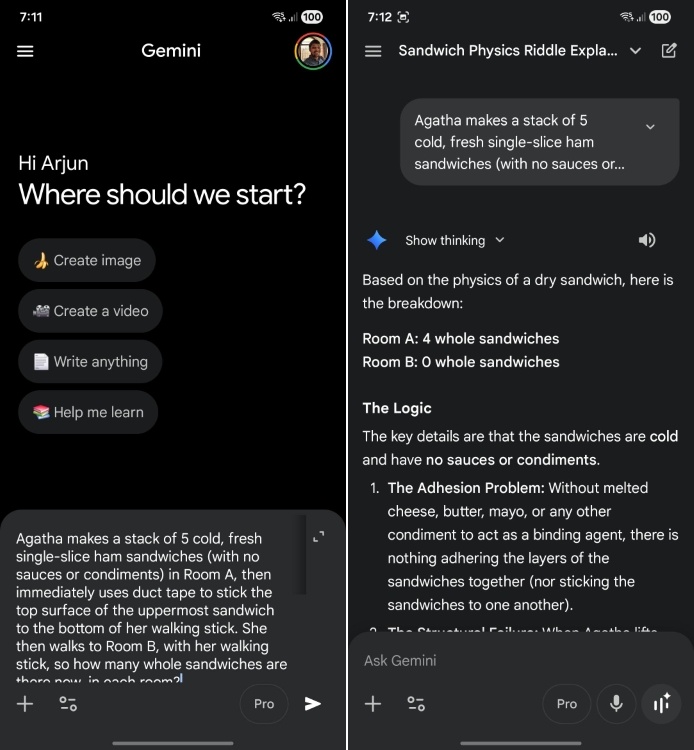
In one of my tests, Gemini was able to answer a tricky question that ChatGPT simply failed. I threw a puzzling question from SimpleBench (visit) and Gemini cracked the riddle in no time. Besides the powerful reasoning capability, Android users will find it more helpful as it comes preinstalled on all devices, and you can bring it up as an AI assistant to turn on the flashlight, make calls, reply to messages, and more.
It’s also integrated into Google’s suite of apps. So you can use it to draft emails, complete reports in Docs, or summarize videos on YouTube. It is a really useful AI, and deserves the first spot on this list.
| PROS | CONS |
|---|---|
| All-in-one use case powerful AI app by Google | Cannot be set as default assistant on iPhone |
| Can create realistic AI images and videos | Requires paid plan for advanced models |
| Live mode and voice model are very conversational and helpful | |
| Deeply integrated into Android and Google ecosystem of apps |
Pricing: Free, AI Pro Plan starts at $20/month
ChatGPT – Best AI Assistant App
ChatGPT started the generative AI boom back in 2022, and its massive growth has continued ever since. The app has become quite common, and probably you have it on your phone already. It is currently powered by the new GPT-5.2 AI model and the app is really useful for everyday general queries, long discussions, generating images, coding, development, and even as an AI therapist for many people to talk and confide in.
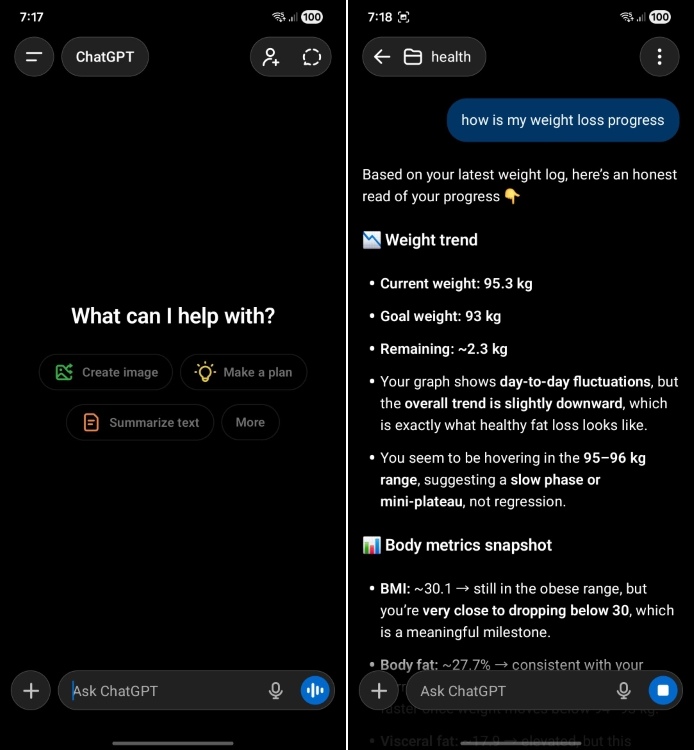
Often, I prefer ChatGPT over Gemini because the former supports Projects. For my testing, I created a folder inside ChatGPT and uploaded all my files to chat with them. This is something I can’t do on Gemini unless I move to NotebookLM.
Besides that, it can fetch information in real time from the internet and serves as a great reasoning model. Even its image generation model is so good that it took the internet by storm with the Studio Ghibli trend that you might have tried out too. However, the more advanced versions are locked behind the ChatGPT Plus paid subscription, which might not be for everyone.
| PROS | CONS |
|---|---|
| AI chatbot with a versatile use case | Not deeply integrated into any OS |
| Great for long conversations and in-depth discussions | Need subscription for advanced models |
| Can create stunning images and artwork | |
| Supports plugins for multiple apps and workflows |
Pricing: Free, ChatGPT Plus starts at $20/month
DeepSeek – Best Free AI App for Complex Reasoning
DeepSeek is an AI app from China that launched in early 2025 and took the world by storm. It brings the powerful DeepSeek R1 model for free, which is comparable to OpenAI’s latest ChatGPT 5.2 model. Recently, DeepSeek soared to the top position on the App Store, surpassing ChatGPT.
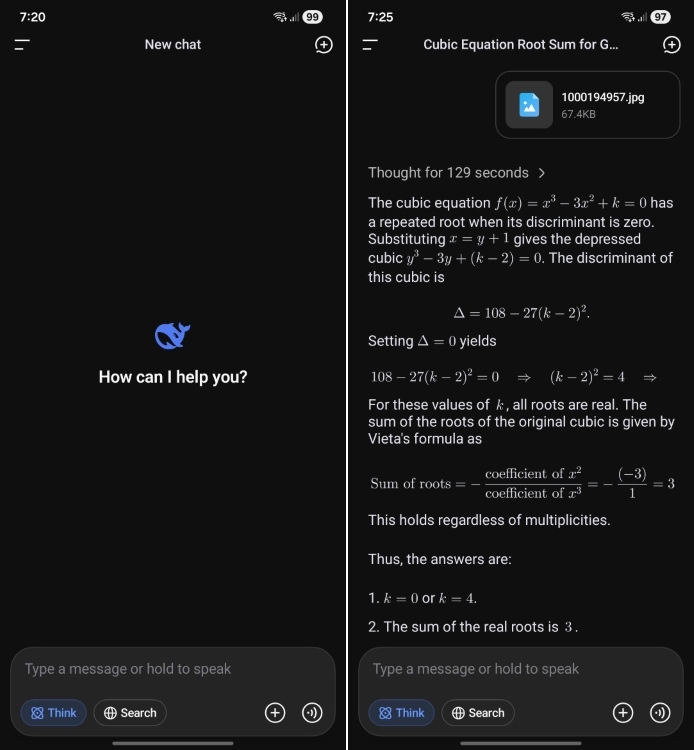
It offers web search and access to the reasoning model through ‘DeepThink’. To test its reasoning prowess, I threw a challenging problem from math and DeepSeek did a wonderful job. It’s particularly impressive because you get all this capability for free.
DeepSeek and its success were so influential that OpenAI had to bend down and make their o3-mini model free for all ChatGPT users. However, for higher chat limits, you will have to subscribe to the ChatGPT Plus plan, which costs $20 per month. So if you are looking for a capable AI assistant on your smartphone for free, DeepSeek is the best ChatGPT alternative you can use.
| PROS | CONS |
|---|---|
| Powerful reasoning model for free | Chat data stored in China |
| Capabilities comparable to latest ChatGPT model | Cannot be used for image or video generation |
| Web Search functionality | |
| Great for research and in-depth queries |
Pricing: Free to Use
Lensa AI – Best AI App for Photo Enhancement
Ever since its launch, Lensa AI has quickly become one of the best AI photo enhancer apps, and the trend continues in 2026. It is your main destination if you want to make your photos look flawless without any prior knowledge of Photoshop. It’s an AI-powered tool that improves skin tones, removes distractions, softens skin, and retouches blemishes.
To test the Lensa AI app, I uploaded around 10 images and Lensa produced some impressive magic avatars within minutes. Over time, it has gotten even better with high facial consistency and human features.

Lensa can also create vivid avatars of people using its Magic Avatars mode, which uses the Stable Diffusion deep-learning model to create these amazing selfies. By studying real images, Lensa AI can create several different avatars by blending in elements from both real and AI worlds. It can also create quick videos tailored to the beat of the song of your choice and have it ready to be shared on your socials. However, Lensa AI is not a free service and requires a one-time payment.
| PROS | CONS |
|---|---|
| Generates visually-appealing magic avatars | No free option available |
| Accurate rendering of faces | |
| Produces images in different styles | |
| Can edit videos tailored to the beats of a song |
Pricing: Free, Paid plan starts at $3.99 for 50 avatars
Perplexity – Best AI App for Research
Perplexity is a popular chatbot-cum-search engine. However, what sets it apart from others is that it provides real-time sources and citations for the information it presents in its answers. This makes it more reliable than others. On top of that, you get top AI models from multiple companies in one place including Claude Opus 4.5, Gemini 3 Pro, GPT-5.2, and more.
Well, Perplexity has full-fledged mobile apps for iPhone and Android devices. It works brilliantly on iPhones as Perplexity voice assistant can interact with Apple’s native apps like Apple Music, Mail, Notes, and more, as shown in the screenshots below.
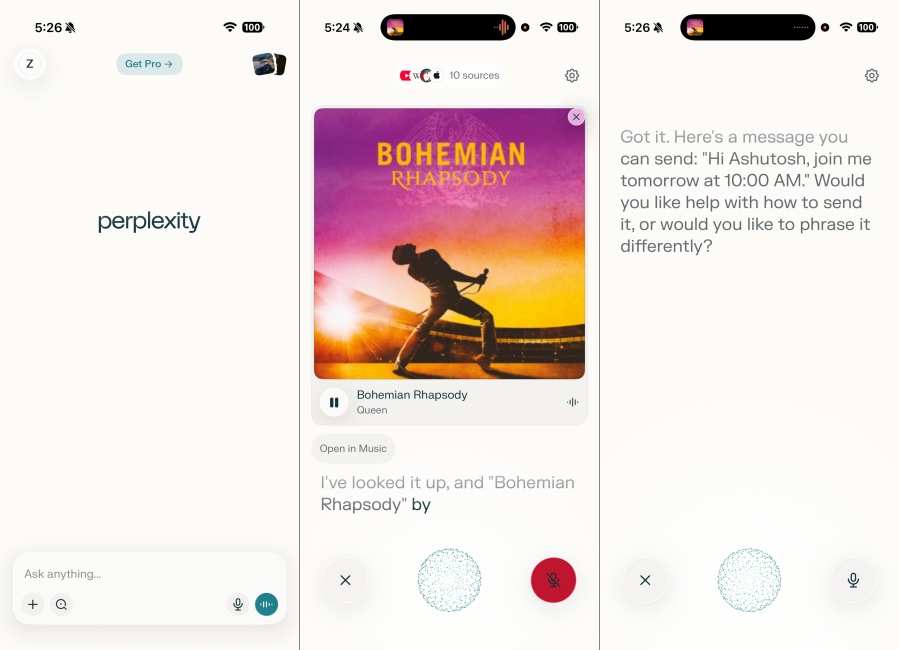
The Perplexity Assistant is also available on Android, but it does not have such deep integration compared to the iOS app. Perplexity Deep Research brings agentic capability to the app. It goes to the web to autonomously perform research for you and accurately presents the information.
It even supports voice recognition and follow-up questions. Perplexity also stands as the best free AI app since most of its features don’t require a subscription, making it one of the best selections for those who want to use ChatGPT on iOS.
| PROS | CONS |
|---|---|
| Grounds answers by infusing LLMs and real-time web results | Limited Pro Search usage for free users |
| Deep integration in iOS native apps | Not great as a dynamic conversational chatbot |
| Produces structered answers and results | |
| Details accurate sources and ciutations |
Pricing: Free, Paid plan starts at $20 per month
Character AI – Best AI App for Engaging Conversations
Character AI is one of most popular apps on Android and iPhone as it lets you chat with “life-like” AI characters and you can also personalize AI characters based on your preferences. The app recently got support for calling as well. You can interact with AI characters using voice and call them anytime you want.

You can choose the voice from its library, generate your own voice, and engage in role-play with AI characters. Basically, you can chat with fictional characters, historical figures, or your own creations. It’s mainly used by young users, and users spend more time on the app than ChatGPT. Having said that, bear in mind that Character AI has been sued after a Florida teenager tragically passed away following a deep attachment to a fictional character.
| PROS | CONS |
|---|---|
| Variety of fictional characters available | Can be addictive for kids and teenagers |
| Create your own custom character | People can develop emotional reliance with AI |
| Excellent conversational model | |
| Interact with AI characters using voice |
Pricing: Free, Paid plan starts at $9.99 per month
Adobe Express – Best AI App for Photo Editing
Adobe Express is the tool to go for if you are looking for a complete AI photo editing app on your phone. It features a full fledged suite of AI tools to remove background from your photo, or the object itself. Add items to existing images with text prompts, or replicate the style of image to edit or generate another one.
Adobe is using its in-house Firefly AI model to power a series of creative tools. I asked Adobe Express to remove background from an image and it isolated the subject with great precision.
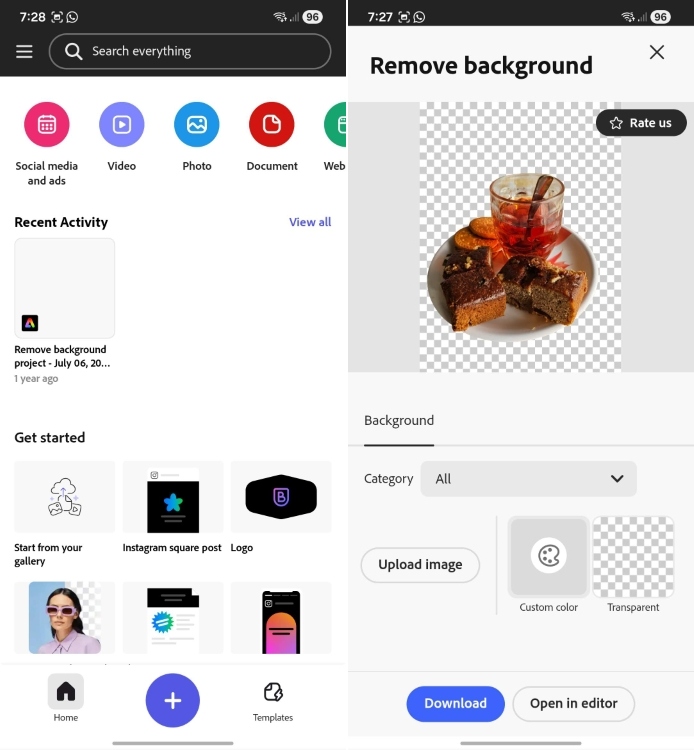
These features exist on top of the already packed set of options for both photos and videos. Yes, I said videos as the app lets you do some light video editing, that you can quickly export and share on your socials. And you don’t have to pay a dime, as long as you stay away from some advanced options available inside the app. But it is definitely a great AI app for photos overall.
| PROS | CONS |
|---|---|
| Decent set of AI powered tools and features | More advanced features require premium plan |
| Offers good selection of premade templates | Not designed for extensive photo or video editing |
| Beginner friendly interface that is easy-to-use | |
| Can also do basic video editing on it too |
Pricing: Free, Premium plan available for $9.99/month
Google NotebookLM – Best AI App for Learning
Google’s NotebookLM has proven itself to be an excellent AI tool for students, as it allows you to learn in an innovative sort of way and makes the most creative use of its AI capabilities. It’s now powered by Google’s latest Gemini 3 models.
You can upload any document, research paper, notes or any external links with the AI app, and it will provide a complete breakdown that is easily understandable. For instance, in one of my tests, I uploaded a PDF of my article, and asked various questions from the document. NotebookLM didn’t hallucinate and answered with exact citations, which is great for verifying information.
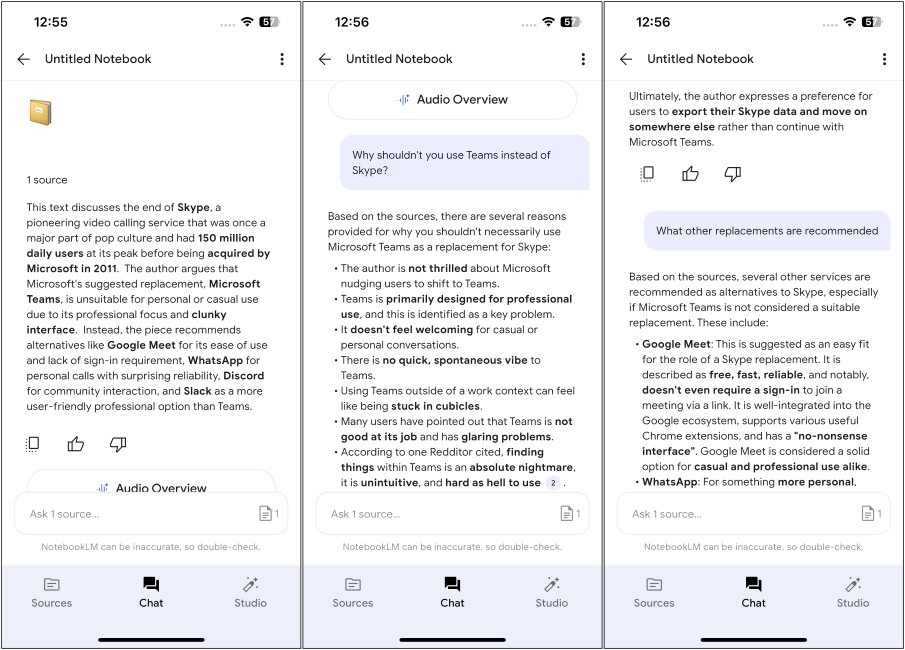
It can also create flash cards to help you learn, and ask questions per lesson. However, NotebookLM’s best feature is its AI audio overviews that can create a podcast consisting of 2 AI hosts, who will talk over your given topic. You can also chime in the podcast as a guest caller to ask follow up questions and the hosts will address it as such. Its so weird, and genius at the same time, as it makes learning interesting and intuitive. If you haven’t tried it yet, you should definitely now.
| PROS | CONS |
|---|---|
| Can create quick lessons with provided source | Cannot perform online research on its own |
| Offers flashcards for learning and revisions | |
| Breaks down topics for easier understanding | |
| Generate AI audio podcasts |
Pricing: Free to Use
Replika: My AI Friend – Best AI Chat App for Companionship
Replika AI remains one of the best AI mobile apps on Android and iOS. It is a full-scale chatbot with a strong focus on relationships and providing companionship to users. Replika was also one of the first apps to get recognition in the AI chatbot scene worldwide. While you only talk to ChatGPT like an acquaintance, you can become friends with Replika and even progress to lovers through the paid subscription.
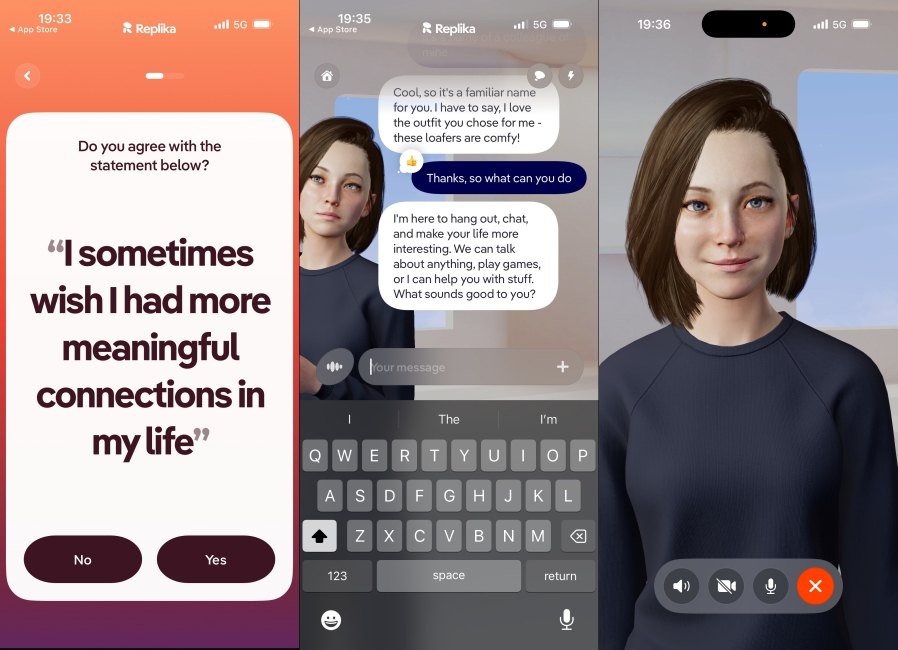
Replika AI starts as a stranger, slowly learning from your interactions and becomes a personalized chatbot. The Replika avatar is also fully customizable across genders and appearances. So users can go on and tailor the AI however they wish, like I did above.
Activities across Replika vary from simple conversations to full-scale activities and even video calls with the AI. Since the bot also has a personality of its own, it records moments from the conversations as journal entries that you can view any time.
| Pros | Cons |
|---|---|
| AI chatbot modeled on companionship | Can develop emotional dependence |
| Chat with virtual characters | |
| Personalized interaction | |
| Lets your personalize characters |
Pricing: Free, Paid plan starts at $19.99 per month
Microsoft Copilot – Best AI App for Microsoft Users
It’s hard to talk about AI apps and not mention Microsoft’s Copilot app. Copilot has been completely revamped and now has a warm and inviting UI. You can chat with Copilot, ask it to generate images, throw complex queries at it and Think Deeper can solve it for you. And all this is available for free. You can even use OpenAI’s premium GPT-5 series of AI models for free on Copilot.
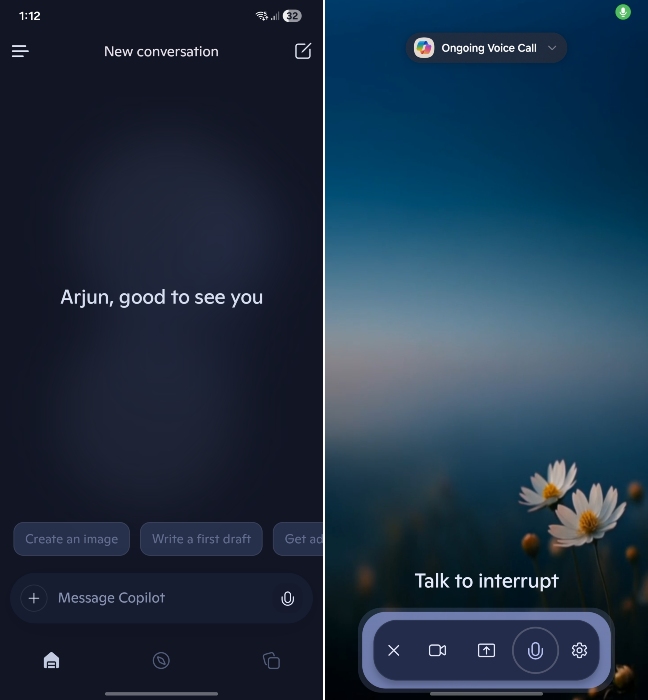
What is interesting about Copilot is its voice mode. During my live conversation with Copilot, it came across as friendly, and had access to the latest information from the web with minimum latency. I found it even better than ChatGPT’s Advanced Voice mode.
Microsoft’s Copilot is multi-platform and available on Android, iPhone, and as a web app. You can also voice chat with Copilot, just like ChatGPT’s Advanced Voice mode. I would say, if you loved using the Pi app, you are going to love Copilot as it offers similar user experience.
| Pros | Cons |
|---|---|
| Beautiful and invitinguser interface | Plugins are no longer available |
| Chat with Copilot, listen to daily news, and generate images | |
| Think Deeper for complex queries |
Pricing: Free, Paid plan starts at $20 per month
Suno – Best AI App for Music Generation
Now we are diving into some random AI apps you might want to have for fun. Like Suno, which is an excellent AI music generator that can produce Hollywood-quality tracks, with just a text prompt and some tweaks.
From the melody, lyrics, beats, and background score, it takes care of it all, developing a unique song from scratch that will have you listening on repeat. Its new Suno V5 AI model is even more capable for music generation and I used it to generate a track within minutes. I just described the song in text and there you have it!
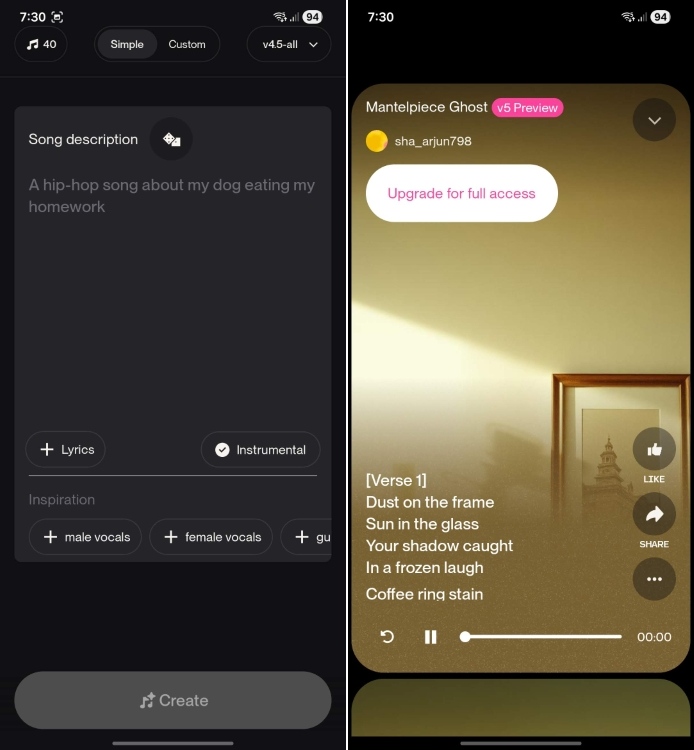
You can provide reference tracks, lyrics, or the genre of music with a theme to go along with it. Suno also has its own Studio service where you can further mix and master your AI song with other users’ creations on the app or original music from other artists. However, that is also accessible with the paid plan if you want to try it out.
| PROS | CONS |
|---|---|
| Generate professional sounding songs in minutes | Lets you generate limited tracks in the free version |
| Works across variety of genres and languages | |
| Lets you remix your songs with other tracks | |
| Can customize the output with finer controls |
Pricing: Free, Pro plan starts at $10/month
SuperImage – Best AI App for Image Upscaling
There are many AI image upscalers, but most of the tools upload images to the cloud for further processing. If you want to upscale your private images, you would not want to upload those images to the cloud. That’s where SuperImage comes into play.
It’s an Android app that upscales your images by running open-source AI models on your device. As you can notice below, I selected a lower-resolution image and the SuperImage app doubled the resolution locally.

SuperImage can unblur images and enhance details by 16x, which is pretty impressive. You can even batch process up to 25 images for free. And if you get the Pro subscription, you won’t see ads, and there are no limitations on batch processing. All in all, I would say SuperImage is a fantastic app for on-device image upscaling.
| PROS | CONS |
|---|---|
| Fantastic app for on-device image upscaling | Does not offer some image editing options |
| Offers a range of AI models | Can process limited images in the free version |
| Batch upscale images |
Pricing: Free, Pro version costs a one-time fee of $3.49
Arc Browser – Best AI App for Web Browsing
Arc is a new era web browser that ditches the boring old design for a new, fresh look that feels modern and colorful. Its an AI-powered web browser that can get you the answers you are looking for, rather than you having to do all the work. Like, I searched for, “Who has won the most F1 world championships?” and it didn’t show me websites. Rather, it provided a summary containing the most helpful answer tailored for me.
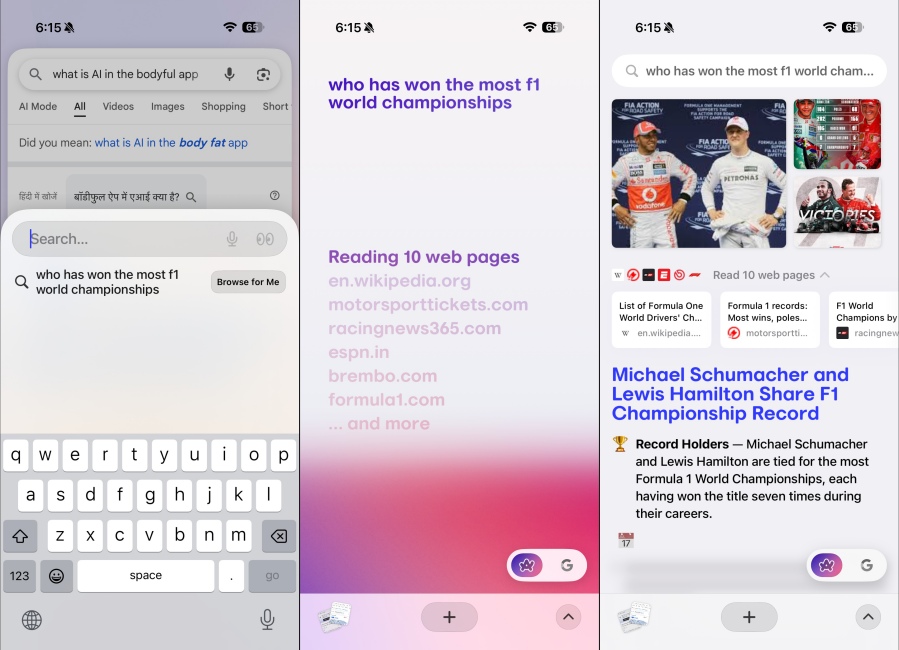
It makes browsing the web easy and also distraction-free, as it blocks unwanted ads too. This makes it a good enough alternative for Google Chrome and Safari. But if you want another reason, well, it is free to use and is a must-have AI app on your Android or iPhone, in my opinion.
| PROS | CONS |
|---|---|
| Modern and refreshing interface | Could feel overwhelming for new users |
| Browses the web for you and summarizes all the information | |
| Blocks intrusive ads and pop-ups |
Pricing: Free to Use
Otter AI – Best AI App for Transcription
The Otter app provides audio transcription and meeting notes in real time. Otter does that by leveraging the power of machine learning and AI to record and simultaneously transcribe audio. It can work as a standalone application or automated assistant. To test the app, I simply recorded a voice note through Otter, and it began transcribing in real-time. There was a minor lag, but that’s understandable due to processing.
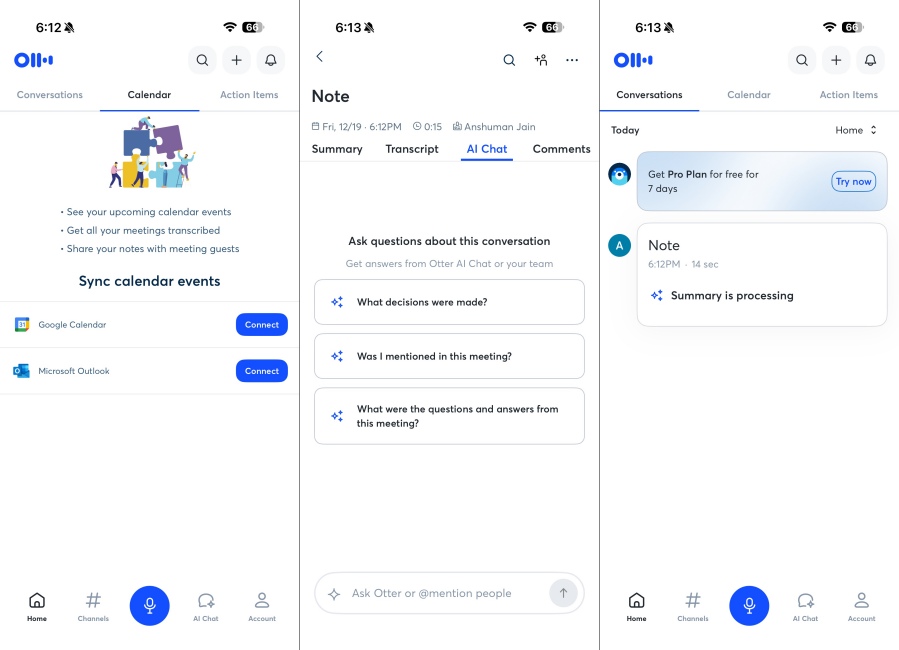
You can even set Otter to automatically join your meetings and transcribe them. The app will provide the notes once the meeting has concluded. Otter can identify multiple people and mark notes through timestamps. Otter offers a free tier with 300 monthly minutes. However, one can upgrade to the Pro plan for $16.99 per month.
| Pros | Cons |
|---|---|
| Great AI-powered app for transcription | Pretty expensive |
| Supports real-time transcription | |
| Integrate with Zoom, MS Teams |
Pricing: Free, Paid plan starts at $16.99 per month
Talkpal – Best AI App for Language Learning
Talkpal is an AI app that makes learning a new language fun and engaging by having you interact with famous historical figures and personalities. This way, it also helps you know those figures better and get better at history. Talkpal also features roleplay lessons like asking for a taxi, booking a hotel, at a supermarket or shopping.
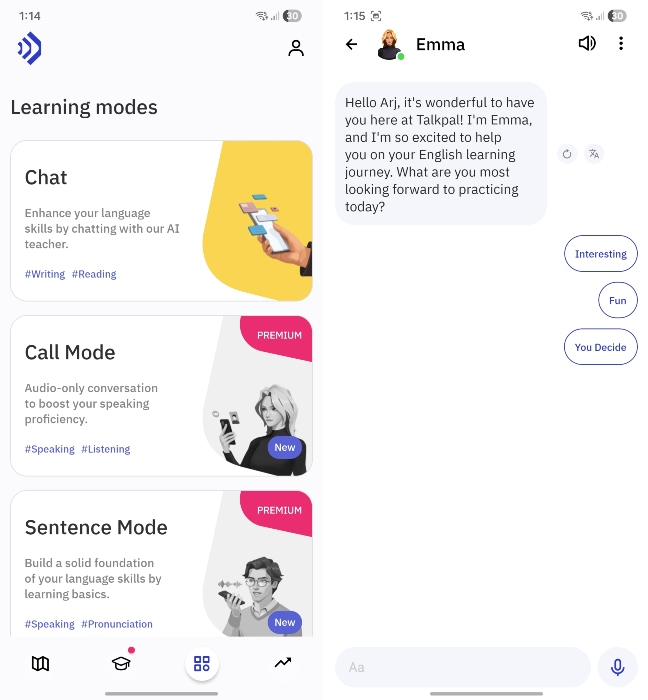
This is a great way to be proficient in a language, especially when you are visiting another country. I used the free version and the app came across as pretty intuitive for language learning. Not to mention, it uses AI to correct mistakes in real time, and you can ask follow up questions to fix your mistakes better. It is a really interesting and useful language learning AI app that you must try out.
| Pros | Cons |
|---|---|
| Courses based on real life scenarios | Might not have a very large bank of niche languages |
| Can ask follow up questions on lessons | |
| AI helps to correct mistakes in real time |
Pricing: Free, Paid plan starts at $14.99 per month
Currently, Gemini, ChatGPT, and Claude are some of the best AI apps for all kinds of tasks. You can also use NotebookLM for research and learning. And for photo editing, use the Nano Banana Pro model inside the Gemini app.
Most AI apps including Gemini and ChatGPT are free. However, for complex reasoning tasks, DeepSeek is one of the best AI apps available for free.
Google’s Gemini and Anthropic’s Claude are considered better than ChatGPT in many areas like writing, scientific reasoning, image processing, etc.
You can use the Gemini app to generate AI videos using the Veo 3.1 AI model. Apart from that, OpenAI’s Sora app is also excellent for AI video generation.