
NYT Pips is a relatively new addition to the publication’s game catalogue, and it can sometimes run into unexpected issues. While other daily puzzles, like Wordle and Connections, mostly run without a hitch, players have reported some common issues that prevent them from accessing Pips. If you’re also running into trouble with this visual logic challenge, here are some reasons why NYT Pips is not working, along with the best methods to fix them.
NYT Pips Not Working? Common Issues You May Face
If you’re having trouble finding out the NYT Pips answers today, here are some common issues that have been reported by hundreds of other players:
Missing Domino Tiles
One of the most frequent complaints, particularly on the hardest NYT Pips difficulty level, is that the screen does not display all the necessary dominoes.
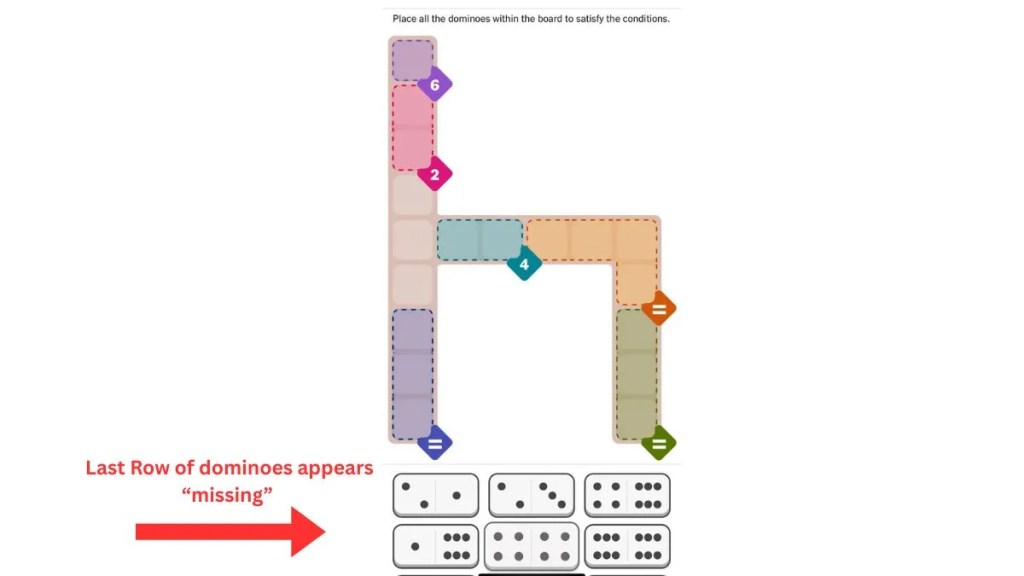
Many players on small-screen mobile devices, like the iPhone mini, find that the lower rows of tiles are cut off, and there is no option to scroll down to see the hidden pieces needed to finish the board. The absence of these tiles can make it impossible to solve NYT Pips. Updating the NYT Games app to the latest version usually resolves this display issue.
“Subscription Required” Loop
This is a common NYT Games app error that could be the culprit behind NYT Pips not working for you.
Sometimes, even with an active NYT Games or All Access subscription, the app may occasionally prompt you to subscribe or limit your play to the “Mini” versions of puzzles. This usually indicates a broken login session where the app has essentially forgotten your credentials despite appearing logged in. Note that NYT Pips is free to play, so a subscription prompt is almost always a session error rather than a paywall.
Puzzle Missing from NYT Games App
Many subscribers have reported that Pips simply does not appear on their NYT Games app home screen, even if the app is updated. This issue was very common when NYT Pips was still in its beta stage, but the frequency of this problem has nosedived since.
Still, the game might occasionally disappear without warning, despite other games, such as Wordle and Strands, still being visible.
Incorrect Inputs and Touch Detection Problems
On both iOS and Android, users have noted that the touch detection while playing NYT Pips can be annoyingly imprecise. The game often tracks the location of your finger rather than the visual center of the domino image, causing tiles to snap into the wrong squares or fail to drag entirely.
It’s a simple yet maddening problem that could render the entire grid inaccessible or cancel out your progress by making the rest of the dominoes non-functional. If you’re new to the game’s mechanics, reviewing the NYT Pips rules and symbols can help clarify how tile placement is supposed to work.
How to Fix the NYT Pips Not Working Issue
If you want to get back to the action quickly, you can follow a set of simple fixes to restore the Pips puzzle. Here are some ways to fix NYT Pips not working:
- Update Your App: Many UI bugs, including the missing dominoes, have been addressed in recent patches. Always make sure to use the latest version of the NYT Games app before firing up a new puzzle.
- Clear Browser Cache: If you’re facing issues while playing on a desktop, the easiest way to fix them is by clearing your browser’s history and cache. Your next NYT Pips session will now open in a fresh window, and any lingering errors will almost certainly be gone.
- Target the Finger, Not the Tile: If you’re struggling with domino placement, try putting your fingertip exactly on the square where you want the domino to land, rather than looking at where the domino graphic is floating. You can learn more about the correct placement technique in our how to play NYT Pips guide.
- Reinstall the App: If Pips has vanished entirely from your NYT Games app, we recommend deleting and reinstalling the application. This simple fix brought successful results for many players online.
- Restore Purchases: If you’re struggling with the “Subscription Required” error, you can restore your receipt through the App Store or the Google Play Store. This fix only applies if your NYT Games subscription is linked to these platforms.
- Log Out and Log Back In: If none of the above steps resolve the issue, signing out of your NYT account and signing back in can reset a broken session and restore full access to NYT Pips.
We hope these methods help fix your NYT Pips not working problems. In case the issues persist, why not check out some excellent NYT Pips Unlimited alternatives that offer an endless variety of these puzzles? You can also compare the experience with NYT Pips vs Wordle to find which daily puzzle suits you best.
NYT Pips is completely free to play on the NYT Games website and mobile apps on Android and iOS.
NYT Pips might occasionally disappear from the NYT Games home screen. The exact reason behind this error is unknown, but you can easily fix it by reinstalling the app.
If the “submit” button on your NYT Pips screen isn’t working, check for small red dots in any of the coloured regions. These dots indicate a rule violation, such as an incorrect sum or duplicate dots in a “not equal” section. You must fix these errors in order to submit the solution.
NYT Pips tracks your fingertip position rather than the visual center of the domino tile. To fix drag issues, place your fingertip precisely on the target square rather than on the floating domino graphic. Updating the NYT Games app to the latest version can also resolve touch detection problems.
This error usually means your login session has expired or broken. To fix it, try logging out of your NYT account and logging back in. If your subscription is linked to the App Store or Google Play Store, use the ‘Restore Purchases’ option within the NYT Games app to revalidate your access.
When Does NYT Pips Puzzle Reset?
 Daksha Gupta

NYT Pips Archive: How to Play Old Games?
 Arnamoy Das

NYT Pips Strategies for Every Difficulty Level
 Pranav Maytray

 Bipradeep Biswas
4 Common Mistakes to Avoid in NYT Pips
 Sanmay Chakrabarti

 Rishabh Sabarwal

What Is NYT Connections Bot, How It Works, and How to Read Its Analysis
Daksha Gupta
Connections Hints Today & Answers for October 21
Sanmay Chakrabarti

Wordle Hint Today - October 21, 2026 (Puzzle #1950)
Rishabh Sabarwal

Wordle vs Globle: Key Similarities and Differences Explained
Daksha Gupta