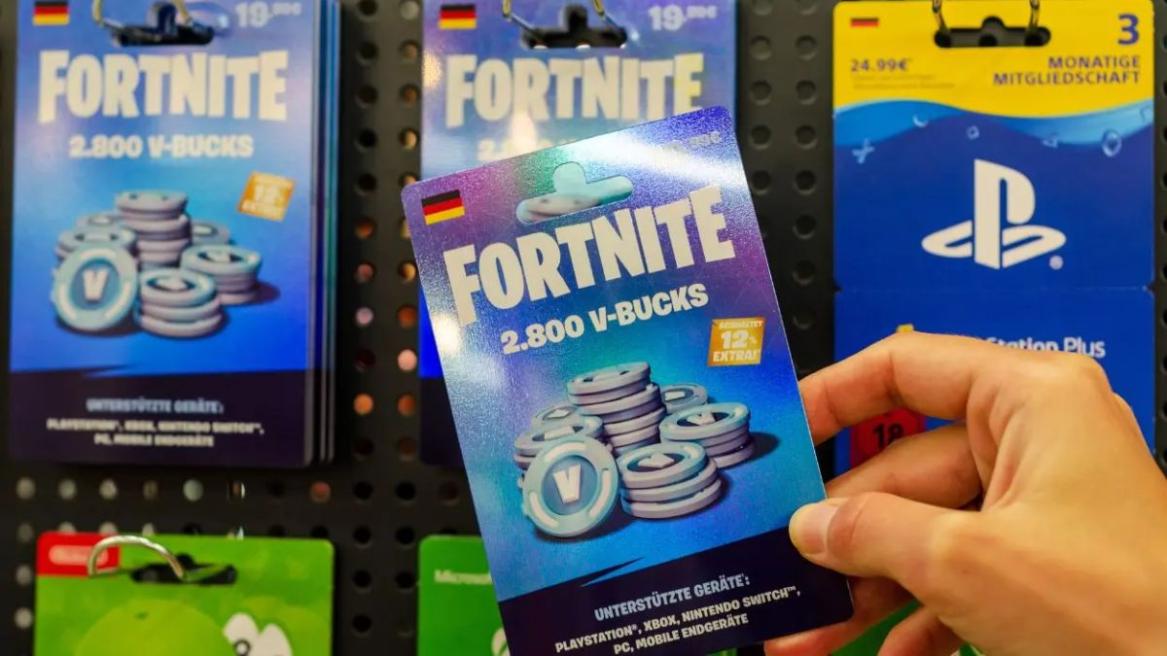
- Fortnite V-Bucks cards allow you to add V-Bucks directly to your in-game account.
- Redeeming a code on Xbox and PlayStation requires a few extra steps.
- V-Bucks Cards never expire and are available indefinitely once you purchase them.
Every Fortnite player out there loves and knows the value V-Bucks hold in the game’s ecosystem. Whether it be purchasing the newest Battle Pass or an Item Shop skin, V-Bucks serve as the backbone of Fortnite’s microtransaction model. One of the best ways to top up your account with this valuable in-game currency is Fortnite V-Bucks cards.
V-Bucks cards, much like Fortnite Gift Cards, involve a simple redemption process that makes sure your V-Bucks show up on the right platform and are ready to spend as soon as possible. In this article, we will break down all the steps you need to follow to get a Fortnite V-Bucks card.
How to Get Fortnite V-Bucks Gift Card
You can easily acquire Fortnite V-Bucks cards through both physical and digital means through any authorized retailer. This includes popular stores like Walmart and Best Buy, or even local gaming outlets. Meanwhile, you can purchase digital V-Bucks card gifts through online platforms like Amazon, the PlayStation Store, or the Microsoft Store.
However, when you are buying a V-Bucks card, you need to make sure that the card you’re purchasing matches the region you are in. This is because some of the V-Bucks Card codes can be locked to a specific region.
How to Add V-Bucks to Fortnite on PC
If you are a PC Fortnite player, you can easily add V-Bucks to your account without much hassle, since everything is directly linked to your Epic Games account. You can follow these steps to add V-Bucks to your account:
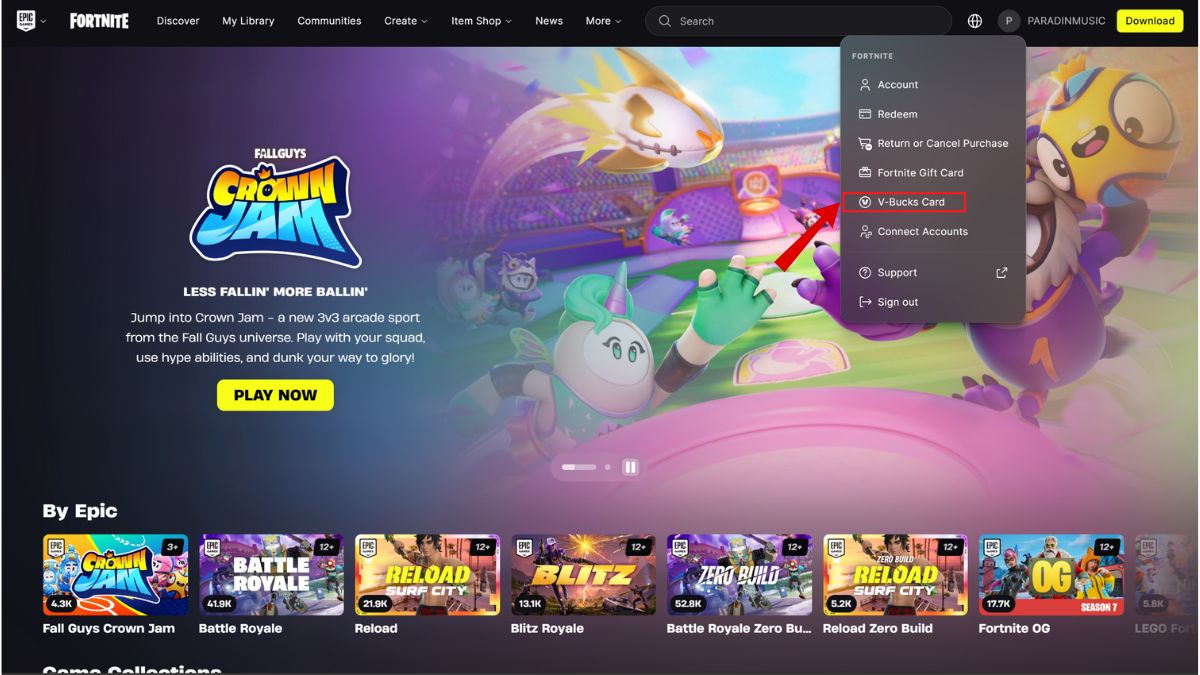
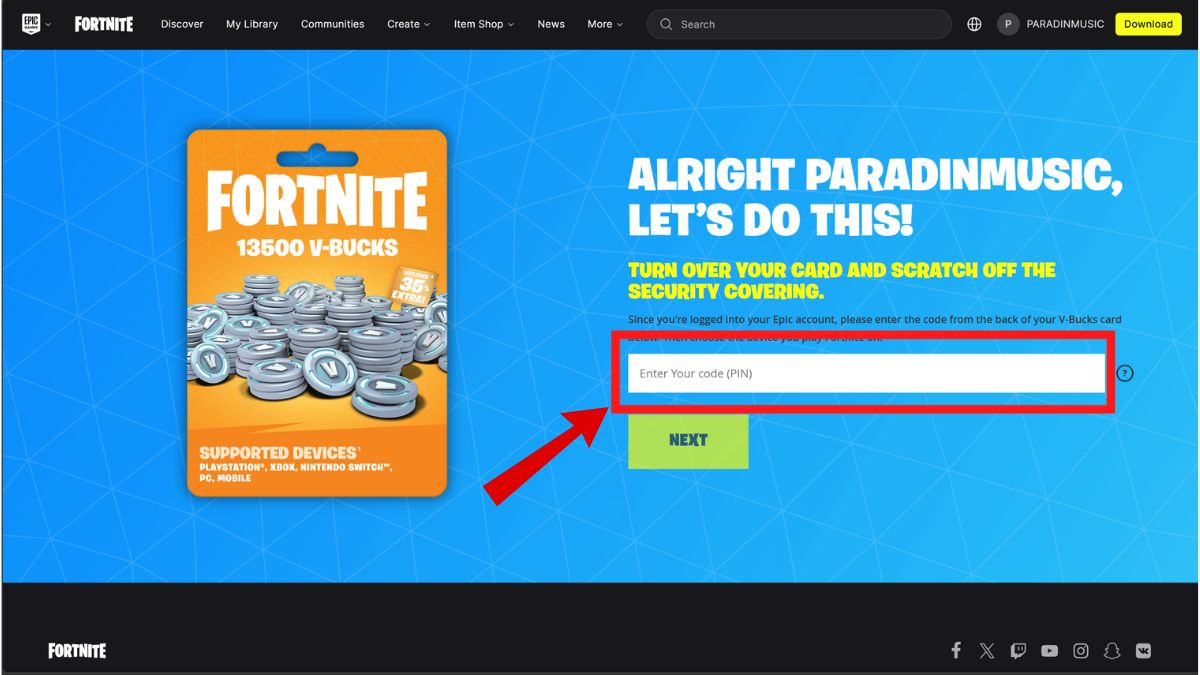
- Visit the Epic Games Redemption page for V-Bucks Cards.
- Make sure to sign in using the Epic Games account you use for Fortnite.
- Enter the code from the V-Bucks card, which you can find on the back of the card.
- Confirm the platform you want to use your V-Bucks on.
- Once the code is verified, you will be able to see the V-Bucks in your Fortnite account balance.
How to Redeem Fortnite V‑Bucks Card on Xbox and PS5
To redeem V-Bucks Card codes on PS5 and Xbox, you will have to go through part of the process on a desktop or PC. The processes to redeem a Fortnite V-Bucks card on Xbox and PS5 are mostly similar. However, there are some differences in the steps that you need to be careful with.
Redeem Fortnite V-Bucks Card on PS5
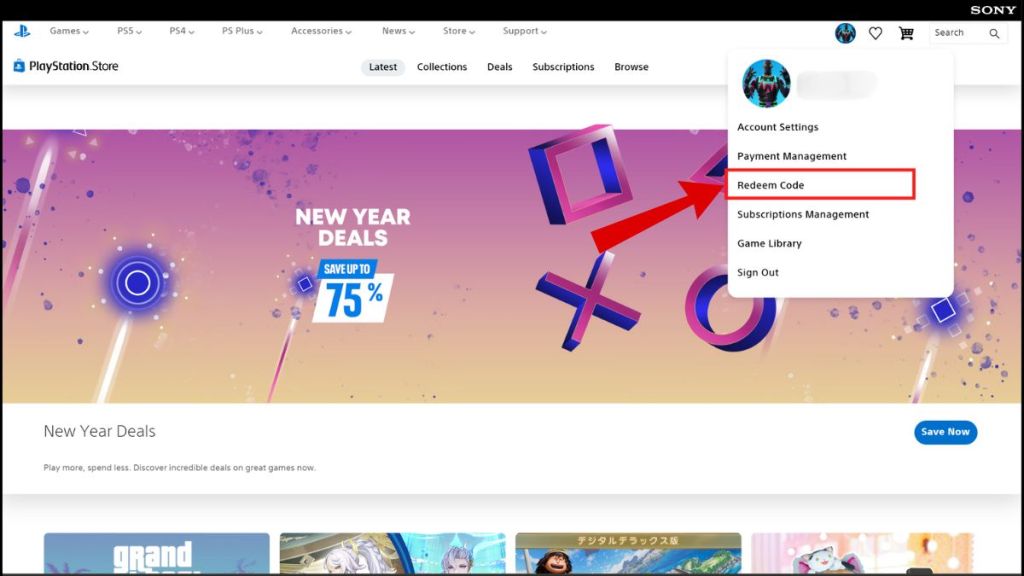
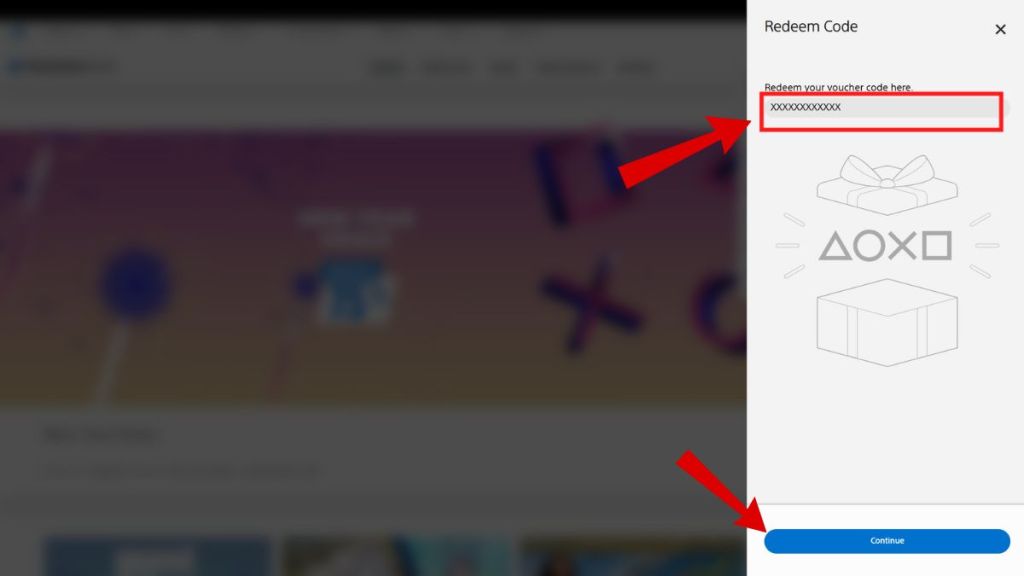
- Head to the Epic Games Redemption page for V-Bucks Cards and log in with your PlayStation account or your Epic Games account linked to PlayStation.
- Enter the code printed on the back of the V-Bucks Card.
- When prompted, select PlayStation as the platform you want to use the V-Bucks on.
- You will then receive another code from Epic Games.
- Launch the PlayStation Store on your PS5 and select the Redeem Codes option from the account settings.
- Enter the new code given to you by Epic Games to add the V-Bucks to your Fortnite account.
- Launch Fortnite to check if the updated balance has been reflected in your wallet.
Redeem Fortnite V-Bucks Card on Xbox
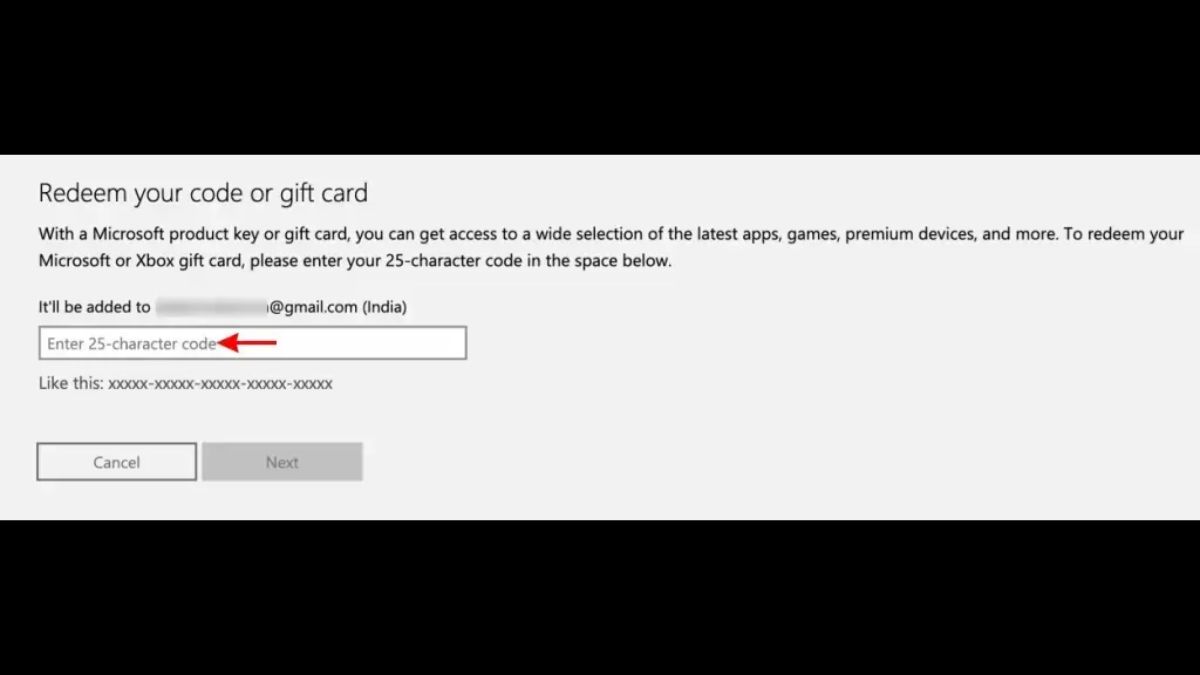
- Head to the Epic Games redemption page for V-Bucks Cards and log in with your Xbox Live account or with the Epic Games account linked to Xbox.
- Enter the V-Bucks Card code in the provided field.
- Select Xbox as your platform of choice when prompted.
- You will then receive a secondary code from Epic Games.
- Head to the Microsoft Store on your Xbox and choose the Redeem option.
- Enter the secondary code from Epic Games in the provided field to redeem your V-Bucks.
- Open Fortnite to check if the V-Bucks have been added to your account.
How to Redeem Fortnite V-Bucks Card on Nintendo Switch
You cannot use the Nintendo eShop to redeem a V-Bucks card for Nintendo Switch. Much like PlayStation and Xbox, you can only redeem a V-Bucks card through a web browser on your computer or phone to redeem your code through the Epic Games website. Here are the steps you can follow to redeem Fortnite V-Bucks Cards on Nintendo Switch:
- Head to the Epic Games redemption page for V-Bucks Cards and log in with your Nintendo Switch account or with the Epic Games account linked to Nintendo Switch.
- Enter the V-Bucks Card code in the provided field.
- Select Nintendo Switch as your platform of choice when prompted.
- Review the account name and amount. Confirm that the details are correct.
- Open Fortnite to check if the V-Bucks have been added to your account.
Can I Redeem Fortnite V-Bucks Card on My Phone?
Yes, it is possible to redeem a V-Bucks card on your phone. However, you can’t do this through the Epic Games or Fortnite application. You will have to use a mobile web browser and follow similar steps to the PC redemption to redeem a Fortnite V-Bucks code through your phone.
How to Fix V-Bucks Not Showing Up on Fortnite Error
Much like any other online purchase, there can be slight hiccups with your V-Bucks after redemption. If you don’t see the V-Bucks reflected in your account, don’t fret. You can try the following quick fixes to see if they help with your issue:
- Check account linking: You need to ensure that the Epic Games profile you redeemed the V-Bucks card on is connected to your PlayStation or Xbox profile.
- Wait a few minutes: Sometimes, Epic Games’ servers can experience delays, which further causes a delay in the transfer of V-Bucks into accounts.
- Restart Fortnite: You can always try restarting Fortnite to see if it prompts the game to refresh your account balance.
If all else fails and your balance hasn’t registered even after an hour or so, you can contact Epic Games Support with your details and the code you have used.
Common Error Codes When Redeeming Fortnite V-Bucks Card
You might run into some errors while trying to redeem your Fortnite V-Bucks code. Here are some of the most common V-Bucks Card errors and how you can fix them:
| Error | What It Means | Fixes |
|---|---|---|
| “This code has already been redeemed” | The 16-digit V-Bucks code has been used already and cannot be used again. | Take a look at your Transaction History in your Epic Games account to see if the code has already been credited. If not, someone else may have used it already. |
| “Invaled Code” | The code was typed incorrectly or the system failed to recognize it. | Double-check for “look-alike” characters like the number 0 vs. the letter O. |
| “Region Lock/Territory Restriction” | The card was purchased in a country that is different than your Epic Games account region. | Your account region must match the card’s region. You can check your region in Account Settings under the “Address” section. |
| “Error Code 19007” | You are trying to redeem the code on the incorrect website. | Make sure that you are using the official Epic Games V-Bucks page to redeem the code. |
Do Fortnite V-Bucks Cards Expire?
No, Fortnite V-Bucks do not have an expiration date. This means that, after purchase, your V-Bucks Card code will remain valid until you decide to use it. However, it is suggested to redeem your V-Bucks Cards sooner rather than later. This is because Epic Games might update or change its redemption policies, which can affect your experience later.
Fortnite V‑Bucks Card vs Fortnite Gift Card
| V-Bucks Cards | Gift Cards |
|---|---|
| Adds a fixed amount of V-Bucks specifically to your Fortnite account. | Adds money to your Epic Games wallet that you can use for Fortnite or other Epic Games Store purchases. |
| Usually specific to platforms, which means you need to select PlayStation, Xbox, etc., when redeeming your code | Allows cross-platform functionality if the account is linked through the Epic wallet. |
| Older system of cards that can still be found in physical and online stores. | Newer system of cards that is gradually rolling out globally. |
With the steps listed in this article, you should be able to redeem your Fortnite V-Bucks Card code with ease. You can now choose how you want to use them, maybe even splurge and get the new Fortnite Regular Show skins. What will you be spending your redeemed V-Bucks on? Tell us in the comments below!
Yes, you can redeem a V-Bucks card using any mobile web browser or directly on your console’s storefront.
The “Region Locked” error usually happens because the country where the V-Bucks card was purchased does not match the region currently set on your Epic Games account.





 Rishabh Sabarwal

 Rishabh Sabarwal