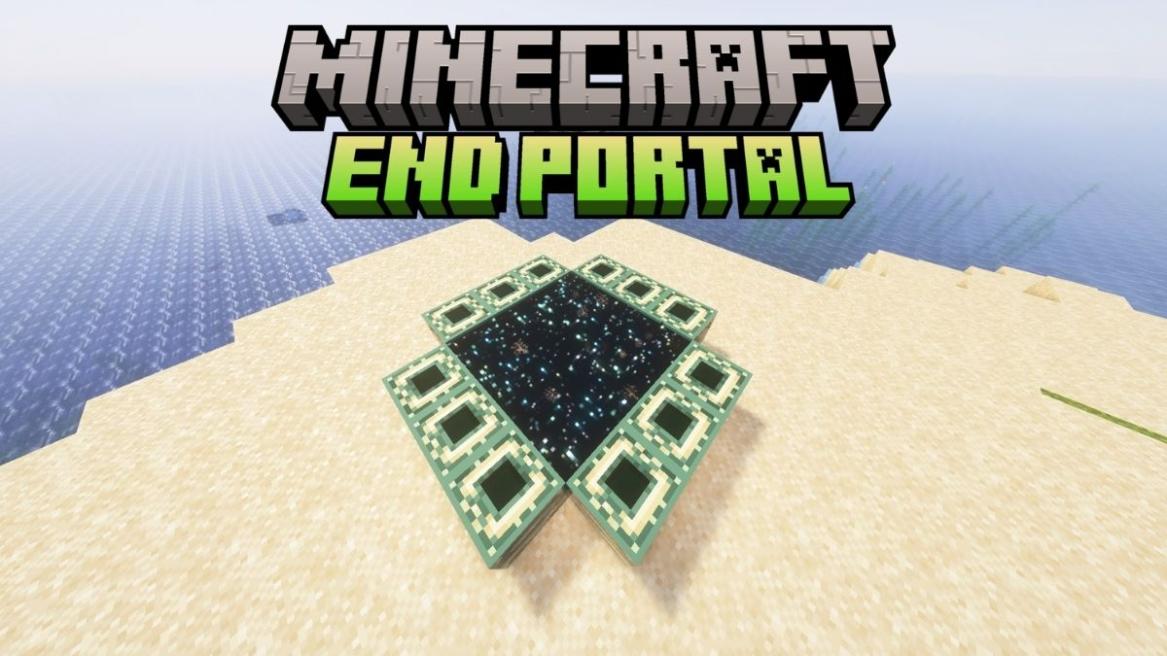
- The End Portal in Minecraft leads to the End Dimension, which is home to the Ender Dragon in Minecraft.
- Players must place 12 Eyes of Ender inside 12 End Portal frames to activate the End Portal.
- Once players ensure that the frames are placed inward, they can use the /fill command to activate the portal manually.
The End portal is easily one of the most important structures in Minecraft. Yet, unlike all the other structures in the game, most players are generally clueless when we talk about its creation. Everyone is focused on finding the Ender portal with Minecraft speedrun seeds. But we are here to change that by explaining how to make an End portal in Minecraft. From unique custom portals to transporting ender portals, we have covered everything in this guide. Though it’s unlike any build you have ever made, so let’s not beat around the bush and jump in!
What Is An End Portal in Minecraft?
The End portal, like the Nether portal, is a dimension gateway in Minecraft that leads to the End dimension. This is the dimension where the Ender dragon, the largest mob or the main boss in Minecraft, spawns. But unlike the Nether portal, the Ender portals are known to spawn underground within the Stronghold structure in the Overworld naturally.

So you first have to find a Stronghold in Minecraft and then locate the End portal. After locating it, you have to place 12 Eyes of Ender in the structure to activate the portal. Without the activation, the portal isn’t useful in any way.
Can You Build an End Portal in Survival Mode?
Since the Ender portal in Minecraft is part of the main plot, it can’t be created manually in the survival, spectator, hardcore, or adventure game modes. Moreover, you can’t even break it in those modes. Fortunately, the game allows you to build the End portal with the help of Minecraft commands in the creative game mode.

Items Required to Make an End Portal
There are only two items you need to collect to make a functioning End portal in Minecraft:
| Item | Quantity | Source |
|---|---|---|
| End Portal Frames | 12 | Using commands (in only creative mode) |
| Eyes of Ender | 12 (15-20) | Crafted using Ender Pearls + Blaze Powder |
How to Get End Portal Frames
An End portal is a hollow square structure that has a row of three End portal frames on each of its four sides. Meanwhile, the 9 x 9 middle area is empty. Unfortunately, you can’t obtain End portal frames without commands or creative mode, which is the reason you can’t make the Ender portal manually in other game modes. This is the command to get end portal frames.
/give @s minecraft:end_portal_frame
How to Craft Eyes of Ender
On the other hand, you can craft the Eyes of Ender in any game mode by combining Ender pearls and blaze dust on a crafting table. For now, to save time, we suggest you take them from the creative inventory or commands as well. This is the command to get the Eyes of Ender.
/give @s minecraft:ender_eye

Method 1 – How to Make an End Portal in Creative Mode
If you don’t want to find an Ender Portal, here’s how to make one while staying in the creative mode:
Step 1: Switch to Creative Mode
First, you need to enable cheats in your world. After that, jump back into the game and use the following command to change the game mode to creative mode:
/gamemode creative

Step 2: Build the End Portal Frame
Now, press the “E” key or your dedicated inventory key to open the creative inventory and get the End portal frames. You only need one frame, as it doesn’t get exhausted. Then, create a 5×5 space using the frames, and leave the corners empty.

Step 3: Place the Eyes of Ender
Now, place Eyes of Ender in all portal frames by right-clicking or using the secondary action key.
Step 4: Activate the Portal Using /fill Command
If the portal doesn’t activate automatically, you can use the following Minecraft fill portal command to add the portal.
/fill A B C X Y Z minecraft:end_portal
Note: Each alphabet represents the numerical value of the corners’ coordinates here. Apart from that, make sure you are outside the portal while activating the command, or else Minecraft will send you to the End dimension.


Method 2 – How to Find and Activate an End Portal in Survival Mode
Unfortunately, in some versions of Minecraft, the manual End portal isn’t activated automatically, even with all the Eyes of Ender in place. But don’t worry, as you can always find and activate it like the game wants you to do.
Step 1: Craft Eyes of Ender
Start by crafting multiple Eyes of Ender. For this, you must combine the Ender Pearl with Blaze powder. Ender Pearls can be obtained from killing Endermen, while Blaze Powder can be obtained from using Blaze Rods. You can get these rods by killing the Blazes found in the Nether Fortresses.
Step 2: Locate the Stronghold
You need more than 12 Eyes of Ender because these items are not only used for activating the portal, but you also need them to find it in Minecraft. When you throw an Eye of Ender, it levitates and points to the direction of the nearest Stronghold.
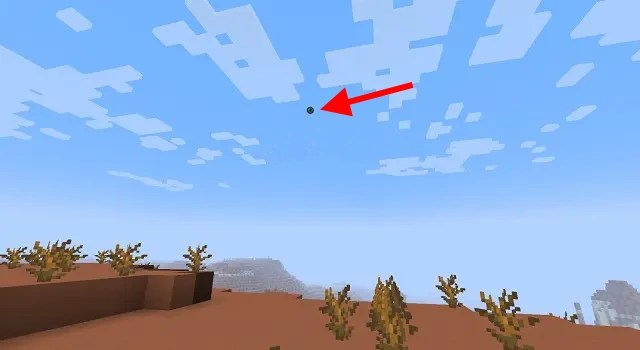
However, after a couple of uses, it breaks, and you have to use a new one until the Eye of Ender points directly down. At that moment, you should start digging down and find the End Portal inside the Stronghold structure.
Step 3: Find the Portal Room
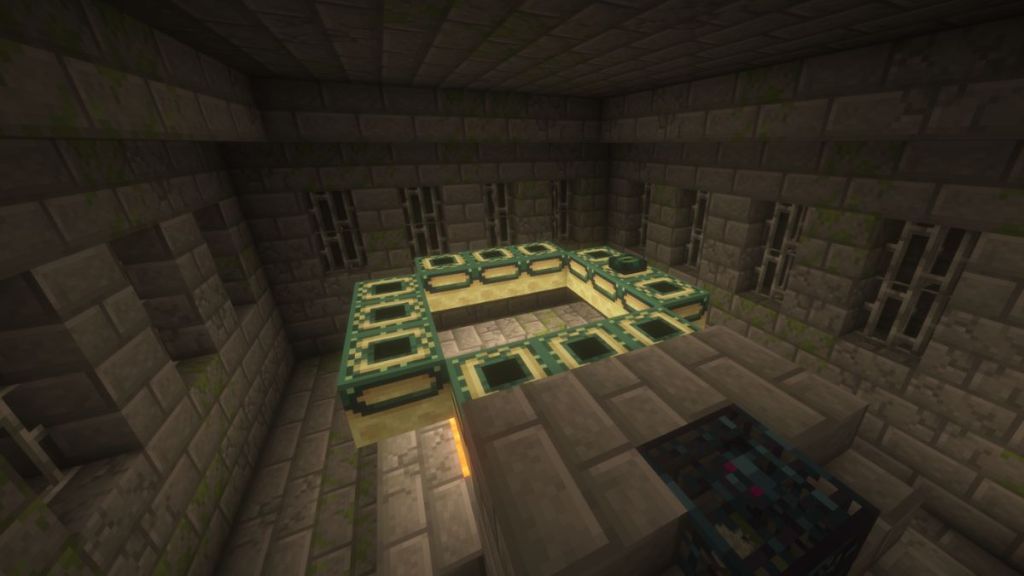
Once inside the Stronghold, you will need to explore its maze-like corridors to find the portal room. This room is identifiable by a pool of lava, a staircase, and a silverfish spawner.
Step 4: Activate the End Portal
After finding the portal, insert the Eyes of Ender into all the empty frame slots. Some frames may contain the Eyes, but that is completely random. Once all 12 slots are filled, the central space of the portal activates and becomes starry black instantly. Stepping into it will transport you to the End dimension.
Java Edition vs. Bedrock Edition – Key Differences
While the core mechanics of the End portals are similar across both dimensions, there are just a few points of difference between them. For example, the Java players may carry their mount or anything they’re riding at the moment to the End dimension. This is not done in the case of the Bedrock gameplay.
Other than that, there are just 128 strongholds inside the worlds generated on the Java Edition, whereas the number is unlimited for Bedrock editions. Lastly, if this fact concerns you, keep in mind that the Wither can travel through End portals in the Bedrock version but not in Java.
End Portal Not Working? How to Fix It
If your portal refuses to activate in Minecraft, here are some common issues that you can fix easily:
Frames Not Facing Inward
Incorrect orientation of the Eyes of Ender inside the frames is a frequent problem. Consider standing on the opposite end of the frame while filling up the ones in front of you to prevent this problem.
Missing or Incorrect Eyes of Ender
You must double-check that all 12 frames contain the Eyes of Ender. If this is not true and you skip even one, the portal will not activate.
Using /fill to Force Activate
If nothing works, consider using the fill command that we have mentioned above to force activate the End Portal in Minecraft.
Custom End Portals – Creative Ideas

As you might have guessed at this point, the most important part of the End portal is the dimensional fluid. So you can use any other block in place of the End portal frame to create a variety of unique portals. It is the perfect addition to your custom Minecraft maps and large bases.
With that, you are now ready to create and activate your custom End portal in Minecraft. Since you can replace its frame with any in-game blocks, a custom end portal can fit almost all Minecraft house ideas easily. But we are more interested in learning how you plan on using it. Share your ideas in the comments below!
An End Portal might not activate in your Minecraft world if the frames have not been placed facing inwards or are inaccurate in number. Other reasons may be that the player might have placed the Eyes of Ender incorrectly.
No, you cannot break the End Portal frames in the Minecraft Survival mode.
To activate an End Portal in Minecraft, players must carry 12 Eyes of Ender and place them inside the sockets. However, if you’re on an adventure to find the portal frame, consider having more than 18 such Eyes of Ender.
Yes, you can make an End Portal in the Minecraft Nether dimension only in creative mode.
You cannot build an End Portal manually in the sruvival mode but locate the stronghold area and activate the portal.
To activate an End Portal in Minecraft, players must carry 12 Eyes of Ender and place them inside the sockets.


 Bipradeep Biswas

 Bipradeep Biswas