Discord is the hub for massive online communities, whether related to gaming, technology, or other niches. But the platform has recently announced new age verification rules, mandatory for everyone trying to use the service. Obviously, not everyone is on board with disclosing their confidential details to the platform, leading many to look for a substitute. That’s what we set out to do. So, here are the best Discord alternatives we suggest in 2026.
Overview of the Best Discord Alternatives in 2026
Now, we looked for several apps that can work as a Discord alternative and don’t have a strict age verification policy like the platform. Here are our top picks along with their features and pricing.
Discord Alternatives Features Pricing GameVox Similar UI as Discord, can create a server for free, allows email-free sign in, rich voice calling experience, web-app available Free, includes in app-payments Fluxer Very similar UI as Discord, free to use, system-wide voice chat support, communities and a variety of channels, member permissions and roles Fluxer Plutonium starts at $4.99/month Telegram Easy to use UI, features tons of bots, bot integration in channels, variety of channels and communities, highly customizable interface Free, Telegram Premium available for $4.99/month TeamSpeak Great for high quality voice chats across platform, granular permission control, familiar interface, low latency audio, limited social and chat features Free, includes additional cost for hosted servers Mumble Ultra-low latency voice chat, positional audio support, open-source, privacy-focused, self-hosted servers via Murmur Free, includes additional cost for hosted servers Rocket.Chat Open source chat apps, privacy-focused, can interact with MS Teams and Slack users from the app itself, good feature set for free users Free, Pro starts at $4 per user per month Element End to end encrypted open source app, clean and easy to use UI, no limit on file transfer, supports voice and video calling, decentralized communities Free, Pro plan starts at $2 per month Slack Catered for professionals, generoud file transfer limit, end to end encrypted, bots integration, can create and manage multiple channels Free with limited functionality, Paid plan starts at $2.67 per month Mattermost UI similar to Slack, neat customization options for chats and channels, store messages locally for privacy Free, Pro plan starts at $2 per month Microsoft Teams Geared towards professionals. 100GB file transfer limit, voice and video call support, can do screen sharing, integration with Microsoft’s suite of apps and services as well as third party software Free, Paid plan starts at $5 per month
How We Picked the Best Discord Alternatives?
Finding the right Discord alternative wasn’t an easy task since many users are already accustomed to the UI and features of the platform. We didn’t want to recommend the obvious, like WhatsApp, which also has communities, or iMessage. We set out to look for an app that closely offers the UI or feature set of Discord, while not having any sort of strict age verification guardrails in place.
I tested out multiple apps with my colleagues and friends, on my phone and my PC. I also considered the demand of many users who want to move away from Discord, looking for specific use cases. Based on that, here are the best Discord alternatives you can try right now.
Best Discord Alternatives to Avoid Age Verification Checks
Starting with the alternatives to Discord that closely resemble the look and functionality of the app, like GameVox, Fluxer, or Telegram. Let’s take a closer look at these services.
GameVox — Best Free and Simple Discord Alternative
If you want something more casual and free, then you might be interested in GameVox. This is another chat and communities app where you can join in with or without an email ID. So, there’s not a single worry about age verification checks on the platform. The service looks familiar to Discord, and you can create a server with up to 50 individuals at no extra cost.

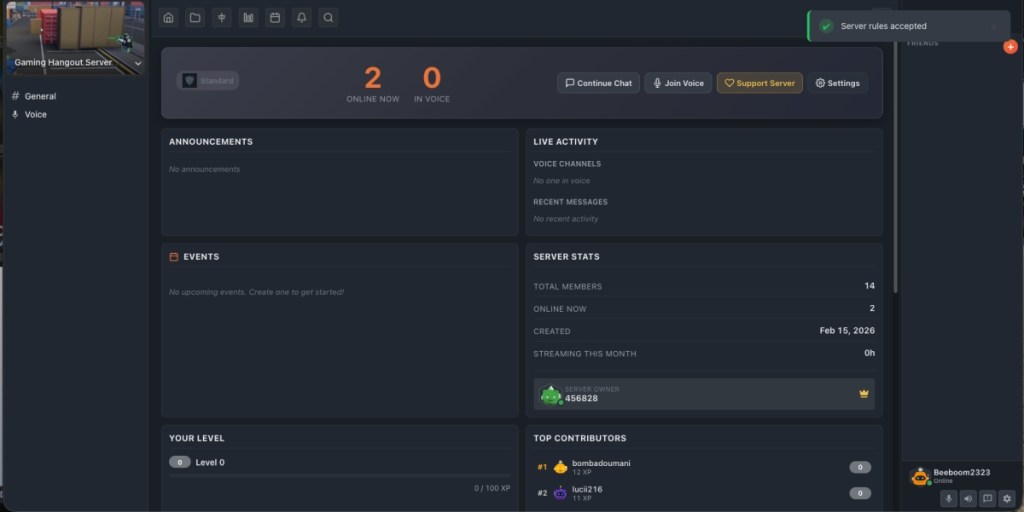
It offers pretty much the same general experience as Discord, since I was able to add my friends to the server pretty easily. I could also carry out a voice chat, which was pretty clear, thanks to the Opus rich voice experience included in GameVox. Even sharing my stream with them worked out quite well, and I, for once, actually started enjoying this Discord alternative.
However, I noticed that the app would censor several of our inside jokes. Upon further testing, I found out that GameVox is quite strict on no-no words, something that even Discord is lenient about. Moreover, we also faced multiple issues with video calls. The latter is understandable since the app is in beta phase, which is why there is no mobile app yet.
PROS CONS Simple and free to use application Strict censoring on text chat Allows streaming gameplay to your server Video calls need improvement Rich voice calls and no age verification Mobile Apps are still under development Can jump in without a verified email
Availability: Windows, macOS, Linux, Web
Price: Free, includes in-app purchases
Fluxer — Closest Discord Alternative Overall
Discord and Fluxer have a lot in common; in fact, so common that upon my testing, I thought this might be just a reskin of Discord. You’ll get the same Categories and Channels on the left, with your profile and voice channel appearing at the bottom. The layout is beat by beat similar to Discord, even down to the colour scheme. Since it is fairly new, there are limited communities, but you can still assign member roles, channel rules, and more in the free version.

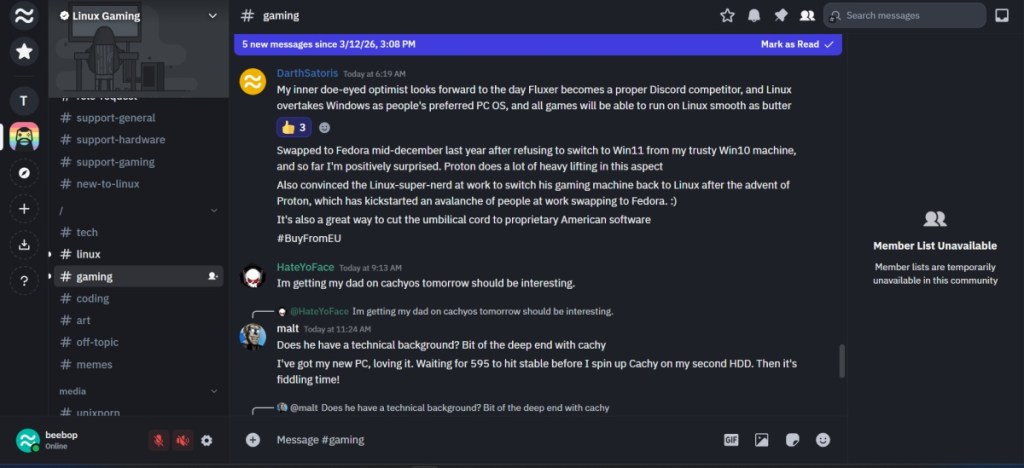
You can, of course, send memes, GIFs, images, audio files, and more in the chat, or react to other users’ messages with emojis. To me, Fluxer looks like the early days of Discord when it actually used to be about community and having fun. Like how Bluesky feels like the younger depiction of X (formerly Twitter). Though it might not have all the pleasant features of the modern Discord, it is still the closest and best Discord alternative you can switch to.
PROS CONS No learning curve when switching from Discord Settings lack key toggles and accessibility features of Discord Very familiar interface Has publicly discoverable servers System-wide voice chat support
Availability: Windows, Mac, Linux, and web
Price: Free, Fluxer Plutonium starts at $4.99/month
Telegram — Best Discord Alternative for Messaging
Telegram is often referred to as a WhatsApp rival, but at its heart, the platform is more than just a messaging platform. Unlike WhatsApp, Telegram is much more feature-rich, and in our opinion, competes directly with Discord rather than WhatsApp. It has tons of features, instant chatting, supports hosting communities (both private and public), public channels, endless customization, and much more.


Telegram supports private and group video calling, and like Discord, there are bots to manage huge groups, integrate scripts, automate queries, etc. Telegram one-ups Discord with End-to-End encryption for private messaging. Besides, there are other useful features such as Silent Messages, a built-in video editor, Chat Folders, Message Translation, and many more.
Discord falls short in this regard. Hence, Telegram is a better pick than Discord if all you care about is privacy features. The best part is that the service is completely free, so you will have no issues jumping from Discord to Telegram. There’s also a premium subscription that offers extra perks such as faster downloads, animated stickers, upgraded file upload limits, and much more.
PROS CONS End-to-end encrypted Some features are locked behind a subscription Great customization features Lots of bots Tons of other features Public and Private channels
Availability: Windows, macOS, Linux, Android, iOS, Web
Price: Free, Telegram Premium available for $4.99/month
Best Discord Alternative for High Quality Voice Chat
If all you are missing after jumping ship from Discord is voice chat, then there are alternatives for that as well. Like TeamSpeak or Mumble, which offer high-quality voice chat with low latency.
TeamSpeak — Most Popular for Cross-Platform Voice Chat
TeamSpeak is the best Discord alternative if your primary requirement lies in voice chat. It has been a trusted option for many professional gamers and league teams, as it delivers high-quality and low-latency communication. I remember using TeamSpeak back in my high school days when playing competitive Call of Duty with my friends. And weirdly, the layout remains quite similar.

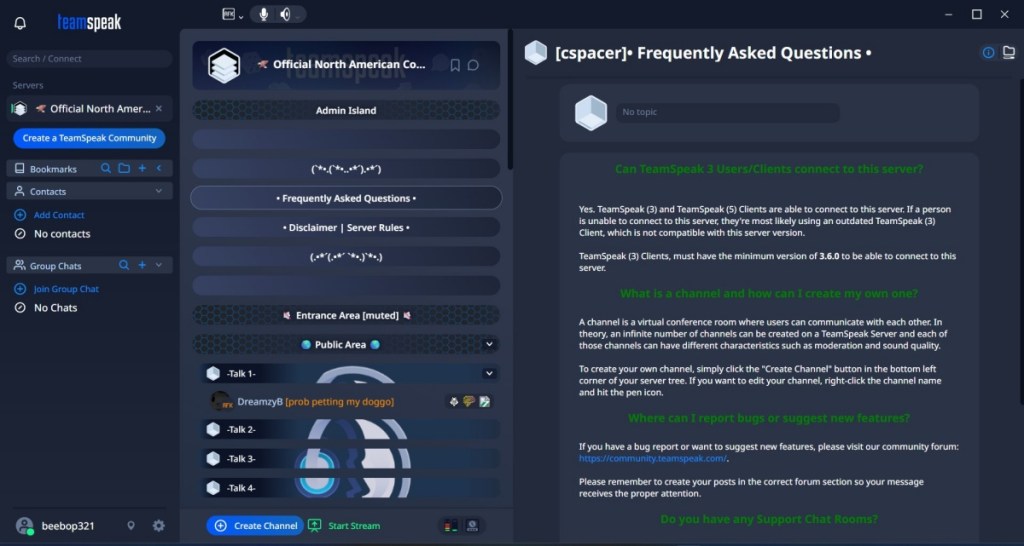
That said, TeamSpeak does allow you to host your own servers or switch to cloud servers instead. There are granular controls over permissions, which give communities greater control over moderation. However, it is not great for text chats, as it does not support emojis, stickers, or GIFs. This can be a bummer for most of the Discord audience.
PROS CONS High-quality low-latency voice chat Fewer social features than Discord Can switch between self-hosted and cloud servers Requires server setup for full control Highly customizable permissions Can be used across platforms
Availability: Windows, macOS, Linux
Price: Free, includes in-app purchases
Mumble — Best for Low Latency Voice Chat
Similar to TeamSpeak, Mumble is another great open-source voice chat platform. From the setup, it looks simple, and quite nostalgic as the app seems something you would use in the 2000s. But its main benefit lies not in its interface, but in the quality of audio it delivers. You get low-latency sound with positional audio support, which is amazing for competitive multiplayer games.

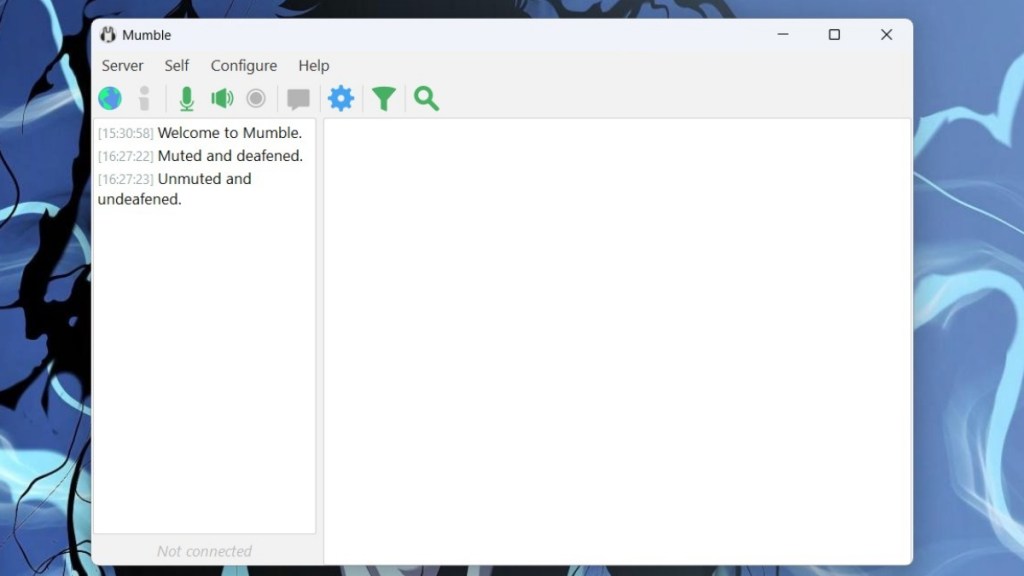
As mentioned above, it is an open-source app, and like TeamSpeak, Mumble also allows you to host your servers through Murmur. This gives you full control over your community and data. But besides that, the app feels very barebones compared to Discord. That said, if you just want a reliable voice chatting option, then Mumble does the job extremely well.
PROS CONS Fully open-source and privacy-friendly Interface that looks straight out of Windows XP Lightweight and clean app Little to no community features Positional audio support Amazing voice quality and low latency
Availability: Windows, macOS, Linux, Android and iOS
Price: Free, includes in-app purchases
Best Discord Open Source Alternatives
There are also a couple of good open source alternatives to Discord, but the pickings are quite slim. That said, we referred to some Reddit communities, and here are the best ones that we have found.
Rocket.Chat — Top Open Source Alternative for Discord
For those of you who want an open-source alternative to Discord, Rocket. Chat is your best bet. Right from the dashboard, you’ll feel at home as the interface is familiar to Discord and Slack, albeit more minimal. The free plan is more than enough for a small group of users of up to 50 people. It bundles unlimited access to app integrations, omnichannel and federated channels, DMs, file history, and admin console.


The service is privacy-focused, offering more control over how user data is shared. Additionally, it offers support for Slack and MS Teams bridges, meaning users from these platforms can interact without switching to Rocket. Chat. Larger teams can switch to the Pro plan, which can host up to 500 users. It also unlocks access to email and webform support. Overall, Rocket. Chat is among the best Discord alternatives for teams that are concerned about privacy.
PROS CONS Open source and privacy focused Not as feature rich as other alternatives Slack and MS Teams bridges Setting up may take longer Offers omnichannel and federated channels Unlimited file history and app integrations Decent benefits for free users
Availability: Windows, Mac, Linux, Android, iOS
Price: Free, Pro starts at $4 per user per month
Element — Discord Alternative with Best Security
Coming back to end-to-end encryption, it could be a dealbreaker for lots of people, and for them, Element is an excellent alternative. Besides offering end-to-end encryption, it includes a bunch of tools to help you streamline your team’s workflow. Element also allows you to talk to anyone in the Matrix.org ecosystem since it’s built on the Matrix open communications protocol.

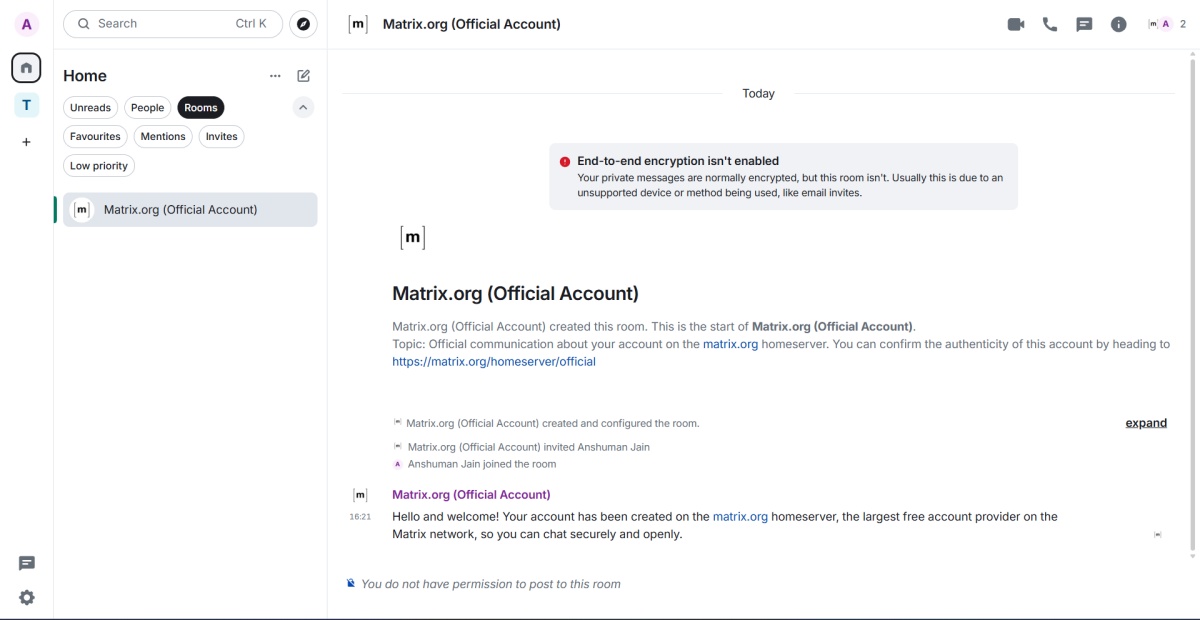
It can really come in handy if someone you want to talk to is using different Matrix-based software, which is an open network for decentralized communication. While it’s not ideal for gaming, Element can also be used by gamers, and it allows users to share messages, images, videos, and files of any type within groups of any size. There’s also support for group video calls and voice calls.
| PROS | CONS |
|---|---|
| End-to-end encryption | Not very “gamery” |
| Matrix protocol; Decentralized communication | The onboarding process could be better |
| Clear Voice and Video calls | |
| No file transfer limit |
Availability: Windows, macOS, Linux, Android, iOS, Web
Price: Free, Pro plan starts at $2 per month
Top Discord Alternatives for Teams and Collaboration
Let’s say you were looking for a Discord alternative for your team to collaborate on, then there are some really popular options like Slack and Microsoft Teams. Let’s take a look at them.
Slack — Best Discord Alternative for Small/Moderate Organizations
If you happen to use Discord for professional use and are searching for an alternative, you might want to switch to Slack. While it doesn’t remotely look like Discord, the overall user interface is clean and simple. The service has the same clean and simple user interface as Discord, but it’s geared towards a more professional setting, so you won’t find any “Gamery” aesthetics.

What you will find instead are lots of helpful features that are geared toward improving your productivity. Voice chat via huddles and screen sharing haven’t been strong areas of Slack, so if your primary focus is lag-free voice comms, you might want to look elsewhere. Although like Discord, Slack has lots of bots and Discord-like app integrations, making it one of the best Discord alternatives.
| PROS | CONS |
|---|---|
| End-to-end encryption | Laggy voice chat and screen sharing |
| Clean UI | Not very gamery |
| Geared toward professionals | |
| Bots and third-party app integrations | |
| A generous file transfer limit |
Availability: Windows, macOS, Linux, Android, iOS
Price: Free with limited functionality, Paid plan starts at $2.67 per month
Mattermost — Best Discord Alternative for Professionals
Realistically, Mattermost trades blows with Slack rather than Discord, but since we’ve mentioned Slack as a Discord alternative, it’d be evil not to mention Mattermost. For starters, it’s open-source and self-hostable software. Like Slack, its target audience is professionals and individuals who want a great Slack alternative, and for Discord users, it is a great alternative too.


It also has great features, such as boards that allow team heads to create goals and OKRs. This may not matter to gamers, but I could see people using it as a checklist for what games are trending and taking suggestions from others. It also has calling and screen sharing to stream your games. Overall, Mattermost is a decent alternative to Discord. One of the drawbacks of the app is that file uploads are limited to 100 MB.
PROS CONS Store messages data locally; much secure Not very customizable Simple interface with low learning curve File sharing limited to 100 MB Geared toward professionals
Availability: Windows, macOS, Linux, Android, iOS
Price: Free, Paid plan starts at $10 per user/USD (For features that shouldn’t matter to gamers)
Microsoft Teams — Best Alternative for Large Organizations
Microsoft Teams may be more fit for professionals, but you could use it to chat with your friends while playing games. Like Discord, there’s support for voice and video calls, both for individuals and groups. Besides, Teams has an upper limit of 100GB for file transfers compared to 500MB on Discord. In addition, Teams now offers a free plan with reasonable benefits.

The only downside to Microsoft Teams is that you can’t host communities — public or private — which can be a pain point for gamers and most Discord users because they’re used to having multiple servers for multiple things. Nevertheless, if you are looking for a free app like Discord for real-time collaboration with your teammates, then Teams is a worthy pick.
PROS CONS Clean UI and easy to use More suited for professional use 100GB File Sharing limit. No Discord channel alternatives Clear calls and Screen sharing Third-party app integrations
Availability: Windows, macOS, Linux, Android, iOS, Web
Price: Free, Paid plan starts at $5 per month
The apps mentioned in this list may not be identical to Discord because it’s intended for anyone who does not want to hand over their data to a platform that already has a track record of losing over 70,000 government IDs of users. Or anyone who wants to move away from Discord now that there are better alternatives to switch to in 2026. Let us know in the comments which of these Discord alternatives you liked best and why.