Generative AI not only includes AI chatbots like ChatGPT and Gemini, but also AI video generators. You can generate AI videos using simple text prompts or upload an image to create videos right away. So in this article, I have compiled the 12 best AI video generators after testing them for months. On that note, let’s go ahead and check out the list.
Best AI Video Generators at a Glance (Comparison Table)
After a thorough testing, I found Google’s Veo 3.1 to be the best AI video generator out of all the tools. Following that, OpenAI’s Sora 2 generates believable videos with native sound. Not to mention, Kling is also one of my favorites from this list as it generates high-fidelity videos.
AI Video Generator Best For Limitation Video Length, Resolution Native Audio Support Free Tier Pricing Google Gemini Veo High quality visuals with synchronized audio Video generation limited to 8 seconds only 8 seconds, up to 4K resolution Yes No Starts at $8 per month OpenAI Sora Physical accuracy and maintaining likeness across scenes Not available in all regions 12 seconds, up to 1080p resolution Yes No Starts at $20 per month Runway Gen-4.5 Top-rated video generation model in the world, cinematic visual quality Objects disappear across different scenes 10 seconds, up to 720p resolution No Yes Starts at $15 per month Midjourney Add cinematic motion to your images Limited to 5 second videos 5 seconds, up to 720p resolution No No Starts at $10 per month Leonardo AI Video Generator Best AI video generator for artists Limited AI models 8 seconds, up to 1080p resolution No Yes Starts at $10 per month Pika Best for short-form social media content, vertical videos Not meant for cinematic videos 10 seconds, up to 1080p resolution No Yes Starts at $8 per month Adobe Firefly Video Generate commercially safe AI videos, produce videos in Adobe apps Behind Veo and Sora in visuals 5 seconds, up to 1080p resolution No Yes Starts at $9.99 per month Synthesia Best for marketers and educators, create AI avatars and talking head videos Not for general users 5 minutes, up to 1080p resolution Yes, text-to-speech Yes Starts at $29 per month HeyGen Best AI for translating videos with incredible lip syncing Some lip-syncing videos have artifacts 30 minutes, up to 1080p resolution Yes, text-to-speech Yes Starts at $29 per month Kling AI One of the best AI video generators from China Struggles in heavy physical scenes 15 seconds, up to 1080p resolution Yes Yes Starts at $6.99 per month MiniMax Hailuo AI All-in-one platform to generate AI videos Occasional artifacts in videos 10 seconds, up to 1080p resolution No Yes Starts at $6.99 per month Higgsfield AI Hosts flagship AI video generators In-house AI model is weak 8 seconds, up to 1080p resolution No Yes Starts at $9 per month
How We Tested the Best AI Video Generators (Methodology)
First and foremost, for any AI video generator, the output must be visually coherent. So while testing AI video generators, I checked whether the generated video follows basic physics or not. Character’s movement, and stationary objects should mirror the real world. Basically, an AI video generator must have a good understanding of the physical world.
So I ran the below prompt across all the AI video generators to check and compare their outputs. I accessed all the services through the API for better controllability.
A woman in a red coat walks slowly through a crowded Tokyo street at night, neon signs reflecting off wet pavement. Camera tracks her from behind at eye level, then smoothly arcs around to reveal her face as she stops and looks up. Shallow depth of field, anamorphic lens flare, 24fps cinematic motion blur.
Apart from that, humans in AI-generated videos should look plausible and lifelike with facial and hand features intact. Generally, AI video generators struggle to render human features properly. So while testing these AI tools, I ensured that video outputs are more believable.
Finally, spatial and temporal coherence are extremely important for any AI video generator. The video output must be consistent between frames, maintaining the same identity and consistent motion. And if I am uploading an image to generate a video using it as a reference, the video should be realistic and reflect the actual reference image. I considered all the parameters before choosing the top AI video generators.
Best AI Video Generators for Text-to-Video Generation
1. Gemini Veo
If you are looking for the best AI video generator, Google’s Gemini Veo 3.1 is currently the best out there. It’s powered by the Veo 3.1 AI model and available inside Gemini. You can simply go to Gemini, select Create videos, and enter a text prompt or upload an image to generate a video. The best part is that Veo 3.1 also generates synchronized audio along with the video.

Veo 3.1 supports video generation up to 1080p resolution at 24FPS. And you can produce videos up to 8 seconds in length in both 16:9 or 9:16 aspect ratio. I would suggest using Google’s Flow AI tool (visit) where you can create AI videos using Veo 3.1, stitch them together, and create stories in a user-friendly video editor.
I reviewed Veo 2 AI video generator earlier this year and I was impressed with its high-quality and realistic visuals. The new Veo 3.1 model has improved physics and human movements even further. And with the latest update, you can now produce vertical videos with Veo 3.1.
Pros Cons Highly realistic AI video generation No longer free Up to 1080p resolution Video limited to 8 seconds Synchronized audio generation
Pricing: Paid plan starts at $8 per month
2. OpenAI Sora
OpenAI, the company behind ChatGPT, has also developed an AI video generation model called Sora. The new Sora 2 model is more realistic and physically accurate than before. It’s also shockingly good at creating videos from images while maintaining the likeness of faces. In fact, OpenAI has released a new Sora app where you can create Cameos — AI clips using your facial features and voice in different styles.

Just like Veo 3.1, Sora 2 can also generate audio along with the video. Not just that, it can also generate dialogue between characters, background soundscapes, sound effects, etc. And the more powerful, Sora 2 Pro can generate 1080p videos at 30FPS with duration up to 10 seconds. You can access Sora through its website or app.
Pros Cons Physically accurate rendering Not available in all regions Create your Cameos in different styles Up to 1080p resolution
Pricing: Paid plan starts at $20 per month
3. Runway Gen-4.5
Recently, Runway introduced its Gen-4.5 AI video generation model and it stunned the AI community. It’s one of the best AI video generators in the market right now. In fact, on Artificial Analysis’ text-to-video leaderboard, Runway Gen-4.5 tops the list with an ELO score of 1,244, outranking Veo 3.1 and Sora 2 Pro.

It offers incredible visual fidelity and generates cinematic and highly realistic AI videos. Besides text, you can also upload images and videos and produce new AI videos on top of them. The AI video generator also follows user instructions more accurately and maintains visual consistency across scenes. All in all, I would recommend Runway Gen-4.5 for the visual quality alone.
| Pros | Cons |
|---|---|
| Top rated model for AI video generation | Objects may disappear across scenes |
| Cinematic and realistic visuals | |
| Supports various AI tools |
Pricing: Free with limited credit, Paid plan starts at $15 per month
Best AI Video Generators for Image-to-Video / Artists
4. Midjourney
Midjourney is popular for AI image generation, but recently, it launched video generation too with its new Midjourney V1 model. You can turn any image into convincing videos in seconds. It’s not meant for long videos, but to bring life to images, you can create 5-second videos. So if you are looking to animate images using AI, Midjourney is the best pick.

If you are an artist, designer, or a storyteller and want to add camera motion or cinematic flair to your images, Midjourney V1 is fantastic. Midjourney is already favored for its visual style and unique taste, and adding motion to images will make things even better. Note that there is an option to customize motion and loop settings.
Pros Cons Animate images and extend videos Not meant for generating long videos Add motion and cinematic flair to images Video duration up to 5 seconds
Pricing: Paid plan starts at $10 per month
5. Leonardo AI Video Generator
Leonardo AI is again known for AI image generation, but it also offers an AI video generator where artists can produce cinematic clips. It’s designed primarily for artists so you will find the Studio and its tools more useful and feature-rich. It brings access to Google’s Veo 3.1 AI model on the platform for video generation.

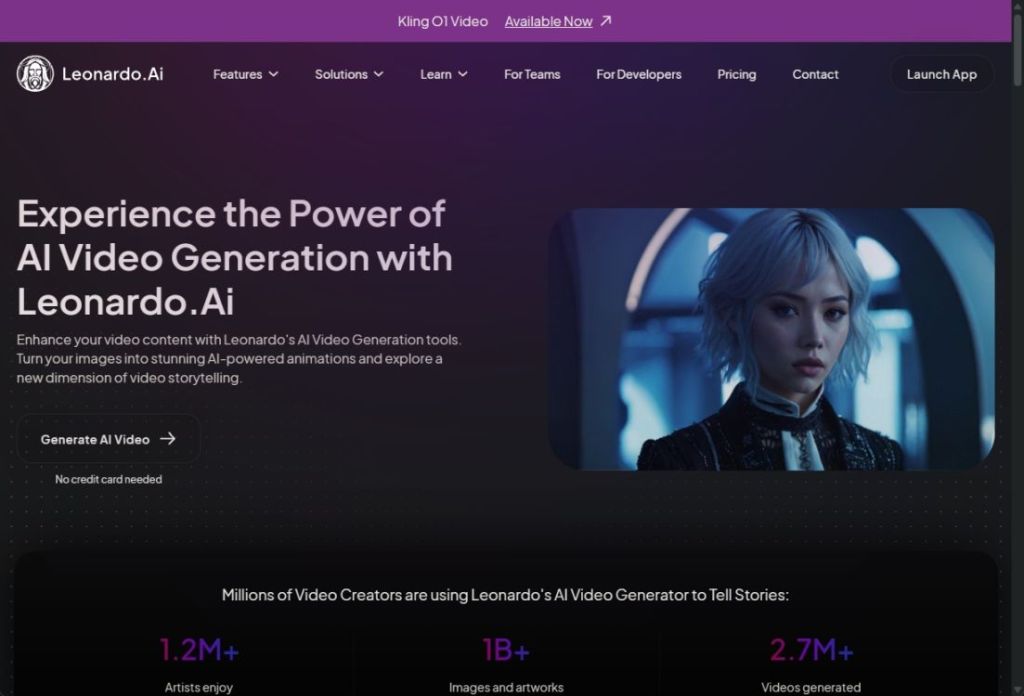
You can create quick animations, add synchronized audio to your characters, and produce cinematic scenes using an image frame. The Storyboard feature of Leonardo AI is impressive as it allows you to stitch multiple videos, edit elements, remove objects, and more. To sum up, Leonardo AI is emerging as one of the best AI video generators and you should use it for the Studio features.
Pros Cons Best AI video generator for artists Limited AI video generation models Offers access to Google Veo 3.1 AI model Generate motion clips and high-fidelity videos
Pricing: Free, Paid plan starts at $10 per month
6. Pika
Pika is gaining traction among social media users for generating short-form AI videos. While tools like Veo and Runway produce high-fidelity cinematic videos, Pika is designed for quick social media posts. You can upload your images and animate them using custom prompts while maintaining facial coherence throughout the video.

Recently, it got the Pika 2.5 update which is even more accurate and can handle multiple objects in a scene. You can generate 1080p videos with up to 10 seconds duration with the flagship model. Apart from that, you can blend videos or images, add audio clips, swap characters and objects, and much more. The free version offers 80 credits (480p resolution), but with $8 per month, you get 700 monthly credits.
Pros Cons Best AI video generator for short-form content Not the best in terms of cinematic video generation Generate 1080p videos, 10 seconds duration Blend images and videos
Pricing: Free, Paid plan starts at $8 per month
7. Adobe Firefly Video
Adobe has also entered into the AI video generation race with its Firefly service. Firefly Video is directly integrated into Adobe’s ecosystem and products. You can use Firefly to generate AI videos in Premiere Pro, and leverage its features in After Effects, and Adobe Express. You can generate B-roll clips, extend footage, or create scene transitions directly within Premiere Pro’s timeline.

The standout feature of Adobe Firefly Video is that it’s commercially safe to use its AI generated content. Adobe emphasizes that video generated using Firefly is trained on licensed content and Adobe Stock footage, which means you can use them in commercial products without any IP concerns. While it remains behind Veo and Runway in terms of video quality, studios and agencies may prefer it over other solutions.
Pros Cons Generate cinematic and high-quality videos in Adobe apps Videos limited to 5 seconds only Commercially safe content Produce videos from text or images
Pricing: Free, Paid plan starts at $9.99 per month
Best Avatar-Based AI Video Generators
8. Synthesia
Synthesia is currently the number one player in AI avatar video generation for businesses. Unlike traditional video generators, avatar-based tools produce talking-head videos featuring AI avatars, which can be used by businesses for corporate training, product demos, marketing, anchoring, and more. You simply type or generate a script, choose an AI avatar, and pick a language, and you get a studio-quality video in minutes.

Synthesia supports more than 140 languages and it has a library of 230+ diverse presenters. You don’t need any camera, microphone or editing skills to create a studio-quality video. The latest update brings a new feature called custom AI avatars. You can now upload your video, and it will create a digital twin of yourself with your likeness intact.
| Pros | Cons |
|---|---|
| Generate talking head videos | Not meant for general users |
| Huge library of AI avatars | No cinematic videos |
| Create custom AI avatar of yourself |
Pricing: Free, Paid plan starts at $29 per month
9. HeyGen
HeyGen is another great AI video generator for producing realistic lip-syncing videos. You can simply upload your existing video and use its video translation feature to translate the script into more than 40 languages. It does a fantastic job at lip-syncing with the translated audio. The video looks as if the speaker is speaking in their native language.

Apart from translation, HeyGen also supports custom avatar generation just like Synthesia. You can create your own avatar or select one from a huge library of realistic avatars. You can generate voiceovers, and styles that match your brand. To sum up, for all your text-to-video needs, HeyGen is an excellent tool.
Pros Cons Translate existing videos with perfect lip-syncing Some avatars lack realism Create custom avatars Best text-to-video generator
Pricing: Free, Paid plan starts at $29 per month
Best AI Video Generators from China
10. Kling AI
You may not have heard about Kling AI, but it’s a capable AI video generator and it has been developed by a Chinese company called Kuaishou. Currently, Kling AI is ranked second on video generation leaderboard, outranking many frontier AI models from the West. Its powerful Kling 2.5 Turbo AI model generates cinematic videos with support for better camera angles and instruction following.

Kling AI also produces videos with natural lighting and handles transitions pretty well. You can generate videos up to 1080p resolution. That said, in my testing, Kling AI struggled to generate coherent videos when heavy physical action was involved. Apart from that, it’s a powerful AI video generator and you should definitely give it a try.
Pros Cons Powered by Kling 2.5 Turbo, supports audio generation too Struggles to render heavy physical actions Offers a user-friendly platform to generate and edit AI videos Resolution up to 1080p
Pricing: Free with limited credit, Paid plan starts at $6.99 per month
11. MiniMax Hailuo AI
MiniMax is another Chinese AI lab and it’s developing powerful AI technologies including AI video generators. Its Hailuo AI platform offers incredible video generation tools and models. You can use both text and image to produce AI videos in no time. Particularly, Hailuo 02 Standard and 2.3 models are great at producing AI-generated videos with realistic scenes.

You can use these models on its platform or third-party services as well. Hailuo AI handles camera pans, human expressions and lighting shifts extremely well and the output looks pretty real. Not to mention, you can generate 1080p videos and there are mobiles apps for Android and iOS too.
Pros Cons Generate cinematic looking videos at 1080p resolution May encounter occasional artifacts in videos Supports both text-to-video and image-to-video generation Offers web and mobile apps
Pricing: Free with limited credit, Paid plan starts at $6.99 per month
Best Multi-Model Aggregator Platforms
12. Higgsfield AI
Higgsfield AI is a popular platform where you can generate AI videos using premium AI models. It hosts AI video generation models like Veo 3.1, Sora 2, Kling, Hailuo, WAN 2.6, and more. Higgsfield has also developed its own in-house model to generate videos. You can either add a text prompt or upload the start frame and end frame to create a complete video.
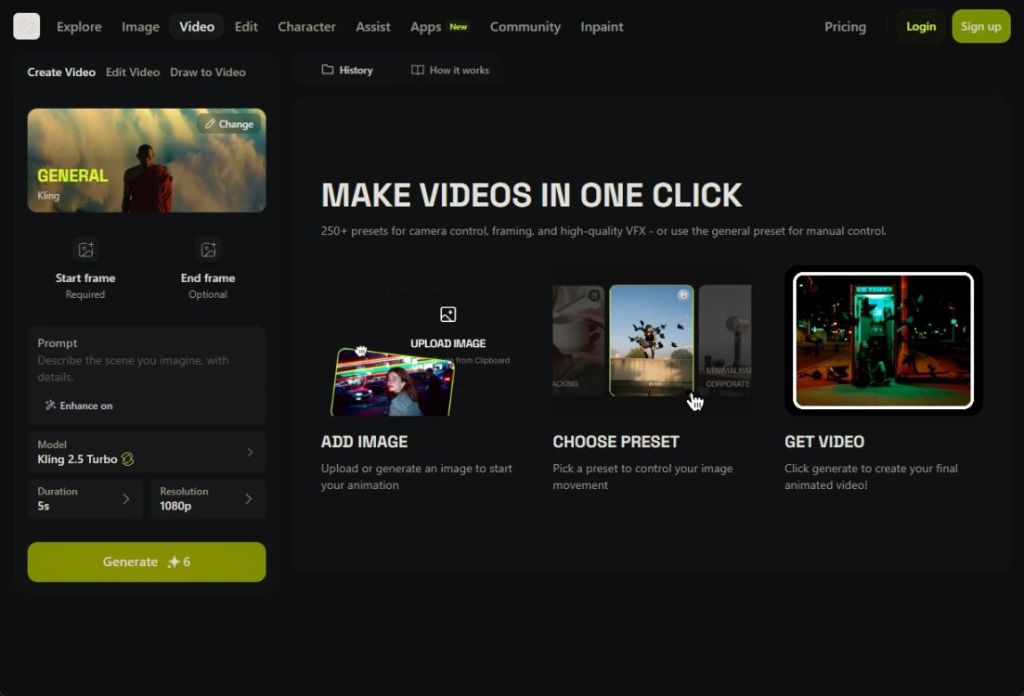
You can produce videos up to 10 seconds in duration and at 1080p resolution. The best part about Higgsfield is that it offers a lot of creative controls to both generate and edit videos. For instance, you can choose presets, edit scenes, remove elements, lip sync audio, turn sketch into videos, and more. Finally, you can also upscale AI videos.
To sum up, if you want an all-in-one platform to generate AI videos using frontier AI models, Higgsfield AI is the best way to do it.
Pros Cons An all-in-one AI video generator No free tier Hosts premium AI video generation models like Veo 3.1, Sora 2, etc. Offers AI tools to edit videos seamlessly
Pricing: Paid plan starts at $9 per month
How to Choose the Right AI Video Editor?
There are many AI video generators and not every tool is designed for all use cases. So, we have made this quick guide so you can easily pick the best tool for your requirement.
- Filmmakers and Cinematographers: Gemini Veo, OpenAI Sora, and Runway are the three top AI models for generating high-fidelity visuals. You should use these generators if you don’t want to compromise on video quality.
- Marketers and Corporate Teams: Synthesia or HeyGen is an apt choice for avatar-based video generation. These tools are used by many Fortune 100 companies and they deliver multilingual content with great lip syncing within minutes.
- Artists and Designers: Midjourney V1 and Leonardo AI are two great AI video generators for bringing life to still images. Midjourney does a beautiful job adding cinematic motion to images and Leonardo AI has multiple Studio toolset with storyboard support.
- Budget Conscious Users: Kling AI or Hailuo AI offer generous free tiers and their paid plan is also cheaper than other services. And don’t forget that they deliver pretty good visuals, especially the Kling 2.5 Turbo model.
- All-in-one Video Generator: Finally, you can check out Higgsfield AI if you want to access top AI video models in one place. It offers some free credits, and hosts models such as Sora, Veo, Kling, Seedance, and more.
So these are the best AI video generators that produce realistic scenes, some generate synchronized audio, and render complex physical actions too. Depending on what you need, you can pick one of the AI tools from the list. And if I have missed an AI tool that you use regularly, let me know in the comments below. I will definitely check it out.
After my testing, I found Google’s Veo 3.1 to be the best AI video generator in 2026, following OpenAI Sora, and Runway Gen-4.5.
You can use Higgsfield AI or Hailuo AI to generate videos for free. You can also try Google’s AI Studio to produce AI videos using the Veo model for free.
Yes, AI tools can generate videos from text and images too. Simply enter a detailed text prompt, describing the scene, and the AI tool will produce a video following your instructions.
ChatGPT doesn’t support AI video generation, however, OpenAI’s Sora lets you generate AI videos through its mobile app and a separate web portal. You can visit sora.com to generate AI videos.
Google’s Veo 3.1 can generate videos up to 4K resolution and consistently produces high-fidelity videos with great detail.
While it’s a grey area as the legal landscape around AI is evolving, you can use Adobe Video Firefly if you want to use AI generated videos commercially. Adobe says their videos are trained on licensed content.
Sora is OpenAI’s answer to AI video generation while Veo is offered by Google. In terms of quality, Veo is better than Sora. However, for maintaining character likeness and generating vertical videos, Sora does a great job.
You can use services like Synthesia or HeyGen if you want to create product demos using AI avatars. You can also create your own AI avatars in multiple languages.