
NYT Connections has a frustrating way of making you feel like a genius one day and leaving you completely clueless the next. I have had a proper love-hate relationship with the puzzle for a long time. However, that changed once I started running my games through the Connections Bot.
Surprisingly, the bot has been around for a while now, yet a lot of players still skip it or just glance at their score before closing it. Well, that’s a waste! It’s one of the best ways to figure out why you keep falling for the same traps. So, I decided to write this guide on how to actually read the Connections bot.
To make it easier for you, I played a game and used its bot’s analysis as a reference for the explanations. So, once you’re done with this article, you’ll understand how to read the Connections bot analysis and use it to improve your game.
What is Connections Bot?
Connections Bot is the New York Times’ own analysis tool for Connections. Once you finish a game, no matter whether you win or lose, it gives you a personalised breakdown of how your game went. The Connections bot doesn’t work just as a scorecard; it knows how millions of other people played the puzzle, and that’s what makes it very useful.
It can tell you how tricky the day’s puzzle was, which categories were easiest or hardest, and which wrong guesses were the most common. However, remember that the bot only works after you’ve finished the game, so it won’t help you find today’s Connections answer while you’re stuck.
Is Connections Bot Free?
Connections Bot isn’t a free tool. To use it, you need an active NYT Games or All Access subscription. A free NYT account won’t be enough to open your analysis.
You also need to be logged in while playing Connections, as well as when visiting the bot. If you aren’t, it can’t find your game or show your scores. So, make sure you’re signed in to your subscribed account before you start the puzzle. If you don’t have a subscription, you can still play Connections as usual, but you’ll have to skip the bot’s analysis.
Connections Bot vs WordleBot
If you play Wordle too, you’ve probably used WordleBot already. NYT calls the two bots cousins, and I think that’s a fair way to put it. They look similar, but they don’t work the same way.
The reason is simple. Wordle is a game of numbers. So, WordleBot can calculate the most efficient guess at every step and tell you exactly what you should have played. Connections isn’t like that. There’s no reliable way to use math, or even AI, to solve it.
So, instead of showing you the ‘perfect move’, the Connections Bot shows you what the crowd did. It compares your guesses with those of other players, points out the traps they fell for, and helps you spot patterns in how the puzzles are built.
Here’s a quick look at the main differences between WordleBot and Connections Bot:
| Aspect | WordleBot | Connections Bot |
|---|---|---|
| Main focus | Finding the most efficient guess | Understanding the puzzle and other players |
| Scores | Skill, Luck, and Steps | Skill and Uniqueness |
| Compares you with | The bot’s own best solution | Other players in the same situation |
| Best for | Improving your word strategy | Learning to avoid red herrings and spot patterns |
How to Use the Connections Bot?
Using NYT’s Connections Bot is pretty simple, and it doesn’t take more than a couple of minutes. Here’s how it works.
1. Log In and Finish the Day’s Connections
First, make sure you’re logged into your NYT account with an active subscription, and play the puzzle as you normally would. If you’re new to the game and need help, check out our guide on how to play NYT Connections. It will help you get accustomed to the game. Now, while playing, don’t think about what the bot might say. The whole point is to see how your instincts hold up.
2. Find Connections Bot
Once you’re done with the game, you can reach the bot in a few ways. The easiest is to use the “How tough was today’s puzzle” link on the results screen. It takes you straight to your Connections Bot analysis. You can also use the link in the Connections Companion, or search for Connections Bot on the New York Times website or app.
3. Go Through the Intro
Once you’ve opened the bot, it will first show you how hard the day’s puzzle was. After that, the bot will introduce itself and tell you what it will analyze. If you don’t want to see this screen every time, you can tick the ‘skip this screen next time’ box.
4. Scroll Through the Analysis
Now comes the main part. The bot will walk you through your ratings, the difficulty of each category, the most common mistakes, and finally your guesses one by one. Some sections also have buttons that you can tap on to see the extra data.
5. Look for Patterns
Finally, go through the analysis, but don’t treat it as a one-day report card. Start looking for patterns with your previous games. The real value will come from spotting what mistakes you keep making. You might notice that you often fall for the same type of red herring, or that you always start with the same category. Remember these patterns, and use them to improve your next game.
I know it sounds like a lot of numbers and charts at first. So, let’s go through each section one by one and see what it all means.
How to Read the Connections Bot Analysis
Once you open the bot, it takes you through your game in a few different sections. Each one tells you something different, so let’s start from the top and go one by one.
Puzzle Difficulty
This is the first thing you’ll see, and it sets the stage for everything else. It shows how tough today’s puzzle was for all the players, so you know whether the game was great or just average.
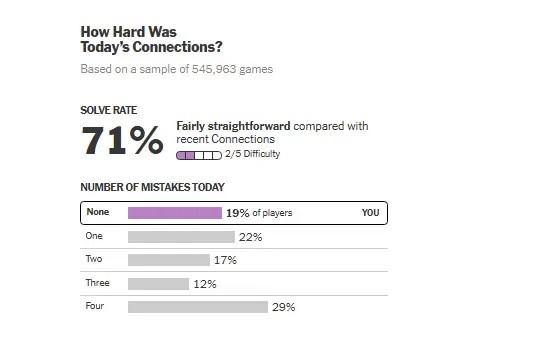
At the top, you’ll see the solve rate. For example, here it shows 71%, which means that 71% of the players solved the puzzle. Right next to it, the bot tells you how the puzzle compares with recent ones, with a difficulty rating. Mine was called “Fairly straightforward,” so I was not dealing with one of those brutal days.
Below that, you’ll see a ‘Number of Mistakes’ chart. It highlights the percentage of players according to the number of mistakes they made. It’s divided into none, one, two, three, or four mistakes, and the category you fall into is highlighted.
Skill and Uniqueness Score
After the difficulty section and a short introduction from the bot, you’ll get to your ratings. This is basically your report card for the day, and it has two scores.
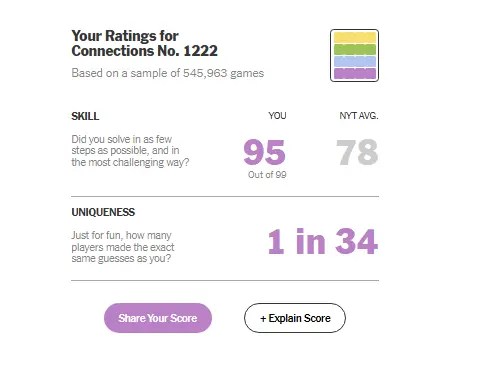
The skill score tells you how well you played. It’s a score out of 99 that depends on how many categories you found, the order in which you found them, and how many mistakes you made. Next to the score, the bot also shows the NYT average so you can see how you stack up. If you want to understand how the bot comes up with these scores, tap on the ‘+ Explain Score’ button under your ratings. It will give you a breakdown of the exact points the bot gives for each situation.
The uniqueness score tells you how many players made the same exact guesses as you. Mine said “1 in 34”, which means about one in every 34 players solved the puzzle in the same way I did. Remember that this score is just for fun and doesn’t make you a better or worse player.
Now that you know how well you played, the next thing to see is how hard each category was for everyone else.
Category Difficulty
The next section shows you which of the four groups were easy to spot and which ones gave players a hard time. The bot lists each category with its title and words, color-coded as yellow, green, blue, and purple.
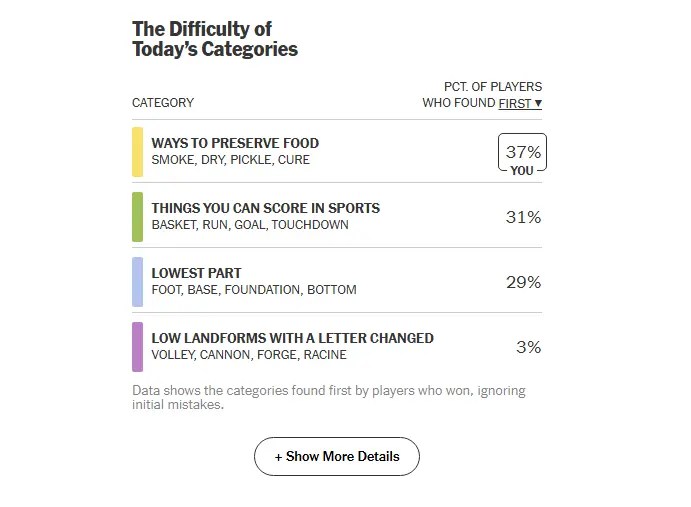
Next to each category, you get the percentage of players who found it first. For example, 37% of players started with the yellow category. Green and blue were close behind at 31% and 29%. The purple category, on the other hand, was found first by only 3% of the players. That tells a lot, doesn’t it? The lower the number, the harder the category was to spot early. Usually, purple is the trickiest group, and this puzzle was no exception.
Note that here the bot counts only players who won and ignores their initial mistakes. So, these numbers show how many people approached the puzzle when they cracked it. Now that you know which categories were hard to find, let’s see where players went wrong.
Top Mistakes
This is easily my favorite section of the bot analysis. It shows the top five common wrong guesses of the day, along with the percentage of players who made each one.
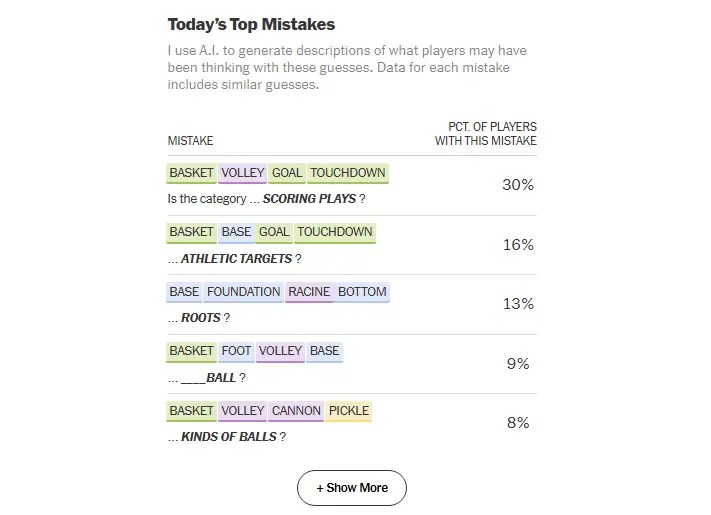
Each mistake is a set of four words, color-coded by the category the words actually belong to. Below it, the bot adds a short description of what the players may have been thinking. For example, here 30% of players guessed basket, volley, goal, and touchdown, and the bot describes it as “Scoring plays.” That makes sense! Three of those words are green, but “volley” belongs to the purple category, and it looks like a sports term too. That’s a perfect trap.
Note that these aren’t the official categories. The bot compiles the most common mistakes each day and uses generative AI to guess the category players had in mind. You can tap on the “Show More” option to see more mistakes. Studying these is a great way to learn how the puzzle makers trick you.
Guess-by-Guess Breakdown
The last part of the bot analysis goes through your game one guess at a time. It shows how you compared with other players at every step of the puzzle.
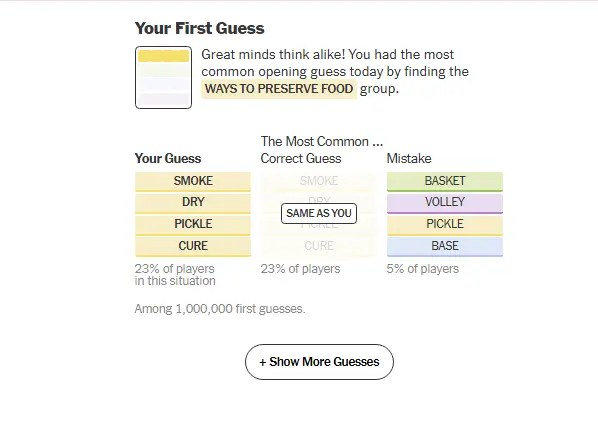
Every guess card has the same layout. First, you get a message from the bot about your guess. Below it, you can see three columns:
- Your Guess: This shows the four words you picked, along with the percentage of players who made the same guess in that situation.
- The Most Common Correct Guess: This shows the correct group most players chose at this point. If it matches your guess, you’ll see a “Same as You” tag on it.
- Mistake: This shows the most common wrong guess made by players in the same situation.
If you want to see the full list of first guesses and how common each was, you can tap on ‘Show More Guesses’.
That covers every section of the Connections Bot analysis. Now, let’s see how you can use all of this to get better at the game.
How to Use Connections Bot to Get Better at the Game
The bot is fun to read; it tells you the common Connections mistakes you can avoid. But it only helps if you actually use what it tells you. The good news is that you don’t need to change how you play overnight. A few small habits are enough, so here’s what worked for me.
Study the Top Mistakes
Start with the Top Mistakes section, because it shows exactly where the players get tricked. Look at the wrong guesses and ask yourself whether you’ve made similar ones before.
The mistake can be a red herring or an incorrect category. Once you recognize it, you start to notice your pattern in future puzzles. So, next time you’re about to make a similar mistake, you’ll know that it’s just the puzzle maker setting a trap.
Learn the Recurring Category Types
Connections isn’t just about categorising the given words; it also works around pattern recognition. The same kind of categories keep showing up, such as fill-in-the-blank words, homophones, and words with a letter changed. So, when the bot shows you a category you didn’t see coming, make a mental note of its type. Over time, these patterns become a part of your toolbox, and the purple starts to feel a lot less scary.
Check the Guess-by-Guess Cards
If you’ve made mistakes while playing, the bot analysis is going to be really useful. It flags guesses where you didn’t fully use the game’s “One Away” hint. It also tells you whether you noticed a red herring or fell for it. Both tell you a lot about how you think. So, if you keep ignoring Connection’s “One Away” message and keep changing the wrong words, slow down and use it properly next time.
Try the Harder Categories Earlier
Look at your category order and compare it with what other players did. Most people start with yellow because that’s a safe choice. However, remember that it is not the only one. The skill score actually gives you bonus points for finding a blue or purple category early.
I’m not saying you should chase the bonus every day. But if you’ve already spotted the tricky group, try going for it first. In fact, if you solve the puzzle from purple to yellow sequence, the game also rewards you with the Reverse Rainbow badge.
Don’t Obsess Over Skill Score
Finally, remember that the skill score is just a summary of one game. A single bad day doesn’t mean you’ve gotten worse, and a 95 doesn’t make you a genius either. So, don’t treat it as a verdict. Instead, check your analysis over several days, and look at the trend. If your skill score keeps going up, or you’re falling for fewer red herrings, you know the bot is working!
That’s all it takes to turn the Connections Bot from a scorecard into a proper practice tool. Give it a few days, and I’m pretty sure you’ll start seeing the traps before you fall into them.
So, go ahead and try it with your next game, and let me know in the comments if the bot helped you improve. And if you use it in a different way to get better at Connections, I’d love to hear about that too!
Yes, NYT’s Connections has its own bot. It’s an analysis tool that you can use after you finish the puzzle. It shows how hard the game was, how you compared to other players, and how well you played.
The Connections Bot is a paid feature. You need an active NYT Games or All Access subscription to use it, and you need to be logged into your account while playing and when opening the bot.
The Connections Bot is used to analyze your game after you finish it. It gives you a skill score and a uniqueness score, shows how tricky each category was, and points out the most common mistakes. It also compares your guesses with those of other players, so you can spot patterns and improve your game.
Connections Hints Today & Answers for October 21
 Sanmay Chakrabarti
What Does 'One Away' Mean in NYT Connections and How to Avoid It?
 Daksha Gupta
When Does NYT Connections Reset?
Daksha Gupta
Full List of Connections Badges & How to Earn Them (2026)
Daksha Gupta
What Is a Reverse Rainbow in NYT Connections? Meaning Explained
Daksha Gupta
Wordle Hint Today - October 21, 2026 (Puzzle #1950)
 Rishabh Sabarwal

Wordle vs Globle: Key Similarities and Differences Explained
Daksha Gupta

7 Best Globle Tips and Tricks to Find the Mystery Country Easily
Daksha Gupta

When Does Globle Reset? Find the Reset Time Here
Daksha Gupta

How Many Countries Are in Globle? A Full Globle Country List
Daksha Gupta