
Guessing the four Connections groups is already tricky enough, but things get even more annoying when you think you’ve finally cracked a category, only for the game to hit you with a “One Away!” pop-up. Talk about frustrating!
If this has happened to you, you’ve probably wondered what the game is trying to tell you and how you can stop wasting guesses. Well, there’s a trick to understanding what ‘One Away’ means in NYT Connections, and I’m here to help you figure it out.
What Does “One Away!” Mean in Connections?
The “One Away!” error message in NYT Connections means that three of the four words you selected belong to the same category, but one word doesn’t fit.
So you are close to guessing a correct group, but at least one word needs to be swapped. However, Connections doesn’t tell you which word is the odd one out. But we can help you out with our NYT Connections hints and answer guide. We update it daily to help you get unstuck and save your long-running streak!
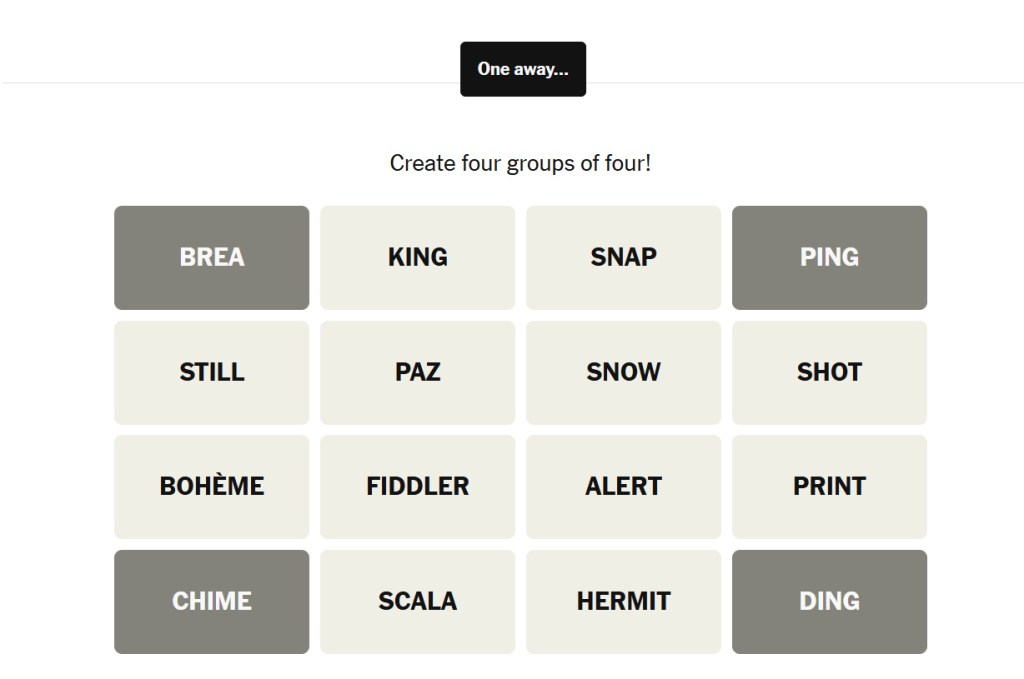
For example, imagine you’re trying to find a category related to colors and select BLUE, RED, GREEN, and CIRCLE. The game responds with “One Away!” because BLUE, RED, and GREEN fit the category, while CIRCLE doesn’t (I know Connections would never make it this easy for us, but bear with me.) So, you’d have to replace CIRCLE with another color to solve the group.
If you have just learned how to play Connections, you must have noticed how several words on the board seem to fit the same category. These red herrings are confusing and frustrating.
So, if you keep three words the same and swap the fourth, you still might receive “One Away!” That means you still have one word that doesn’t belong to that group. And that word can be among the three words you kept or the word you keep swapping in and out.
So, don’t treat “One Away!” as a confirmation that you’ve figured out most of the group. Instead, use it as a clue to rethink your choices.
What Should You Do When Connections Shows “One Away!” Pop-up?
When you get the “One Away!” message in Connections, don’t start swapping words randomly. This is a common NYT Connections mistake players make. Instead, take a breath and look at the words you’ve selected again. That little pop-up can help narrow things down only if you use it to question your assumptions.
- Reconsider your least convincing word: Look at the four words you selected and identify the one that fits the category most loosely. If three words have a clear connection but the fourth one only makes sense after a bit of adjustment, start by questioning it.
- Look for alternative connections: Don’t get too attached to your first interpretation. A word might fit your suspected category, but another word on the board could make the connection much more specific. Check whether your group still makes sense when you consider the other available words.
- Compare your previous guesses: If you’ve received “One Away!” more than once, pay attention to which words you’ve changed. For example, if you replaced CIRCLE with SQUARE and got the same message, don’t immediately assume the other three words are correct. Revisit the entire group and consider whether one of the unchanged words could be the problem.
- Check for overlapping categories: Some words can fit more than one theme, which is exactly what makes Connections challenging. If you’re grouping words based on a broad association, check whether they share a specific relationship or whether one of them belongs to another category.
- Save your mistakes: You only get four mistakes in Connections, so don’t spend them testing every possible combination. Take a moment to reason through your choices before submitting another guess. If you’re stuck between two possible groups, look for a different category you can solve confidently first.
How to Avoid Getting “One Away!” in Connections?
Now, you know what the “One Away!” message means and what to do if you get it. But can this message be avoided completely? Well, you can be a little more deliberate in your attempts and follow the points given below to try to avoid the pop-up.
Find the Most Obvious Connections First
Start by looking for four words that share a clear, specific relationship. These are usually safer guesses than groups built around vague similarities. If four words form an unmistakable category, solve that group before getting tangled up in trickier possibilities.
Make Sure All Four Words Fit Equally Well
Before submitting a group, ask yourself whether every word fits the category for the same reason. It’s easy to find three strong matches and convince yourself that the fourth belongs too. That’s often where a “One Away!” message comes from.
Watch Out for Red Herrings
Connections is designed to make you second-guess yourself, and words that fit multiple themes are a big part of that. Before locking in a group, scan the remaining board for words that could create a stronger or more specific category with your selections.
So, that’s everything you need to know about the “One Away!” pop-up message in NYT Connections. Remember, even after following all these tips, there’s still no guarantee you’ll never see the message. Sometimes a tricky board can get the better of you, and that’s part of the fun.
That being said, your goal is to solve all four groups before Connections resets. So, if you’ve already received three “One Away!” messages, you really can’t afford another wrong guess.
“One Away!” means that three of the four words you submitted belong to the same intended category, but one doesn’t. However, Connections doesn’t reveal which word is incorrect.
The message doesn’t identify which three words belong together. Even if you keep three words unchanged across multiple guesses, one of those words can still be incorrect. So, treat the message as a clue and not confirmation.
Yes, “One Away” counts as a mistake in Connections. It’s an incorrect submission and therefore is counted towards your four allowed mistakes.
You can avoid the message by looking for specific connections, making sure all four words fit the same category, and watching out for red herrings. If you’re unsure about a word, reconsider the group before submitting instead of trying random combinations.
Connections Hints Today & Answers for October 17
 Sanmay Chakrabarti
When Does NYT Connections Reset?
 Daksha Gupta
Full List of Connections Badges & How to Earn Them (2026)
Daksha Gupta
What Is a Reverse Rainbow in NYT Connections? Meaning Explained
Daksha Gupta
NYT Connections Color Meaning: Yellow, Green, Blue & Purple Explained
 Anmol Sachdeva
Wordle Hint Today - October 17, 2026 (Puzzle #1946)
 Rishabh Sabarwal
7 Best Globle Tips and Tricks to Find the Mystery Country Easily
Daksha Gupta

When Does Globle Reset? Find the Reset Time Here
Daksha Gupta
How Many Countries Are in Globle? A Full Globle Country List
Daksha Gupta
Globle Answer Today for October 17, 2026 - Hints and Full Solution
Daksha Gupta