
It feels like every platform is jumping on the daily puzzle bandwagon these days, and honestly, I’m not complaining! From Wordle to NYT Connections, there’s always a new way to give your brain a quick workout. And now, even LinkedIn Games is part of the puzzle community.
LinkedIn introduced its first three games, Pinpoint, Queens, and Crossclimb, in May 2024, giving professionals another way to sneak in a little fun and challenge each other. Since then, LinkedIn’s collection has grown to eight daily games, with everything from word association to logic puzzles.
So, let’s take a look at every LinkedIn game and understand how each puzzle works and how to solve them:
List of LinkedIn Puzzle Games
Pinpoint
Pinpoint is a daily word association game where you get five clues, revealed one at a time. You have to figure out the common category connecting them.
The catch is that you start with only one clue. Then, you make your first guess. If it’s correct, you’ve won the game. If not, a new clue is revealed, and you get five attempts. As each new clue is revealed, you have to make a guess until you run out of clues.
So, the challenge is to identify the category in as few clues as possible. It’s like a little guessing game where the answer seems obvious once you look closely.
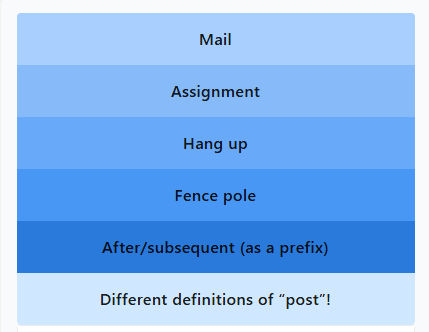
The trick is to look beyond what each clue means individually and think about what connects them.
For instance, if the clues include mail, assignment, hang up, fence pole, and after/subsequent (as a prefix), the answer “DIFFERENT DEFINITIONS OF ‘POST’!” can be difficult to interpret using the first few clues.
It’s only when you look at the clues together that you understand it. So, don’t rush, and take your time to think about how the clues connect with each other.
Crossclimb
If word ladders and trivia had a baby, it would look somewhat like Crossclimb. The game works in two stages. First, you have to guess five hidden words using their respective clues. Once you find these hidden words, you have to arrange them as a word ladder, with each word differing from the next by just one letter.
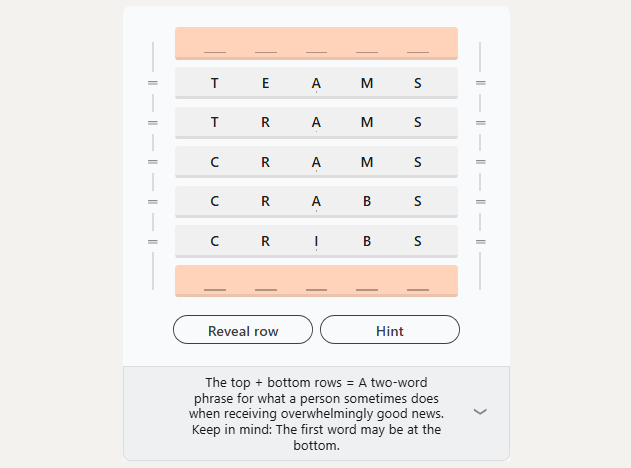
The second stage begins after you get the word ladder right. After that, the game reveals additional clues that you can use to find the final two words: the ones at the top and bottom.
The trick is to look for words that share similar letter patterns and think a step ahead before locking in your answers. It might take a little shuffling around, but that’s half the fun!
LinkedIn Queens
If you like Sudoku, you’ll love Queens by LinkedIn. This logic puzzle asks you to place crowns (👑) on a grid while following a few simple rules.
You must place exactly one crown in every row, column, and colored region. These crowns must also not touch each other diagonally, which means one careless mistake can mess up the entire board.
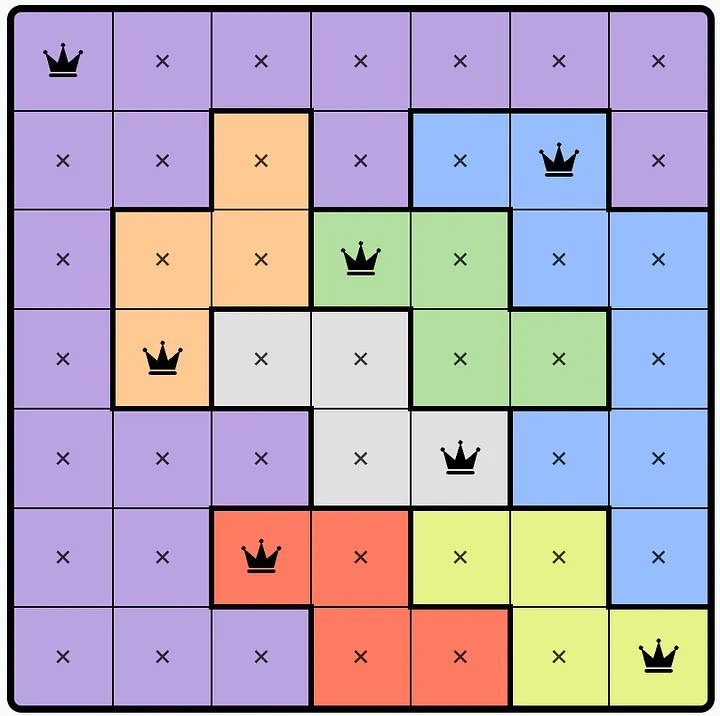
The game is all about logical placement. You can’t place the crowns wherever you wish; you always have to think a few moves ahead to get the answer. I suggest you start with rows or colored regions that have fewer possible spots, and then use the rules to narrow things down.
Trust me, one wrong placement can leave you scratching your head and having you start the puzzle again.
Tango
Tango is another grid-based logic game, but this time, you’re working with suns (☀️) and moons (🌙) instead. The challenge is to fill the grid in such a way that every row and column contains an equal number of both symbols.
Another Tango rule to remember is that you cannot place more than two identical symbols next to each other horizontally or vertically.
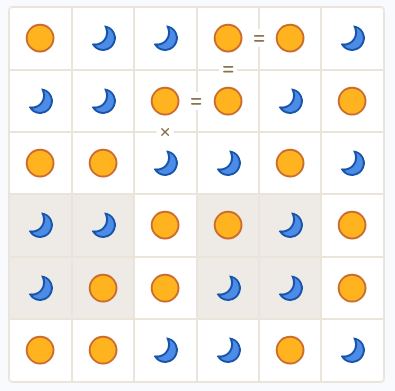
The game becomes easy once you understand the rules. The key is to consider the rows and column rules together. For example, if you’ve already placed two suns next to each other, the next cell in that line must contain a moon.
In the end, the game is all about logical deduction, so if you keep checking both directions, you will gradually fill in the board.
LinkedIn Zip
Remember the childhood puzzle where you had to find your way out of a maze? Zip is somewhat like that. Just, you don’t really have to find a way out, but the right path through a grid.
So, the game gives you a grid with numbered points throughout. Your objective in Zip is to connect the numbered checkpoints in ascending order, starting with 1.
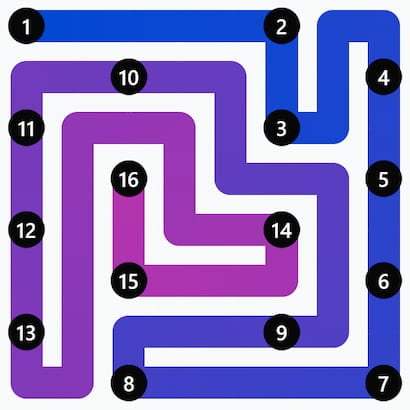
That’s not all; you also have to fill every cell on the board while connecting the checkpoints. You can’t simply jump from one number to the next and call it a day. Your route must account for the entire grid. So, I recommend looking at the checkpoints and the shape of the board before drawing your path.
Mini Sudoku
If you enjoy classic Sudoku, Mini Sudoku should feel familiar. It’s a compact number puzzle where you fill the grid so that every row, column, and region contains each required number exactly once.
LinkedIn’s Sudoku uses a smaller 6 x6 grid, making it a handy little challenge when you don’t have time for a full-sized Sudoku puzzle.
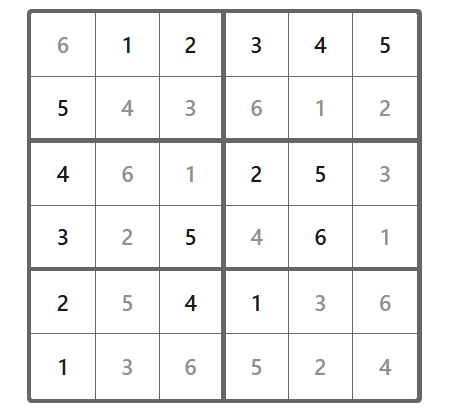
You can use the usual Sudoku strategy here as well. Look for rows, columns, or regions with the fewest empty cells and work out which numbers can fit. Use the numbers already on the board to eliminate possibilities rather than guessing randomly.
Remember that a little patience goes a long way, and you might find yourself solving Mini Sudoku before your coffee gets cold.
Patches
LinkedIn Patches is a spatial logic puzzle that challenges you to fill a grid with colored squares and rectangles based on the clues provided. The challenge is to cover the entire board without leaving empty cells or overlapping shapes.
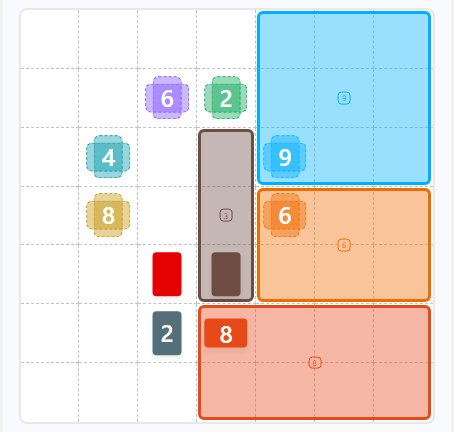
Start with the clues that give you the fewest possible shape placements, then see how those pieces affect the space around them.
A shape that fits perfectly in one spot might make the rest of the board much harder to complete if you place it carelessly. The game is effortless to learn, but the trick is to think about how each piece affects the bigger picture.
Wend
Wend is the latest addition to LinkedIn’s Games roster. It is a word search game where you connect letters in a grid to uncover hidden words. Your job is to figure out all hidden words and figure out how they all fit together to complete the board.
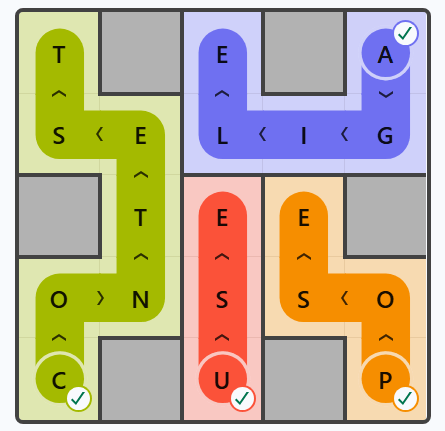
So, start by scanning the grid for familiar word patterns, then connect the letters to form words while keeping an eye on what’s left. While a word might look perfectly valid on its own, it can leave you with awkward leftover letters, so don’t commit too quickly.
How to Play LinkedIn Games
Now that you know what each LinkedIn game is about, it’s time to give them a try! Thankfully, finding and playing these daily puzzles is pretty straightforward. Here’s how you can get started:
- Visit LinkedIn Games: Open the LinkedIn app and log in. You can find the games on the sidebar. If you don’t have a LinkedIn account, you can head straight to the LinkedIn Games Hub in your browser to access the puzzles.
- Choose your game: Once you find the puzzles roster, browse through them all. From the eight LinkedIn puzzles, select the one you want to play. You can pick one puzzle or solve all of them one after another, if you like.
- Read the rules: If you’re trying a game for the first time, check its instructions before jumping in. Each puzzle has its own set of rules, so it’s worth knowing what you’re getting into.
- Solve the daily puzzle: Now, play the puzzle at your own pace and try to crack the challenge. You get a new puzzle daily, so once you’re done with a game, wait for it to reset to get a new challenge.
- Compare your scores: Once you’re done with the puzzles, you can compare your results with friends and colleagues. However, you’ll need to be signed in to your LinkedIn account to use this feature.
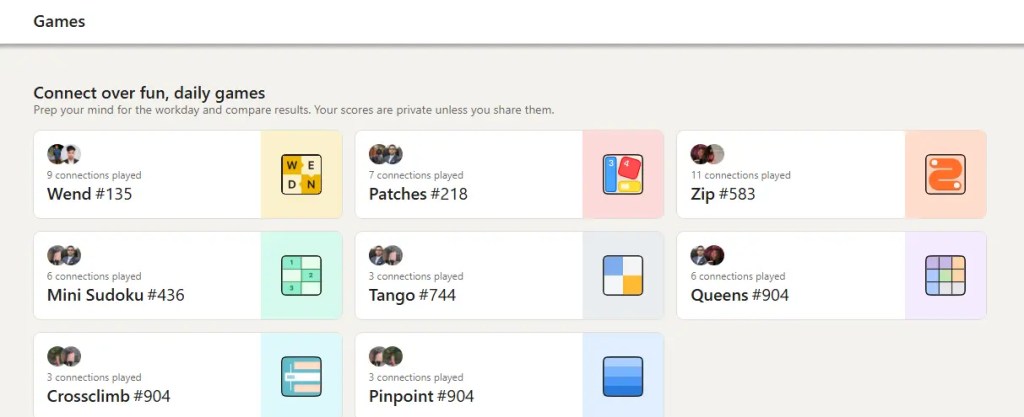
So, those are all the LinkedIn Games available right now and how to play each of them. Whether you enjoy word games, tricky logic puzzles, or number challenges, there’s something for everyone. Now, the real question is: how many of these LinkedIn puzzles can you solve without hints? Go ahead and give them a try!
LinkedIn currently has eight daily puzzles: Pinpoint, Crossclimb, Queens, Tango, Zip, Mini Sudoku, Patched, and Wend. Each of these games offers a different kind of challenge, including word association, trivia, number puzzles, and more.
Yes, LinkedIn games are free to play. You don’t need a paid LinkedIn subscription to enjoy the daily puzzles, making them an easy way to take a quick mental break during the day.
Yes, you can play LinkedIn games without signing in to an account. However, signing in lets you access social features such as leaderboards and streaks.
LinkedIn games reset daily at midnight Pacific Time (PT). A new puzzle becomes available at that time, giving players a fresh challenge to solve each day.
LinkedIn’s games are designed around daily puzzles with new challenges released every day. There is no archive of the previous puzzles, so don’t count on being able to revisit every past challenge.

LinkedIn Pinpoint Answer Today (October 27, 2026)
 Daksha Gupta

How to Play Pinpoint on LinkedIn: A Step-by-Step Guide for Beginners
Daksha Gupta

Wordle Hint Today - October 28, 2026 (Puzzle #1957)
 Rishabh Sabarwal
Connections Hints Today & Answers for October 28
 Sanmay Chakrabarti
NYT Letter Boxed vs Spelling Bee – Key Similarities and Differences Explained
 Ajith Kumar
What Is Quordle Sequence and How Does It Work? Explained
Ajith Kumar
NYT Midi Crossword vs Crossword: Key Similarities and Differences
Daksha Gupta