Pinpoint
Pinpoint is a free daily word association puzzle game on LinkedIn. Each puzzle has five clues, revealed one at a time, and players need to find the single category that connects them all.


LinkedIn might’ve been your go-to platform for job updates, connecting with colleagues, and finding new opportunities, but now there’s another reason to stick around. The platform added daily puzzles in 2024 and has a roster of eight games at the moment. Out of these, LinkedIn Pinpoint has become a fan favorite!
If you’re new to this word association game, don’t worry. Here is everything you need to know about LinkedIn Pinpoint, including how to play, the rules, tips to solve with fewer clues, and more!
What is LinkedIn Pinpoint?
Pinpoint is a word-association game from LinkedIn. It challenges you to find a common category connecting five hidden clues. The game reveals these clues one at a time, and your job is to figure out what brings them together. Remember, the fewer clues you use to solve the puzzle, the better your result.
For example, imagine the clues are Lunch, Sand, Mail, Safe deposit, and Think outside the. At first, these words might seem to have nothing in common. However, if you add the word “box” to each clue, you’ll get Lunchbox, Sandbox, Mailbox, Safe deposit box, and the phrase “think outside the box.” So, that’s the connection you’re looking for when solving Pinpoint today.
The game tests your vocabulary, pattern recognition, and lateral thinking skills. While sometimes the connection becomes obvious with the first clue, there can be times when the puzzle will have you second-guessing every possibility until the final reveal. And that is what makes Pinpoint so much fun!
Is Pinpoint Free to Play?
Pinpoint is a completely free game to play on LinkedIn’s website and app.
While Pinpoint is only available on LinkedIn, you don’t need an account or subscription to play the game. However, note that there’s a difference between playing as a guest and signing in with your LinkedIn account.
If you play without an account, LinkedIn will show your final score, but it won’t save the gaming activity or your daily streak. You also won’t have access to leaderboards or game reminders if you are not logged in.
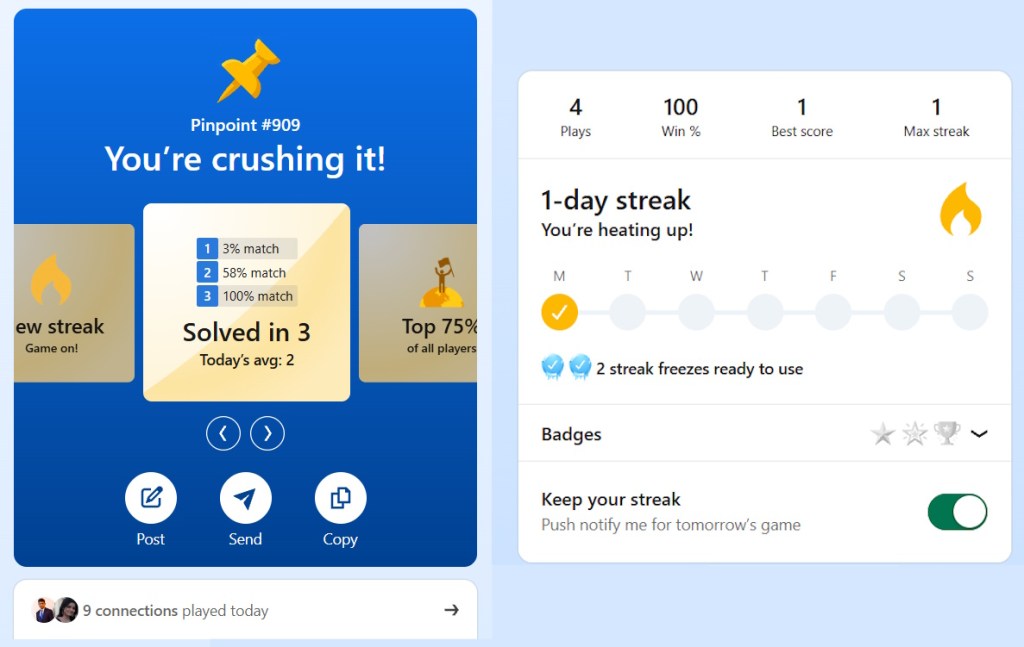
So, if you want to track your progress, maintain a winning streak, compare your results, or share your score, I advise you to sign in before you start playing.
Where to Play Pinpoint?
You can play Pinpoint on the LinkedIn website through its Games hub.
If you’re already logged in, you can find games through the search bar, the My Network page, or the games section on your homepage.
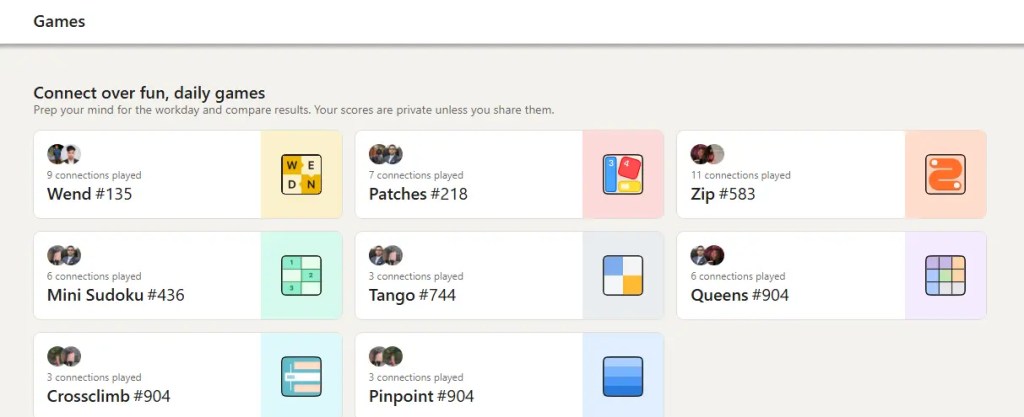
On the LinkedIn mobile app, you can also swipe right on the homepage to access the games section in the side panel.
In a web browser, simply visit the official LinkedIn Games page and select Pinpoint. You can also directly open the Pinpoint game page to jump straight into today’s puzzle without signing in.
How Does Pinpoint Work?
Now that you know where to find Pinpoint, let’s look at how the game works.
The rules are straightforward, but figuring out what connects the five seemingly random clues can take a little more time and thought than you’d expect.
Objective
The main objective of Pinpoint is to figure out the relationship between the five hidden clues and identify the common category they belong to. This category will be today’s Pinpoint answer.
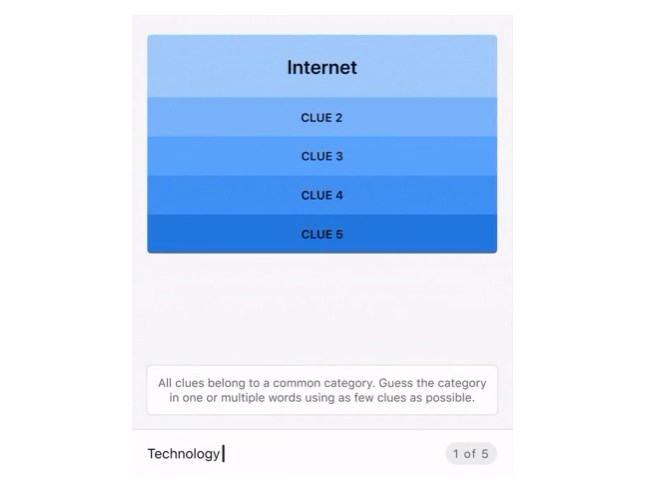
The game doesn’t reveal all the clues at once. Instead, you start with one clue and have to make a guess. If your guess is incorrect, the game reveals another clue.
Your goal is to solve the puzzle using as few clue reveals as possible. While you can use all five clues to find the answer, you get a better score if you solve it earlier.
Rules
Pinpoint doesn’t have a complicated rulebook; here is everything you should know before making your first guess.
- Each daily puzzle contains five clues that belong to a common category.
- When you start the game, Pinpoint reveals the first clue.
- You have to type the category you think that clue can belong to and submit it.
- If your guess is incorrect, the game reveals the next clue.
- Use each clue to reconsider your theory and identify the connection.
- If you guess the category correctly, you win, and the game displays the answer. If you use all five clues without finding the category, you lose, and Pinpoint will reveal the correct answer.
Clues
While the clues in Pinpoint may seem completely unrelated at first, they always have something in common. The trick is to look beyond their individual meanings and find the connection that works for every word.
For example, if you get violin, guitar, kite, tennis racquet, and marionette as your clues, you might initially think of musical instruments after seeing violin and guitar. However, once you reach kite, that category no longer works. The answer is “things with strings,” and the following clues – tennis racquet and marionette – only reinforce that.
This means that every new clue you get matters. One word can completely change how you interpret the clues you’ve already seen. So, instead of settling on the first connection that comes to your mind, consider different possibilities and see which one fits all five clues.
How to Play LinkedIn Pinpoint
Now that you know how Pinpoint works, let’s walk through the actual gameplay. Here is the step-by-step guide on how to play Pinpoint:
- Open Pinpoint: Visit the official LinkedIn Games page and select Pinpoint. You can also open the game directly if you don’t want to log in.
- Start the game: Click on the Start button to reveal the first clue.
- Read the clue carefully: Think about the different meanings of the word and the categories it might belong to. Do not rush to submit your first guess.
- Enter your guess: Type the category you think the clue belongs to into the answer field and submit.
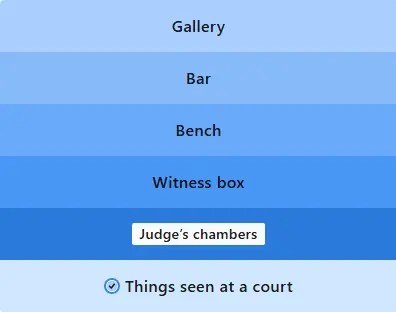
- Check the next clue: If your answer is incorrect, the game will reveal the next clue. Look at it alongside the previous clues and see whether your original theory still makes sense.
- Keep narrowing it down: Continue guessing after each clue reveal until you find the answer (the correct category) or use all five clues.
- Check your results: Once you finish, review your score. If you’re signed in, you can also track your streak, check your game statistics, and compare your performance against other players.
Tips and Tricks to Solve Pinpoint Quickly
If you’ve familiarized yourself with the rules and want to solve Pinpoint in one or two guesses, here are some strategies you should be using.
- Look for words that form common phrases: Sometimes, the connection isn’t between the meanings of the clues. Instead, each clue might form a familiar phrase when you add the same word to it. For example, Lunch, Sand, and Mail might initially seem unrelated. However, if you add “box”, it gives you lunchbox, sandbox, and mailbox.
- Don’t settle on the first possible category: A clue can fit several categories, so don’t submit the first answer that comes to mind. Take “violin,” for example. It might make you think of musical instruments, orchestras, or things made of wood. Your first idea might be correct, but it’s worth considering other possibilities until you have more evidence.
- Use every new clue to narrow down your options: Each incorrect guess you make reveals another clue. Use those clues to test your existing theory. If a new word doesn’t fit your category, don’t force the connection. Go back to the earlier clues and look for another explanation that makes sense.
- Look for a connection that fits all five clues: A category might explain three or four clues but fail to account for the rest. So, before submitting an answer, check whether it works for every word. The strongest solution will be the one that connects all five clues without requiring awkward exceptions.
- Don’t guess just to reveal another clue: Make every guess count. If you’re unsure of your answer, take a moment to explore the different interpretations of the words you’ve already seen instead of throwing out a random category.
When Does Pinpoint Reset?
LinkedIn Pinpoint releases a new daily puzzle at midnight Pacific Time (PT). This means the game releases at different times for different time zones.
You need to convert midnight Pacific Time to your time zone to find out when the puzzle releases in your region.
Once the game resets, the previous puzzle is gone, and you can no longer play it. So, if you are trying to maintain your daily streak, make sure you solve the puzzle before the next reset.
Note that LinkedIn doesn’t have an official Pinpoint game archive where you can browse and replay past puzzles. So, if you missed a game or want to try it again, you will have to wait for another daily puzzle.
Best Games Like Pinpoint
If you have finished today’s puzzle but still want more, here are a few Pinpoint alternatives worth checking out. These games also challenge you to spot hidden connections, decode clues, and think outside the box.
- NYT Connections: If you enjoy finding hidden connections between words, NYT Connections is an easy recommendation. Instead of revealing one clue at a time, it gives you 16 words and asks you to sort them into four groups of four. This game is perfect for players who enjoy spotting patterns and avoid red herrings.
- Contexto: Contexto is another great puzzle to try for challenging word association. Your goal is to uncover a secret word by guessing related words. The game ranks your guesses according to how closely they relate to the target, so you’ll need to experiment with different associations.
- LinkedIn Crossclimb: If you want another word game on LinkedIn itself, try Crossclimb. It combines trivia with a word ladder. The game gives you five little trivia questions. Once you solve these questions, you get five words. You arrange them in a word ladder in a way that each word differs from the next by one letter. Once you arrange the ladder correctly, you get additional clues to finally solve the last piece of the puzzle.
- NYT Strands: Strands is a daily word-search game built around a hidden theme. It challenges you to find words scattered across the letter grid. Like Pinpoint, the game rewards you for identifying a common idea, but you’ll need to search for words themselves rather than guess a category.
- Wordle: If you like the guessing aspect of Pinpoint, you’ll like playing NYT Wordle. The game swaps category for a five-letter word challenge. You get six attempts to find a hidden word, with the help of color-coded clues. The game doesn’t focus on word associations, but it makes a great companion to Pinpoint if you enjoy short daily puzzles.
LinkedIn Pinpoint is a daily word-association puzzle where you have to guess the common category connecting the five clues. The game reveals the clues one at a time, and your goal is to find the connection using as few clues as possible.
Pinpoint is free to play on LinkedIn’s website and mobile app. You don’t need a paid LinkedIn subscription or even a LinkedIn account to access the daily puzzle.
You can play Pinpoint as a guest without signing in. However, LinkedIn doesn’t store your scores, activity, or maintain your streak in guest mode.
The Pinpoint puzzle gives you five clues that connect to a common category. The game reveals the first clue when you start playing, and every incorrect guess reveals another. Your goal is to identify the category before you use all five clues.
Pinpoint resets daily at midnight Pacific Time. Once the game resets, the previous day’s puzzle expires and can no longer be played through LinkedIn.
To maintain a streak on Pinpoint, sign in to your LinkedIn account and play and win the game every day before it expires. You can also enable game reminders to help you remember when a new puzzle becomes available.
Recommended for You

LinkedIn Pinpoint Answer Today (October 27, 2026)


How to Play Pinpoint on LinkedIn: A Step-by-Step Guide for Beginners
More in Puzzle
Connections Hints Today & Answers for October 27

NYT Letter Boxed vs Spelling Bee – Key Similarities and Differences Explained


Wordle Hint Today - October 27, 2026 (Puzzle #1956)

What Is Quordle Sequence and How Does It Work? Explained
NYT Midi Crossword vs Crossword: Key Similarities and Differences