- Sony implemented a mandatory online check-in DRM system for PlayStation for games purchased after March 2026.
- The change was designed to combat refund scams and piracy on online game purchases on jailbroken consoles.
- Physical discs and digital games bought before March 2026 remain unaffected by this change.
If you’re a PlayStation gamer, you might have likely come across something called a “30-day DRM timer” in recent buzz and wondered what all the fuss is about. Some gamers see it as a safeguarding measure against piracy, while others believe it crosses the line of true video game ownership. But before you pick a side and the panic sets in, let us walk you through what PlayStation DRM actually is and how it works in this guide.
What is the PlayStation 30-Day DRM Policy?
In April 2026, PlayStation users observed quite odd patterns in their new digital game purchases on the PS4 and PS5, where they saw a 30-day license timer, sparking fears around a mandatory online check-in every month. After days of fan backlash and confusion, Sony officially issued a statement on the situation, clarifying that only a one-time online check is required to confirm a game’s license, after which no further check-ins are needed.
This DRM policy applies only to digital games that were purchased post March 2026, with physical games and older digital game purchases remaining completely unaffected. If you’re still confused as to why this simple change caused such an uproar among gamers, here’s how the story unfolded.
The Panic Around Mandatory Online Check-In
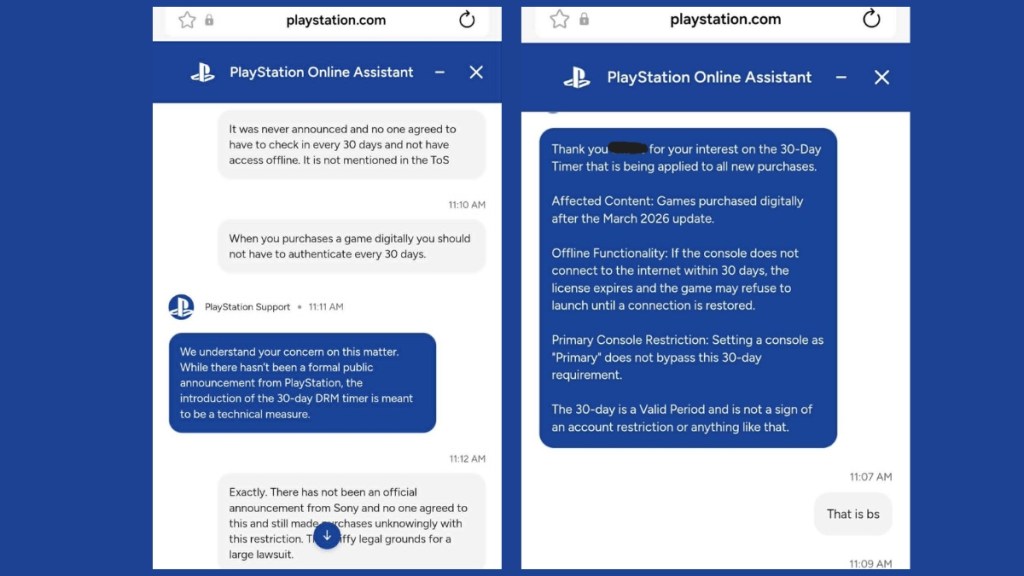
The panic around the PlayStation DRM went viral on social media after a user shared an online screenshot of a game requiring a mandatory check-in each month via a timer. A PlayStation Support assistant also initially confirmed that the 30-day validation countdown timer was part of an intentional update and not a bug, thus informing the user that their PS games would become unplayable if their console didn’t connect to the internet within a 30-day window.
Meanwhile, other PS support agents, probably human, denied this policy, creating even more confusion. Even several users verified that the games would crash once the 30-day timer expired without verifying an internet connection, and trigger an error that would prompt that the license couldn’t be verified. GameStop jumped in on the action as well and promoted physical games over digital games. This clearly reflected a failure on Sony’s comms team, which rolled out the feature silently on PS consoles.
How the 30 Day License Timer Actually Works
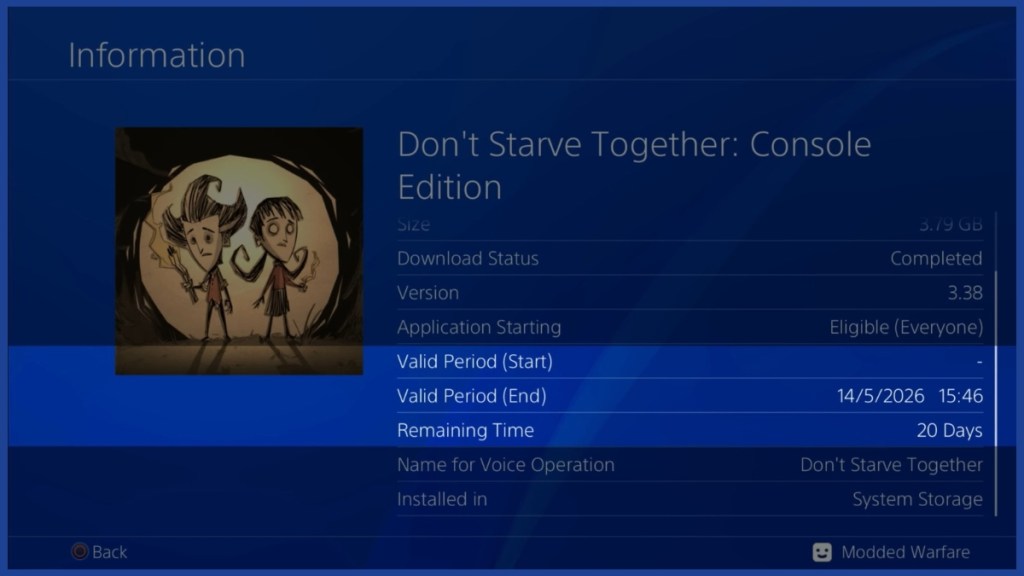
Once Sony finally broke the silence, things became clearer surrounding the PlayStation DRM timer. When you purchase a digital game from the PlayStation Store (PSN), your console receives a temporary license rather than a permanent one for an online copy of the game. This license then carries a 30-day validity window.
As long as your console connects to Sony’s servers during that window at any given time, and the servers don’t detect anything fishy, your temporary license converts into a permanent one, and you no longer require any check-ins. After that, you’re fully able to play any online copy of a game even while your console is offline.
Why Did Sony Implement PlayStation DRM?
While Sony hasn’t officially commented on why the PlayStation DRM change has been implemented, it obviously points strongly in one direction: combating refund scams and license exploits on jailbroken consoles. There has been plenty of conversation about bad actors purchasing games via the PSN store website, ripping the license file apart on a jailbroken console, and then refunding the purchase, all while keeping the ripped license to run a pirated PS5 copy of the game.
Usually, downloading a game voids any refund eligibility, but by purchasing via the website, scammers avoided that safeguarding measure put in place by Sony. The timing also lines up with PS5 ROM keys leaked earlier this year, which led to a fully functional version of Linux installed on the console, which made even Sony sweat their pants about PlayStation’s security.
By issuing such a temporary license and implementing a DRM on PlayStation, Sony prevents their video game licenses from being pirated, and once the console verifies a legitimate connection, the license becomes permanent. It’s reasonable, but the way it was implemented was quite bothersome.
How to Ensure Your PlayStation Digital Games Stay Playable
While the PlayStation DRM is an added process when you purchase an online game, it’s quite straightforward. Once you buy a digital game on your PS4 or PS5 console, connect your console to the internet once to confirm the license and launch the game.
After this, no further check-in is required. For most players who play with their PlayStation connected to the internet, this process will happen automatically in the background, effortlessly. Also note that any physical games and any digital games bought before March 2026 remain completely unaffected by this change.

Can You Still Bypass PlayStation DRM?
The answer is no. After this mandatory PlayStation DRM check-in, you won’t be able to bypass the online process, as Sony has designed the system to close the loophole that pirates were exploiting on jailbroken consoles.
Furthermore, setting your console as the primary console still does not serve as a workaround, as the one-time check applies regardless of your console’s activation status. The only real “bypass” to PlayStation DRM is going physical, as physical disc copies remain unaffected by the new policy.
But beyond that, connecting your console to complete that mandatory online check-in is simply the best approach to retain a copy of your game on the console. Let’s see if this same timer carries on to the upcoming PS6 console.
What are your thoughts on the new PlayStation DRM policy? Let us know in the comments below!