- GTA 6 lets you manually save your progress through the pause menu.
- GTA 6 has 15 manual save slots, and you can overwrite existing saves.
- You cannot create manual saves during missions, and autosaves use a separate slot.
With so many missions, activities, and significant story decisions in GTA 6, you might want to save your progress before moving forward. Fortunately, GTA 6 lets players manually save their game instead of relying entirely on autosaves. So, let’s learn how to save your game in GTA 6.
How to Manually Save Your Game in GTA 6?
You can save your progress through the pause menu in GTA 6. You cannot manually save the game during a mission, but it’s possible to save your progress while exploring the open world or before/ after a mission.
Manual saves allow you to return to a specific point in the GTA 6 mission list without depending on the game’s autosave system. Here’s how to do it:
- Pause the game by pressing the Options button on PS5 or the Menu button on Xbox Series X|S.
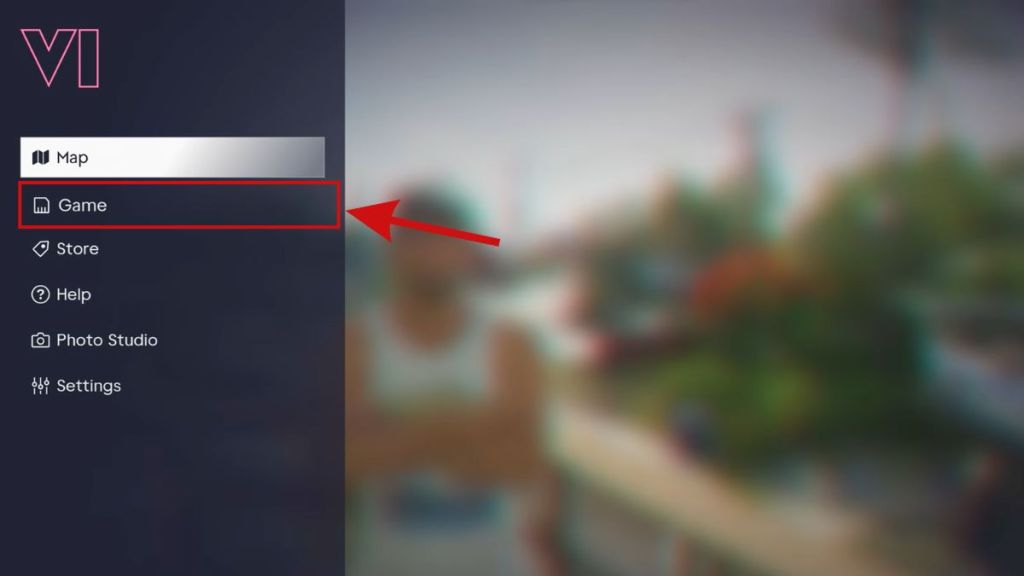
- Navigate to the “Game” section in the pause menu.
- Select the Save option.
- Choose an available save slot to save your progress.
GTA 6 offers 15 save slots, so you will need to manage them carefully. You can also overwrite an existing save slot, but doing so will replace your previously saved progress.
Manual saving is particularly useful before major story decisions. For example, certain renovation tasks at Jason’s house become unavailable after picking up Lucia, and completing them influences Jason and Lucia’s relationship.
Creating a separate save beforehand allows you to revisit these activities if you miss anything.
How Does GTA 6 Autosave Work?
You can also rely on GTA 6’s autosave system, which automatically records your progress as you play. However, the game uses only one autosave slot, meaning each new autosave overwrites the previous one.
Manual saves are unavailable during active missions, so you’ll need to save your progress before starting a new mission or after one ends.
To avoid losing important progress or missing out on GTA 6 activities, it’s always a good idea to create a manual save. So, make sure to do this before you dive into any major GTA 6 missions or make meaningful story decisions.
GTA 6 does not allow manual saving during active missions.
GTA 6 uses a separate autosave slot, so autosaving does not overwrite your manual saves.


 Sanmay Chakrabarti