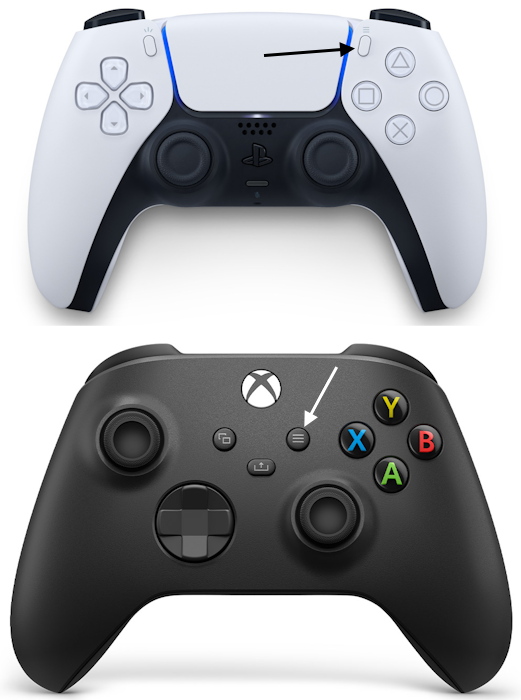
- Players can pause GTA 6 using the Options button on PS5 and the Menu button on Xbox controllers, respectively.
- When you press the pause button, time stops in GTA 6, allowing you to check settings or the map without hesitation.
- You can pause GTA 6 during gameplay and cutscenes, resuming at your convenience.
While exploring Leonida’s beauty in GTA 6, you may need to pause the game for various reasons. It might be to grab your food delivery, take a short break to stretch your legs, or read a GTA 6 guide on Beebom. Whatever the case, it’s essential to know how to pause GTA 6 without impacting gameplay.
With GTA 6 platform support extending to PS5 and Xbox Series X|S, check out how to pause the game on both platforms.
How to Pause GTA 6 on PS5 and Xbox Series X|S
- PlayStation 5: Press the “Options” button at the top right on the PS5 DualSense controller.
- Xbox Series X & S: Press the “Menu” button, available to the right of the Share button, in the middle of the controller.
Both the Options and Menu buttons are denoted by the three horizontal lines symbol on PS5 and Xbox controllers. Check out the reference images below:
You can pause the game at any time to bring up the GTA 6 map. During this time, Grand Theft Auto 6 won’t run in the background, as there are too many dynamic variables at play. Once you close the map, the game resumes.
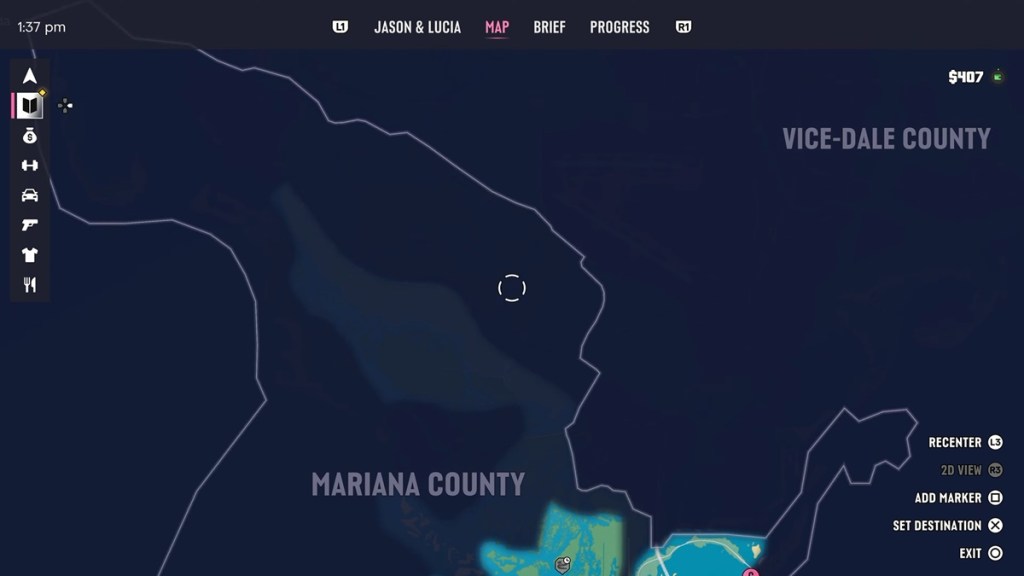
GTA 6 Pause Screen: Features and Options
There are several features and options that become available to players upon pausing GTA 6. Here’s a list of them that can be accessed once the game is paused:
- Jason & Lucia: With GTA 6 being a couple simulator, you can check out Jason and Lucia’s status from the pause screen. It gives information about individual characters, such as their Criminal Profile in GTA 6, cash on hand, body shape, calories, and more.
- Map: Like previous GTA 6 games, the pause screen displays the map. It allows you to have a closer look at Leonida. With satellite imagery replacing basic maps, it makes navigation easier and gives you a clear view of all map legends.
- Brief: This gives players information about their current objective and situations they are in. It shows dialogue, help text, and objective text.
- Progress: Players can use this to track their overall progress in GTA 6, which includes stats, vehicles, weapons, and animals.
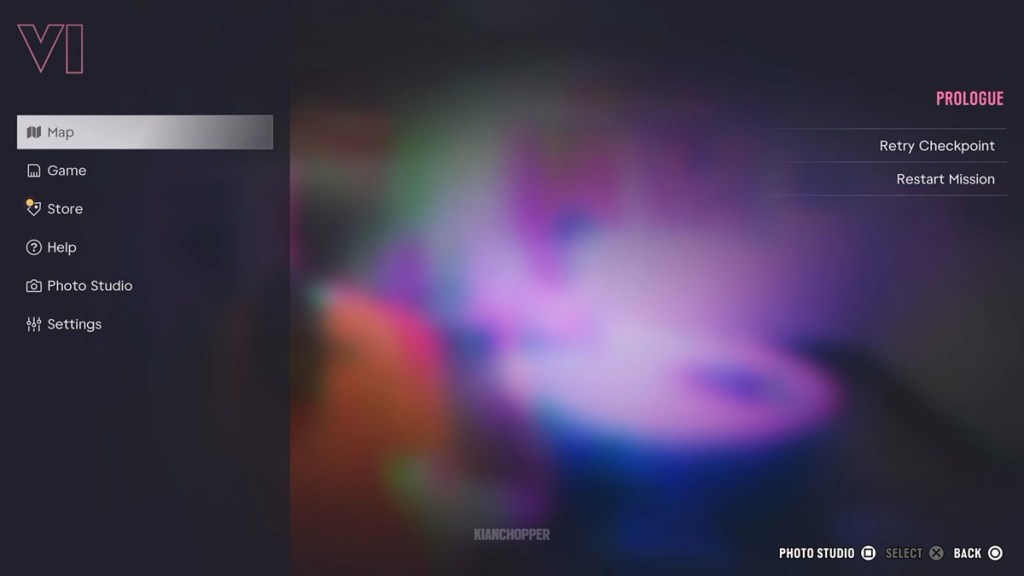
Additionally, going to the Main Menu gives players the following options:
- Map: Same as Above.
- Game: Showcases all aspects related to gameplay.
- Store: Gives access to the GTA Store to make cosmetics and other in-game content purchases.
- Help: General help options related to the game.
- Photo Studio: Allows players to take photos in-game using the official photo mode in GTA 6.
- Settings: Gives players options to adjust settings to personalize the experience to better suit their playstyle. This includes turning off copyrighted music and changing gore settings.
- Retry Checkpoint: Restart the mission from the last saved checkpoint.
- Restart Mission: Restart the current mission from the beginning.
That’s everything we can tell you about the features and options listed in the GTA 6 pause screen and main menu. Additionally, you also have the option to start a new game or quit the current session alongside saving progress.
Does Pausing GTA 6 Affect Gameplay?
Yes, pausing affects gameplay in the sense that time is frozen. All in-game activities are put on hold; this includes combat, police chases, and even fishing and hunting in GTA 6. Players can take their own sweet time to check out options from the pause screen before jumping back into the action.
However, keep in mind that pausing GTA 6 at any moment cannot stop an action that’s already in motion. For instance, if Jason and Lucia are involved in a shootout, it won’t end when the game is paused.
As soon as it’s unpaused, bullets will fly in GTA 6, and you may not be ready for what follows. It’s best not to pause in intense situations, as unpausing during a crucial moment could lead to unforeseen consequences with either of the protagonists in GTA 6.
For more information, go through our GTA 6 launch day guide to make sure you’ve got everything figured out to experience Leonida.
Yes, you can pause GTA 6 during cutscenes and resume at your own convenience.
No, time does not advance in GTA 6 when the game is paused.















 Sanmay Chakrabarti