- You can go to myaccount.google.com/google-account-email to change your Gmail address.
- The option is gradually rolling out so it may not be immediately available to all users.
- Your old Gmail address and the new one will continue to work without any issue.
Google is starting to roll out the ability to change your Gmail address without losing your existing data. This option will be applicable even if you have “@gmail.com” address. Earlier, Google said that if your account’s email address ends in @gmail.com, you couldn’t change it, however, this is changing now. Here is how you can change your Gmail address and some of the key points you should keep in mind.
Things to Know Before Changing Your Gmail Address
As reported by 9to5Google, this option to change your Gmail address was first spotted on the Hindi support page. The new process mentions that it’s gradually rolling out to all users so it will take some time before everyone gets the feature. On that note, here are the notable points you should keep in mind before changing your Gmail address.
- Users can change their Gmail address with a different username. Your old Gmail address and the new one will continue to work without any issue.
- The new Gmail address will act like an alias which will point to the old Gmail address.
- You will receive emails at both your old and new email addresses.
- You will not be able to change or delete the email within a year of the change.
- Your Google data including Photos, messages, and emails won’t be affected.
- You can sign in with both your old and new email address on any Google service.
- Finally, you change the Gmail address up to a total of three times.
Steps to Change Your Gmail Address
With that out of the way, here is how you can check if you can change your Gmail address. Note that this option is slowly rolling out, so it might not be immediately available. You can check later if the option is not visible right now.
- Head to myaccount.google.com/google-account-email and sign in with your Google account.
- You should see a pencil icon that will let you edit the Gmail address.

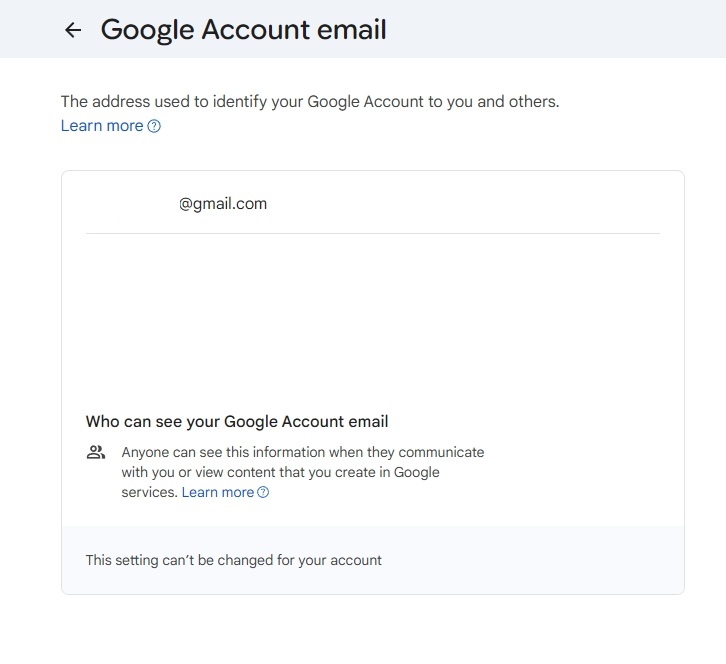
- If it’s not available, you will see “This setting can’t be changed for your account.”
- In that case, you should wait for the option to appear for your account.
So this is how you can change your Gmail address in just a few steps. As you can notice, this option is not available on my account. I also tried multiple other Google accounts and the address changing button is not visible as of now. Overall, Google is taking a slow approach to roll out the feature.