- Minecraft circles are built using block patterns, and larger diameters create smoother and more realistic curves.
- A Minecraft circle generator helps in creating accurate circles, domes, and spheres.
- Moreover, players can also build the circles manually or rely on the WorldEdit mods.
Minecraft is built on cubes and straight edges, but it has never stopped players from pushing their creativity beyond the blocky limits. The game revolves around using squares and cubes to build your world, so suggesting to make circles and spheres in Minecraft sounds almost impossible. However, the giant castles and medieval towers have always been full of large, rounded structures. Thanks to the community, we have some reliable ways to create almost perfect circles and spheres in Minecraft. With that said, let us teach you how to make a circle in Minecraft.
What is a Minecraft Circle Generator?
A Minecraft circle generator is a tool that helps players build circular shapes by using the game blocks as a reference. Since there are no true circles in the game due to the block-based mechanics, these tools help in creating a visual template that approximates a circle using block patterns.
Learning how to make a circle in Minecraft opens the door to the best house ideas. So, instead of just making blocky and rectangular bases, you can further add domes and circular towers to add a sense of realism to your world. This is where the Minecraft circle generator comes into play, granting you a layout for building circles with ease.
How to Use a Minecraft Circle Generator
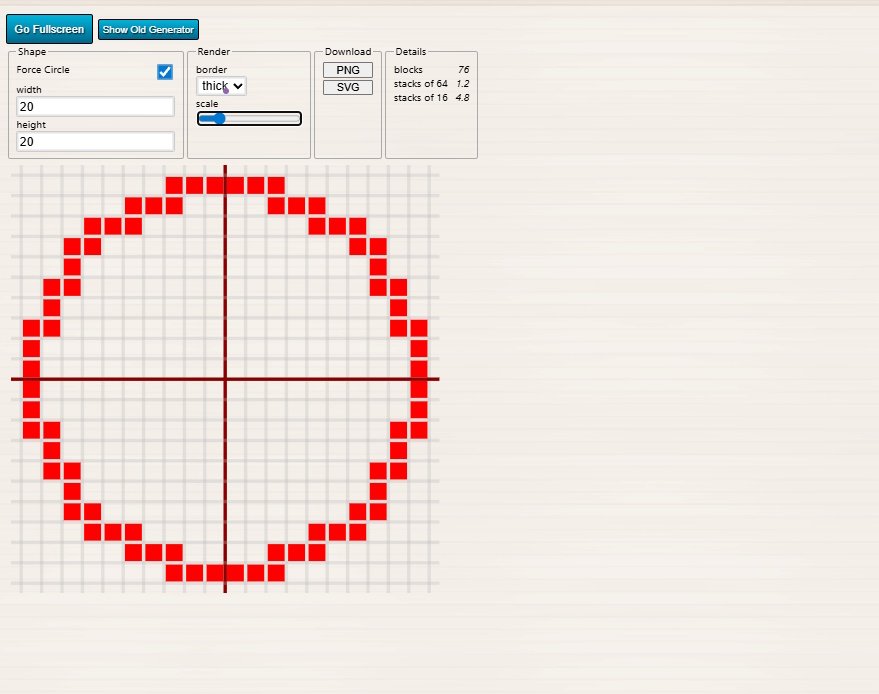
Instead of guessing how many blocks you need to make a circle in Minecraft, you can always use a circle generator. This is how you can use it:
- Go to any Minecraft circle generator site.
- Select the width or height and click on the Force Circle checkbox.
- Select whether you want a thick or thin circle, and the block layout will be visible.
- Now, you can count the required number of blocks and create the circle in your world.

How to Make a Circle in Minecraft (Manual Method)
If you prefer making these cool Minecraft builds without external tools, understand how these structures work. At a close distance, it will not appear like a perfect circle. However, the shape keeps smoothing itself as you increase its size and your distance from it.
The principle at work here is simple. Enough smaller-sized square blocks, arranged in a round format, will appear like a circle from a distance. Here’s how this method works:
Plan and Size of Minecraft Circle Construction
The plan with basic circles in Minecraft is to create four longer horizontal lines of blocks. Then, you connect them diagonally with the same number of blocks on each angled side. You can start by creating small circles that are 8 x 8 blocks in size and increase the size until you are satisfied with your creation.
Do keep in mind that the higher the number of blocks used, the more realistic the circle’s shape will be from a distance. But with an additional number of blocks, the structure will keep getting more complex.


For comparison, we have an 8 x 8 block circle in Minecraft that requires 24 blocks with only 4 blocks in diagonals. Meanwhile, the adjacent 18 x 18 block circle uses a total of 52 blocks. The four main sides of any circle larger than the 18 x 18 figure will continue to be 5 blocks long. Meanwhile, the number of blocks used in the diagonals will keep changing. Here’s a standard pattern of diagonal blocks you can follow:
- 8 x 8: use one block for each diagonal
- 12 x 12: place two blocks vertically, followed by two horizontal blocks
- 18 x 18: place two blocks vertically, then two more blocks vertically, two blocks horizontally, and two more blocks horizontally, all in an increasing block level on the x-axis.
Steps to Make an 18 x 18 Circle in Minecraft
If the explanation sounded a little confusing and left you scratching your head, let’s learn how to make a circle in Minecraft. But do make sure that you either enter Minecraft in Creative game mode or at least have 52 blocks that we need to make our 18 x 18 circle.
- To begin, start by creating two parallel lines with a distance of 18 blocks between them. The parallel lines should be 5 blocks long.
- The easiest way to do that is to create a long straight line of 18 blocks. Then, create parallel lines on either side of that 18-block line (shown below). You can break the long line of 18 blocks later, as it serves no function in the finished circle.


- Now, make a horizontal line on either edge of both the original lines created in the step above. This horizontal line should only be 2 blocks long.
- Our aim with each new line is to make a diagonal while moving closer to the original parallel lines. Then, on the edge of the newly created horizontal lines, make an identical horizontal line of 2 blocks. Your structure should look like this after the first two steps:

- While expanding the circle, make one vertical 2-block line from the edge of the last horizontal line. Once you have created that, make another identical vertical 2 blockline. The structure should feel like an incomplete pixelated circle from the top.

- Finally, what’s left for us to do is to complete making a circle in Minecraft. To do that, you need to create a 5-block line on the outer edges of both incomplete sides. Remember not to fill the space between the existing blocks.
- Instead, the 5-block lines should touch the vertical lines at their edges. The final figure should look something like the screenshot attached below. The final 5-block parallel lines will also have a distance of 18 blocks between them.

That is how you can make a circle in Minecraft. You just need to keep the basic plan in your head. Start by creating two parallel lines, then keep joining them with similar diagonal sides. You can create a circle in multiple formats, depending on the number of blocks you use. So, feel free to experiment in your Minecraft world.
How to Make a Sphere in Minecraft (Manual Method)
Once you get comfortable with creating diagonals, a circle is relatively easy to make. As for making a sphere in Minecraft, things can get a little tricky. This can be required for making several Redstone builds. But if you follow these steps carefully, you can start by making a 13 x 13 sphere in no time.
- Start by placing a single block in the air, at least 10 blocks above the surface. You can do so by building up to it from the surface and then breaking the rest of the supporting blocks. Then, place 5 blocks on each of the six sides of the cube block. It will look something like the screenshot below. You can use any type of block to build this structure.

- Now, once the base is ready, we need to start building the sphere from the outside. At the end of each of the newly created block lines, create a 3 x 3 square using 9 blocks. The structure should look like the screenshot below once you finish.

- Now, you need to build a circular shape along the edges on the inner side of the squares. The easiest way to build it is from the inside. Make 5 block-long straight lines located 1 block towards the inner side of our structure.
- They should also have a gap of 1 block from the central block. Then, on the outer side of the 5-block lines, place 3 blocks next to the middle 3 blocks. If the description feels too complex to follow, try replicating the structure in the screenshot below.

- Once you finish the mini Minecraft circle on one of the outer edges, you need to repeat the process on all the 9 x 9 squares we built in Step #2. The final structure will look almost like a complete sphere.


- Now, we need to connect the rest of the structure while moving inwards. There can be multiple ways to do it, with the simplest being creating a wall in the space.
- But what we recommend doing is creating stair-shaped gap-filling structures at the top and bottom areas. These are made with 5 blocks in the back row and 3 blocks in the front row. It will look something like this.

- Finally, you need to fill the remaining gaps inwards. It’s best done from outside the structure. Go near a gap, look towards the inner blocks on either side, and start placing blocks adjacent to them.
- In the middle layers, it will take you 2 blocks only, but as you move towards the bottom and top, you need to use 3/4 blocks as required. Our only aim is to fill the gaps in the same fashion on all sides.

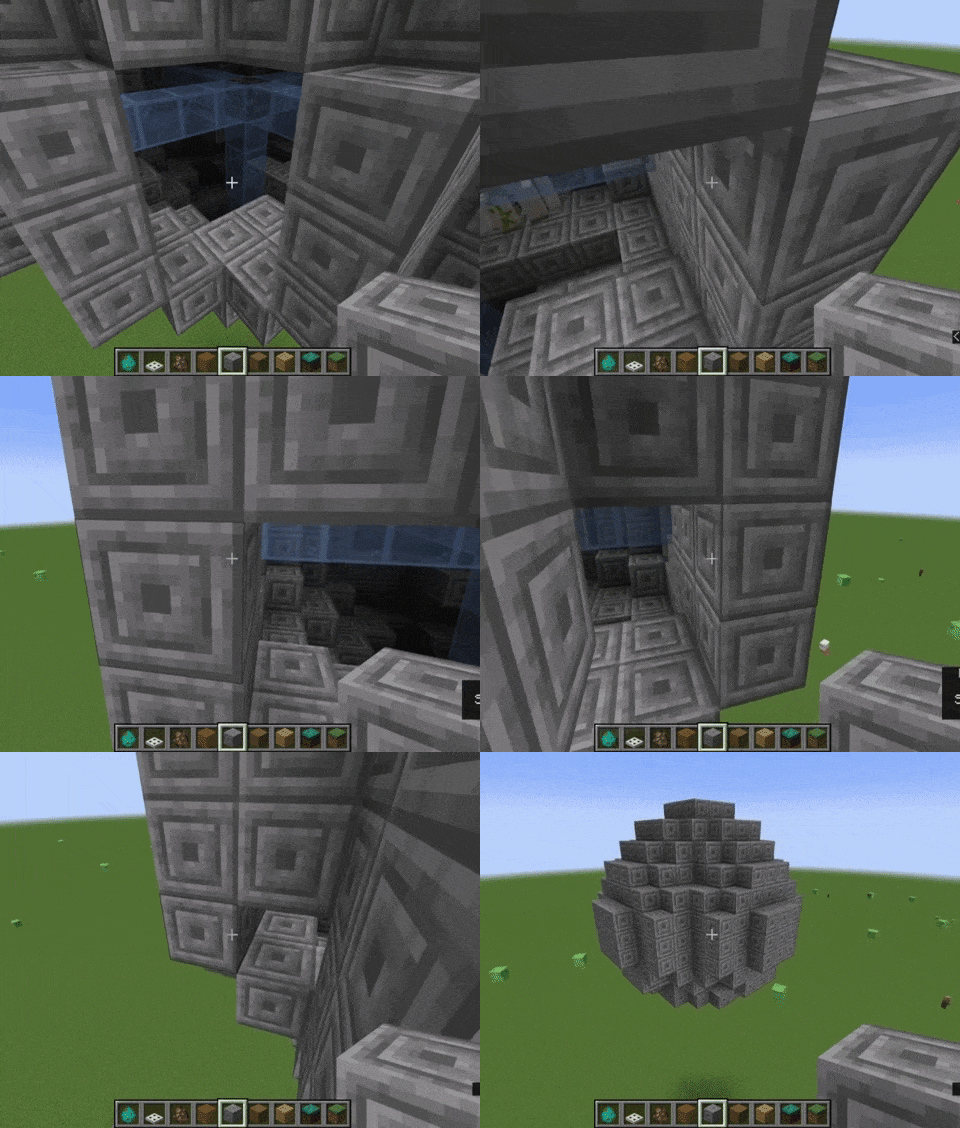
- If you are using random blocks throughout the process, an additional step will be required to create uniformity. You can replace blocks to make the structure out of the same type of block for a better circular aesthetic. But that’s purely optional.


This method can be replicated with a higher number of blocks to create larger spheres in your Minecraft world. We suggest you try it out in creative game mode first before recreating spheres in Minecraft survival mode. But if the steps above seem complex, some simple workarounds for creating circles and spheres in Minecraft require little to no effort.
How to Make a Circle and Sphere using Minecraft Mods
Minecraft mods can help you create circular structures in-game. We are avoiding mods that make blocks circular to keep our structures useful in vanilla Minecraft. So, the most useful mod for creating circular structures is the Minecraft WorldEdit map editor.
You can learn how to install Minecraft mods in our linked guide. Once done, go through the steps to learn how to make a Minecraft circle using the WorldEdit mod:
How to Make a Minecraft Circle and Sphere using WorldEdit Commands
For those unaware, WorldEdit works with in-game commands that we can type in the chatbox. One of the best features of this mod is that you can create a sphere out of any block in-game. So, load up your Minecraft world, and let’s see how it works.
- Once your world loads up, you need to go to an empty place if you are in creative mode. Then, you can choose to go to a certain height as well.
- When you are in a large open space, it’s time to put the mod to use and create a sphere.

- Press the “/” or “t” button on your keyboard to open up the chat option. In the chat textbox, type the command in the following format: //sphere block_name number_of_blocks and press Enter.
- That means, if you want to create an iron ore sphere with 11 blocks from the center, the command will be //sphere iron_ore 11. The sphere created with this command will not be hollow, so you will have to dig your way out of it.

- You can experiment with the number of blocks to create smaller or larger spheres. But if you try making too large a circle, it could crash your game.
- Now, to make a hollow sphere, you need to add “-h” after the term “sphere” in our command.
- So, our command for an iron ore sphere in Minecraft will now look like – //sphere -h iron_ore 11. It will generate a hollow sphere in your Minecraft world.

- Finally, what’s left to do is put your creativity to use to make spheres with the most unexpected blocks in Minecraft.
- While typing the command, the game will suggest a few blocks you can use to make spheres. Feel free to choose any of those blocks and make some unique spheres, like the ones shown below:

How to Make a Perfect Circle in Minecraft
We have explained the manual and command-based methods to make a circle and sphere in Minecraft in the sections above. So now, let’s talk about how to make a perfectly smooth and round circle in Minecraft.
Yeah, it seems impossible with the cube-based game mechanics, but players have found a reliable way to make it even in vanilla Minecraft. There are several cool Minecraft mods you can use to achieve a feat like this, but this YouTuber found a way to do it in vanilla Minecraft.

This trick functions using Command Blocks, which are in-game programming blocks. These can be used not only to spawn entities and blocks but also to make them do particular actions. The YouTuber Mysticat uses 6 command blocks to spawn invisible armor stands alongside falling sand blocks. These blocks have zero gravity, so they aren’t interactable like regular blocks.
You can not interact with the circle in any way, but it still is a great visual aesthetic in the game. And thanks to the combination of in-game commands and visual glitches, you get a perfect-looking circle in Minecraft. For new players, the tutorial will be a trial-and-error method, but once you get the hang of it, it works like a charm. If you feel stuck at any moment, you can reach out to us in the comments section. Our team has tested this method on Minecraft Java version 1.17.1, and it works without any trouble.
If you choose to use the command block or mods as your solution, don’t forget to install Optifine in Minecraft. It helps improve in-game performance and graphics quality. Some players can even find circular structures pre-built in a few Minecraft modpacks. But creating one on your own is truly fun and challenging. Now, go ahead and start making circles and spheres, and don’t forget to share them with your friends.
You can make Minecraft circles by using manual block placements or using a Minecraft circle generator. The generators are faster methods, while the manual methods involve creating a symmetrical stair -like pattern.
Yes, there are a lot of Minecraft circle generators that can help in creating flat circles as well as spheres, domes, and ellipses.