- Armor Stands can be crafted by using 6 sticks and 1 smooth stone slab in Minecraft.
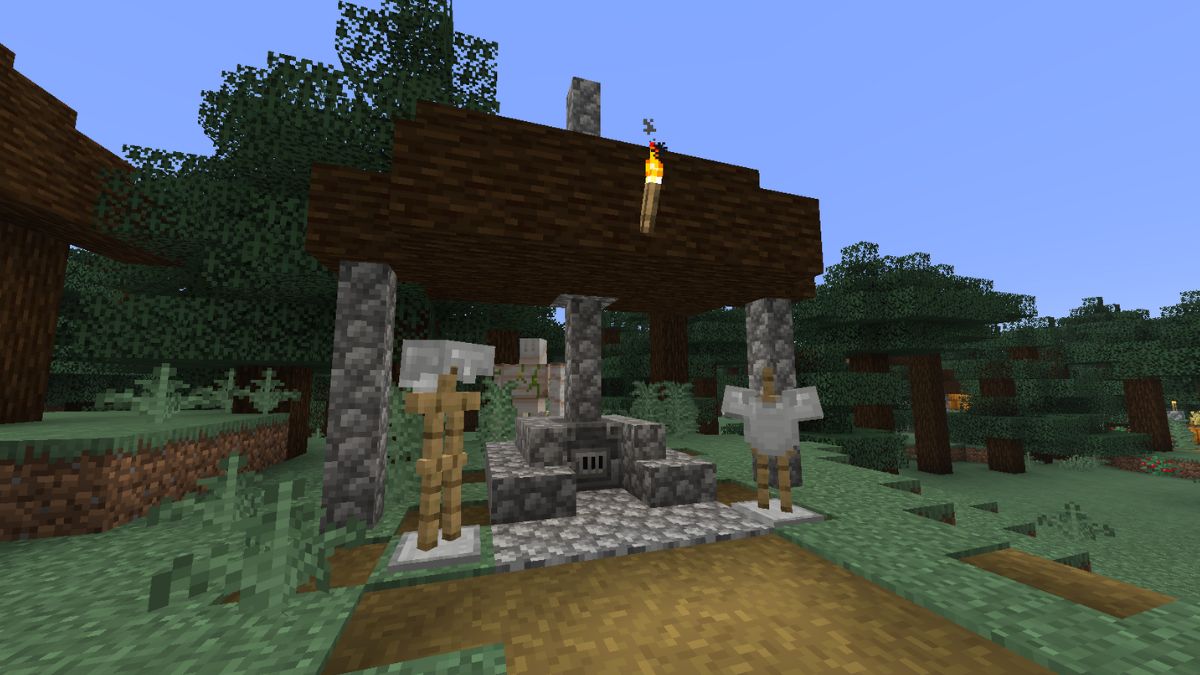
- Players can even find armor stands generating naturally in Taiga villages in the game.
- These armor stands can be used to exhibit your armor and keep it on display at your base.
Minecraft now has a variety of armor, and you can customize them further using the armor trims in the game. So, now comes the question of whether there’s a way to store and showcase them at your base. And the answer is yes! You can display armor on, well, armor stands. So, in this guide, we will share the step-by-step process of how to make an Armor Stand in Minecraft and its uses in the game.
Materials Needed to Craft an Armor Stand
The crafting recipe for an armor stand requires the following resources:
| Crafting Recipe | Ingredients Required |
|---|---|
| 1x Armor Stand | 6x Sticks and 1x Smooth Stone Slab |
| 6x Sticks | 4x Planks |
| 1x Smooth Stone Slab | 3x Smooth Stones |
Sticks are one of the most basic items in the game. They can be made using two planks from any wood type. For crafting a smooth stone slab, you need to first make smooth stone. You will also require the crafting table, a utility block that allows you to craft items in a 3 x 3 crafting grid. On the other hand, you can also use the crafter, which is basically a crafting table, but it can only craft items using Redstone power.
How to Get Smooth Stone Slabs
This step is quite crucial, as you can’t really craft the smooth stone in Minecraft. Either you get them from the Mason villager homes by mining the blocks using a Silk Touch pickaxe, or you have to make them in a furnace.
Yes, you need to smelt the cobblestone first in a furnace to get the regular stone blocks. Then, smelt the regular stone blocks again to get smooth stone. Now, you can either use a crafting table or a stonecutter to get smooth stone slabs in Minecraft.
Armor Stand Crafting Recipe: Step-by-Step
If you collected the required resources, let’s start crafting an armor stand.
- Place the crafting table or crafter in your world and right-click it to open its UI.
- Start by placing the smooth stone slab in the central slot of the bottommost row.
- Next, place one stick above the stone slab and then one to the left and right of it.
- Finally, fill the top row of the crafting grid with sticks completely.
- Then, you can click on the armor stand icon on the right to craft it.
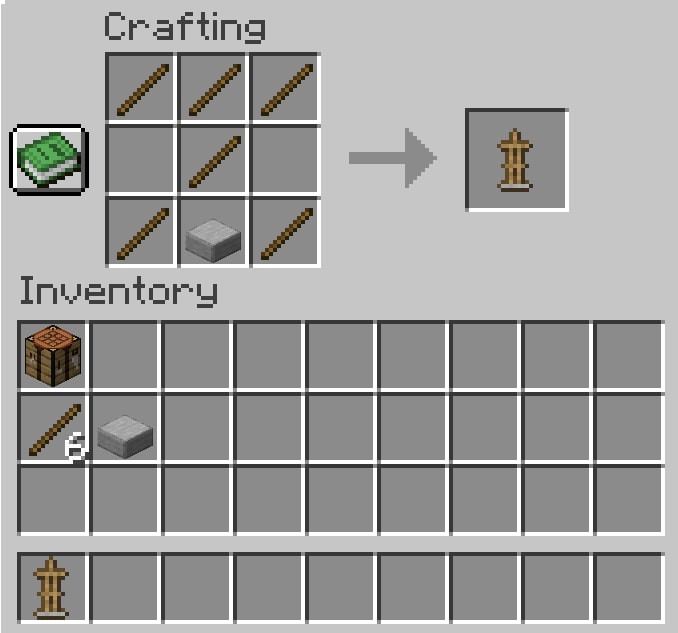
However, if you’re using a crafter, you’ll need to power the block with a button, lever, or any other redstone power source.
Where to Find Armor Stands Naturally
Armor stands generate naturally only in one location throughout your world – in taiga villages. But not in every single one. That village needs to contain an outside armory site. You will find that they are completely open with a blast furnace and an overhang above it.
Here, you’ll always find 2 armor stands with a couple of iron armor pieces. So, stumbling upon one of these in the early game would be a pretty good time-saver.
How to Use and Pose Armor Stands
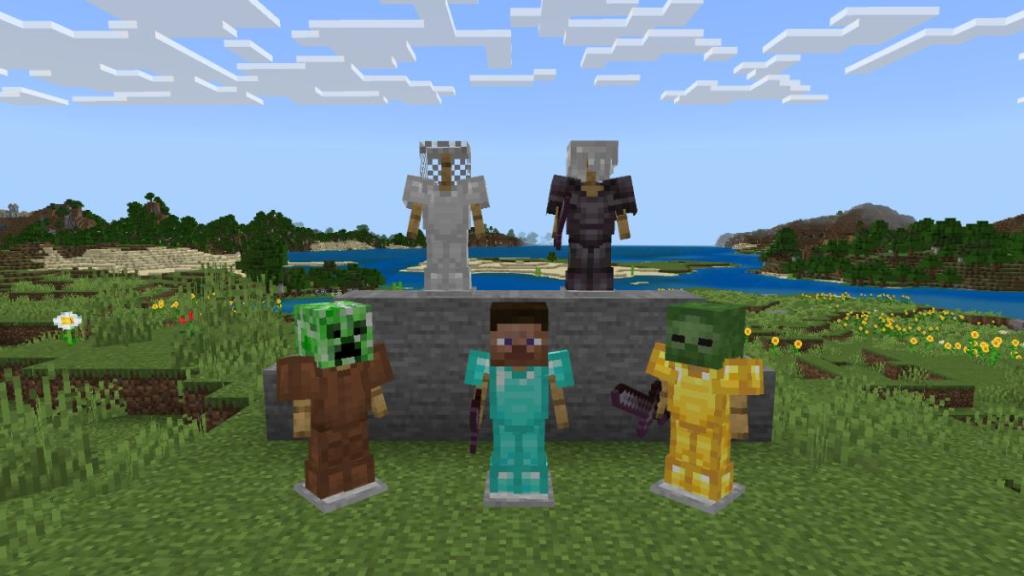
Armor Stands can be used to showcase all your armor pieces or any one of your weapons, showing off to your friends how wealthy your base is. To place the items, consider doing the following steps:
- Place an armor stand on the ground and hold the armor pieces in your hand.
- Aim towards the armor stand and right-click your mouse to equip the item on it.
How to Add Arms to Armor Stands
Technically, you can’t make an armor stand with arms in Minecraft Java Edition. The arms feature is exclusive to the Bedrock Edition. By using Minecraft commands, you can spawn one in your Java world. To do so, press T to open chat and use the following command to summon an armor stand with arms:
/summon minecraft:armor_stand ~ ~ ~ {ShowArms:1}Do keep in mind that the spawned armor stand will lose its arms when broken. So, only spawn it where you want to place it. Moreover, this custom armor stand can hold items like swords, even on the Java edition. But you will have to break the stand to get that item back.
Changing Armor Stand Poses and Using Redstone
The armor stand in itself stays in a single position; however, you can further modify its position by using the following command: ‘/summon minecraft:armor_stand ~ ~ ~ {Rotation:[0f,0f]}‘, where ‘0f‘ depicts the angle. This way, you can think of numerous ways in which the armor stand can be positioned.
So, you can place the stands in your base as mannequins, and they can be thought of as NPCs in the game. You can further use a redstone mechanism to create a structure that pops out your favorite gear at the press of a lever or a button.
Armor Stand Commands for Advanced Users
For all the veteran Minecraft players, here is a list of armor stand commands to gain complete control and unlock more customization options:
- Enable arms on an Armor Stand: /data merge entity @n[type=armor_stand] {ShowArms:1}
- Remove Armor Stand Base Plate: /data merge entity @n[type=armor_stand] {NoBasePlate:1}
- Make the Armor Stand Invisible: /data merge entity @n[type=armor_stand] {Invisible:1}
- Create a Small Armor Stand: /data merge entity @n[type=armor_stand] {Small:1}
- Change Arm Poses: /data merge entity @n[type=armor_stand] {ShowArms:1,Pose:{LeftArm:[0f,0f,0f],RightArm:[0f,0f,0f]}}
Java vs. Bedrock Edition: Key Differences
Minecraft Java and Bedrock editions handle the armor stands differently, and it directly affects their use cases as well. The armor stand in Java doesn’t spawn with arms and requires toggling on the commands to display their arms, change poses, and some advanced customization.
Whereas in Bedrock, most of these features are available through direct interaction and redstone signals. You can simply spawn an armor stand, let it hold a weapon or armor, and let the redstone components change the poses by themselves. Here is a quick comparison table for armor stands in Java and Bedrock:
| Feature | Java Edition | Bedrock Edition |
|---|---|---|
| Arms (by default) | No | Yes |
| Pose without commands | No | Yes |
| Redstone pose control | Limited | Supported |
| Customization with commands | Advanced customization | Limited customization |
| Holds weapons | Command-based | Native |
There you have it, folks, now you know how to make armor stands in your world. The most special feature of armor stands is its poses. Some members of the community have even developed entire art styles involving them.
You can make your world feel alive using armor stands, as well as tell stories in a unique way. What do you use the armor stand for? Let us know in the comments below.
Armor stands are entities and are affected by gravity. So if you break a block below one, it will start to fall.
In Bedrock addition, yes, you can put weapons on armor stands. You can put all sorts of items in the armor stand’s hands. However, in the Java edition, you cannot, since those armor stands don’t even have arms.
Turn on in-game cheats and use the command ‘/summon minecraft:armor_stand ~ ~ ~ {Rotation:[0f,0f]}‘ to change the pose of armor stands in Minecraft Java.
Place the smooth stone blocks at all the squares of the bottommost grid in a crafting table to get smooth stone slabs in Minecraft