- Anvils help repair tools, enchant, and even rename them in Minecraft.
- The anvils let players preserve the enchantments while upgrading them, which is not possible with the grindstone.
- However, using the same item on an anvil will eventually show the "Too Expensive" message, which leads to making the tool unusable for further repair.
Imagine your diamond sword snapping in the middle of a sword fight in Minecraft, just before you’re about to kill a strong hostile mob. Or mining a deep underground cave only to realize that your pickaxe won’t last the trip back to the surface. These are the exact moments why the anvil exists in Minecraft.
It is the ultimate utility block for repairing, enchanting, and even upgrading all your gear in Minecraft. But, at times, the anvil can be tricky to use. It can confuse players with the ‘too expensive’ statement, costing tons of XP, or how it differs from a grindstone in Minecraft. So, to avoid confusion, let’s dive in and learn all you need to know about the anvil in Minecraft.
What is an Anvil in Minecraft?

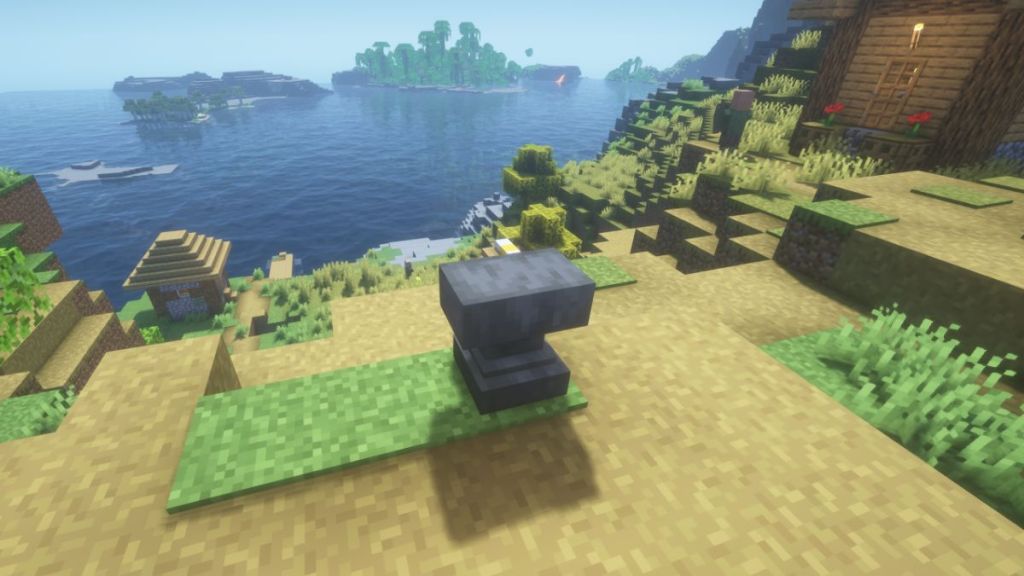
The anvil is a utility block in Minecraft that allows players to repair items, rename them, and even modify enchantments in the game. It naturally spawns in the woodland mansions of Minecraft, but can be crafted easily. If you’re stepping into the world of Minecraft enchantments, the anvil is a must-have.
Unlike the grindstone, the anvil preserves valuable enchantments. Beyond utility, the anvils are affected by gravity. So, if there is no support, they can damage mobs and players directly below it. So, either keep it as a decorative block for your medieval builds, or use it like a blacksmith to repair your tools.
How to Craft an Anvil
An anvil relies on a variety of game mechanics to function properly. Crafting it may feel expensive at first for the early-game players due to the high number of iron required. However, if you have made an iron farm in Minecraft, the iron required will seem trivial.
Required Materials
You need the following items to make an anvil in Minecraft:
- 31 Iron Ingots (27 of which will be used to make blocks of iron)
- 3 Blocks of Iron (made with existing iron ingots)
- Crafting Table
Crafting Guide
Finding Iron: Quick Tips
As you can see, the recipe for an anvil requires a lot of iron. So, you first need to find and mine iron ore. Our Minecraft ore distribution guide will help you find the iron ore in no time. The best places to look for iron in Minecraft are in the following areas:
- Mountain Peaks and Surfaces
- Inside Caves and Ravines (in Y=16 and less)
- Loot Chests inside Shipwrecks, Woodland Mansions, Bastion Remnants, Strongholds, Mineshafts, and Trial Chambers
Then, you have to smelt all the raw iron in the furnace until you have 31 iron ingots in your inventory. Moreover, when you put nine iron ingots on the crafting table, filling it up completely, you will get a block of iron. The crafting recipe of an anvil requires 3 blocks of iron. And you can use the remaining 4 iron ingots as they are.


Step-by-Step Crafting Recipe
Once you have collected all the items, it’s easy to craft an anvil. Follow the steps below to craft an anvil in Minecraft:
- First, place three blocks of iron in the top row of the crafting area.
- Then, place an iron ingot in the middle cell of the second row.
- Finally, fill the bottommost row of the crafting table by placing iron ingots in each cell. And, you have successfully crafted an anvil in Minecraft.


How to Use an Anvil: A Complete Guide
The anvil has several distinct features with varying experience costs. Understanding anvil mechanics can help you reduce XP level and resource waste. So, here’s how you can use the anvil for the following purposes in Minecraft:
Repairing Item & Strategies
You can add a material ingot to a damaged tool on an anvil to repair it. Alternatively, you can also combine two damaged items to restore their durability. This mechanic is similar to a grindstone, but doesn’t remove the enchantments in Minecraft.


To repair a damaged tool in Minecraft, you simply have to place the tool in the anvil and combine it with another copy of the same tool. And you can return back to your adventures with a functioning tool.
Alternatively, you can also use an ingot of the same mineral you used to make the item that’s damaged. In some special cases, you can use technically unrelated materials to repair some items. For example, the elytra can be repaired using a phantom membrane.

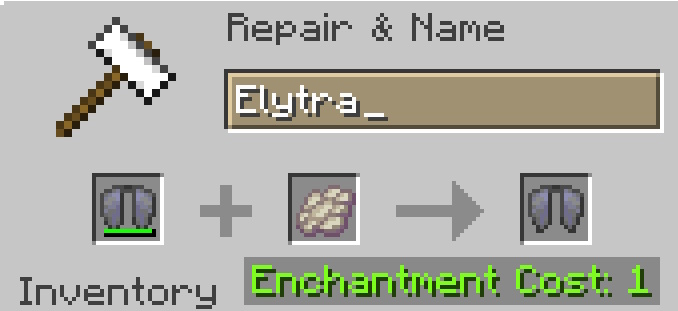
Below is a table for all the materials required to repair a tool and improve its durability:
| Item | Repair Material |
|---|---|
| Wooden tools and shield | Any wooden planks |
| Leather armor | Leather |
| Stone weapons and tools | Cobblestone, Cobbled Deepslate, Blackstone |
| Copper weapons, tools, and armor | Copper ingot |
| Iron weapons, tools, and armor | Iron ingot |
| Gold weapons, tools, and armor | Gold Ingot |
| Diamond weapons, tools, and armor | Diamond Ingot |
| Netherite weapons, tools, and armor | Netherite Ingot |
| Turtle Shell | Scute |
| Elytra | Phantom Membrane |
Enchanting With Books
You can combine enchanted books in Minecraft with tools to enchant them on an anvil. Do note that enchanting, using books, is usually cheaper than combining two enchanted tools, especially when you are dealing with high-level enchantments.

If you combine a tool with an enchanted book in Minecraft, the enchantment gets applied to the tool. But remember that it will only work with enchantments compatible with a particular tool and destroys the enchanted book in the process. Moreover, the enchanted book always goes in the middle cell of the anvil, and the item goes in the left cell during enchanting.
Renaming Items and Special Effects
First up, you can put an item or a group of items in the anvil to rename them. To do so, you just have to type the name of that item in the name field at the top of the anvil’s UI. Once renamed, Minecraft assigns that item its new name. You can even use a nametag in the anvil to give new names to mobs.


Making Name Tags
Even though the mechanics of naming items feel simple, it can have a special effect in some cases. Here are a few of them:
- In Java Edition, you can rename mobs trapped in a bucket by placing that bucket in the anvil. The mobs will carry the name even after being removed from the anvil. The same effect applies to the spawn eggs of mobs.
- Once you name an item, it can’t be stacked with other items with a different name or no name, even when they are the same type.
- Functional blocks like an enchanting table display their own name in the anvil’s UI.
- You can use name tags with an anvil to assign special names to mobs and unlock some amazing easter eggs. For example, the name “Dinnerbone” turns mobs upside down in Minecraft.
Using Falling Anvils as a Trap
Unlike most blocks in Minecraft, anvils are bound by gravity. So, if you place them floating on the side of another block, they will fall down. While doing so, they damage any entity that’s below them.
When placed in a floating position, the anvil tends to fall down due to gravity. You can use this mechanic to kill mobs by throwing anvils on top of them. Moreover, you can even use a falling anvil to smash a dropped item out of existence.
Advanced Anvil Mechanics
Since there are a few unique ways to use an anvil in Minecraft, let’s have a look at its core mechanics to understand it better.
Understanding Experience
Every action inside the anvil interface costs experience levels. These costs can increase based on the complexity of enchantments, the repair method, and even the number of times an item has been worked on previously.
Cost & Penalties
When you are using an anvil, you might notice that each action performed has an “enchantment cost” attached to it. Enchantment cost is the total cost of performing an action on the item, including renaming, repairing, enchanting, and more. The cost depends upon the level of repair and the type of action you are performing on the anvil.
The “Too Expensive” Limit
While repairing or enchanting a tool in Minecraft, the cost is paid using your in-game experience level. So, if you plan on using the anvil a lot, you should learn how to make a Sculk XP farm in Minecraft.
In survival and adventure modes, the anvil caps the actions at 39 experience levels. Once you reach an action that costs more than 40 levels, the item will become “Too Expensive” for the anvil. After that, you won’t be able to rename, repair, or enchant it further.


This message is shown due to a hidden mechanic that follows the prior work penalty formula: 2^n – 1, where n is the number of previous anvil uses. This is why the anvil shows the message after a few uses on the same tool.
Hitting the “Too Expensive” limit is inevitable when you’re constantly trying to repair or upgrade the same tool. However, you can delay hitting this limit if you combine the enchant books together and then use them collectively on the tool.
Anvil Durability and Damage Stats
Every time you use an anvil, it has a slight chance of getting damaged. On average, it lasts for about 25 functions before getting completely annihilated. But it can also get damaged and destroyed due to falling. The higher the height, the more fall damage will be dealt to the anvil. Given below are the three visible damage stages that can act as warnings before it becomes unusable:
- Usual Anvil: At this stage, it is fully intact and has a smooth texture.
- Chipped Anvil: Slight visual cracks are visible on the surface.
- Damaged Anvil: The anvil becomes heavily cracked and is close to breaking.
Anvil vs Grindstone: Which to Use?
Both Anvil and the Grindstone are great utility blocks to repair your armor, tools, and weapons, but their purpose varies slightly based on your requirements. So, refer to the table below, which compares the Anvil and Grindstone on the basis of their functionality:
| Features | Anvil | Grindstone |
|---|---|---|
| Repairs Item | Yes | Yes |
| Enchantments | Preserves enchantments and combines them | Doesn’t preserve enchantments, rather removes them |
| Uses XP | Yes | No |
While the anvil is best for stacking up enchantments on a tool, the grindstone is ideal for removing those unwanted enchantments, like the Curses.
Just like that, you are now ready to make the most out of an anvil in Minecraft. Having said that, do you think the anvil usage cost is an unwanted feature, or is it an essential mechanic? Share your views in the comments below!
Anvil is a better utility block than a grindstone, as it can perform all the actions of a grindstone without making you lose your enchantments.
An Anvil gets destroyed after 25 uses. Though it can perish earlier if any fall damage is dealt to the anvil.
If you want to continue using an item with an anvil after it has passed its level limits, you can switch to creative game mode to increase the limit. Doing so will also allow you to add incompatible enchantments to random items.