- Valheim supports crossplay on PC, Xbox, PS5, Mac, Linux, and Switch 2 platforms.
- All players on these platforms can share the same Valheim multiplayer world.
- Crossplay isn't the same as cross-save, and universal save progression isn't supported.
Valheim has just released its 1.0 update, and the game is now available on multiple platforms, including PlayStation and Nintendo. So, if you’re planning to hop into this Viking adventure with your friends, you must be wondering: Is Valheim crossplay for players on PS5, PC, Xbox, and Nintendo? So, here’s all you need to know.
Does Valheim Have Crossplay?
Yes, Valheim has crossplay features now. With the Valheim 1.0 patch update, the game supports multiplayer across its officially supported platforms, that includes the following:
- PC through Steam and Microsoft Store
- Mac
- Linux
- Xbox One, Series X/S
- PlayStation 5
- Nintendo Switch 2


Does Valheim Have Cross- Save?
Keep in mind that crossplay doesn’t automatically mean cross-save. This is one of the easiest things that you might misunderstand while looking up Valheim crossplay. You cannot start with a character on PC via your Steam account and load up the same local save on your PS5.
The only platform that supports cross-save in Valheim is the Xbox ecosystem. You can save your world on the Xbox console and boot it up using the same Microsoft account on your PC. Here is a quick table that tells you which platform supports cross-save and crossplay in Valheim:
Platforms Cross-Save Crossplay PC Only with Xbox via the same Microsoft Store account Yes Xbox Only with PC via the same Microsoft Store account Yes PS5 None Yes Nintendo None Yes Mac/Linux None Yes
So, if you have been searching, is Valheim crossplay between PS5 and PC, or between Xbox and PS5, or with any other platforms, the short answer is yes. This means that any player on the above-mentioned platforms can join their friends present on the others.
How to Crossplay with Friends in Valheim
Playing Valheim with friends on different platforms is fairly straightforward. Here’s how you can call your friends to join the same Valheim seed you always wanted to try out:
- Start Valheim and create or select your world.
- Enable crossplay when setting up the multiplayer session.
- Start the multiplayer server in your world and open the pause menu.
- Find your server code and share it with your friends.
- Now, your friends must open the Join Game menu in Valheim and choose the option to add a server using the join code and password.
- Once connected, it will allow crossplay in Valheim.
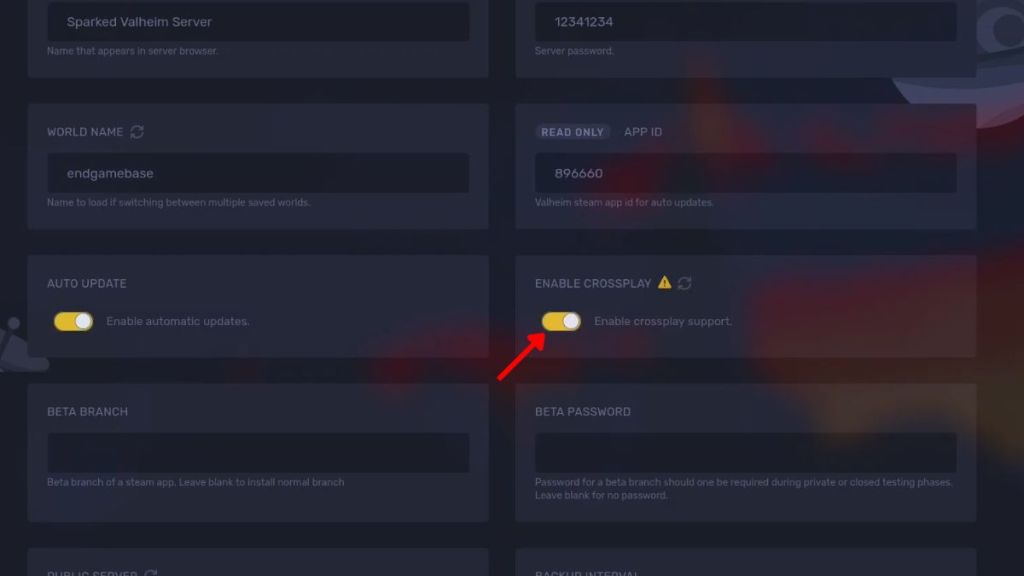
Although you can always play on the normal player-hosted multiplayer world, it will stop once the host logs out. In such cases, you can set up a dedicated server in Valheim to keep playing even when the host leaves the group.
Why Is Valheim Crossplay Not Working?
If you’re trying to connect to a friend and the Valheim crossplay isn’t cooperating, here are a few things worth checking out:
- First, make sure that everyone is running the same Valheim version.
- Check that crossplay is enabled for the server or multiplayer session where required.
- If the server doesn’t appear, try using the Join Code to find it at once.
- Double-check the password, as any typos would simply not let you in.
- If nothing seems to work, try restarting the server or your game to fix the issue.

And that is pretty much it for crossplay in Valheim. Since the stable version has just been launched, it will be worth checking out the Valheim recipes and materials to refresh your knowledge. So, which Valheim boss are you having trouble with? Tell us in the comments below.
Yes, PS5 players can join PC players, including those using supported versions through Steam.
Valheim does not offer universal cross-save across every platform. Only Xbox and Microsoft Store PC have a supported save-sharing option.
Yes, Xbox players can play with PS5 players in the same Valheim multiplayer world.
Yes, PC players using Steam can play Valheim with those on Xbox consoles.