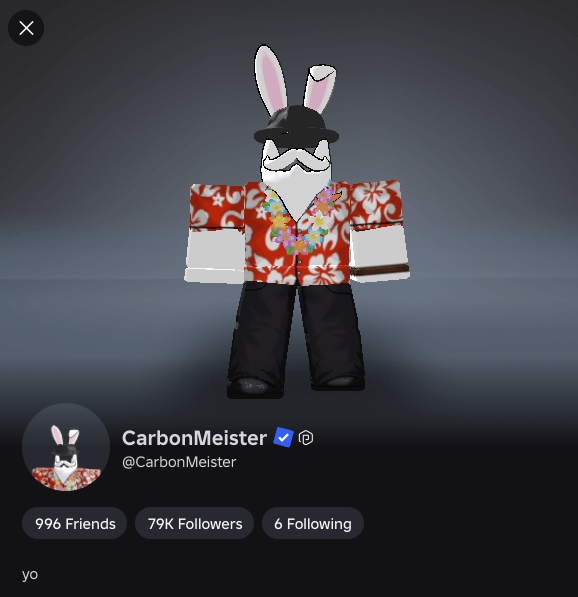
- Roblox provides a blue verified badge to notable creators and developers.
- Creators need to meet certain requirements to get verified on Roblox.
- Violating the terms can remove the verified badge from the profile.
You must have seen the blue checkmark on a famous Roblox creator’s profile. These are verified badges that separate authentic creators, developers, brands, and public figures from regular players. But how do you get it? In this guide, we will tell you how to get verified on Roblox.
How to Get the Verified Badge on Roblox
You cannot simply apply to become verified on Roblox. The Roblox team checks your account to see if you meet all the requirements before granting the badge. You must meet four main conditions:
Meet the Notability Requirements
The most important thing you need in order to get the badge is that you should be a notable creator, developer, or public figure. Roblox has a strict policy when it comes to the verified badge. There are different types of accounts that can get verified, and each has its own requirements:
- Brands and Figures: Must be part of the Roblox Video Stars program.
- Experience Developers: Must own or have a 10% or higher automatic group payout from an experience with over 1 million playtime hours in the last 90 days.
- Avatar Item Creators: Must generate at least 2 million Robux in revenue and sell at least 200,000 items in the last 90 days.
How to Get VC on Roblox and 17+ Access (ID Verification Steps)
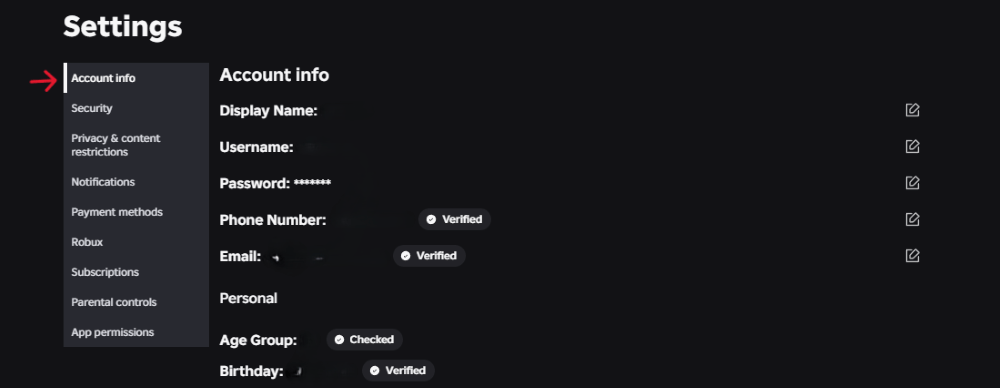
Go to your account settings and complete the Roblox ID verification to prove that your account belongs to you. This helps the Roblox team confirm that you are an authentic creator rather than a fan account.
Many players looking up to get verified are actually trying to verify their age rather than get the celebrity blue checkmark on Roblox. Follow these steps if you want to know how to get VC in Roblox and verify your identity for 17+ Roblox experiences:
- Open Account Settings: Log into your Roblox account and click the Gear icon in the top-right corner on PC (or the More three-dots menu on mobile) and select Settings.
- Start Age Verification: Under the Account Info tab, look right beneath your birthday and click the Verify My Age button.
- Scan the QR Code: A QR code will pop up on your screen. Scan it using your smartphone camera to launch the verification portal.
- Scan Your Government ID: Follow the prompts to take a clear photo of the front and back of a valid government-issued ID (Driver’s License, Passport, or State ID).
- Take a Live Selfie: Complete the liveness check by taking a quick selfie so Roblox can match your face to your ID.
- Enable Your Microphone: Once verified, go to Settings > Privacy, and toggle the Microphone switch to On to enable voice chat.
Secure Your Account
In the security settings, enable two-step verification (2FA) to authenticate your Roblox account. You can use any authenticator app like Google Authenticator or Microsoft Authenticator to secure your account and become eligible for the badge.
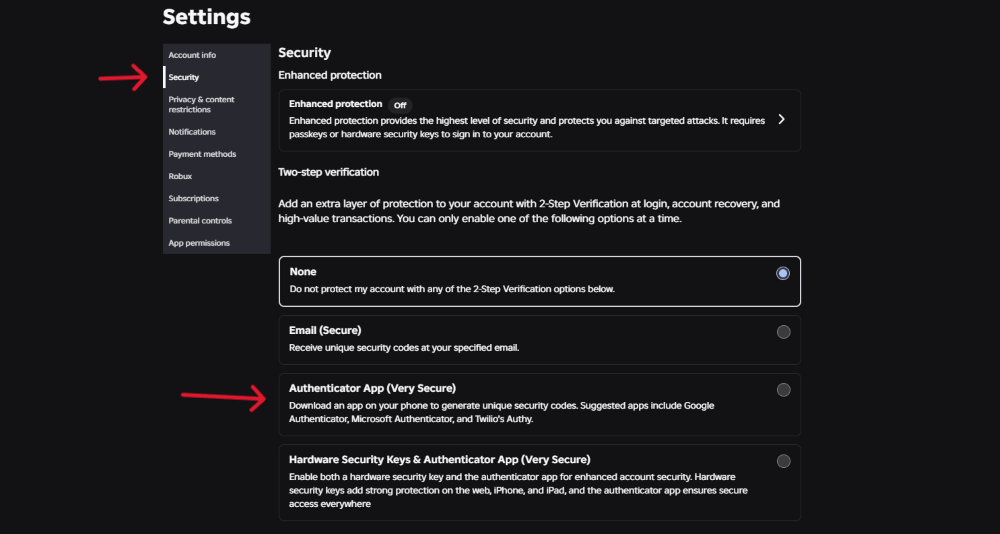
If you fear hacks on Roblox, 2FA protecting your account is the best way to prevent them. This is critical because high-profile creator accounts are frequent targets
Stay Active
One of the most important requirements is that your account must be active within the last 180 days. It doesn’t matter whether you log in from a gaming PC, mobile device, or even figure out how to get Roblox on a Chromebook while traveling. Just make sure you actively use your account.
Roblox has a monthly verification cycle; if you meet all these requirements before that, you will get a verified badge in no time.
How to Keep Your Roblox Verified Badge
Getting the blue checkmark in Roblox is only part of the process. To maintain it, you must follow certain rules, or your badge might get removed:
- Keep your names consistent: Do not change your username or display name after getting the badge, or it will be automatically revoked.
- Keep 2FA active: If you disable your authenticator app on your account, your badge will be removed.
- Follow Roblox Community Standards: If you repeatedly violate Roblox Community Standards or Terms of Use, they will remove the badge. Never risk your account standing by searching ‘how to get hack on Roblox’ or ‘how to get Roblox hacks’ to use third-party exploits. Similarly, handle your marketplace transactions honestly. While normal players might legitimately search for a refund on Roblox, abusing unauthorized bank chargebacks will get your account banned and your badge stripped.
How to Get Roblox Studio and Scripts (For Developer Verification)
If you want to hit the 1 million playtime hours required to get the Verified Badge as an Experience Developer, you need to build and manage your own game. Here is how to get Roblox Studio and set up your game’s basic code:
- Download the Creator Software: Head to the official Roblox Create page (create.roblox.com) and click Start Creating to download and install the Roblox Studio application on your PC or Mac.
- Learn How to Get a Script in Roblox: Open a Baseplate template in Roblox Studio, hover over ServerScriptService in the Explorer window on the right, click the + icon, and select Script.
- Use the Toolbox for Pre-Made Code: If you do not know how to code in Luau from scratch and are wondering how to get scripts on Roblox, open the Toolbox from the top menu bar, switch the dropdown to Models or Plugins, and search for free community scripts.
- Set Up Moderation Commands: When your game starts gaining traction, you will need to know how to get admin on Roblox for your experience. Search the Studio Toolbox for verified admin modules like HD Admin or Kohl’s Admin Infinite and drop them into your game’s Workspace to moderate players easily.
If you maintain these rules, you will be able to keep the badge. That was everything you needed to know to get verified on Roblox. Have you secured your account yet? Let us know in the comments.
If you are a regular creator, you do not need to apply. Roblox automatically notifies and verifies accounts that meet its eligibility requirements.
Roblox issues Verified Badges once a month. Even after meeting all the requirements, you may need to wait up to a full month for the badge to appear.
No, you cannot buy a verified badge on Roblox. If you try to sell or spoof it, you will become ineligible.