Valheim can be a hard game to play. The grind is particularly hard in Valheim, which is why players are often looking to cheat. Whether it is an item you need or a place you have to fast travel to, you can do so instantly using Valheim console commands or cheat codes. Here is how you can use console commands or cheat codes in the game, along with all the codes.
New Valheim 1.0 Console Commands
Valheim 1.0 patch notes mention new console commands that have been added with the update. So, here are all the new console commands:
- confirmcheats
- achievements
- getstat
- haslocation
- snow
- updatecover
- cinematic
- cinematicsleep
- inventorysize
- inventoryclean
- clearpopups
- height
- pevents
- repairall
- resetbuildui
- biomeinfo
- altbiomes
- findbiome
- findbiometp
We are still testing the console commands and will soon update what each of them does in the game. Until then, you can check the full list of previous Valheim console commands from the sections below.
Full List of Valheim Console Commands and Cheat Codes
Here is the list of Valheim console commands and cheat codes. If you don’t know how to enable them, then check the section below. Other than that, if you play Subnautica 2, then check our Subnautica 2 console commands guide as well.
Command / Cheats Variables Effect spawn [item] [quantity] [level] [p/e/i] Spawn items. Add p, e, i at the end to automatically pick up the spawned items, automatically attempt to use or equip the item, and only spawn and pick if it doesn’t exist in the inventory, respectively.
(add * after item name to spawn every object containing that word)addstatus 54 variables possible, including:
Burning, Cold, CorpseRun, Encumbered, Freezing, RestedAdds status effect. beard 1-16 Change beard. clearstatus – Clear all status effects. die – Kills player. ghost – Become invisible to mobs. god – Invincible mode. hair 1-23 Change hair. heal – Heal to full health and stamina. model 0-1 Changes player model. Use 0 for masculine and 1 for feminine. nocost – No build cost. nomap – Disables map for this character. If used as host, will disable for all joining players from now on. puke – Empties stomach of food. raiseskill [skill] [amount] Raises skill. resetcharacter – Resets character data. resetskill [skill] Resets your skill. setpower GP_Eikthyr
GP_TheElder
GP_Bonemass
GP_Moder
GP_Yagluth
GP_Queen
GP_FaderSets your current guardian power and resets cooldown. exploremap – Explore entire map. find [text] [pingmax] Searches loaded objects and location list matching name and pings them on the map. Pingmax defaults to 1; if more will place pins on the map instead. genloc – Regenerate all locations. goto [x,z] Teleport to given coordinates. location [location] (148 variables)
[SAVE]Spawn at a particular location. But saving is permanently disabled unless you specify SAVE. nextseed – Forces the next dungeon to a seed. Saving is permanently disabled. nomap – Disables map for this character. If used as host, will disable for all joining players from now on. optterrain – Optimize old terrain modifications. pos – Print current player position. printlocations – Shows counts of loaded locations. printseeds – Print seeds of loaded dungeons. recall [name] Recalls all players to you, or matching name if specified. resetmap – Resets map exploration. resetsharedmap – Removes any shared map data from the cartography table. resetspawn – Resets spawn location. forcedelete [radius] [*name] Force removes all objects within the given radius. If a name is entered, only deletes items with matching names. Radius default 5, max 50. Make sure to back up the data before using this command. itemset [name] [keep]
Meadows
BlackForest
Swamps
Mountains
Plains
PlainsBoss
Mistlands
MistlandsGear
MistlandsMage
MistlandsWarrior
Fisherman
Ashlands
AshlandsFood
AshlandsMage
AshlandsMedium
AshlandsWarrior
AshlandsWeaponsSpawn a premade named set; add ‘keep’ to not drop current items. removedrops – Remove all item drops in the area. aggravate – Aggravate all nearby neutrals. killall – Kill nearby creatures. killenemies – Kill nearby enemies. killtame – Kill nearby, tame creatures. printcreatures – Shows counts and levels of active creatures. removebirds – Remove all birds removefish – Remove all fish. tame – Tame all nearby tameable creatures. env Clear
Twilight_Clear
Twilight_Snowstorm
Misty DeepForest
Darklands_dark
Heath clear
DeepForest
Mist
GDKing
Rain
LightRain
ThunderStorm
SnowStorm
SwampRain
AshRain
Bonemass
Eikthyr
Moder
Queen
GoblinKing
Crypt
SunkenCrypt
Caves
Mistlands_clear
Mistlands_rain
Mistlands_thunder
InfectedMine
nofogts
Ashlands_Ashrain
Ashlands_Ashrain_Clear
Ashlands_Storm
Ashlands_Meteorshower
Ashlands_Cinderrain
Ashlands_Misty
Ashlands_SeastormOverride environment (weather). event army_eikthyr
army_goblin
army_theelder
army_bonemass
army_moder
army_gjall
army_seekers
army_charred
army_charredspawners
boss_eikthyr
boss_bonemass
boss_moder
boss_gdking
boss_goblinking
boss_queen
boss_fader
wolves
skeletons
blobs
foresttrolls
surtlings
batsStart event. noportals – Disables portals for the server. players [number] Force difficulty scale. 0 = reset. event – Start a random event. resetenv – Disables environment override. resetwind – Resets wind. save – Force saving of world and reset world save interval. skiptime [gameseconds] Skips ahead in seconds. sleep – Skips to next morning. stopevent – Stops current event. time – Shows current time in-game. timescale [target]
[fadetime, default:1, max:3]Sets timescale. tod -1, 0, 1 Sets time of day. ban [name/ip/userID] Ban user. banned – List banned users. kick [name/ip/userID] Kick user. ping – Show ping. restartparty – Restart PlayFab party network. unban [ip/userID] Unban user. lodbias – Set draw distance for server. bind [keycode] [command and parameters] Bind a key to a console command. May cause conflicts with game controls. clear – Clear the console window. debugmode – Fly mode. dpsdebug – Toggle DPS debug print exclusivefullscreen – Changes window to exclusive fullscreen or back to borderless. gc – Shows garbage collector information. help 1-5 Shows list of console commands. info – Prints system info. listkeys – Lists keys. maxfps [FPS] Sets FPS limit. printbinds – Prints current binds. removekey – Removes keys. resetbinds – Resets all custom binds to default. resetkeys – Clears global keys. setkey [name] Sets a global key. tutorialreset – Resets tutorial data. tutorialtoggle – Toggles hugin hints. fly – Toggles fly. freefly – Toggles free camera. ffsmooth 1 or 0 Adds/removes free camera smooth movement. fov [number] Changes field of view. blowkiss – Headbang emote. bow – Kneel emote. comehere – Laugh emote. cower – No no no emote. challenge – Point emote. cheer – Roar emote. cry – Shrug emote. dance – Sit emote. despair – Thumbs up emote. flex – Wave emote.
Popular Valheim Spawn Commands
If you are looking for spawn commands in Valheim, then here are some popular spawn commands in the game. Make sure to use the ‘Spawn’ console command before it with other variables to spawn them in the game.
| Spawn Commands | Item |
|---|---|
| AxeBronze | Bronze Axe |
| AxeBlackMetal | Bronze Black Metal Axe |
| ArmorWolfChest | Wolf Chest Armor |
| ArmorWolfLegs | Wolf Legs Armor |
| SwordBlackmetal | Black Metal Sword |
| SwordSilver | Silver Sword |
| Wishbone | Wishbone |
| Coins | Coins |
| Silver | Silver |
| BlackMetal | Black Metal |
| Haldor | Summons the Haldor merchant. Beware, he will spawn one foot off the ground, and you won’t be able to remove him from your game afterwards. |
| FineWood | FineWood |
| Bronze | Bronze |
| Iron | Iron |
| Wisp | Wisp |
| FlametalOre | Flametal Ore |
| ArmorAshlandsMediumChest | Ashlands Medium Chest Armor |
| ArmorAshlandsMediumLegs | Ashlands Medium Chest Legs |
How to Use Console Commands or Cheat Codes in Valheim?
To use Valheim console commands or cheat codes, here is what you need to do:
- Open Steam and find Valheim in your Library.
- Right-click on it and select Properties.
- In the General section, type ‘-console‘ in the Launch Options box.
- Open Valheim and press the F5 key on your keyboard to open the console.
- Type ‘devcommands’ in the console and press Enter. Enter the same command again to stop using the console codes.

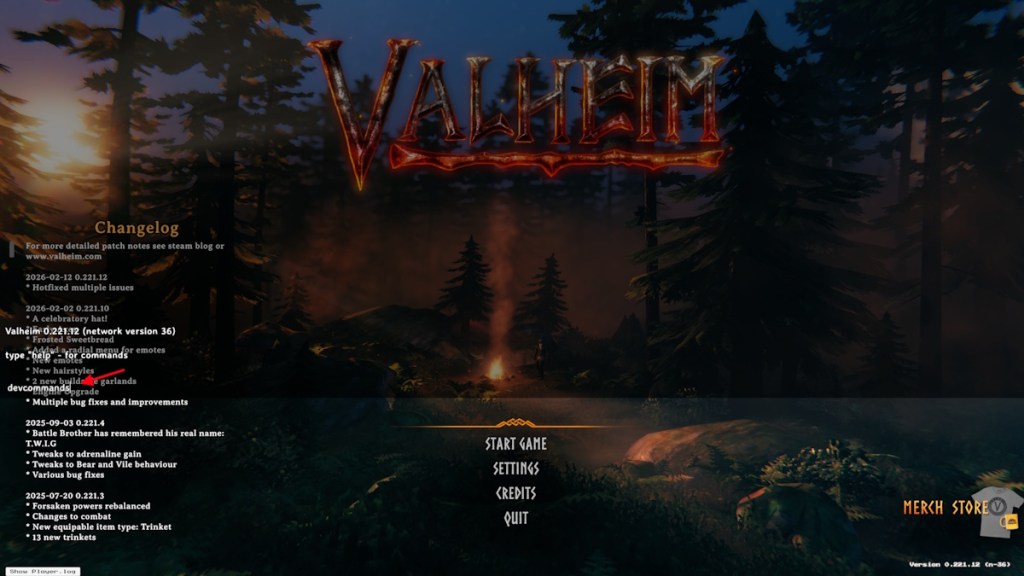
If you want to open the console on your Xbox, all you have to do is launch the game and press the RB + LB + RT + LT + Menu buttons. Press A after the console opens on Xbox to open the keyboard. Now, enter the devcommands codes, and then you can use the cheat codes in Valheim for Xbox consoles.
So, there you have it. Now you know how to use Valheim console commands or cheat codes. Have any questions? Ask them in the comment section below.