
As a regular Wordle player, I’ve had those days when I get the answer in three or fewer guesses and feel like I deserve a medal of honor. Then WordleBot looks at my game and basically tells me I got lucky. Rude, but okay! I let it slide because, honestly, Wordle Bot has been a pretty good tool for helping me improve my game.
But I’ve also seen plenty of players use WordleBot without really knowing how to make the most of it. Sure, the bot can be a little irritating when it tells you that your seemingly brilliant guess was actually not that great. But once you understand how it works and what all that analysis actually means, you can use it to your advantage.
So, I’ve put together this detailed guide on WordleBot to help you get the most out of it. By the end, you’ll know what WordleBot is, how it works, how to use it to sharpen your Wordle strategy, and maybe, someday, beat the WordleBot at its own game.
What Is WordleBot?
WordleBot is The New York Times’ official companion tool for Wordle. It’s an AI bot that analyzes a Wordle puzzle after you’ve finished playing and breaks down how well you played. This analysis tells you how effective your individual guesses were and how your game compares with the bot’s own approach.
Note that WordleBot isn’t there to help you cheat your way to today’s Wordle answer. Instead, it looks at the guesses you made and gives you a better idea of where you played well, where you got lucky, and where a different guess could have narrowed down the possibilities faster.
Is WordleBot Free?
When the New York Times acquired Wordle in 2022, one of the biggest concerns among the players was whether the game would go behind a paywall. Thankfully, that didn’t happen. Wordle remained free to play, and it still is. But NYT has added a few extra features around the game over the years, and some of them aren’t free.
WordleBot is one of those paid features. So, you can continue playing the daily Wordle without spending a penny, but if you want WordleBot to analyze your game and break down your guesses, you’ll need a New York Times Games subscription.
How Does WordleBot Work?
If you know how to play Wordle, you can take a step further and use WordleBot to improve your chances of winning. But before we get into that, let’s understand how WordleBot works.
So, WordleBot essentially retraces your game and asks a simple question at every turn: given everything you knew at that point, was that a good guess? It then uses the remaining possible solutions and the information your guesses provided to evaluate your choices
What Does WordleBot Tell You About Each Guess?
WordleBot doesn’t just look at whether a guess gave you green or yellow letters. It considers how much useful information the word gave you and how much it narrowed down the possible solutions.
That’s why you might see WordleBot praise a word that didn’t look particularly exciting on the board. A guess can be useful because it rules out a large number of possibilities, even if it doesn’t have a single green tile on the board.
How Does WordleBot Decide If a Guess Is Good?
WordleBot’s idea of a “good” guess is more about efficiency than accuracy. It considers how a word divides the remaining possible solutions and how many turns it would need to solve the puzzle from that point.
In other words, getting the answer isn’t the only thing that matters. If you happened to guess the correct word from a huge pool of possibilities, WordleBot may consider that lucky rather than skillful.
What Does WordleBot Compare Your Guesses Against?
WordleBot compares your decisions with the moves it considers most efficient from the same position. It isn’t simply comparing your final number of guesses with some universal “perfect Wordle” score.
This is also the reason why two players can finish in the same number of guesses but still receive different Skill and Luck scores. So, what matters is not just where you ended up, but how efficiently you get there.
How to Use WordleBot to Improve Your Wordle Game
Now that you know what WordleBot is and how it works, let’s see how you can use it to improve your game. Here’s the simple process I recommend.
1. Finish the day’s Wordle: First, play the day’s Wordle as you normally would. Don’t worry about what WordleBot might think while you’re playing. The whole point is to see how your instincts compare with its analysis.
2. Open WordleBot and submit your answer: Once you’ve finished the puzzle, Wordle gives you the option to open WordleBot and analyze your game. You can also go ahead directly to the WordleBot page and share a screenshot of your completed game.
3. Analyze the game: Now, WordleBot will analyze your guesses and generate a detailed breakdown of your performance. You’ll get an overall look at how you played, along with insights into individual guesses, so you can see which moves helped you and where you could have made a smarter choice.
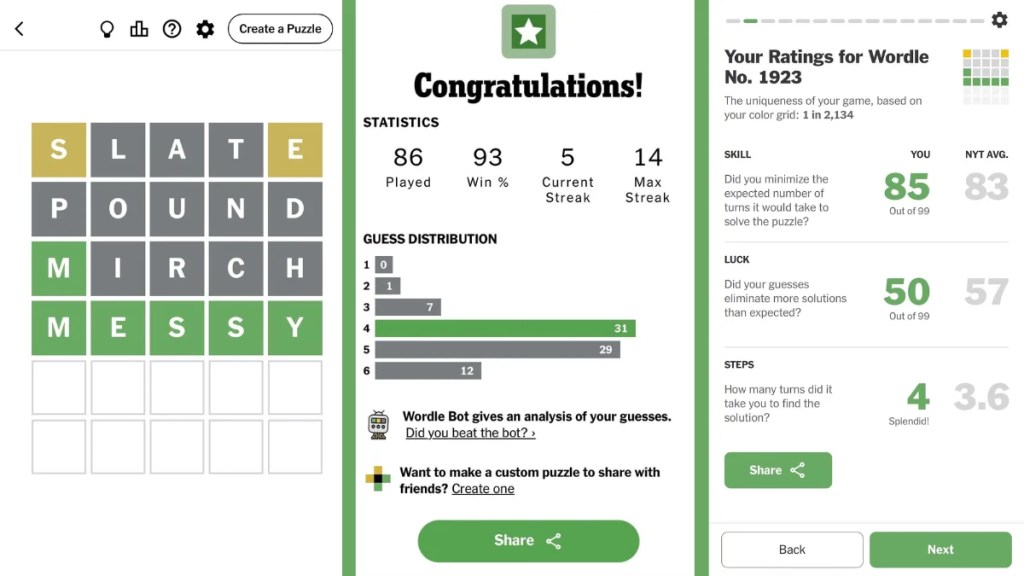
4. Compare your choices with WordleBot’s: Once you get the analysis, look at where WordleBot would have played something different and check what that alternative would have accomplished. While sometimes the difference is surprisingly small, other times you’ll wonder why you didn’t think of the bot’s word yourself.
5. Use those patterns in future games: One common Wordle mistake players make is trying to memorise every WordleBot recommendation. Don’t do that; instead, look for the patterns. You may notice that you regularly hold on to duplicate letters, ignore useful vowels, or choose an unlikely answer. Remember these patterns and use them to better your next game.
How to Read WordleBot Analysis?
Once you open WordleBot, it walks you through your game in a few distinct sections. Here’s what each one means so you’re not just starting at numbers and colors wondering what you’re looking at.
Overall Rating
This is the first thing you’ll see, and it’s basically your report card for the day. WordleBot gives you three scores: Skill, Luck, and Steps.
- Skill: This tells you how well you minimized the expected number of turns it would take to solve the puzzle.
- Luck: This tells you whether your guesses eliminated more solutions than expected.
- Steps: This is simply the number of guesses you took to land on the answer.
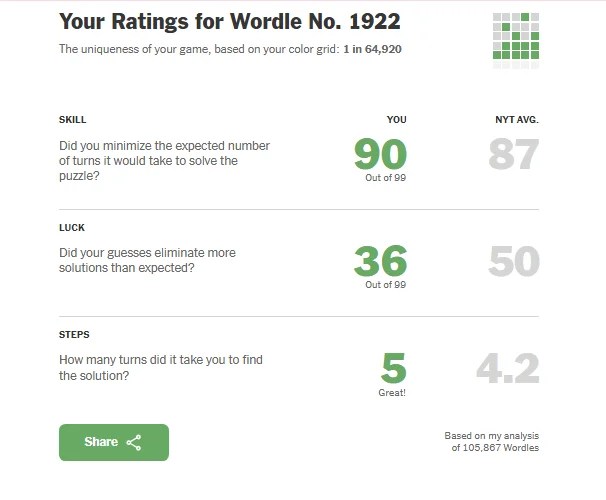
Right next to your numbers, WordleBot also shows the NYT average for each category, based on its analysis of over 100,000 Wordles played. So, you’re not just getting a score in isolation; you can immediately see how you stack up against everyone else.
Individual Guesses
Next, WordleBot breaks down your game guess by guess. Each guess gets its own Skill and Luck ratings. You’ll also spot two more numbers here: Words Left and Info Gained.
Words Left is WordleBot’s estimate of how many plausible solutions remained after your guesses. Note that it’s not just a random number; the bot weighs possibilities based partly on how common a word actually is. Info gained is the percentage of available information your guess pulled out of the puzzle.
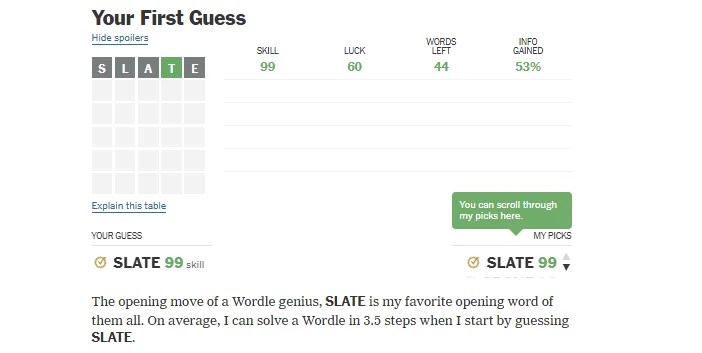
As you scroll further, WordleBot shows the word you played next to the word it would have played in the same spot. Both words also have the Skill rating next to them. Under this, the WordleBot explains the reason behind its choice and compares your guess with its own.
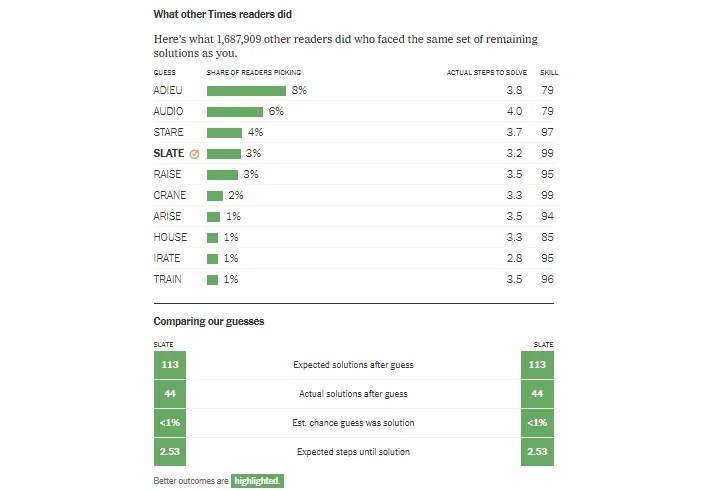
On the same page, you’ll also see a section of ‘What Other Times Readers Did.’ This shows how other players chose to move forward. It’s a nice reality check to see if you were thinking along the same lines as everyone else or going rogue. Each page wraps up by comparing your guess directly against WordleBot’s own pick for that turn, so you always know exactly how your choice measured up.
Solutions Compared
After going through your individual guesses, WordleBot shows you how it would have solved the entire puzzle on its own, without knowing anything about the guesses you actually made.
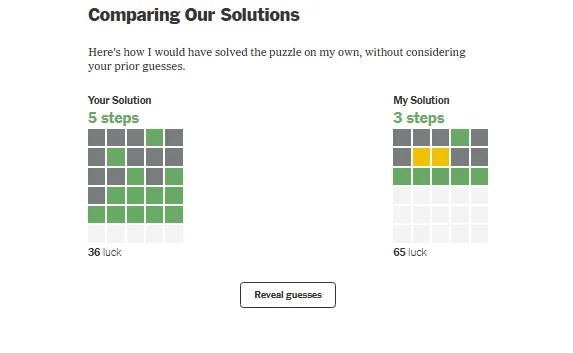
You’ll see both the boards side by side, your solution path and the bot’s, laid out in the familiar grid of colored tiles. Below each board is that game’s luck rating, so you can compare not just how many steps each of you took, but how much luck played into it.
Other Players’ Guesses
The last stretch of analysis shows what other players guessed at each stage of the puzzle, based on a dataset of over 1.6 million Wordle games. For every turn, you’ll see a ranked list of the most popular guesses along with the percentage of readers who picked them.
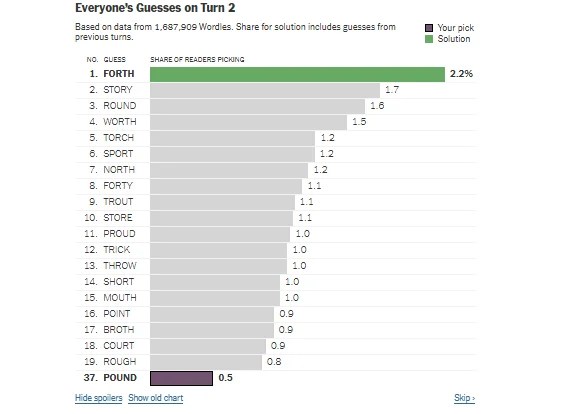
Your own pick and the actual solution are also highlighted so they’re easy to spot. It’s a fun way to see if you were following the crowd or going off with your guesses.
Can You Use WordleBot with Wordle Hard Mode?
Yes, WordleBot can analyse the Wordle Hard Mode games, but it doesn’t evaluate them exactly like the regular games. If you know how Wordle works, you must know that the game’s Hard Mode forces you to use revealed green and yellow letters in the subsequent guesses. Now, WordleBot has to make its recommendations within those same constraints.
It’s also worth remembering that WordleBot can have different recommendations depending on the mode and certain settings. So, if you’re playing in Hard Mode, keep in mind that WordleBot’s recommendation may suggest a different starting word and strategy than it would for a regular game.
Best Wordle Opening Words According to WordleBot
Your opening word can make a surprising difference in Wordle. Pick one strategically, and you can uncover a few important letters right away, rule out a bunch of others, and make the next few guesses much easier. That’s why researchers, Wordle players, and frankly, people who take five-letter words a little too seriously are constantly looking for the best Wordle starting word.
WordleBot has done its homework too. The AI bot has a preferred opening word that it considers to be the most effective Wordle opener. In 2026, that word is SLATE. It gives WordleBot a useful mix of common letters and vowels, helping it narrow down the possible answers early in the game.
However, things get a little different when you switch to Hard Mode. Since you’re required to use any revealed yellow or green letters in your subsequent guesses, WordleBot too has to work within those restrictions. As a result, its recommended opening word can differ from the one it uses in regular mode.
Can You Beat WordleBot in Wordle?
Now that you know WordleBot has its own strategy, you might be wondering if you can actually beat it at its own game. Well, you can! To beat the WordleBot, you just need to solve the same Wordle in fewer guesses than it does.
For example, if WordleBot solves the puzzle in four guesses and you get it in three, you’ve beaten the bot. It doesn’t matter if you got there because of a brilliant strategy or a lucky guess. However, this is where WordleBot’s Skill and Luck scores come in. You could solve the puzzle in fewer guesses but still get a lower Skill score because your winning guesses weren’t as efficient as the bot’s.
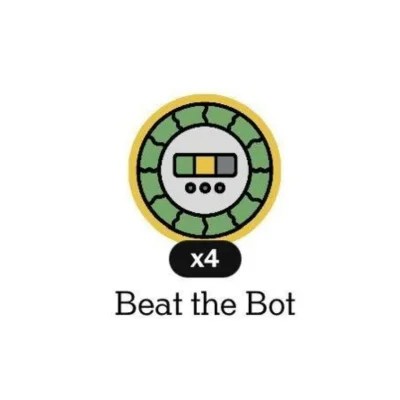
So, beating the WordleBot isn’t necessarily about proving that you’re a better strategist. Sometimes, it’s simply about getting the answer before the bot does. And if you manage to do that, you can even earn the ‘Beat the Bot’ Wordle badge!
WordleBot is designed to evaluate your guesses based on the information available at each point in the game. Its analysis is useful for understanding your strategy, although a high Skill score doesn’t always mean you’ll finish in fewer guesses.
Yes, while Wordle is free to play, WordleBot’s detailed analysis requires an eligible New York Times Games subscription.
Yes, you can use WordleBot to analyze completed Wordle games, including older puzzles. This is particularly useful if you want to revisit a game that went surprisingly well, or terribly wrong, and figure out what happened.
For regular Wordle, WordleBot recommends SLATE as its opening word. However, its recommendation can change over time.
WordleBot only analyzes your game after you’ve finished playing, so opening it won’t affect your Wordle streak. Your streak is determined by whether you successfully complete the daily Wordle, not by how WordleBot rates your guesses.
Wordle Hint Today - November 1, 2026 (Puzzle #1961)
 Rishabh Sabarwal
NYT Games Reset Time Guide: When Do Wordle, Strands, Connections and Other Games Reset?
 Daksha Gupta
An X User Claims to Have 'Cracked Wordle,' So We Put His Three Opening Word Trick to the Test
Daksha Gupta
How Does Wordle Work? Explained
 Sanmay Chakrabarti
When Does Wordle Reset Daily? Check The Time When New Wordle Releases
Daksha Gupta
Connections Hints Today & Answers for November 1
Sanmay Chakrabarti
How to Get Halloween Hat 2026 Badge in NYT Spelling Bee
Daksha Gupta

When Does LinkedIn Pinpoint Reset?
Daksha Gupta

All LinkedIn Games Explained (Updated October 2026)
Daksha Gupta
LinkedIn Pinpoint Answer Today (November 1, 2026)
Daksha Gupta