The NYT Spelling Bee is one of the trickiest daily word puzzles the New York Times has to offer. Every edition has players racking their brains and tapping into the depths of their vocabulary to earn points. Sometimes this puzzle can even feel impossible, and that’s exactly where the Spelling Bee Buddy comes in.
The Spelling Bee Buddy is a handy companion tool that can help you ace every single puzzle. We have explained everything you need to know about it in this guide.
What is Spelling Bee Buddy?
The NYT Spelling Bee is a daily word puzzle that tasks players with creating as many words as possible from a predetermined pool of seven letters. These letters are laid out in a honeycomb structure, and the letter in the center must be present in every word. If you’re struggling today, check out today’s Spelling Bee answers for a quick assist.
The Spelling Bee Buddy is an interactive companion tool developed by the New York Times to help players find missing words in the daily puzzles. Unlike the standard hints page, which provides a static overview, the Buddy is a dynamic, personalized tool that updates in real-time as you enter words into the game.
Since the daily puzzles can feature anywhere between 15 and 80+ words, discovering all of them and earning the highest rank in NYT Spelling Bee every day is almost impossible.
The Buddy helps even the odds by showing you exactly how many words are left based on their starting letters and lengths. It serves as an answer key of sorts, but it never reveals too much to be considered cheating.
By providing community-based statistics such as how many other players found a specific word, it also helps guide you in the right direction and narrow your focus. If you want to learn the full rules first, our how to play Spelling Bee guide covers everything from the basics to the ranking system.
How to Access Spelling Bee Buddy
Follow these steps to access the Spelling Bee Buddy on the NYT Games platform:
- Head to the NYT Games website or open the NYT Games app.
- Make sure to sign in to your New York Times account. Without logging in, the Spelling Bee Buddy cannot track your personal progress or hide the words you have already found.
- Click on the hints button, which is located just above the grid to the right.
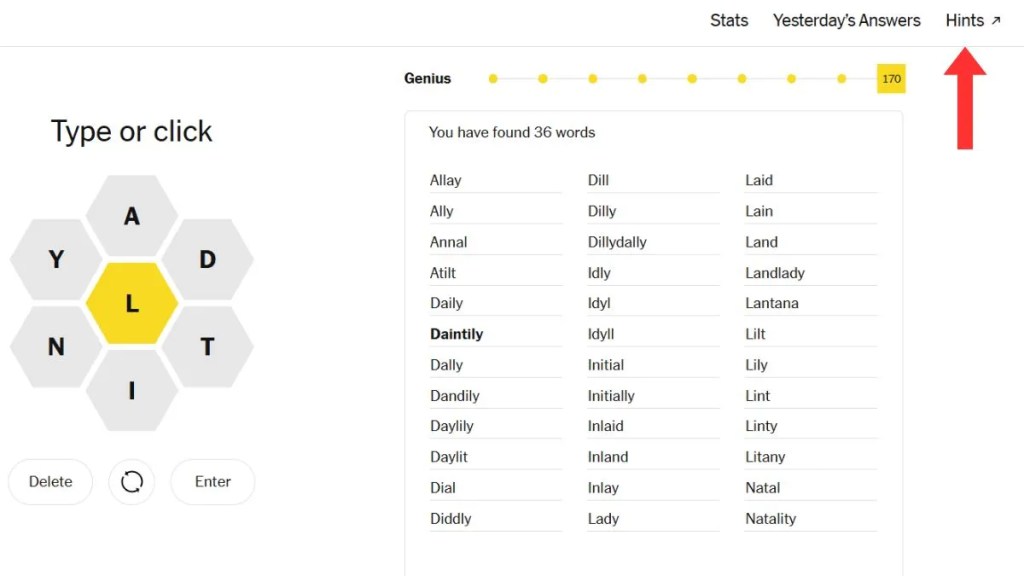
- You’ll now be taken to the standard hints page, but there will be a banner for the Spelling Bee Buddy that you can select.
- Alternatively, you can also launch the companion by visiting the official Buddy page for the NYT Spelling Bee.
It’s important to note that the Spelling Bee Buddy requires a New York Times Games or All Access subscription. If you’re using a free account, you won’t be able to access the interactive companion.
How Do Spelling Bee Buddy Hints Work?
The Spelling Bee Buddy hints are based on the words and letters you’ve already attempted. It gathers data in real-time and directs you toward secret words that you are yet to discover.
As you request more clues, the hints become more and more specific. They are designed to act as a nudge and ensure that you still have to do the mental work of solving the puzzle yourself.
Before we get into the nature of the hints, it’s important to clarify that the Spelling Bee Buddy will not solve the puzzle for you. It won’t just reveal the word if you’re stuck on something for too long, it is not an answer key.
Dynamic Word Grid
At the heart of the Spelling Bee Buddy page is a grid that categorizes every missing word by its starting letter and its total length.
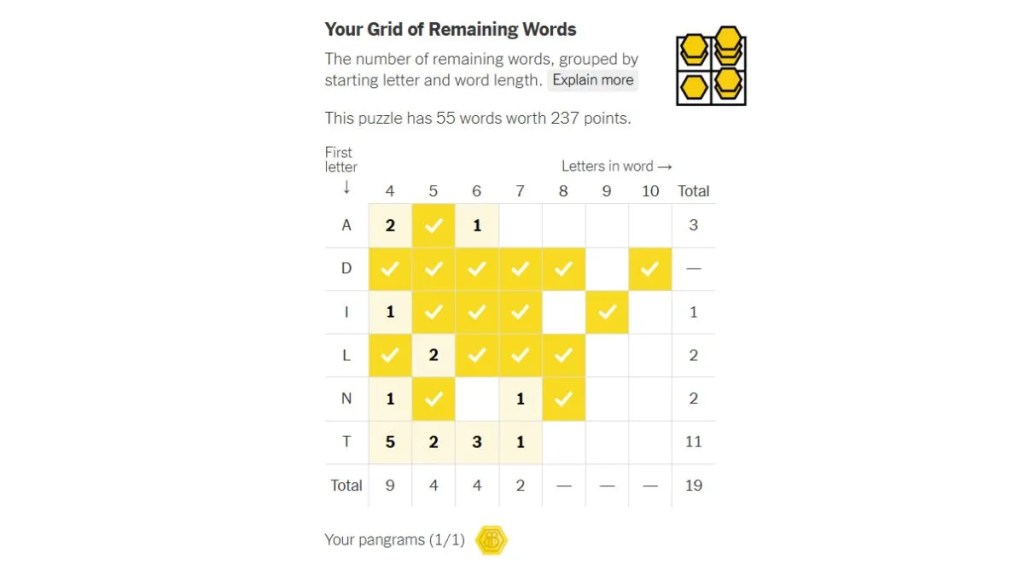
For example, the grid might show that you are missing two 5-letter words starting with the letter “M.” Unlike the static version found on the basic hints page, the Buddy’s grid updates automatically and removes words from the count as soon as you find them.
This grid is especially helpful for tracking Spelling Bee Pangrams, which are often the trickiest words to nail down.
Two-Letter List
The two-letter list is a personalized indicator and perhaps the most granular tool on offer. The Spelling Bee Buddy provides a list of two-letter starting combinations, telling you exactly how many words begin with specific letter pairs like “AL” or “IM.”
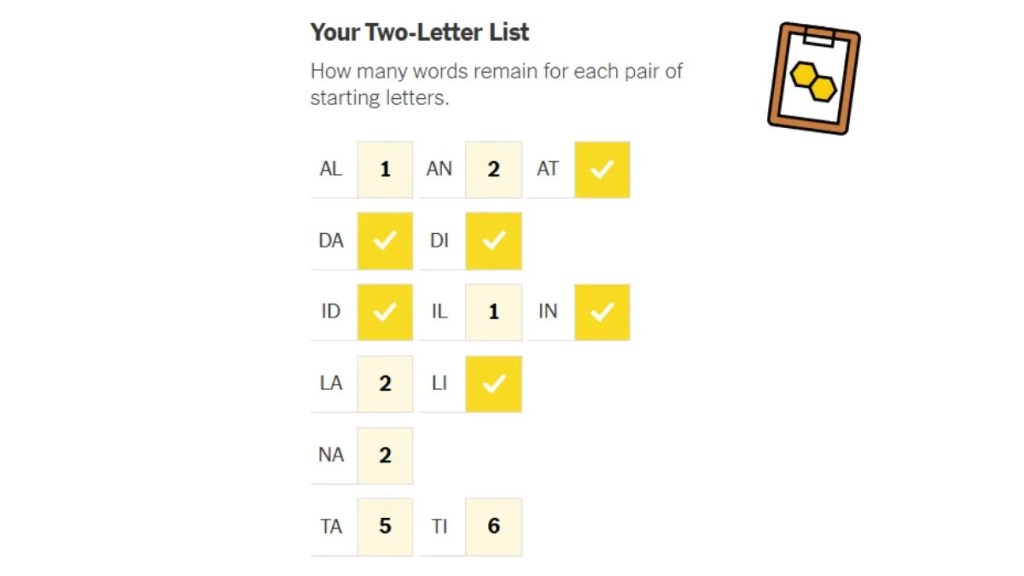
By knowing the prefix, your brain can narrow down its focus, which is often enough to remind you of a common word you may have overlooked.
Customized Hints and Clues
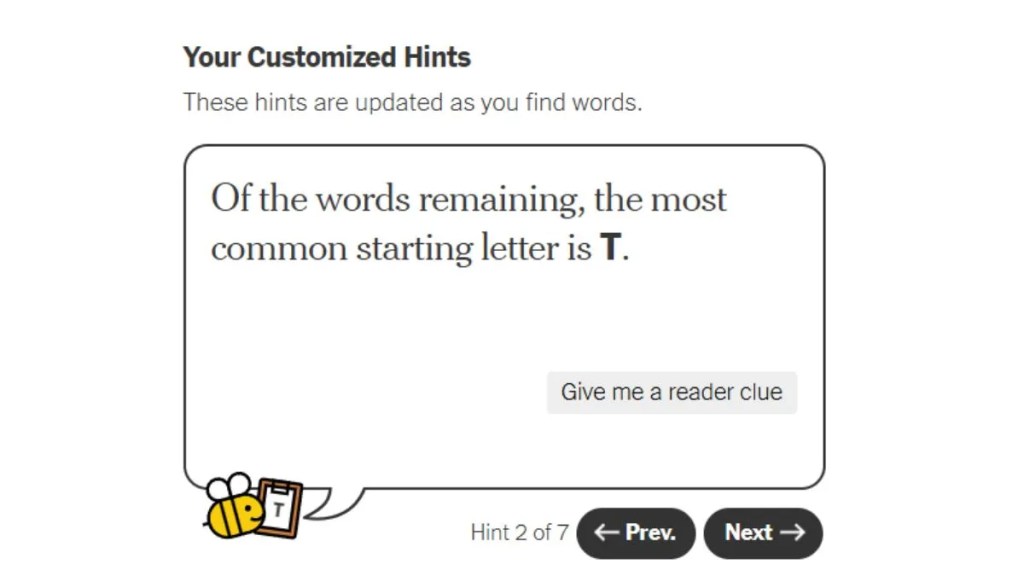
If the grid and prefix reveals aren’t enough, the Spelling Bee Buddy also offers written clues. These hints are hidden behind a toggle, so you don’t see them by accident. They typically start with a vague definition or a pun and become more explicit if you continue to click ‘Next’ for more information.
Community Percentages
Another standout feature of the Spelling Bee Buddy is the Community Discovery chart. This tool features a “found by” percentage revealing what portion of the community has successfully found a missing word in today’s puzzle.
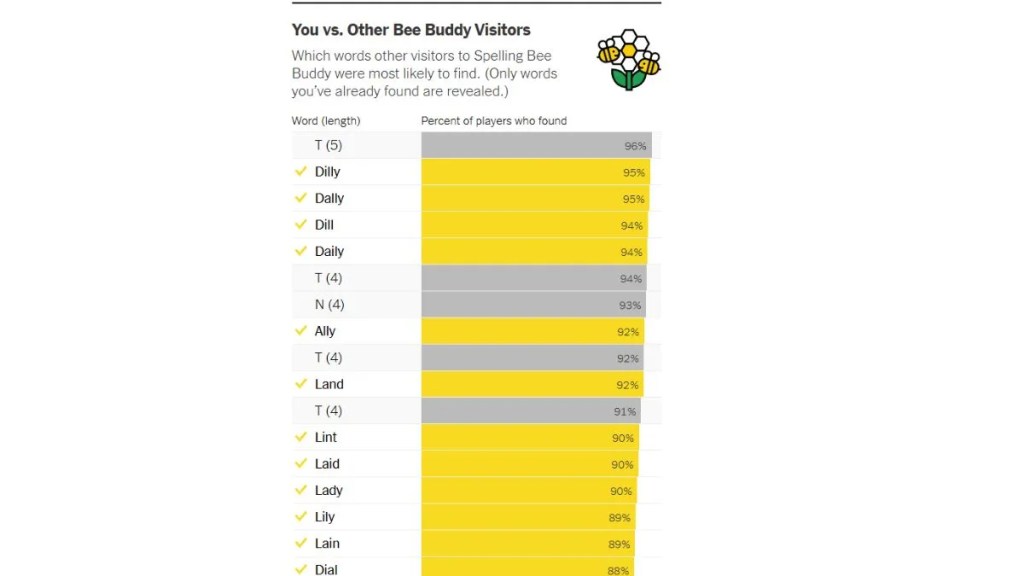
If the Buddy shows a word has been found by 90% of players, you know you are looking for a very common term. Conversely, a word found by only 5% of players means you’re hunting for something obscure or lengthy.
Tips to Use Spelling Bee Buddy Without Spoiling Answers
While the Spelling Bee Buddy doesn’t spoil answers entirely, it does provide specific hints that can strip away the challenge players are looking for.
If you’re someone who takes pride in dominating the Spelling Bee scoring system, you’re probably keen on steering clear of any giveaways. To help you use the tool “ethically”, here are some handy tips:
- Start with the Word Grid: Begin by only looking at the Word Grid to see the lengths of your missing words. This provides just enough of a hint, especially when it comes to the frequency of specific letters.
- Avoid the Two-Letter List: Avoid the two-letter list until you have exhausted all possibilities. Knowing the second letter of a word significantly narrows the search space and can make the answer too obvious.
- Treat reader clues like a last resort: Make the Reader Clues your final option when you are truly stuck and on the verge of giving up. At that point, you might as well go for broke since the puzzle won’t solve itself.
How Spelling Bee Buddy Can Help You Get Genius or Queen Bee Rank
If you want to earn bragging rights over your fellow Spelling Bee competitors, using the Buddy companion is a must. Nobody’s vocabulary is wide enough to ace the puzzle every single day, but you could easily go on a “Queen Bee” streak with the personalized companion’s help.
- Use Grid to Identify High-Value Words: The Word Grid lets you see exactly which word lengths are missing, so you can prioritize longer words that offer more points rather than wasting time on smaller ones when you’re close to the Genius threshold.
- Prioritize High Discovery Percentages: Use the Discovery Percentages as a priority list by focusing on words found by most players. These are usually common terms you likely already know but are simply overlooking.
- Eliminate Guesswork: Since the tool updates in real-time to show only what is missing, it prevents you from repeatedly attempting incorrect word variations. This saves both time and mental bandwidth, letting you focus on what’s left.
- Reveals Number of Pangrams: Pangrams are often the hardest words to find — rare, obscure, and worth the most points. The Spelling Bee Buddy tells you the exact number of Pangrams in the puzzle, so you’ll know whether to keep guessing or stop after finding one.
That covers everything you need to know about the NYT Spelling Bee Buddy. Whether you’re a casual player or chasing Queen Bee every day, this personalized daily word puzzle companion is one of the best tools available. While you are here, visit our Strands hints today page if you want to try a different NYT daily puzzle.
No, the Spelling Bee Buddy is not free to use and requires players to have an active NYT Games or All Access subscription.
No, the Spelling Bee Buddy is not an answer key and will never show you the actual words you are missing.
Yes, you can access the Buddy on any mobile device by using the NYT Games app or even a web browser.
When Does NYT Spelling Bee Reset?
 Daksha Gupta
All NYT Spelling Bee Badges and How to Earn Them (2026)
Daksha Gupta
NYT Spelling Bee Tips, Tricks, and Strategies to Win Every Day
 Ajith Kumar
How Spelling Bee and Wordle Compare: Differences, Difficulty, and Which to Play
 Pranav Maytray

Where to Play Spelling Bee Unlimited: 5 Best Websites and Apps
 Arnamoy Das