When it comes to platform support, Minecraft is one of the most inclusive games out there. From the latest legacy consoles to desktop PCs, almost every device can run Minecraft without any heavy lifting. No wonder it is still one of the most-played games on the planet.
But, with a great player base comes great multiplayer demands. And it is a tricky territory for Minecraft, especially in the cross-platform department. Is Minecraft cross-platform friendly? Can your Minecraft Bedrock friend join Java servers? The questions are countless, but we are here to answer them all. So, invite your friends, and let’s start playing!
Is Minecraft Cross-Platform?
Yes, Minecraft supports cross-platform play, but only for the Bedrock Editions. Minecraft Java can be played only on PCs, and hence, there is no question of crossplay. But if you, as a Java Edition player, want to play with your friends with the Bedrock Edition, then you can use the third-party GeyserMC plugin.
This allows you and your friends to join its world on a variety of devices. However, it is quite different from other video games, as not every version and edition of Minecraft is compatible with each other. The main difference lies between the two main editions of Minecraft: Java and Bedrock. You can use our dedicated guide to understand the differences in depth.


For the sake of this guide, all you need to know is that the Java and Bedrock editions use different programming languages, which makes it challenging to enable cross-play. Luckily, there is a workaround, and we have discussed that separately in this guide below.
What is Cross-Platform Play in Minecraft?
Cross-platform play, also known as crossplay, is a gameplay feature that allows players on different platforms (such as PC, Xbox, and PS) to join a common server simultaneously. Then, even though their hardware is different, these players can freely play with each other and give shape to their Minecraft house ideas.
So, whether you are on your phone, PC, console, or even VR device, you can play with your friends if your game supports cross-platform functionality.
Cross-Platform vs Cross-Progression Explained
Crossplay is directly related to “cross-save” (also known as cross-progression), a feature that enables players to save and continue their game on any platform without any hiccups. It relies on cloud servers to store your game’s save files, so the local backup doesn’t limit you.
A good example of the feature is seen in Fall Guys, a free-to-play game you can access from any device without losing any progress as long as you are using the same account. Now, let’s explore crossplay and cross-progression in terms of Minecraft.
Every Platform That Supports Minecraft Crossplay
Minecraft is available on many platforms, but not all of them can play together.
Bedrock Edition Cross-Platform Support
The following platforms are compatible with each other, and these belong to the bedrock family:
- Windows 10 and 11
- Android
- iOS & iPadOS
- Windows Mobile
- Fire OS/TV
- PlayStation 4 & 5
- Xbox One and Series X/S
- Nintendo Switch
- Samsung Gear VR
- PSVR
- Oculus
- PS Vita
- Nintendo 3DS, 2DS
- Wii U
Java Edition Cross-Platform Support
The following platforms are compatible with each other for the Java edition:
- Windows 10 and 11
- macOS
- Linux
That said, use the table below to find out about the Minecraft edition your platform supports and whether it supports crossplay or not.
Minecraft Edition Device or Platform Cross-Platform Play Minecraft Java Edition Minecraft for PlayStation Cross-platform play with Bedrock versions only using the GeyserMC Plugin Minecraft Bedrock Edition Windows 10 and above
VR HeadsetsCross-platform play with all other Bedrock versions Minecraft Pocket Edition for Mobiles Apple
Android
Amazon Phones and TabletsCross-platform play with all other Bedrock versions Minecraft for Xbox Xbox One
Xbox One X | S
Xbox Series X | SCross-platform play with all other Bedrock versions Minecraft for Playstation PlayStation 4 & 5 Cross-platform play with all other Bedrock versions Minecraft for Nintendo Switch Nintendo Switch Cross-platform play with all other Bedrock versions
How to Play Cross-Platform on Minecraft Bedrock
Follow the steps below to enjoy cross-platform multiplayer on your Minecraft Bedrock:
Sign in to Microsoft Account
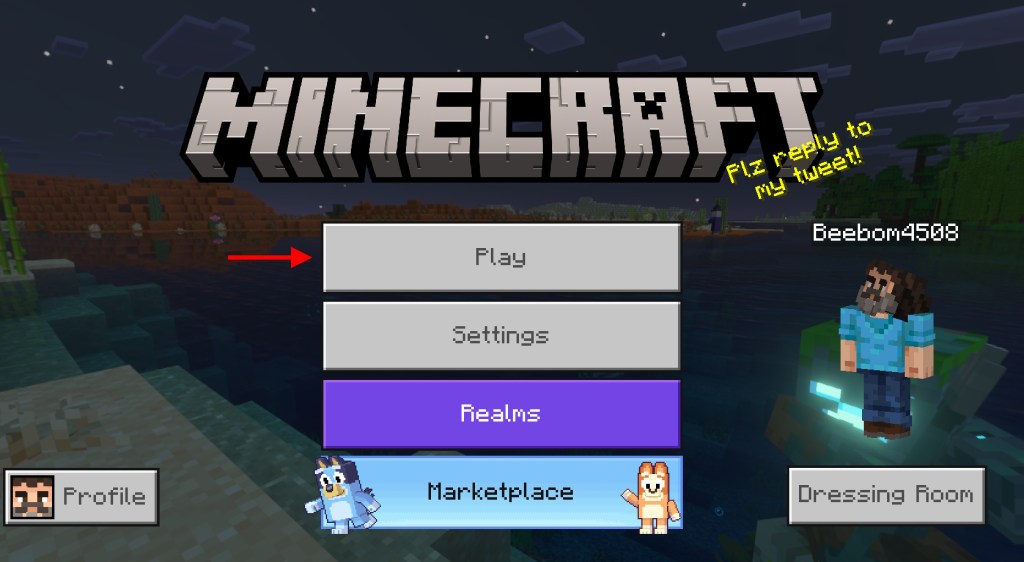
- First, launch your game and sign into your Microsoft account if you haven’t already.
- The “Sign In” button is available in the bottom left corner of the home screen.
- However, players on Xbox devices do not have to sign in manually and are automatically signed in using their Xbox account. Then, click on the “Play” button.

Invite Friends to Your World
- Next, open an existing Minecraft world or create a new one.
- Once you are in the world, press the “Pause” button on your device.
- Then, tap on the “Invite to Game” button in the pause menu.
Note: For this step, console players will need an active subscription to multiplayer services like Xbox Live, PlayStation Plus, or Nintendo Switch Online.

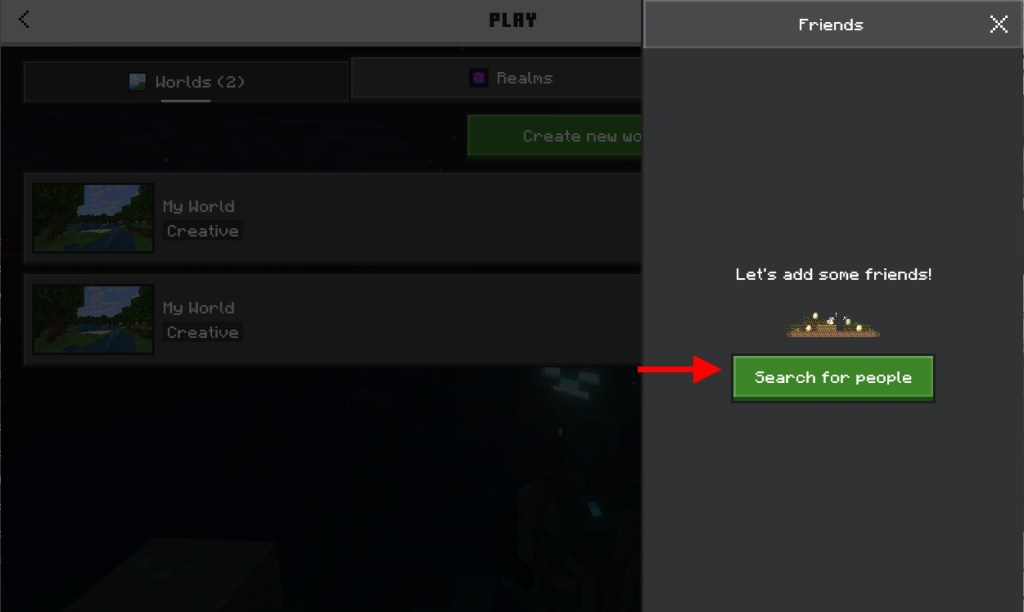
- Now, all your online friends will appear within the multiplayer menu. Otherwise, you can search for them using their usernames and add them.


- Finally, when your friend shows up in the list, select their name and use the “Send Invite” button to invite them to your world.
- Keep in mind that Minecraft might prevent you from inviting crossplay friends on certain exclusive DLC-based worlds.


Troubleshooting Connection Issues
If your friends aren’t appearing in the Bedrock edition, make sure that they have a decent internet connection and are on the same version of the game as you. You should also check the NAT type, which can often block the incoming invites.
How to Play Cross-Platform on Minecraft Java
If you have the Java edition on your system, here is how to play cross-platform:
Use Minecraft Realm
Minecraft Realms are the official servers run by Mojang and are always online. You don’t need a host or someone to come online every time to run this multiplayer server.
Creating a Private Server
Other than creating a Minecraft Realm server, you can simply start up your world and click on the connect to LAN to start your private server. Here’s how to make a private Java server and join it:
- Create a private Minecraft Java server using the linked guide. However, remember that the world will be saved on your device.
- You could use Minecraft server hosting services to create an online server that you or your friends can access at any time.
- Starting a local area network, or LAN, through the pause menu (other players have to be on the same network)
Joining Public Servers
Lastly, if you’re playing on Java, consider joining the public servers available online for Minecraft. These include Hypixel, Akuma MC, DonutSMP, and more.
Can Minecraft Java and Bedrock Play Together?
While most popular Minecraft servers have dedicated worlds for each edition, they don’t allow players to interact with each other unless they are on the same edition. However, there are some workarounds for this issue:
Using GeyserMC Plugin
GeyserMC (visit) is a server plugin that enables cross-play between Minecraft Java and Bedrock. It serves as a data packet translator and tracks updates around player movement and world changes.


Limitations of Cross-Edition Play
The servers running with this plugin currently support players on Windows 10, iOS, iPadOS, Android, and consoles. However, the combat system, block placement, and even mods will not work for players on the incompatible edition.
Moreover, even though there is a complex setup involved for the Java server owners, the Bedrock players can just hop right into the server. If more servers or the official devs team adopt this plugin, we can probably witness a truly cross-platform Minecraft one day.
Best Servers Supporting Both Editions
Some of the best multiplayer servers on Minecraft that support this plugin include: PaperMC, Spigot, Velocity, BlossomCraft, Sunrealms, Complex Gaming, Vortex Network, and more.
Cross-Platform Compatibility by Console
Before you start calling your friends over to crossplay on Minecraft, make sure that you have the following settings turned on in your Minecraft launcher. The following settings are for Minecraft Bedrock edition, and since every console, along with the Mobile version, runs the same thing, it will work for all of them.
Log in to your Microsoft account and open the Minecraft launcher. While creating a world, go to the Multiplayer tab and turn on the Multiplayer game along with the Visible to LAN players button.


Troubleshooting Minecraft Cross-Platform Issues
Although cross-platform play in Minecraft is seamless and the connection mostly stays stable, a few common issues might still arise:
“Can’t See Friends” Fix
If you can’t see your friends in the game, the issue might be that the Microsoft account hasn’t synced properly. Make sure that you check that your login is done correctly, along with that of your friends.
Version Mismatched Solutions
The Minecraft cross-platform play only works when all players have the same version. This issue might be common for Nintendo Switch and mobile versions, where the updates lag slightly.
NAT Type and Connection Problems
Finally, another common issue is due to your network connection. Even when everything else is set up correctly, you need to enable UPnP on your router to allow other platform players to join your server using your port address.
Cross-Platform vs Cross-Save: What’s the Difference?
Cross-play lets you play Minecraft together, whether you’re on different consoles. Whereas cross-save lets you access the same world when it is saved on different platforms.
How Minecraft Saves Work
Meanwhile, when talking about cross-save or cross-progression, the game world is only saved on the cloud if you are playing on a dedicated Minecraft Realm or public server.
Cloud Save Support
If your server is locally hosted on your PC and you invite your friends into the game, the saved files will remain on your device. In this case, you won’t be able to access the same world by logging into your account on a different device.
With that, you’re now ready to play Minecraft with all your friends on any platform or device they own. So, which device do you play Minecraft on? Has crossplay ever been a hindrance for you? Tell us in the comments below!
No, officially, Minecraft Java and Bedrock players cannot play together, but you can use the GeyserMC plugin to do that.
Yes, with the Minecraft Bedrock edition, you can play it with your friends who are using it on different platforms.
Minecraft Realms are optional for crossplay in Minecraft, but you can also do that by setting up a LAN server.