- GTA 6 players are reporting two-day Xbox account suspensions over automatically uploaded gameplay clips.
- One player claims they were banned for a Vice City beach clip featuring NPCs in swimsuits, without explicit nudity.
- Players can disable automatic uploads through the Capture & Share settings on Xbox Series X|S.
Players exploring Vice City’s beaches or nudist locations in GTA 6 might want to think twice before letting their gameplay clips automatically upload to the Xbox network. Some Xbox players report getting temporary account suspensions after their clips were automatically shared, even when the footage didn’t contain anything particularly explicit.
Xbox Reportedly Bans Player for Auto Uploading GTA 6 Clips
The issue came to light when Reddit user sangobar reported receiving a two-day Xbox account suspension after a 28-second GTA 6 gameplay clip was automatically uploaded from their Series X to the Xbox network. According to the player, the footage only showed NPCs wearing swimsuits and bikinis on a Vice City beach, without any explicit nudity.
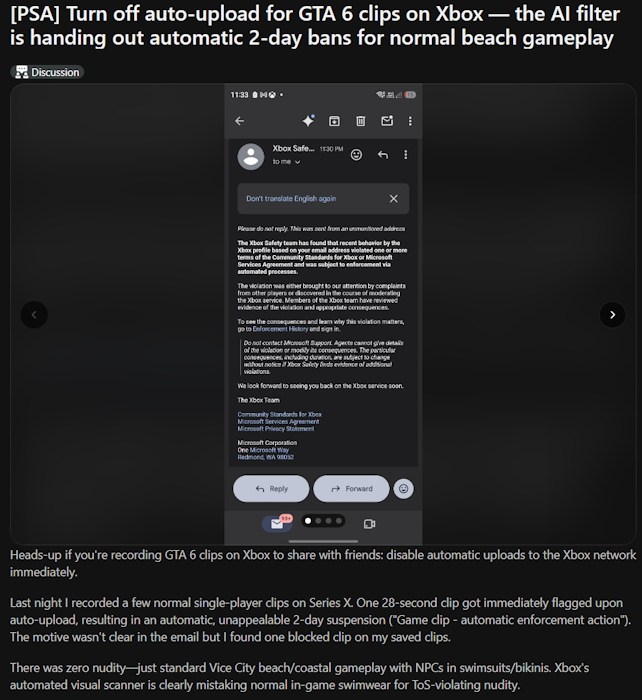
The clip was flagged almost immediately for breaching its family and online safety guidelines after being automatically uploaded to the Xbox network. The player received an enforcement email citing a violation of Microsoft’s guidelines, but it did not specify the exact reason. They also claimed the 2-day ban could not be appealed.
Grand Theft Auto 6 certainly isn’t short on mature content, especially when it comes to the strip clubs in GTA 6 or nudist resorts. Under the Xbox regulation, sharing gameplay clips or screenshots containing mature sexual content can result in enforcement actions. So, a suspension for uploading explicit footage from one of these locations would be more understandable.
But in this case, the clip is about NPCs simply wearing swimsuits on a beach. Some players suspect Xbox’s automated moderation system may have incorrectly flagged the footage, although there’s no confirmation that this caused the suspension. Other players have also reported similar temporary bans while playing GTA 6 on Xbox.
Until Microsoft provides more clarity, Xbox players might want to disable automatic uploads to prevent their GTA 6 clips from being shared with the Xbox network without their knowledge.
How to Turn Off Automatic Uploads on Xbox Series X|S
If you’re exploring Vice City in GTA 6 on Xbox Series X|S, you can disable automatic uploads to stop your gameplay clips and screenshots from being shared with the Xbox network. Here’s how you can do it:
- Press the Xbox button and go to the Captures tab (fifth from the left).
- Scroll down and open the Capture settings on your Xbox Series X|S.
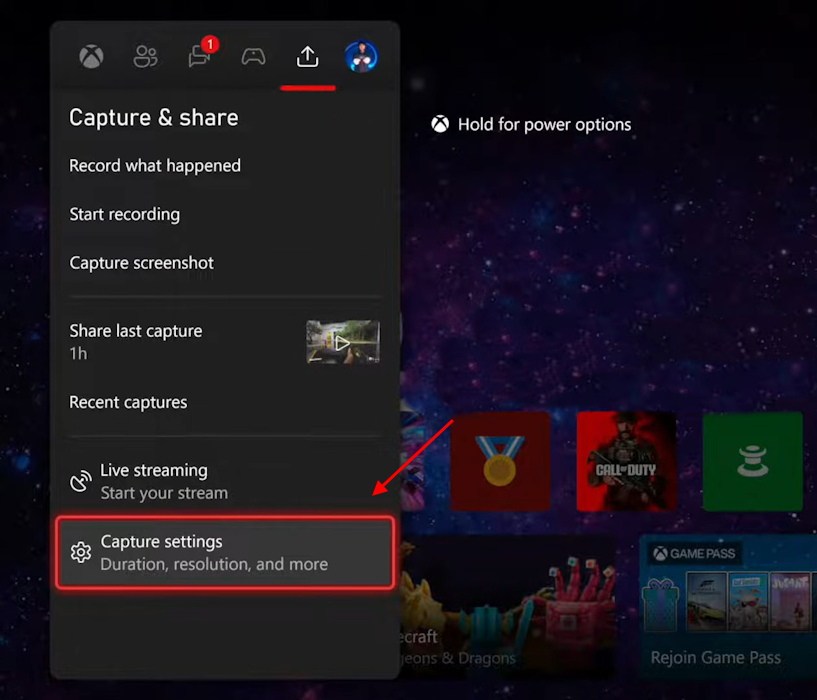
- Change the Automatic uploads settings on this screen.
- Change the ‘To the Xbox network’ and ‘To OneDrive’ settings to ‘Don’t upload’ from the dropdown menu.
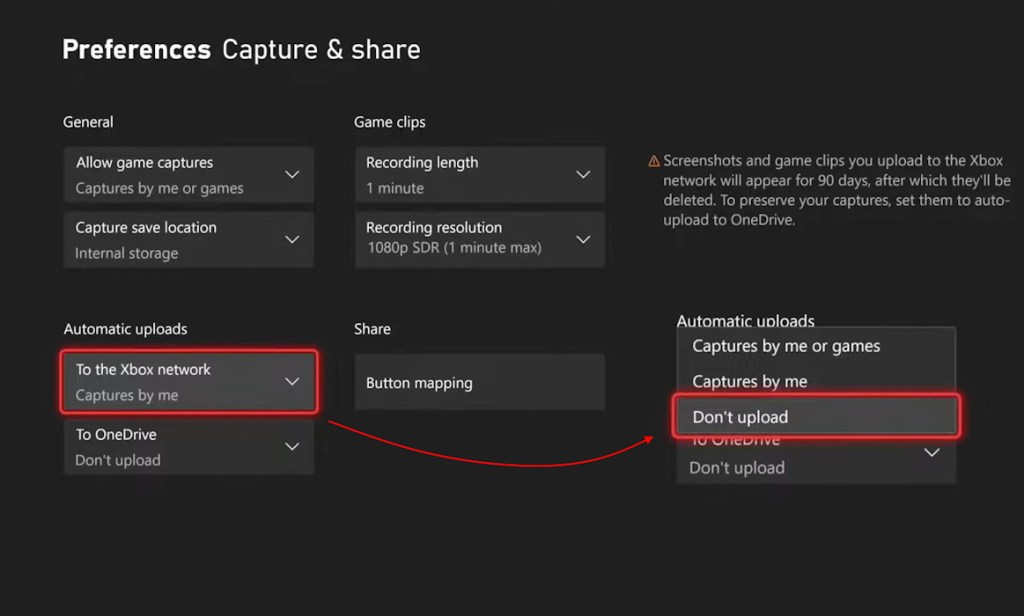
Alternatively, you can also reach the Xbox auto upload settings by going to Settings -> Preferences -> Capture & Share -> Automatic uploads.
Disabling automatic uploads won’t prevent you from taking screenshots or recording gameplay clips in GTA 6. You can still save captures locally on your Xbox console and choose which ones to upload manually.
For now, Xbox players might want to keep automatic uploads disabled while exploring Vice City. After all, nobody wants to risk an account ban over an innocent gameplay clip.




 Sanmay Chakrabarti