There is no escaping AI in 2026, so why not use it to make your everyday life a bit easier? As an Android user, I have hundreds of apps installed on my phone, but let me tell you about the best AI apps for Android that I use every day to guide me through complex topics and situations, making my life a bit simpler. So let’s take a look at them, and maybe you will find your next favorite app here, too.
Best AI Apps for Android Compared
I have tried, tested, and been using these Android apps for a while now. They have basically become my everyday necessities. So here is a quick look at them, along with their use case, limitations, and pricing.
| Android App | Best Use Case | Limitations | Pricing |
|---|---|---|---|
| Google Gemini | Everyday assistance, deep search, creative outputs on mobile | Advanced models locked behind paid plans | Free, AI Pro plans start at $20/month |
| ChatGPT | Anyone looking for a reliable and versatile AI chatbot for Android | Does not have deep integration with Android ecosystem like Gemini | Free, Paid plan starts at $20/month |
| Grammarly | Anyone who makes too many typing mistakes | Some advanced tone suggestion features are exclusive to Pro plan | Free, Grammarly Pro starts at $12/month |
| Notion AI | Daily workspace management, organization, note taking and summarization | Not a standalone AI app, mostly suited for workspace professionals | Free, Plus plan starts at $10/month |
| Comet Browser | People who spend lots of time reading and researching on their phones | Doesn’t offer the deep generative features | Free to use |
| Canva | Social media creators, small business owners, marketers, and casual editors | Advanced tools and templates limited to Canva Pro subscription | Free, Canva Pro costs $12.99/month |
| Perplexity | People who need accurate, up-to-date information quickly on Android | Not designed for creative thinking and idea suggestions | Free, Paid plan starts at $20/month |
Overview of the Best AI Apps for Android
These AI apps prove that your Android phone, however old it may be, can do much more than you think. And honestly, these AI apps have helped me organize a lot of my digital clutter ever since I started using them. So, in no particular order, here are my favorite AI apps for Android.
1. Google Gemini
Google Gemini is the de facto AI assistant on Android, and at first, I didn’t quite enjoy using it, but now I can’t imagine a day without it. It is quite a competent natural language assistant, so I don’t have to get things right while speaking to it. It can set alarms, turn on the flashlight, add calendar events, help me search for something random, write, summarize, plan, reverse search images, and create one on its own.
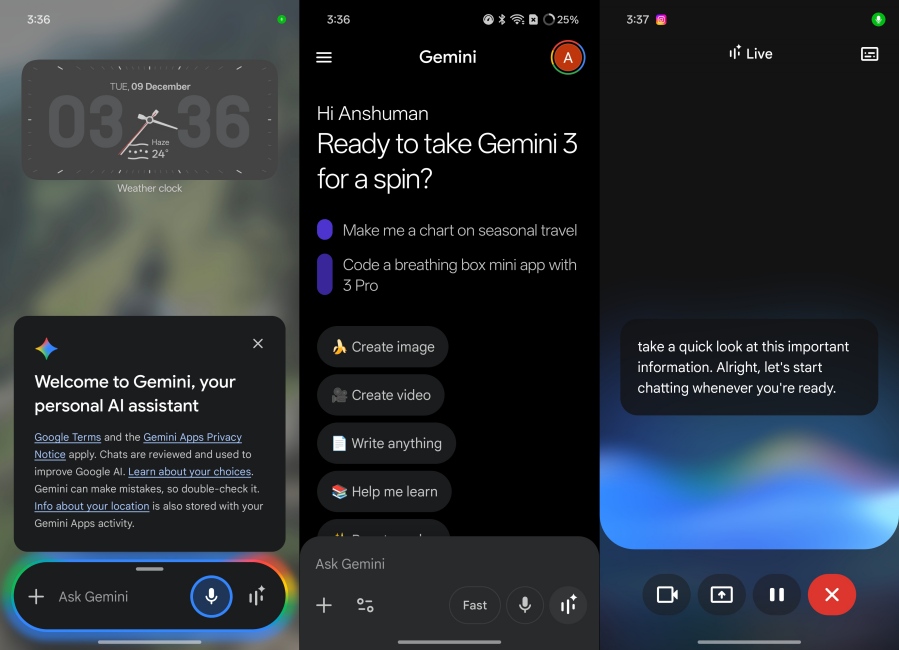
Gemini is like the jack of all trades of AI assistants, and it is just a swipe away anytime I need it. Its Gemini Live mode is also a handy option if you want live input from the AI on any situation. Plus, it is deeply integrated into Google’s suite of apps, whether it is Gmail, Docs, Sheets, or Keep. You will find it everywhere, and it syncs your details effortlessly.
| Pros | Cons |
|---|---|
| Deep integration with Android and Google apps | Access to advanced models require a paid plan |
| Real-time knowledge powered by Google Search | |
| Default assistant on Android phones | |
| Great image generation model |
Pricing: Free, AI Pro plan starts at $20/month
2. ChatGPT
After Gemini, ChatGPT is my dependable AI chatbot that I use every day, just because it is more consistent in its responses than Gemini. It also provides more coherent and creative responses, which make it a suitable AI app for Android if you need quick brainstorming or structured writing and summarization. It can also look up the web for the latest trends and news, making it one of the best AI research tools you can have on your phone.
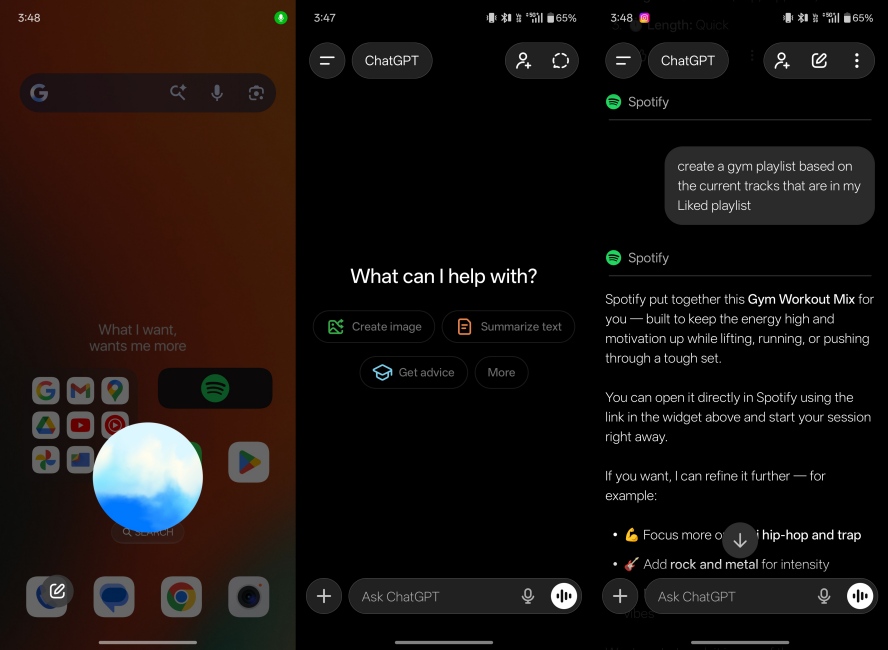
What I really enjoyed about ChatGPT after using it daily is how adaptable it is. Over time, it has learned from my conversation and understands my preferences. This allows it to provide more tailored answers. It can also be set as the default assistant on Android, replacing Gemini, so you can get instant access to its voice mode. Plus, it integrates several apps like Spotify, so I can ask ChatGPT to make me a gym playlist, and it will do so in a jiffy and add it to my Spotify library.
| Pros | Cons |
|---|---|
| Versatile and adaptable AI chat bot | Responses still need fact-checking for accuracy |
| Help with brainstorming ideas and creative inputs | |
| Also works as a deep research tool, providing real-time data | |
| Clean, distraction-free Android interface |
Pricing: Free, Paid plan starts at $20/month
3. Grammarly AI Writing Assistant
After using Grammarly for years on my desktop browser, I thought it might be worth trying out on my Android phone, and it was the best decision ever. It’s an always-on-standby AI app for Android that catches grammatical issues, sentence errors, and spelling mistakes and provides suggestions to correct them. It works with the default keyboard, so you don’t need to open its own app to use it.
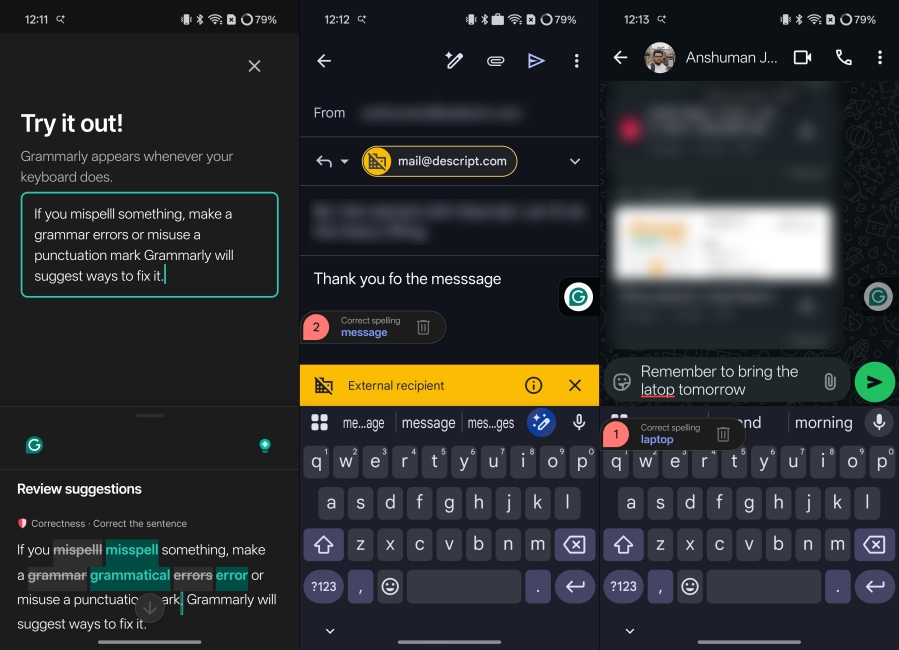
I have been using it while writing emails, WhatsApp messages, Google Docs, and social posts, and it has significantly helped with my Grammar. I make fewer mistakes, and my writing sounds more professional as well. The only issue I have faced with Grammarly is that sometimes it tries to do its own thing and suggests too many unnecessary changes. Still, it is a great free AI app for Android that is a must-have if you frequently make typing mistakes.
| Pros | Cons |
|---|---|
| Excellent grammar, spelling, and punctuation correction | Advanced suggestions require a premium plan |
| Minimal setup and very easy to use | Tends to suggest unnecessary changes at times |
| Helpful tone and clarity suggestions | |
| Works system-wide across most Android apps |
Pricing: Free, Grammarly Pro starts at $12/month
4. Notion
Notion is an amazing note-taking and workspace organization app, which I came to know about from my current job. I use it for everything, from assigning tasks, organizing, planning for upcoming calendar events, and even writing rough drafts of my articles. And the best part is I could do all this, right from my Android phone, and share it with my peers.
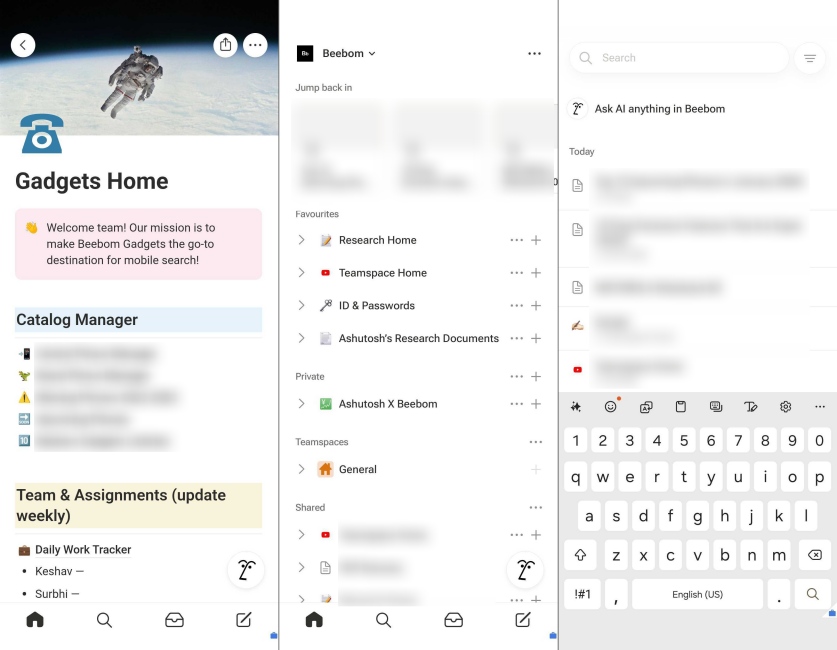
It’s an excellent app, and it has integrated a bunch of useful AI features like generation, rephrasing, summary, and task breakdowns, which help further simplify workflows and improve productivity. My favorite is its idea expansion feature, which helps me out whenever I have writer’s block. It’s a great AI app for Android, but it has a learning curve to it, which you need to learn to use Notion’s full potential.
| Pros | Cons |
|---|---|
| Great note taking, organizing and task management app | Steep learning curve for new users |
| Can generate outlines, ideas, and structured tasks instantly | Best features require a Notion AI subscription |
| Works offline for basic prompts and editing | |
| Integrated directly into your notes and workspace |
Pricing: Free, Plus plan starts at $10/month
5. Comet Browser
Comet is not like any other web browser you have used before. It is an AI web browser on Android that uses generative AI capabilities to bring the answers to you, rather than you having to search for them. How? Instead of loading Google pages, it goes through them on its own and creates a summary of the answer you were most likely looking for. It is the ease of use that is why I have set Comet as my default web browser.
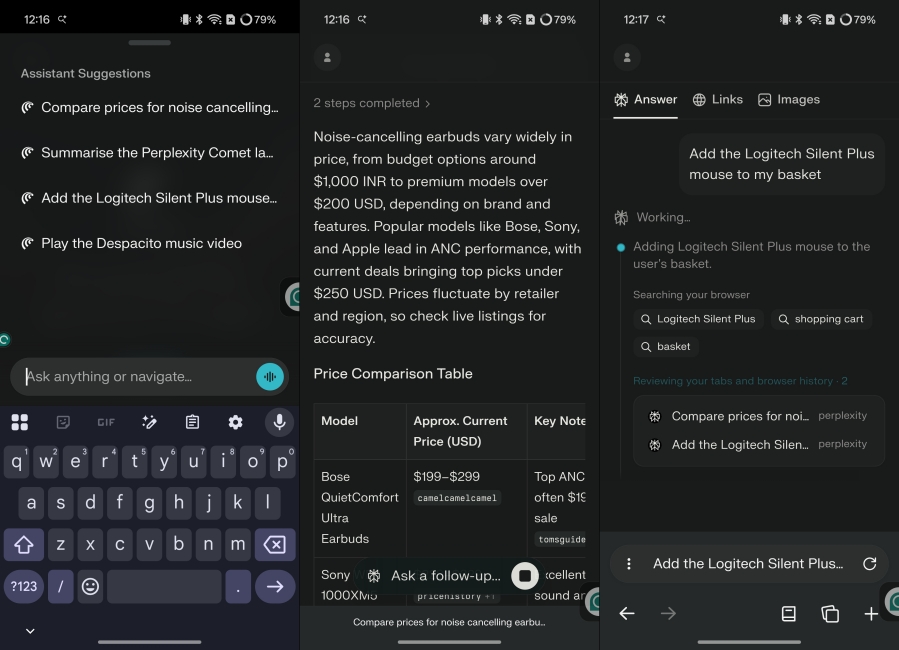
It even lets me chat with it for more refined details, offers quick search insight, content rephrasing, and contextual help, just to name a few other features. It is one of those AI apps on Android that you don’t know you need until you have tried. For anyone who researches, reads, or works on mobile, Comet is the best browser for them.
| Pros | Cons |
|---|---|
| AI built into the browser itself | Some responses feel generic on complex topics |
| Can fetch answers from multiple websites and sources | Occasional latency when summarizing very long pages |
| Summarizes long articles and reviews | |
| Clean, fast browsing experience with AI shortcuts |
Pricing: Free to use
6. Canva
Canva is one of the best graphic design tools you can have on your Android phone, as it features a plethora of useful tools and templates to come up with quick creative ideas. Besides offering an AI image generator, it has recently integrated a bunch of AI features like background remover, image to image generation, auto captions and smart resizing for social media apps.

I have been using the last feature a lot to make sure my Instagram posts look perfect, the way I want them to. I also dabble in creating some images, when I can’t find the right stock image that fits my ideas. Plus, Canva has come in handy to get quick cards and poster ideas, for my family events. And I was able to do all that just from my phone without any advanced skills. This is why it is one of the best AI apps for Android and I highly recommend it to everyone.
| Pros | Cons |
|---|---|
| Huge library of templates for every social format | Background remover and other advanced features require Pro membership |
| Generate text to image or image to image features | Auto captions may not be correct every time |
| Intuitive drag-and-drop interface | |
| Beginner friendly app |
Pricing: Free, Canva Pro costs $12.99/month
7. Perplexity
If you are looking for an free AI app for Android to help with deep insightful research on complex topics, and break them down into bite sized, easily consumable information then Perplexity is best option for you. I have to often look into complicated topics out of my expertise for articles, and Perplexity comes along as a lifesaver. It sources information from every part of the internet, giving my detailed data.
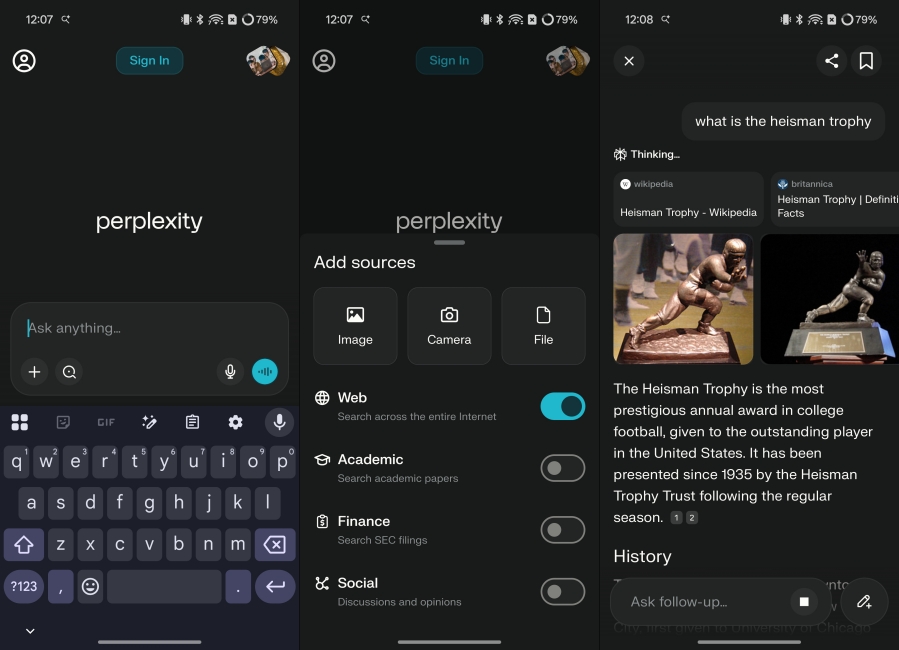
It is a great solution for doing random fact checking on the go, with proper citations. So I know the information is valid, and 9 out of 10 times, I don’t have to recheck it again myself. Its voice mode is also helpful when my hands are full, or I am not in a typing mood. The reason it ranks the last in this list is because there is no deeper integration with Android itself, or other apps. However, it is one of the best AI apps for iPhone since it works with Apple’s stock apps.
| Pros | Cons |
|---|---|
| Clear, summarized responses that save time | Not great for creative ideas or brainstorming |
| Sourced links make fact-checking easy | |
| Great for research and quick insights on the go | |
| Voice mode can understand thick accents and nuanced words |
Pricing: Free, Pro plan starts at $20/month
So these are some of my favorite AI apps for Android that I daily on my smartphone. All of them have a free version, so you won’t have an issue trying them out. I, myself, don’t pay for the subscriptions since I personally don’t feel the need to use the advanced features. So which one was your favorite? Did I miss out on my important ones? Let me know in the comments below.






 Anshuman Jain