The NYT Crossword has been around since the 1940s and remains popular among puzzle fanatics even today. Over time, the New York Times has released smaller variants of the classic Crossword, appealing to different audiences. Among these variants, the Mini Crossword has gained popularity for its smaller grid and low time investment. So, if you are eager to play the compact version, learn how to play the NYT Mini Crossword, along with some of the best tips and tricks here.
NYT Mini Crossword Rules and Mechanics
When starting with a new puzzle game, it’s essential to learn the game’s mechanics along with its rules. So, here is how the NYT Mini Crossword game works:
NYT Mini Crossword Grid Size
The classic NYT Crossword has a 15×15 daily grid and a 21×21 grid on Sundays. The newest addition, NYT Midi, features a 9×9 and 11×11 grid.
On the other hand, the Mini Crossword usually has a 5×5 grid every day, except for weekends when the grid can grow to 6×6 and 7×7. Due to the smaller grid size, the Mini Crossword is perfect for beginners as it only requires you to solve up to 12-15 clues.
Does Mini Crossword Have a Theme?
Unlike the Classic and Midi Crossword, the Mini Crossword doesn’t have an overarching theme. So, there is no theme mentioned under the header, as in the NYT Midi Crossword.
This means the clues and answers to the NYT Mini Crossword aren’t related to one common theme. Instead, they are based on trivia, wordplay, vocabulary, and more.
Mini Crossword Keyboard Shortcuts
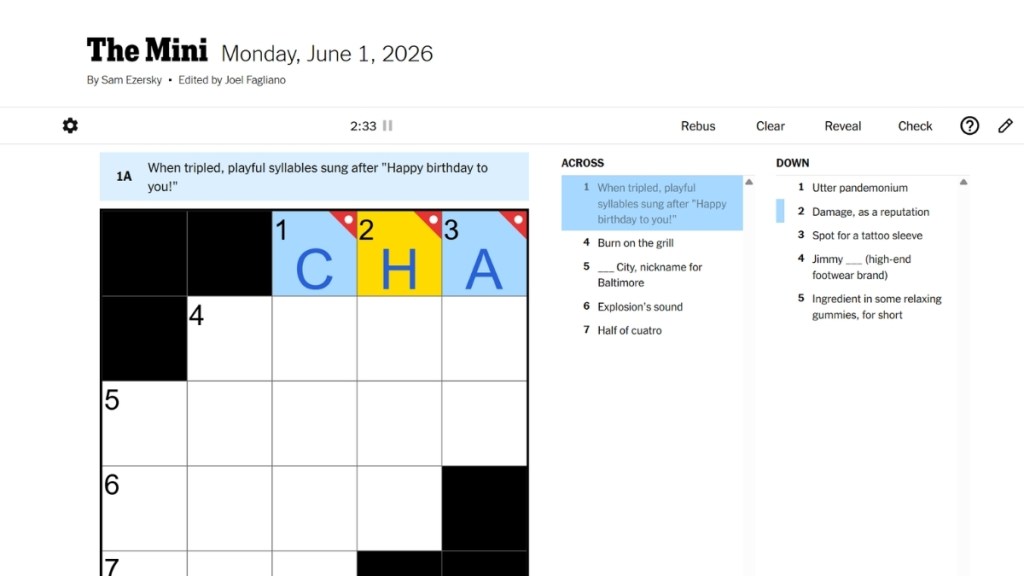
You don’t always have to rely on your mouse to navigate the grid, as The Mini has handy keyboard shortcuts that you can use. They are:
- Arrow keys: Used to switch direction within the grid. It lets you change between across and down sections, move in the direction of the arrow, jump back to the first blank in the word, or jump to the next clue.
- Spacebar: This shortcut is used to move between the square boxes one by one.
- Backspace (Delete on Macs): Press this key to remove letters from the grid.
- Tab key: Used to jump to the next clue between the across and down sections.
- Shift + Tab: Use this key combination to move to the previous clue.
- Escape: Pressing the Escape key enters Rebus mode.
Pen and Pencil Modes
If you are wondering why there is a pencil icon next to the help button, it is one of the most handy tools available in NYT Crossword games.
When you enter letters in the grid, each letter is automatically written in black color, which indicates it’s using the default Pen mode. However, Pencil mode allows you to separate confirmed words from words you’re unsure of being the answer.
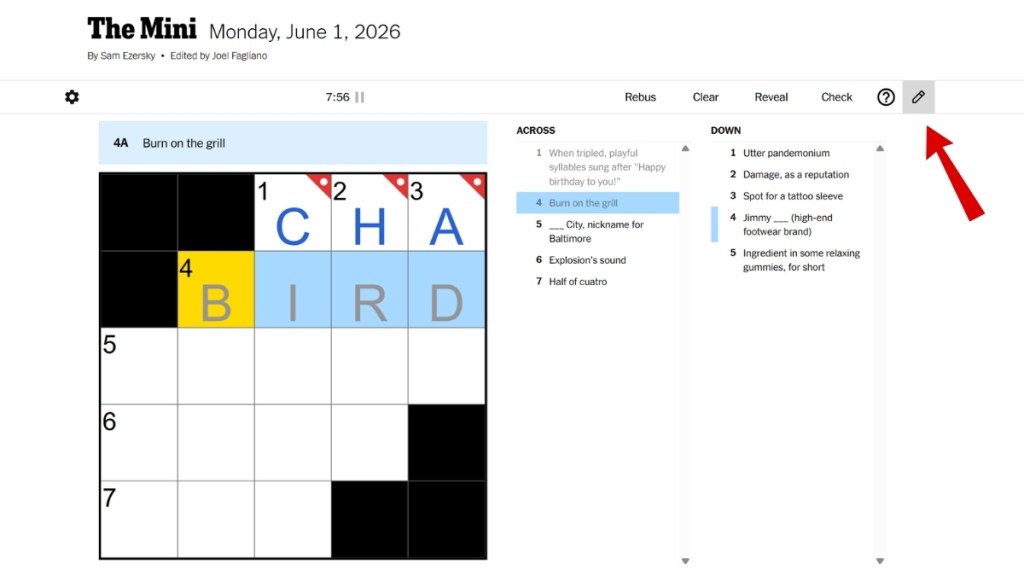
When you click the pencil icon, it activates Pencil mode. Now, the words you input are highlighted in grey color as opposed to the default black. You can disable Pencil mode by clicking its icon once again.
Letter Colors in The Mini
In line with other crosswords, the letters are highlighted in three different colors in the NYT Mini Crossword as well. These visual cues are really helpful for the player, and they are:
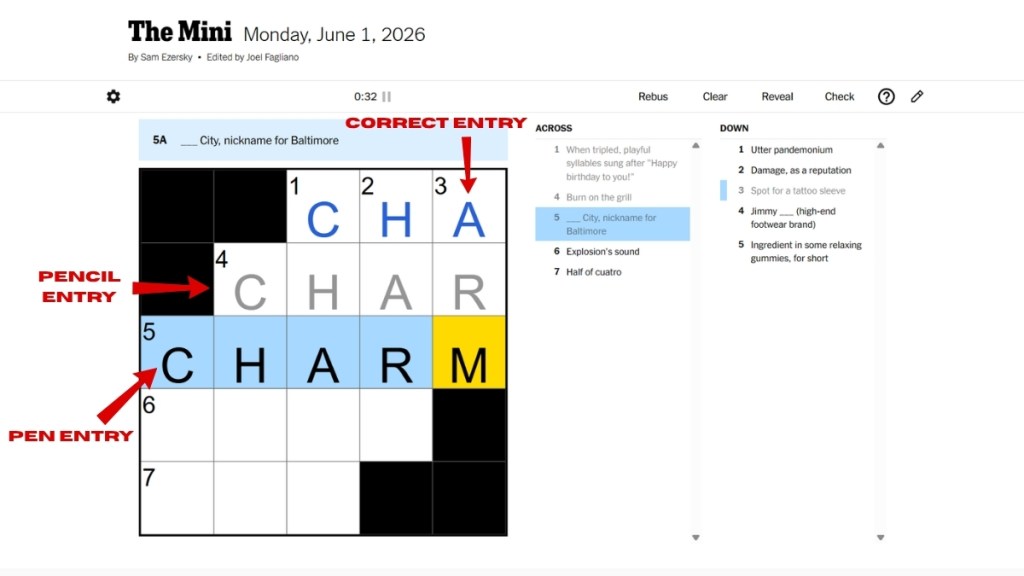
- Black: Letters entered using the Pen mode
- Grey: Letters entered using the Pencil mode
- Blue: On clicking the Check button, letters are highlighted in blue if they are correct
How Does The Mini Crossword Timer Work?
Fortunately, the NYT Mini Crossword puzzle doesn’t have a time limit. You can complete the puzzle at your own pace.
Still, there is a timer above the puzzle to track how long it takes you to complete the grid every day. You can pause this timer manually, or it pauses automatically if you switch to another tab.
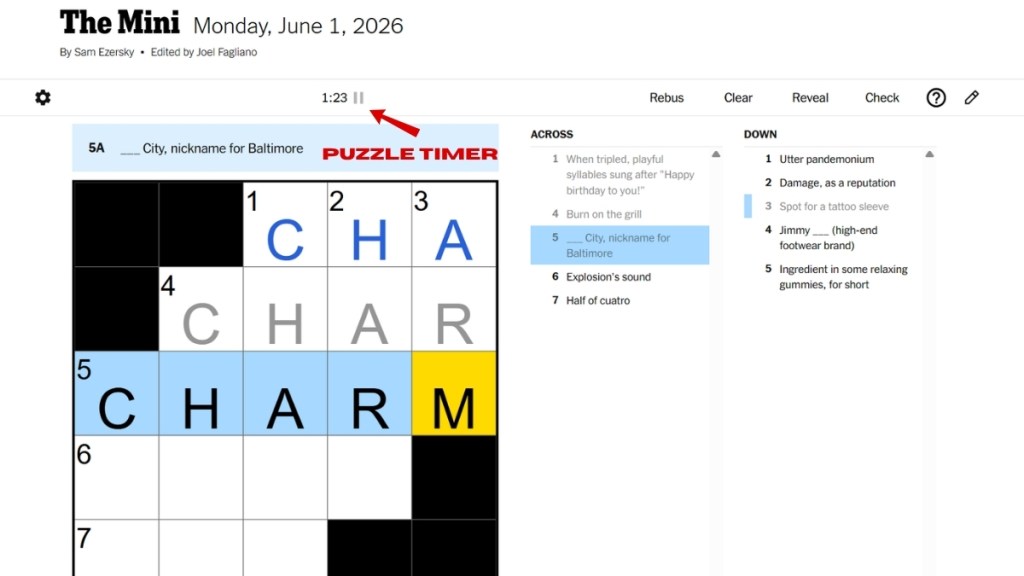
The timer will be reset if you select the ‘Clear Puzzle and Timer’ button. Moreover, if you find the timer annoying, you can disable it in the settings menu.
What Do Check, Reveal, and Clear Mean in NYT Mini?
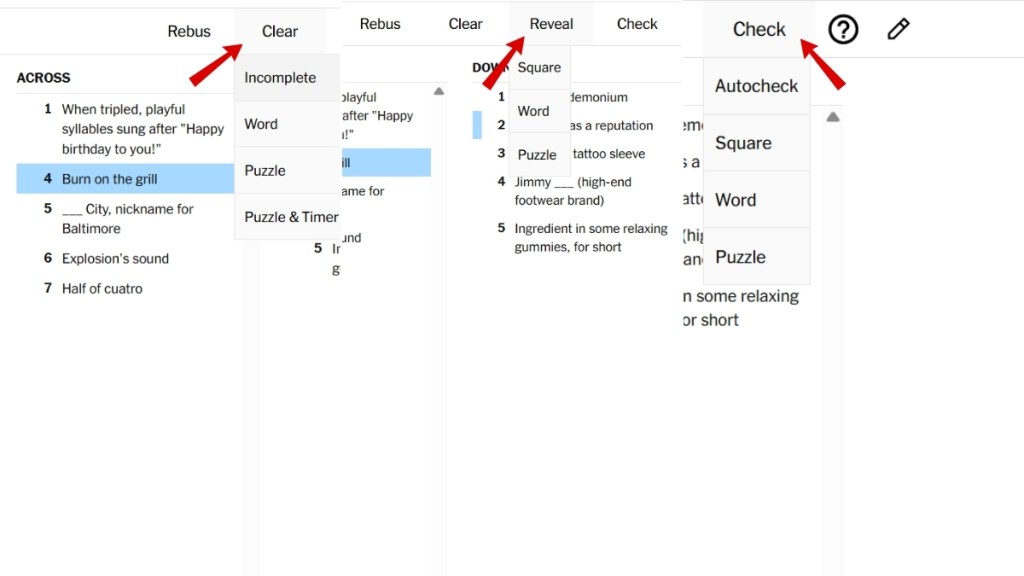
NYT offers three features that can assist you in solving the Mini Crossword puzzle: Check, Reveal, and Clear. Here is what each feature does when you select it:
- Check: This option lets you check if the entered word is correct or not. You can check a word, a letter, or the entire puzzle. Moreover, the “Auto-Check” option checks the words automatically as you input them in the grid. The letters are highlighted in blue if they are correct, and a slash appears on a letter if it’s incorrect.
- Reveal: If you feel stuck, you can use the Reveal option to reveal the puzzle’s answer. You can reveal a letter, word, or the whole puzzle.
- Clear: This option does as the name says and helps you delete letters, words, or even the entire puzzle.
What Is Rebus in NYT Mini Crossword?
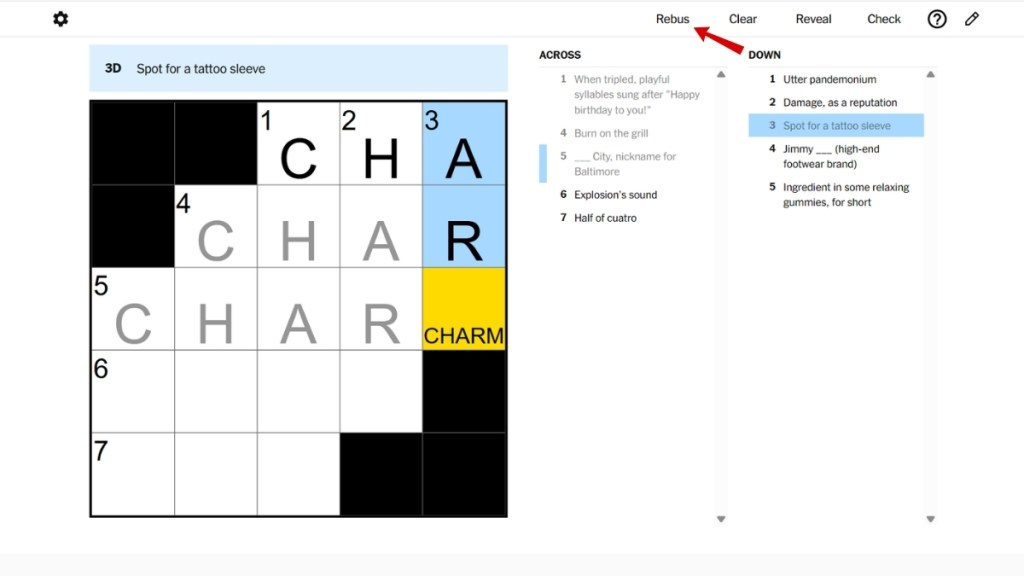
On the top right of the puzzle window, you will find another option called Rebus. This feature, for those who are new to crosswords, is used to enter more than one letter in a single square in the crossword grid.
Using this feature, you can enter multiple letters or a whole word into a single cell. Rarely, you are required to enter a word in a single square in the Classic and Midi puzzles. So, in times of need, the Rebus option is present in the Mini Crossword as well.
How to Play The Mini Crossword: A Step-by-Step Guide
If you are a beginner and are now well-versed with the NYT Mini Crossword’s rules and mechanics, it’s time to learn how to play the game. But first, you need to get an active NYT Games or All Access subscription to play the Mini Crossword. So, log in to your account on the NYT Games website and buy a subscription if you don’t have one.
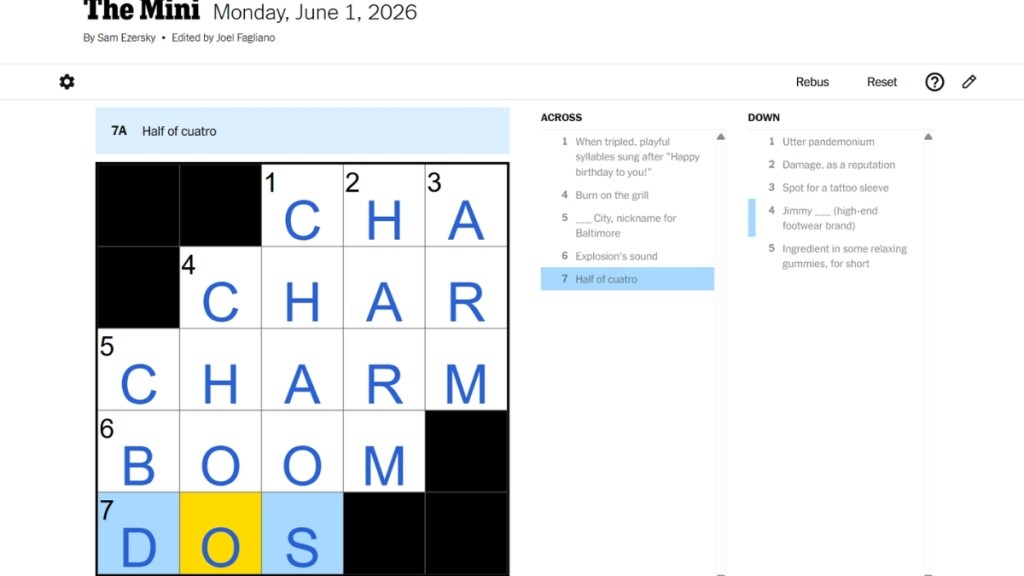
- Once you are subscribed, The Mini will become accessible. The puzzle grid will be on the left, and the clues (Across and Down) will be on the right side.
- Pick either Across or Down clues and begin entering your answers one by one in the required squares.
- It is best to enable the autocheck feature right at the start of the game. This way, you can check whether a letter or word you entered is correct or not as you type.
- Fill the grid based on the clues. If all the letters are correct, aka blue, the puzzle will be marked complete, and you will immediately receive a congratulatory message.
- On the other hand, if you have entered incorrect letters or words, they will be crossed out in red in the puzzle. You can go over them and correct them, or use the reveal option in case you are stuck.
How to Play The Mini Crossword with Friends
Currently, there is no option in the NYT Mini Crossword that lets you solve the puzzle with your friends.
Instead, you can play alongside your friend using various apps on mobile or PC, or you can share your screen with friends while playing the Mini Crossword.
Try sharing the puzzle link with your friend to play The Mini at the same time on different screens. However, your friend must also have an active NYT subscription to play the game.
After you complete the Mini Crossword, you can share your completion status with your friends by pressing the “Share your results” link. This way, you can compare the time taken to solve the puzzle for you and your friend.
Can You Play Past NYT Mini Crossword Puzzles?
Yes, you can access older Mini Crossword puzzles via the Mini Crossword archive. Head to the NYT Mini Crossword archive, and select the desired month and year. Then, you can click on any one of the puzzles and begin playing right away.
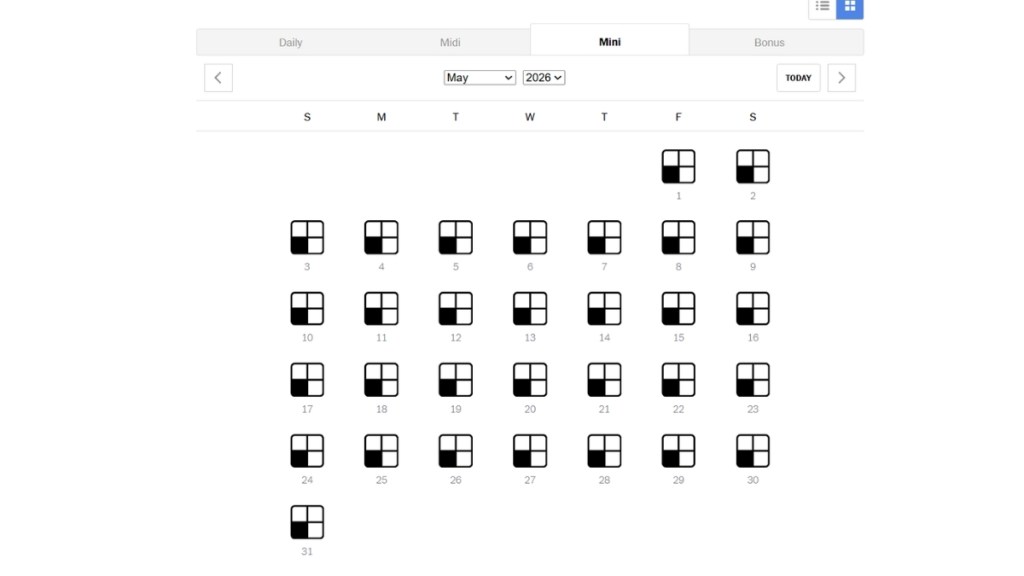
In addition to the archive, there is a trick you can use to access previous puzzles. For that, you need to switch your system’s date and time to an older date, and then you can play the puzzle.
NYT Mini Crossword Tips and Tricks
Unlike the Classic and Midi Crosswords, you can finish The Mini in a couple of minutes if you are good at trivia and have a strong vocabulary.
If you want to complete the puzzle in a short time, here are our tried and tested tips and tricks to master the NYT Mini Crossword :
- Begin with easy clues: First, check the list of clues and enter the words you are sure about. If you have “Auto Check” enabled, you can quickly find out if your entered words are correct. This way, you can establish a strong foundation and can easily complete the rest of the puzzle.
- Skip tough clues: No matter how good you are at solving crosswords, there will always be clues that you don’t know the answer to. Instead of wasting time on cracking hard clues first, skip them for now and solve the easy ones.
- Enable Auto Check: Always use the Auto Check option so that you can find out if your word is correct as you enter it in the square.
- Get familiar with crossword vocabulary: As you keep playing the Mini crossword every day, you will get familiar with the Crossword’s vocabulary, and you can begin solving the puzzle quickly over time.
- Keep practicing older puzzles: As we mentioned earlier, you can access older Mini puzzles via the official archive. So, keep playing previous puzzles if you have time to beat your personal best record and get good at the game.
If you’re a beginner, I hope we covered enough ground to help you understand how to play the NYT Mini Crossword. The mini version is perfect for puzzle lovers around the world, as it requires only a limited time commitment.
The NYT Mini Crossword usually comes in a 5×5 grid size, which can sometimes extend to 6×6 and 7×7 on weekends.
Yes, you need a NYT Games or All Access subscription to play the Mini Crossword every day.
No, the Mini Crossword is easier to solve than the Midi puzzle as it has a smaller and more accessible grid. Moreover, the NYT Mini Crossword does not have a theme tying each clue together.
Is the NYT Mini Crossword Still Free? (Updated 2026)
 Sanmay Chakrabarti
When Does NYT Mini Crossword Reset?
 Daksha Gupta
4 Common Mistakes to Avoid in NYT Mini Crossword
Sanmay Chakrabarti
NYT Mini Crossword Answers Today - October 9, 2026
 Ishan Adhikary