Smartphone cameras have significantly advanced over the past decade. So the images come out looking better, and we find even less need to use a photo editing app on our mobile phone. But editing is not about making your photos look good; it can also help to accentuate the mood, remove background objects, or add color correction. That is why I tested out the best photo editing apps for Android that are still relevant in 2026, and here are my top picks.
Overview of the Best Photo Editing Apps for Android in 2026
I have prepared a table to make it easy for you to compare the photo editing apps I have selected, their features, limitations, and pricing models.
Best Photo Editing Apps Features Limitations Pricing Adobe Lightroom AI Excellent editing features, RAW support, selective adjustments, presets, healing/retouch tools, cloud-sync Advanced tools and cloud features locked behind a paid plan Free, Paid plan starts at $11.99/month Picsart AI effects, background remover, filters, stickers, text overlays, collage maker, preset templates, simple UI Ads in the interface Free, Picsart Plus starts at $13/month Luminar Space AI sky enhancer, object removal, filters, tone, color adjustments, crop/rotate, and quick export AI features and filters locked behind paywall Free, Perpetual license available for $139 Snapseed Selective Adjust, Healing brush, Curves, RAW support, Perspective, Frames, completely free to use Interface can look dated, app not updated in years Completely free Background Eraser AI background removal, manual removing tool, zoom, enhance and soften removed object Requires to watch ad to export a photo Completely free Google Photos Auto-enhance, Magic Eraser, portrait light, color and light sliders, filters, crop/rotate, cloud backup, smart search Manual editing options are limited Free, Google One starts at $1.99/month Lensa AI portrait retouch, skin and eye enhancement, background blur, filters, color adjustments, crop/rotate Best AI features are locked behind a paid subscription Free, Paid membership starts at $29.99/annually Remini AI photo enhancement, face detail restoration, old photo repair, video enhancement, AI styles and effects Requires to watch ad to export photo in free version, most AI effects tied to subscription Free, Remini Pro plan available at $9.99/week
How I Selected the Best Photo Editing Apps for Android
Since we are talking about photo editing apps for Android, I started testing out by clicking photos on my daily driver device, the OnePlus 12R, which has a decent camera, but falters in some low-light and close-up scenarios. Next, I looked up the best free photo editing apps, since most of us wouldn’t want to pay up right away for an app.
The apps that I picked are also dependent on user ratings and recommendations from Reddit. Once I had the pool of apps, I started testing them for different use cases like background removal, adjusting colors, improving the overall image, AI enhancements, and other useful features. And from testing over 30 apps, my choice came down to these 10 apps.
Best Photo Editing Apps for Android in 2026
So, without making you wait any longer, let me take you through my overall pick for the best photo editing app for Android that is perfect for most casual users. These are certainly not going to be Photoshop alternatives, but they should be enough to get you the results you were looking for.
Adobe Lightroom AI Photo Editor
I have used Adobe products for years, and that is why using Adobe Lightroom AI photo editor felt so natural to me. I can easily sync photos with Adobe Creative Cloud and edit desktop images on my phone, or vice versa. Moreover, it offers a good set of features to begin with, which will please both casual and professional users.
Adobe has also incorporated some AI photo editing features into the mix as well. However, the biggest hurdle is the paywall. You need to pay up for the Lightroom Premium for $11.99/month. While I wouldn’t recommend you get the subscription right away, it is a decent starting point, and one of the best photo editing apps for Android in my book.
What I Liked What I Didn’t Like Sync photos across devices Premium features require a subscription Professional-grade tools in a mobile app Excellent RAW and color editing features
Price: Free, Paid plan starts at $11.99/month
Picsart
Picsart is another great photo editing app for Android, used by millions of people out there. It is not professional-centric like Adobe Lightroom; it caters more towards casual users who want to improve the look of their photo or add different effects, filters, backgrounds, or stickers to share on their socials. I have been using Picsart since my college days, and it was out go to app of choice.

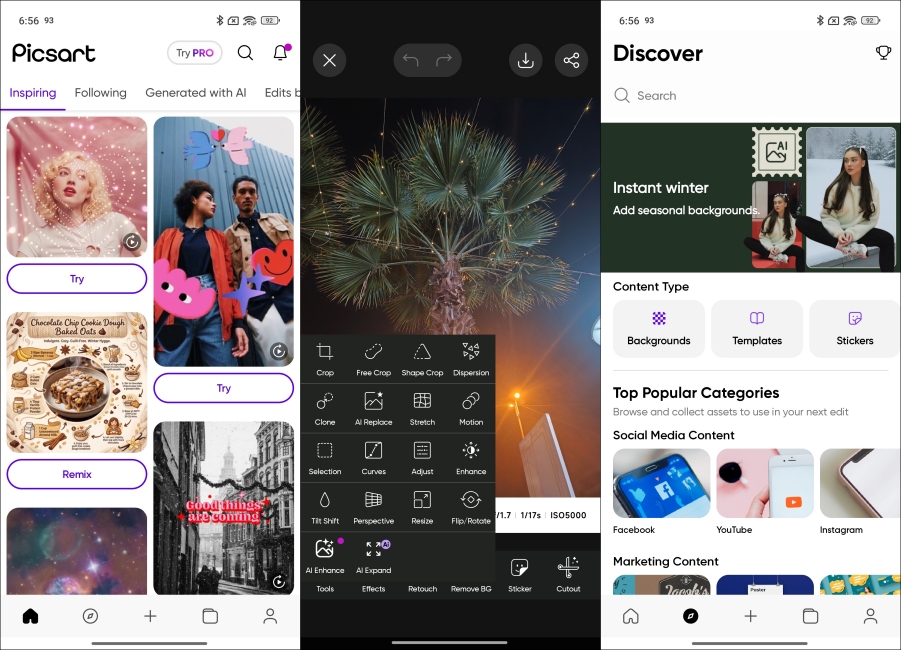
Besides all the filters, crop tools, and background removers, Picsart also features some really unique and cute templates that you can try out for yourself or share the ones you have made. It’s quite easy to insert your photo in any one of the templates and have it ready to share within seconds. However, it does feature ads in the UI in the free version.
| What I Liked | What I Didn’t Like |
|---|---|
| Tons of fun and creative tools and options | Ads in the UI |
| Variety of templates and presets | Some features locked behind subscription |
| Easy to use interface |
Price: Free, Picsart Plus starts at $13/month
Luminar Space
Luminar Space is one of the most well-designed photo editing apps I have ever used. It lets go of the typical layout. Like how it uses dials instead of sliders, and every movement is accompanied by a haptic vibration, which makes the experience of using Luminar Space that much more engaging. I have used this app for both quick touch-ups and turning my photos into moody, creative edits. And it fulfills both demands satisfyingly.
I found that there are a good number of AI photo editing features here as well. Like Relight, which helps change the source of background light in the image. There are also Skin and Structure options to adjust the size and shape of your body, as well as many other options. However, many of these are locked behind the Pro paywall, along with all the filters. This made me feel quite restricted.
What I Liked What I Didn’t Like Interactive and unique interface Most features and filters locked behind paywall Tons of useful AI features Occasional lag on older devices Good set of filters and quick enhance options
Price: Free, Perpetual license available for $139
Snapseed
Snapseed has remained one of the preferred photo editing apps for many veteran Android users, including me. The simple reason for that is the deep integration of customized control variables in each filter and tool that lets us achieve the desired outcome and make that perfect image worthy of posting on Instagram.
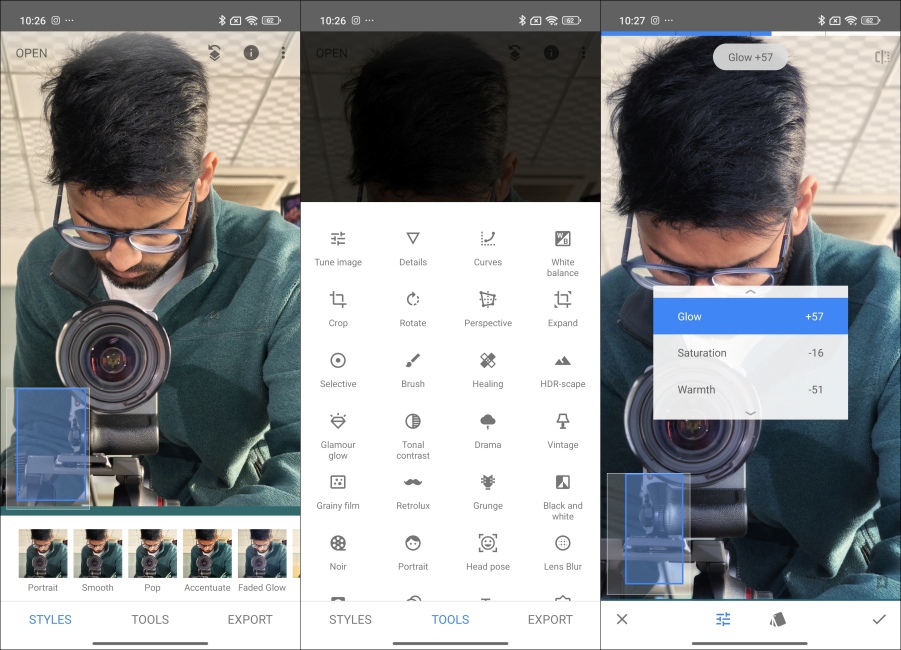
Even though the sheer diversity of editing tools and effects can get overwhelming, once you get a hold of them, you will evolve into a certified photo editing machine. Snapseed has other standout features too, like the ability to edit RAW files and export them as JPG files without any loss in quality. The photo editing app is free to use, without ads or a paywall. But over the years, Google seemed to have forgotten about Snapseed, as it has not received an update in years.
What I Liked What I Didn’t Like Tons of editing tools and options Interface can feel dated Can edit RAW and DNG files No built-in cloud or social features Make accurate adjustments/ completely free
Price: Completely Free
Best Photo Editing Tools for Background Removal
Now, I also checked out some of the best photo editing apps to remove the background. For this, I have picked the aptly named Background Eraser. Let me tell you more about them in detail.
Background Eraser
As the name suggests, Background Eraser is a straightforward photo editing app that lets you remove the background of your photos, if you want clean cutouts for WhatsApp stickers, templates, or other reasons. You can use the AI feature to quickly get a clean cutout.
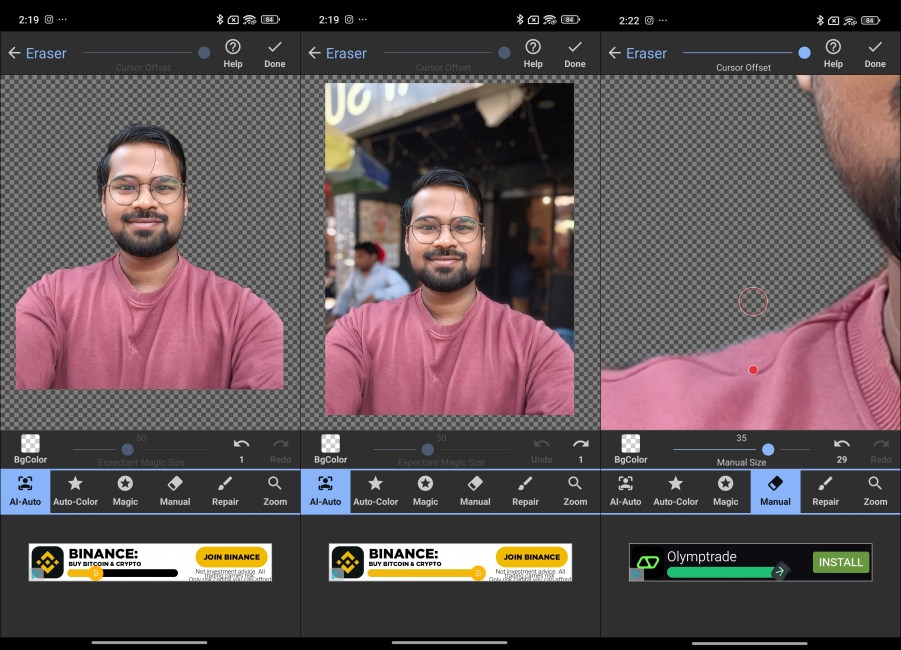
But if that doesn’t offer a satisfactory result, then you can use the manual option to clear the unnecessary portion on your own. There is also an option to soften the rough edges, which is pretty useful if you did manual background removal. However, there are a bunch of ads in the UI, and it also forced me to watch one to export the image.
| What I Liked | What I Didn’t Like |
|---|---|
| AI background remover works quite well | UI can look dated |
| Easy to use and decent feature set | Ads when exporting the picture |
| Completely free to use |
Price: Completely free
Best Photo Editing Apps for AI Enhancements
Most photo editing apps these days come with some sort of AI enhancements, but there are some, like Google Photos, Lensa, and Remini, that take it to the next level.
Google Photos
Contrary to popular belief, Google Photos is more than just an image gallery. Over the year, it has also added a bunch of useful AI photo editing features that you can use completely for free. This includes the popular Magic Eraser tool that lets you clean up your background in a photo by removing unwanted objects or people in the background.
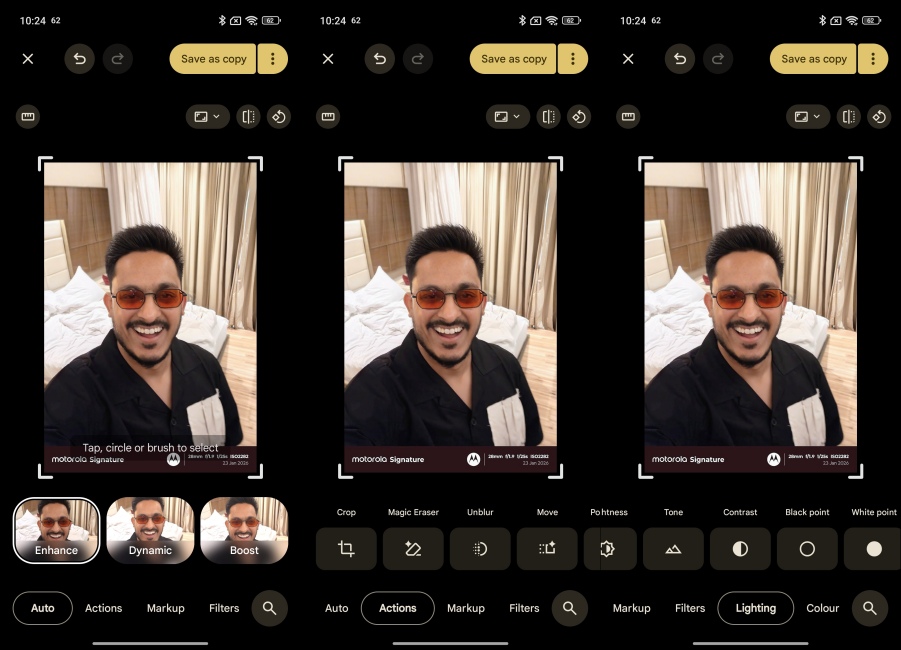
It uses advanced AI models to remove things in the photos, so you can focus on what is truly important in the shot. But that’s not all, other handy AI tools like Quick Enhance, Boost, Unblur, Move, Portrait Blur, or Pop can also improve the photo quality, and make it look better than before. The best part is that all these tools are available at your disposal for free, making Google Photos one of the best photo editing apps on Android.
What I Liked What I Didn’t Like Excellent AI-powered editing features Limited manual editing options Clean up background with Magic Eraser Advanced AI tools require Google One Works consistently across Android and iPhone
Price: Free, Google One starts at $1.99/month
Lensa
When we talk about the best photo editing app for Android or the best photo editing app for iPhone, Lensa’s name is sure to come up. That’s because it offers an intuitive experience, with its amazing set of AI enhancement features, filters, and effects. I tried out Lensa and was blown away by the AI features it has to offer.
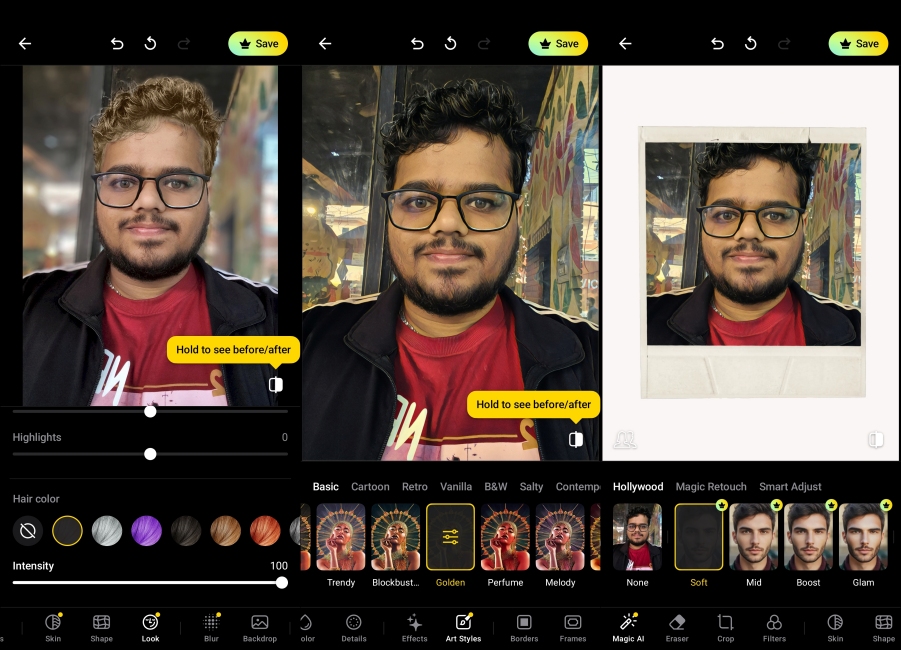
It offers some basic effects for smoothing and brightening your skin, to change your hair color, eyebrows, and the entire tone of the image. Lensa can also blur the background, and offers basic photo editing tools to adjust color, tones, exposure, sharpness, highlights, and shadows. However, its AI filters and effects make it a standout in my list. But sadly, you will have to get the subscription to try out most of the stuff.
What I Liked What I Didn’t Like Variety of AI filters and effects Mostly catered towards portrait photos Can change or adjust certain features of your face and hair AI filters and effects locked behind paywall Offers basic photo editing features
Price: Free, Paid membership starts at $29.99/annually
Remini
Remini feels like a traditional photo editing app, and more like an AI app with image enhancement features built-into it. Yet, I have added it to this list because it does a pretty decent job at improving existing photos. The Enhance option removes blemishes, clears background objects, softens skins and brightens it, making it perfect for sharing on your socials.
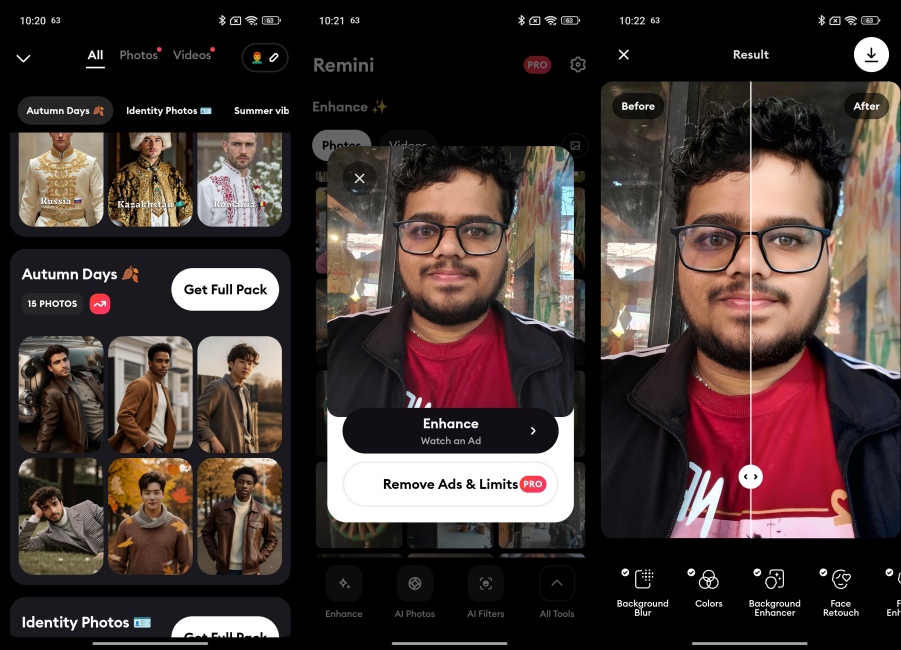
I also found some interesting options in Remini, like I can create a whole studio-like photoshoot using eight of my selfies. The app takes those images and, with the help of AI, creates realistic-looking studio shots. It has a library of AI templates where I can try out different outfits, backgrounds, styles, and effects. However, this requires the Lite or the Pro plan right out of the bat. So the free experience was quite limiting, and I had to watch an ad to export even a single photo.
| What I Liked | What I Didn’t Like |
|---|---|
| Tons of AI effects, styles, templates | Requires to watch ad to export photo |
| AI Enhance features works quite well | Most options are limited to the Lite or Pro plan |
| Easy to use interface | Includes ads |
Price: Free, Remini Pro plan available at $9.99/week
Well, these were the best photo editing apps that I have used. What are your ideas about our collection of the best photo editing apps for Android? Did we miss any that you think should have cut? Let us know in the comments section below, and also tell us which app(s) you downloaded after reading this article.
Adobe Lightroom AI photo editor earns the top spot for the best photo editing app for Android. It features a variety of creative tools to edit your photos, sync with Adobe Cloud, professional editing options, and AI features as well.
Picsart and Lumina Space are some of the easiest to learn Android photo editors. Both offer a simple interface and tools that you can quickly get familiar with.
Yes, all Android phones come with a built-in photo editor in the gallery app. Moreover, Google Photos offers a great set of AI editing options, like Magic Eraser, Quick Enhance, and Unblur.
Starting from the top, Adobe Lightroom AI photo editor, Picsart, Lumina Space, Snapseed, and Google Photos are some of the best photo editing apps on Android.