- Marvel Rivals Season 10.5 Twitch Drops went live on October 9, 2026, at 12 PM UTC.
- Players have to watch for 4 hours to claim the free Angela skin.
- The Season 10.5 Twitch Drops will remain active until November 6, 2026, at 9 AM UTC.
With the upcoming release of Marvel Rivals Season 10.5, NetEase is rolling out a fresh batch of Marvel Rivals Twitch Drops. This time around, players can score exclusive cosmetics for free, including a free skin for Angela. Here is everything you need to know about claiming all the free cosmetics for yourself.
Editor’s Note: Last updated on October 9, 2026, to include information about the latest Marvel Rivals Twitch Drops.
How to Get Free Marvel Rivals Angela Twitch Drop Skin
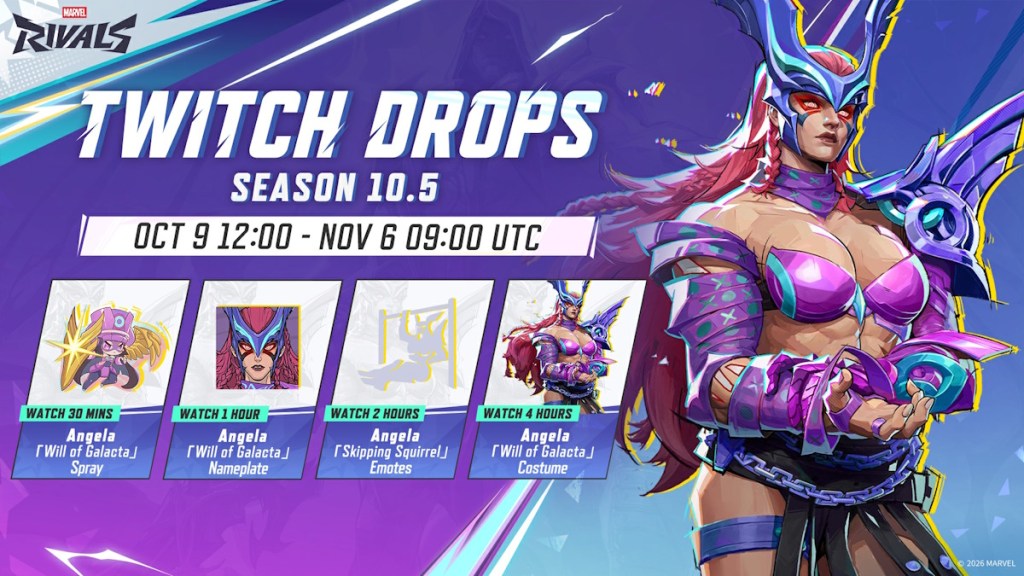
NetEase Games has launched free Twitch drops for players to claim with the release of Marvel Rivals Season 10.5. Discover the exact timings of the new Season 10.5 Twitch drops below:
- Marvel Rivals Season 10.5 Twitch Drops event began on October 9, 2026, at 12:00 PM UTC and ends on November 6, 2026, at 9:00 AM UTC.
Once the event is live, you can start watching Marvel Rivals’ official Twitch channel or the participating streamer channels that have drops enabled for about four hours to receive the Angela ‘Will of Galacta’ costume as a Twitch drop.
As with all the Will of Galacta free skins released so far, the Angela free skin collection also includes a nameplate, spray, emotes, and the main costume. Here is how long it would take for you to obtain each item by watching a drops-enabled Twitch stream:
- Angela ‘Will of Galacta’ Spray: Watch 30 minutes
- Angela ‘Will of Galacta’ Nameplate: Watch 1 hour
- Angela ‘Skipping Squirrel’ Emotes: Watch 2 hours
- Angela ‘Will of Galacta’ Costume: Watch 4 hours
Fortunately, the watch time to collect the free skin has been reduced for Angela in Marvel Rivals. And the good news is that you can let the stream run in the background and do your work to collect all the free rewards.
How to Claim Marvel Rivals Twitch Drops
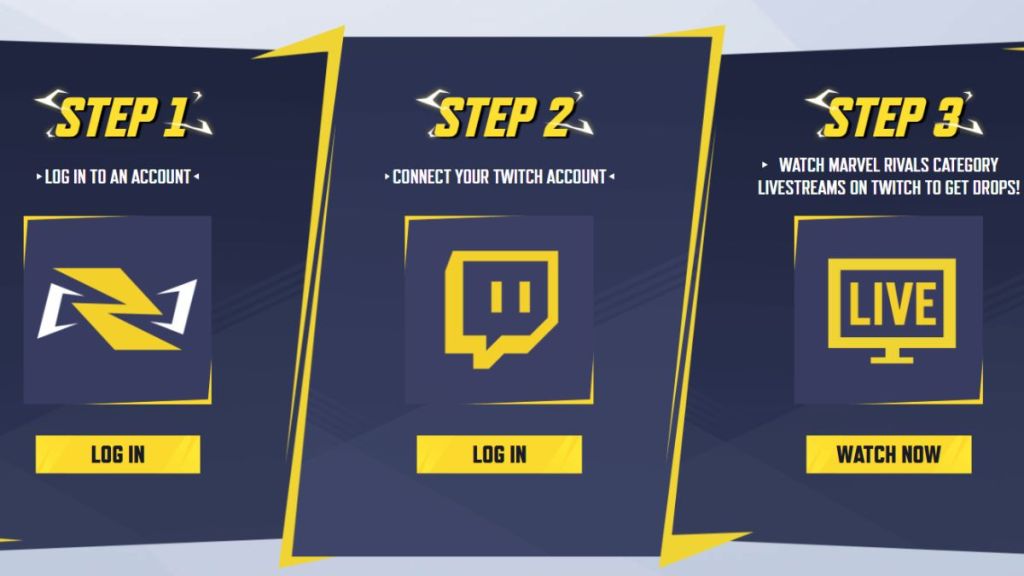
You can easily claim the new free Marvel Rivals skin in-game if you have already linked your Twitch account with Marvel Rivals. In case you haven’t done the linking before, here is how to link your Marvel Rivals and Twitch accounts:
- First, log in to your game account on the official Marvel Rivals Twitch Drops page.
- Then, select the option to connect your Twitch account.
- Once the event starts tomorrow, head to Twitch and start watching either Marvel Rivals’ official Twitch stream or participant streamers’ streams with drops enabled.
- Once you meet the required time quota, open your Drops Inventory and claim the rewards.
- Now, open the Marvel Rivals game on your PC or console and check your in-game inbox to collect the Twitch Drop rewards you received earlier.
If this free Angela skin doesn’t impress you, you can check out all the Marvel Rivals free skins you can claim now. That said, are you interested in collecting the free Twitch Drop skins in Season 10.5? Let us know in the comments below.





 Ajith Kumar