- Mac users can't download Fortnite directly anymore since the Apple-Epic Games dispute.
- The three main ways to play Fortnite on Mac are Xbox Cloud Gaming, Amazon Luna, and GeForce Now.
- For the best experience, players might want to try multiple services to find which one works best with their setup.
Want to play Fortnite on your Mac but not sure how? You’re not alone. Even though the game is back on the iOS App Store, it still isn’t available natively on Mac. The good news? You’ve still got options. If you own a Mac and want to see what Chapter 7 Season 2 has to offer, here are all the cloud gaming services you can use to play the game.
How to Play Fortnite on Mac
1. Xbox Cloud Gaming (Free)
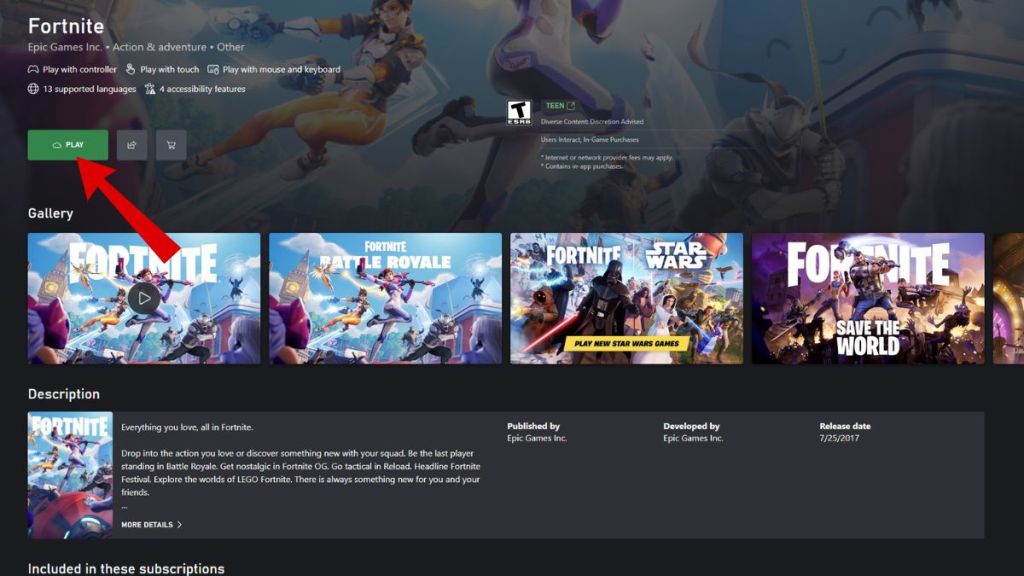
Xbox Cloud Gaming is probably the easiest way to start with Fortnite on your Mac. Despite the fact that Xbox Cloud Gaming is a paid service, running titles like Fortnite is completely free. All you need to do is link your Epic Games account to Xbox Cloud and follow the steps below:
- In your web browser, visit the official Xbox Cloud Gaming website
- Sign in with your Microsoft account or create one if needed
- Link your Epic Games account to save your progress
- Find Fortnite in the game library and click “Play.”
2. Amazon Luna
If you already have an Amazon Prime subscription, then Luna is an excellent choice since it’s included at no extra cost. Luna supports both controller and keyboard/mouse controls, giving you more flexibility in how you play. Follow the steps below to play Fortnite on Mac using Amazon Luna:
- Visit the official Amazon Luna website and log in with your Amazon account
- Find Fortnite in the Free to Play section.
- Click “Play Now with Prime.”
- Finally, link your Epic Games account when prompted.
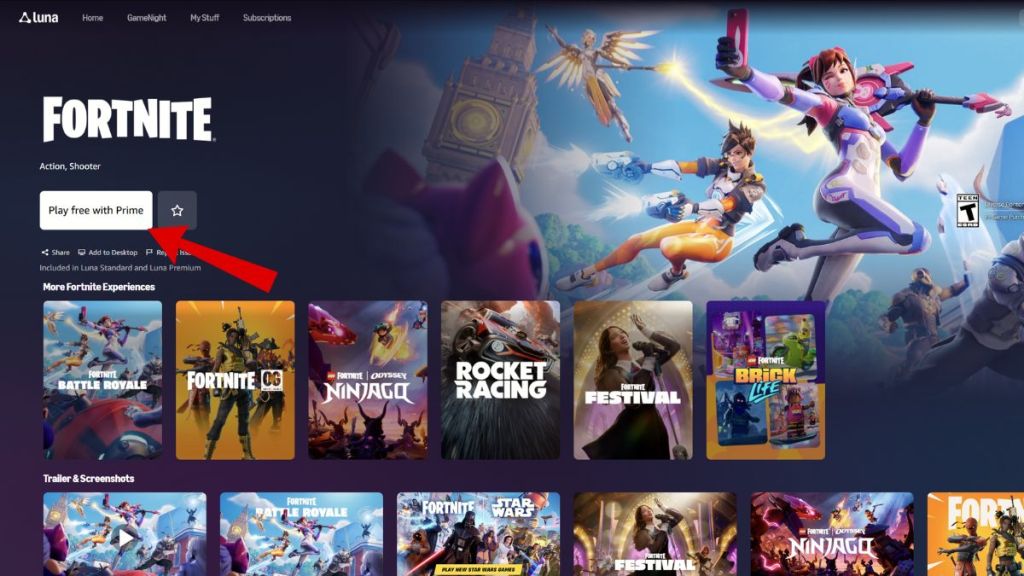
If you don’t have Prime, you can sign up for Luna+ separately for $9.99 monthly, with a 7-day free trial available for new users.
3. NVIDIA GeForce Now
GeForce Now offers both free and paid tiers, making it a flexible option for different budgets. The free tier lets you play Fortnite without spending anything. Follow the steps below to do so:
- Start by visiting the official Nvidia GeForce Now website and logging in with your account.
- Click the “Connect Your Store Accounts” option on the left side of the page, and then choose Epic Games.
- Follow the prompts to connect your Nvidia and Epic accounts.
- Finally, launch Fortnite from the game library.

Does Fortnite Run Better on M3/M4 Macs?
Yes, Fortnite can run noticeably better on M3 and M4 Macs compared to older Intel or even M1/M2 models, especially when using high-end services like NVIDIA GeForce Now. While the “brain” of the game is located on a server hundreds of miles away, your Apple Silicon still plays a critical role in how the game feels.
The remote server handles the graphics rendering, logic, physics, etc. However, the server has to compress that gameplay into a high-quality video stream and send it to you. This is exactly where the M3 and M4 chips shine, as they feature an updated Media Engine with dedicated hardware acceleration. Older Macs often have to use software decoding, which can add 15-30 ms of lag before the frame hits your screen. The latest Apple Silicon (M3/M4 chips) can decode these streams in as little as 1-3 ms.
Which Cloud Gaming Service is the Best for Fortnite on Mac?
While all three cloud gaming services mentioned can get you into the Battle Bus, there are many factors that you need to think about when deciding which service works best for you. Here’s a breakdown of Fortnite on all three cloud gaming services and everything they offer:
| Service | Xbox Cloud Gaming | NVIDIA GeForce NOW | Amazon Luna |
| Price | Free (No sub required for Fortnite) | Free (Basic) / Paid Tiers ($9.99+) | Free with Amazon Prime |
| KBM Support | Full KBM Support | Full KBM Support | Full KBM Support |
| Max Resolution | 1080p | Up to 4K (Ultimate Tier) | 1080p |
| Session Limit | None (Queue-based) | 1 hr (Free) / 8 hrs (Ultimate) | None (Queue-based) |
Why Can’t You Play Fortnite on Mac?
The short version is that Apple terminated Epic Games’ ability to develop Fortnite for Mac in 2020 during their legal dispute. While Fortnite has since returned to iOS App Stores for iPhones and iPads, Mac users worldwide still can’t download and play the game directly through the Epic Games Store like before.
With these methods, you can get back to enjoying Fortnite on your Mac despite the platform restrictions. The cloud gaming options actually offer some advantages, like not having to worry about hardware requirements or large downloads. Pick the method that best fits your setup and preferences, and you’ll be dropping into matches in no time.
No, unfortunately, Fortnite still has no native macOS version, so you must use cloud gaming services to play.
Yes, you can play Fortnite with a keyboard and mouse on all three cloud gaming services.
Yes, you can play Fortnite for free using Xbox Cloud Gaming or the free tier of NVIDIA GeForce NOW.



 Rishabh Sabarwal
 Matthew Wilkins