- The Sodium Minecraft mod can massively boost FPS and reduce stuttering without affecting the natural visuals.
- It is compatible with the Fabric and NeoForge mod loaders, so make sure you have them installed in the device already.
- Once the mod has been downloaded from the CurseForge or Modrinth page, move the file to the mods folder to install it.
Minecraft worlds can be grown bigger without affecting performance, FPS, and there would be no stuttering as well. Sounds quite difficult, right? But with the Sodium Minecraft mod, all of these things are possible. It is known for being the best performance mod across the internet and can dramatically improve frame rates while keeping the classic look and feel of the game intact. So, check this guide to know the easy steps of installing Sodium in Minecraft.
How to Download Sodium Minecraft Mod
Before jumping into the steps, it is important to understand what the Sodium Minecraft mod actually does. This is a powerful rendering and optimization mod for Minecraft installed on your system. It can significantly boost FPS, reduce stuttering effects, and fix the graphics as well. Unlike most other optimization mods available, Sodium can run on both Fabric and NeoForge mod loaders. That said, follow the steps given below to download Sodium on your computer:
- Visit the Sodium download page on CurseForge or Modrinth. Moreover, make sure to first read the Hardware Compatibility section on the download page before downloading Sodium.
- Go to the Files or Versions tab and find the latest file for the Minecraft version you have. Fabric loader also needs to be compatible with the same version.
- Download the file and find it in your Downloads folder.


How to Install Sodium in Minecraft
The Sodium Minecraft mod works faster than older forks like Xenon or Embeddium and offers significant improvements. While the downloading part was easy, installing it is also simple. But first, make sure that you already have the Fabric or Neoforge mod-loader installed. Once done, follow the steps below to install Sodium in Minecraft:
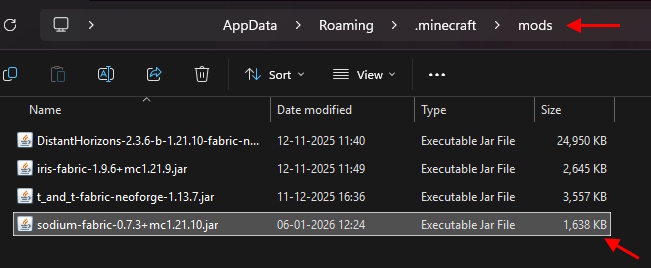
- Open the main ‘.minecraft‘ folder in your AppData folder. You may easily find it by typing the following in the Windows Run app: %appdata%/.minecraft.
- Now, you should create a folder called “mods” if it’s not there already, and open it
- The final step is to drag and drop the Sodium file into the mods folder, and you have installed it successfully.
- Many mods also require the Fabric API mod to work properly, so make sure you download and install it too.

How to Use Sodium in Minecraft
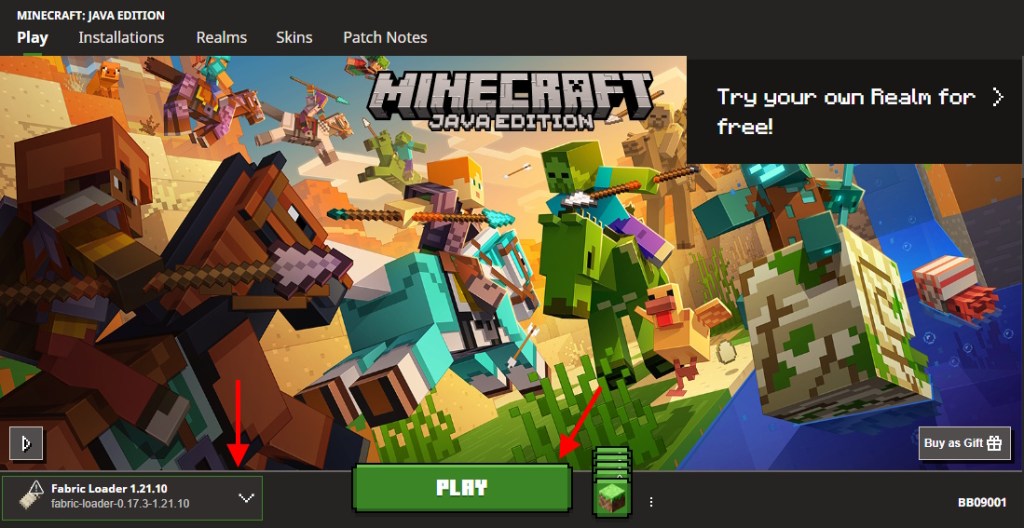
To use Sodium, you can simply run Minecraft with Fabric. Open Minecraft Launcher, set Fabric mod loader as the version on the left, and click on Play to start the game. Jump into the world and see the difference for yourself.
Fabric Loader provides no “Mods” tab to see whether a specific mod has made it or not, but Sodium is much easier to determine if it’s working. You can pause the game and go to the Video Settings. If they look different from the vanilla game, that means Sodium is active, as it has a custom UI for this section. Now, you can also learn how to install Iris Shaders in Minecraft.

With that, you have now installed Sodium, one of the most popular Fabric mods for Minecraft, and can enjoy the amazing graphics Iris provides at high frame rates. Speaking of Fabric mods, if you’re interested in other mods out there, follow our linked guide listing the best Minecraft Fabric mods. So, which mod are you thinking of pairing with the Sodium? Tell us in the comments below.
Yes, Sodium is a free and open-source optimization mod.
Sodium is, in most cases, better than Optifine when it comes to FPS performance. However, with shaders, Sodium will have more hiccups than Optifine. Still, the results vary depending on the hardware components you own.
Yes, the Sodium Minecraft mod can boost FPS by up to 185% at times.
Yes, the Sodium mod can run easily on low-end PCs and help those with FPS crashes and other performance issues while using mods.