- Cyberpunk 2077 doesn't come with an inbuilt console for cheat codes.
- Players need to download the Cyber Engine Tweaks mod from GitHub to enable the console in the game.
- Extract the Cyber Engine Tweaks files and replace the files in the Cyberpunk 2077 installation folder to enable the console.
Cyberpunk 2077 is one of the best RPGs of all time, and it provides massive replayability. However, grinding for ammo and other items in the game can become annoying. In such a scenario, players can use console commands and cheat codes to get them. Here is a full Cyberpunk 2077 console commands and cheat codes list for you to use in the game.
Full List of Cyberpunk 2077 Console Commands and Cheat Codes
Here is a full list of all Cyberpunk 2077 console commands and cheat codes available after the latest Edgerunners 2 (2.5) update. Use them in the console to apply their effect in the game. If you play GTA 5, also check out the GTA 5 cheat codes list.
Console Command Description Game.ModStatPlayer(“Health”, “x”) Set custom HP. Game.ModStatPlayer(“CarryCapacity”, “x”) Set custom carry capacity. Game.ModStatPlayer(“MaxSpeed”, x) Change the default speed of the player. Game.InfiniteStamina(true) Infinite Stamina. Game.SetLevel(“StreetCred”,x,1) Set custom street cred level. Game.SetLevel(“Level”, x) Set custom level of the player. Game.AddToInventory(“Items.money”, x) Add money. Game.AddToInventory(“Ammo.x”,x) Add Ammo. Game.AddToInventory(“Items.CWCapacityPermaReward_Legendary”) Provides players with the ability to increase their maximum Cyberware. Game.AddToInventory(“Items.PerkPointSkillbook”) Perk Points can be added as consumables. Game.AddToInventory(“Items.AttributePointSkillbook”) Maximizes Attribute points. Game.AddToInventory(“Items.x”,1) Add any item in Cyberpunk 2077. Game.TeleportPlayerToPosition(x, y, z) Teleport the player to a specified coordinate.
For some of the console commands, you will need additional information, like the ammo name or teleport coordinates for those specific commands. Below, we have added them separately so that you can simply use them as per your requirement.
All Ammo Commands in Cyberpunk 2077
Here are all the ammo console commands in Cyberpunk 2077. Use them to refill any ammo type in the game, especially when you’re going guns blazing in the Clampdown quest in Cyberpunk Edgerunners 2 update.
Ammo Type Command Handgun ammo Game.AddToInventory(“Ammo.HandgunAmmo”, 500) Rifle ammo Game.AddToInventory(“Ammo.RifleAmmo”, 700) Shotgun ammo Game.AddToInventory(“Ammo.ShotgunAmmo”, 100) Sniper rifle ammo Game.AddToInventory(“Ammo.SniperRifleAmmo”, 100) Common components Game.AddToInventory(“Items.CommonMaterial1”, 1000) Uncommon components Game.AddToInventory(“Items.UncommonMaterial1”, 1000) Rare components Game.AddToInventory(“Items.RareMaterial1”, 1000) Epic components Game.AddToInventory(“Items.EpicMaterial1”, 1000) Legendary components Game.AddToInventory(“Items.LegendaryMaterial1”, 1000)
All Teleport Coordinates in Cyberpunk 2077
Here are all the location coordinates in Cyberpunk 2077. You can use these coordinates with the teleport Cyberpunk 2077 console commands to directly teleport to that location. This way, you can easily complete the Cyberpunk 2077 Welcome to Paradise quest.
| Location | Coordinates |
|---|---|
| Megabuilding H8 Apartment | -690.816, 823.984, 324.856 |
| Japantown Apartment | -786.091, 975.949, 29.828 |
| Glen Apartment | -1517.805, -969.188, 91.200 |
| Northside Apartment | -1504.078, 2228.468, 23.798 |
| Corpo Plaza Apartment | -1607.948, 350.182, 50.997 |
| V’s Penthouse (Path of Glory) | -1340.495, 1189.842, 116.618 |
| Afterlife | -1455.068, 1010.975, 17.824 |
| Clouds | -625.404, 794.564, 132.252 |
| Arasaka Tower | CEO Level | -1437.788, 157.247, 565.346 |
| Arasaka Tower | Jungle Floor | -1449.256, 118.300, 321.639 |
| Arasaka Tower | Johnny’s Interrogation Room | -1389.446, 141.266, -139.361 |
| Arasaka Tower | Orbital Station | 4743.650, -1091.755, 1310.439 |
| Time Machine Guitar Room | -1843.676, -575.336, 7.754 |
| Voodoo Boys’ Subway | -1662.758545, -1867.002563, 54.982040 |
| Hanako’s Estate Bedroom | 290.197662, 1022.468079, 229.920425 |
How to Use the Console in Cyberpunk 2077
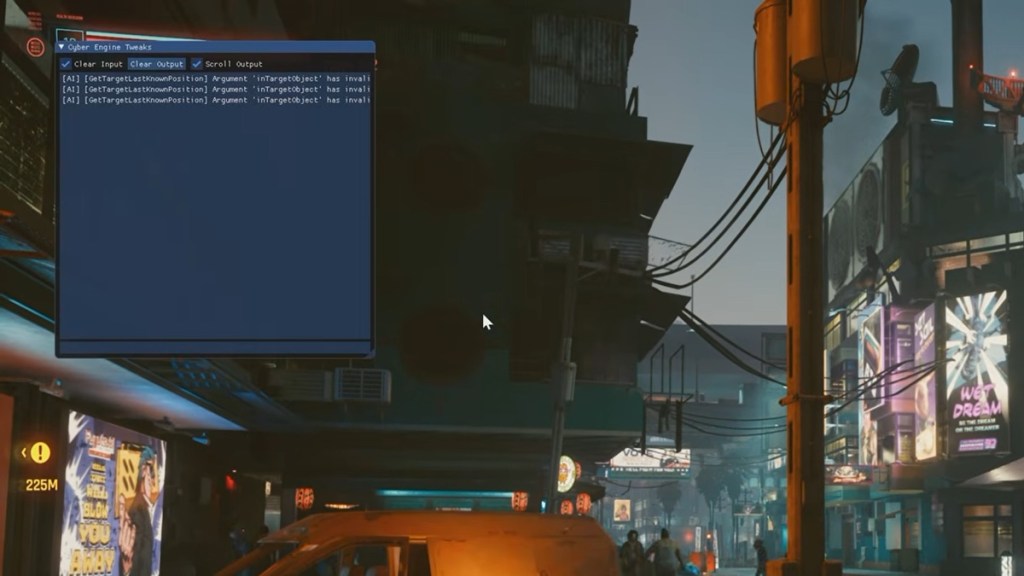
Cyberpunk 2077 doesn’t have a built-in console, which is why you cannot use the console directly in the game. To use console commands and cheat codes, players must first install a separate mod and scripting framework.
The mod that is most popularly used for Cyberpunk 2077 is CyberEngineTweaks. Here is how you can install and use the console in Cyberpunk 2077:
- Download Cyber Engine Tweaks from GitHub.
- Now you will need to find the folder where CP2077 is installed. The default location should be as follows:
- GOG users: GOG Games/Cyberpunk 2077
- Steam users: Steam Library/SteamApps/common/Cyberpunk 2077
- Once you have found the folder, extract all the Cyber Engine Tweaks files and replace them in the game file folder.
- Now, start Cyberpunk 2077 and press the tilde key (~) to open the console.

So, now you know about all the Cyberpunk 2077 console commands. Have any more questions? Ask us in the comments section below.