- Roblox groups are called Communities, and players can join up to 100 communities for free.
- Players can join communities on PC, mobile, tablets, PS5, PS4, and Xbox through the Roblox app.
- Creating a community costs 100 Robux, while owners can manage members, roles, games, and payouts.
Groups, now known as Communities, are one of the key features of the Roblox platform. Groups are used to bring all players of one game under a single community. Through a group, the admins can also share announcements and reveal new events for the games. In this guide, learn how to join a group in Roblox, how to leave it, and all important things to keep in mind.
Since RDC 2024 till now in 2026, Roblox officially calls groups “Communities” across all platforms. Players can join up to 100 communities for free to connect with friends. Creating your own new Roblox community costs 100 Robux instead.
How to Join a Group in Roblox PC and Web
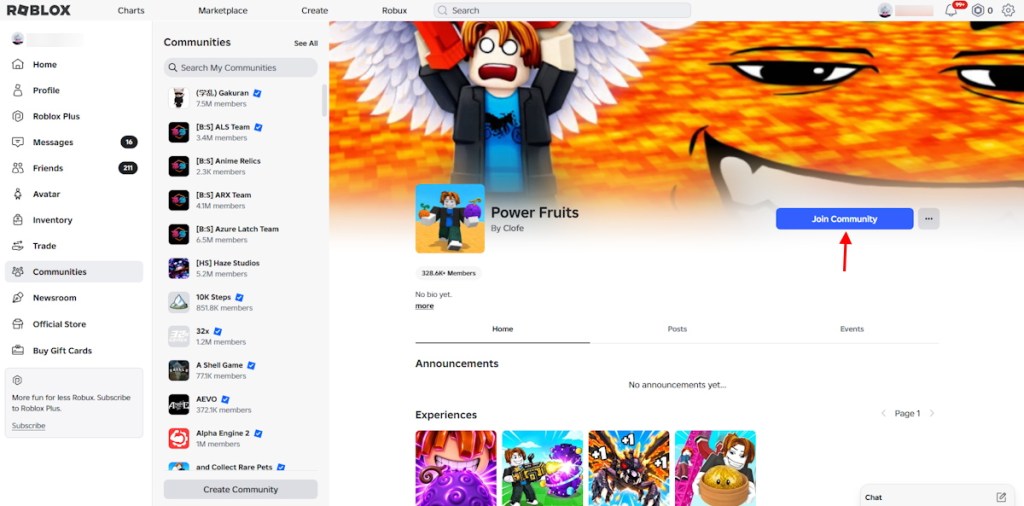
PC and Mac players access Roblox communities through web browsers or the desktop app. You find the main navigation menu on the left side of the screen. Follow these steps to join a Roblox group on your computer:
- Log in to your Roblox account on the official website or PC app.
- Click the hamburger menu icon (app) and select Communities from the left sidebar.
- Click More Communities or See All near the top right corner.
- Type a group name or keyword into the top search bar.
- Click your desired community from the results to open its main page.
- Click the blue Join Community button next to the community name.
- If you are already logged in, you can also directly join a Roblox group using official links.
How to Join a Group in Roblox Mobile, Tablet and iPad
Mobile, Android tablet, and iPad users can find groups inside the Roblox app. The community tab exists inside a secondary navigation menu. Being in a group and contributing helps you earn Robux for free.
Follow these steps to join Roblox groups on smartphones, tablets, or iPads:
- Open the Roblox app on your phone, tablet, or iPad.
- Tap the … More button at the bottom or left screen edge.
- Tap the Communities tile from the expanded menu options.
- Tap the search bar under My Communities at the top right.
- Enter the community name or browse the featured category lists.
- Select the community and tap the blue Join Community button.
How to Join a Group in Roblox on PS5, PS4, and Xbox
If you are a console player on PS5, PS4, or Xbox, and use the Roblox console app, you can navigate the menus using your controller’s bumper or directional buttons. Follow these steps to join a Roblox group on consoles like PlayStation or Xbox:
- Launch the Roblox app on your PS5, PS4, or Xbox console.
- Select the … More icon on the left or bottom navigation bar.
- Select the Communities tile from the menu screen.
- Select the top search bar to type a group name or keyword.
- Choose your desired community from the search results or categories.
- Select the blue Join Community button to complete the process.
Roblox Group Approval and Community Features
Public Roblox communities let you join immediately with a single button press. Private communities require the owner or staff to approve your request manually. Some owners also ask you to send a personal message before approving.
Group members can view group updates in the Shout and Description sections. Players aged 13 and older post messages on the community Wall. Make sure you are age-verified on Roblox, as some communities have a 17+ requirement. You also access exclusive group experiences, member ranks, and linked social pages.
How to Leave a Roblox Group
Roblox caps your total community memberships at 100 communities at any time. You must leave an existing group before joining a 101st community. Follow these steps to leave a community you no longer want:
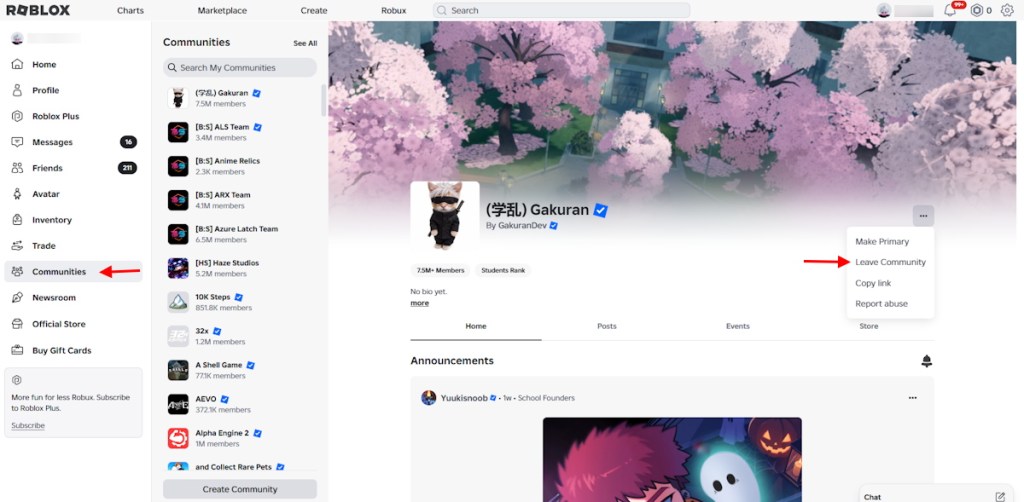
- Open the Communities tab and select the group you want to exit.
- Click the three-dot menu in the upper right corner of the page.
- Select Leave Community and confirm your choice in the pop-up window.
Roblox Communities: Important Rules and Troubleshooting in 2026
If you already own a Roblox community and leave the group, you will permanently lose the admin powers. You must transfer the ownership to another member of the group before leaving. Otherwise, the community remains ownerless forever, even if you rejoin later.
A missing Join Community button usually means you hit the 100-group limit. The Microsoft Store PC app, PS5, PS4, and Xbox sometimes experience join bugs. Switch to a mobile browser or desktop website to fix this issue.
How to Make Someone an Admin in a Roblox Group
Community owners grant admin powers by creating custom roles and assigning them to trusted members. Roblox lets you create up to 100 free custom roles in the unified permissions system. Follow these steps to create an admin role and assign it to a member in a Roblox group:
- Open your community page, click the three-dot menu, and select Configure Community.
- Select Roles in the left sidebar and click the Create role button.
- Name the role “Admin” and choose either public or private role visibility.
- Open the Permissions tab and toggle on the powers you want to grant.
- Drag the Admin role near the top of the list to give it high authority.
- Select Members in the sidebar and add the Admin role next to the player’s name.
Roblox Communities Settings and Role Permissions
The Configure Community menu controls your group profile, member ranks, and experience development tools. You must complete a Two-Factor Authentication (2FA) check before granting high-risk admin permissions.
| Feature | Description |
|---|---|
| Profile and Entry Settings | Change the description, emblem, cover photo, social links, and manual approval rules. |
| Member and Role Management | Let admins invite, approve, kick, ban, or assign lower roles to members. |
| Audit Logs and Allies | View the community activity history and manage ally or enemy relationships. |
| Creations and Experiences | Allow developers to playtest, edit, publish, and moderate community-owned games. |
| Revenue and Payouts | View group Robux balances, run ad campaigns, and send Robux payouts to members. |
| Avatar Items and Analytics | Create community clothing, configure catalog accessories, and view game analytics. |
That is how you can join a group in Roblox, leave the communities, or be an admin. How many groups are you in? Let us know in the comments.
You can join up to 100 Roblox communities for free using a single account.
Yes, creating a new Roblox community costs 100 Robux.
Yes, you can rejoin a community anytime, provided you meet its entry requirements and have an available membership slot.