Rockstar Games has spent over a decade crafting the next massive chapter in the Grand Theft Auto franchise. Because the GTA 6 release date is right around the corner, navigating the internet safely without running into major GTA 6 spoilers requires a strong defensive strategy. One careless scroll could instantly ruin the story that you have patiently waited years to experience firsthand.
With 13 years since the last mainline Grand Theft Auto game, the global hype of GTA 6 reaches far beyond gaming communities. Casual social media users and content creators alike will soon flood every single timeline with late-game story footage. That is why, in this guide, we will help you mute all the words to avoid any GTA 6 spoilers on the internet.
Best Keywords to Mute to Avoid GTA 6 Spoilers
Muting specific words and phrases across your favorite social media platforms is the best way to protect yourself. Because clever trolls often omit the game title from posts, you must block GTA 6 character names and general terms.
You should also include every possible title variation to ensure that your timeline filters catch all hidden leaks. GTA 6 RP mechanics are something you should keep as personal experience. So, it is better to avoid others’ playthroughs overall.
With that said, here is a list of all words you must use to avoid GTA 6 spoilers on the internet:
General Game Title Variations and Locations
- Grand Theft Auto 6 / Grand Theft Auto VI
- GTA 6 / GTA VI / GTAVI / GTA6
- Grand / Theft / Auto / Six
- Leonida / Vice City
- GTA 6 Leak / GTA VI Leak / GTA 6 Leaks / GTA VI Leaks
- GTA 6 Story / GTA VI Story / GTA 6 Plot / GTA VI Plot
- GTA 6 Story Leak / GTA VI Story Leak / GTA 6 Story Leaks / GTA VI Story Leaks
- GTA 6 Story Spoilers / GTA VI Story Spoilers / GTA 6 Spoilers / GTA VI Spoilers
Story Ending and Mission Terms
- Ending / Endings / Ending Leaked / Ending Explained / All Endings
- Secret Ending / True Ending / Final Cutscene / Death Scene
- GTA 6 Ending / GTA VI Ending / GTA 6 Endings / GTA VI Endings
- GTA 6 Ending Explained / GTA VI Ending Explained
- GTA 6 All Endings / GTA VI All Endings / GTA 6 Alternate Ending / GTA VI Alternate Ending
- GTA 6 Secret Ending / GTA VI Secret Ending / GTA 6 True Ending / GTA VI True Ending
- GTA 6 Plot Twist / GTA VI Plot Twist / GTA 6 Betrayal / GTA VI Betrayal
- GTA 6 Mission / GTA VI Mission / GTA 6 Missions / GTA VI Missions
- GTA 6 Final Mission / GTA VI Final Mission / GTA 6 Last Mission / GTA VI Last Mission
- GTA 6 Final / GTA VI Final / GTA 6 Final Scene / GTA VI Final Scene
- GTA 6 Final Cutscene / GTA VI Final Cutscene
- GTA 6 Credit / GTA VI Credit / GTA 6 Credits / GTA VI Credits
Character Fate and Mortality Keywords
- Jason / GTA 6 Jason / GTA VI Jason
- Lucia / GTA 6 Lucia / GTA VI Lucia
- Jason Ending / Lucia Ending / Jason and Lucia Ending / Jason & Lucia Ending
- Who Dies / Who Dies in GTA 6 / Who Dies in GTA VI
- GTA 6 Death / GTA VI Death / GTA 6 Death Scene / GTA VI Death Scene
- GTA 6 Death Cutscene / GTA VI Death Cutscene
- Jason Betrayal / GTA 6 Jason Betrayal / GTA VI Jason Betrayal
- Jason Death / GTA 6 Jason Death / GTA VI Jason Death
- Jason Dies / GTA 6 Jason Dies / GTA VI Jason Dies
- Jason Kill / GTA 6 Jason Kill / GTA VI Jason Kill
- Jason Killed / GTA 6 Jason Killed / GTA VI Jason Killed
- Lucia Betrayal / GTA 6 Lucia Betrayal / GTA VI Lucia Betrayal
- Lucia Death / GTA 6 Lucia Death / GTA VI Lucia Death
- Lucia Dies / GTA 6 Lucia Dies / GTA VI Lucia Dies
- Lucia Kill / GTA 6 Lucia Kill / GTA VI Lucia Kill
- Lucia Killed / GTA 6 Lucia Killed / GTA VI Lucia Killed
Now that you know which words to mute to keep your internet feed spoiler-free during the GTA 6 countdown, let us show you how you can do it on different platforms.
How to Mute GTA 6 Spoiler Words on X (Twitter)
Setting up your social media filters before the release of GTA 6 guarantees that your feeds remain clean when leaks begin. On X, you can easily block specific phrases and hashtags from appearing in your timeline or notifications.
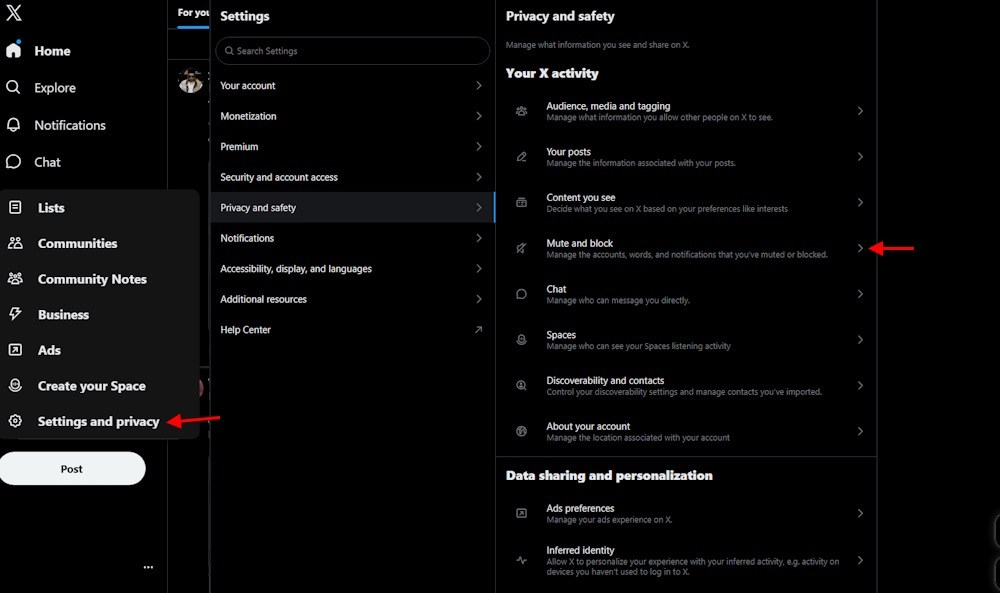
Follow these simple step-by-step instructions on desktop or mobile to set up your muted word list right now:
- Open the X website or mobile application and log in directly to your social media account.
- Click the Notifications tab on desktop, or tap your profile icon in the top corner on mobile devices.
- Select the gear icon or open the Settings and privacy menu located near the bottom of your screen.
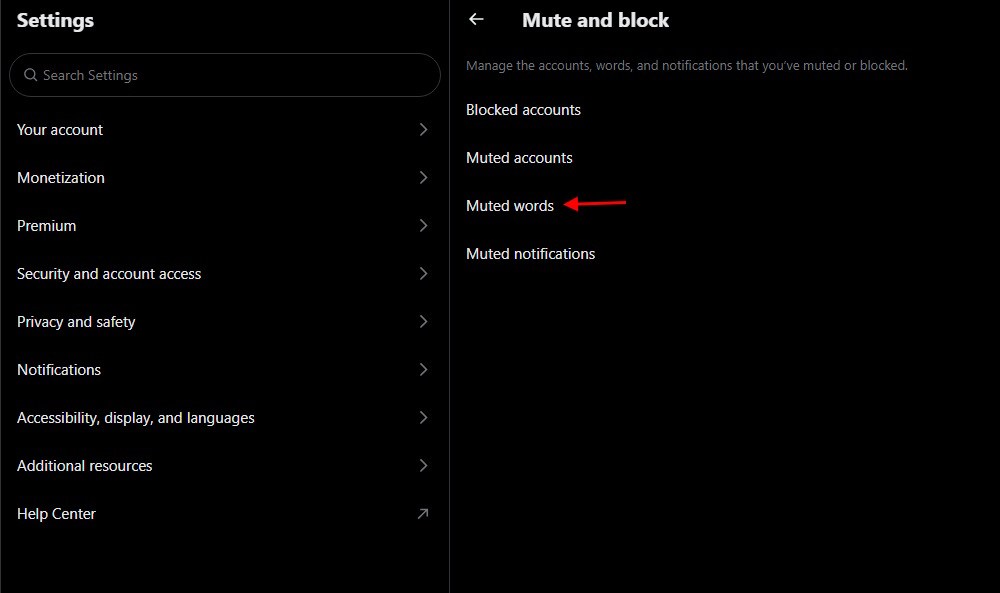
- Navigate directly to the Privacy and safety section, and then click on the Mute and block menu option.
- Select Muted words from the menu and press the plus icon in the corner to add new terms.
- Type a word or phrase from our list into the text bar to block GTA 6 spoilers effectively.
- Customize your preferred timeline and notification settings, select your desired mute duration, and click the Save button below.
- Repeat this simple entry process for every single variation on the keyword list to protect your feed completely.
How to Block GTA 6 Spoilers on YouTube
YouTube poses a threat to players because gamer or non-gaming content creators frequently put major plot reveals inside video thumbnails. Even though Rockstar Games issues copyright strikes against early leaks, new GTA 6 locations or characters videos will still slip through the cracks.
Desktop users should immediately install the BlockTube and Unhook browser extensions to hide recommended feeds and block channels. This will make sure you are not swarmed with channels you don’t want to see when GTA 6 drops.
If you watch YouTube on your phone or television, browser extensions cannot protect you from seeing recommendations. To stay safe on mobile devices, you should completely clear and pause your personal YouTube watch history immediately. Disabling your watch history disables the recommendation algorithm, leaving your home feed completely blank and safe from thumbnails.
You should also avoid searching for gameplay videos and stay away from comment sections under any gaming videos. We suggest you avoid typing the keywords from our list to avoid any kind of GTA 6 spoilers in the video search feed.
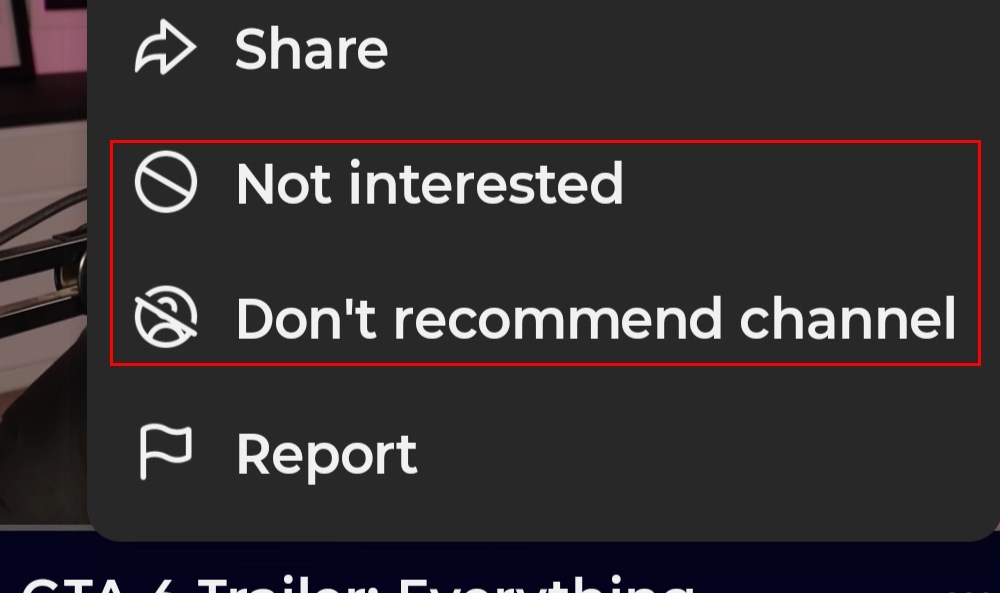
If a suspicious video appears, click the three dots icon and select the Not interested or Don’t recommend channel option immediately.
Moving the YouTube app on iPhone or Android to a hidden phone folder can also stop you from opening the app mindlessly.
How to Avoid GTA 6 Spoilers on Instagram Reels and Feed
The majority of the gamer or non-gamer audience spends time doomscrolling reels or liking the story of their crush on Instagram. This can cause a serious spoiler fest if you are not cautious when on Instagram during the GTA 6 launch.
Well, to prevent that, the first thing you must do is to completely make the algorithm unlearn your pattern of using the app. Start by marking posts containing GTA 6 spoilers as Not Interested. Tap the three dots on a post or Reel and select the option to see less similar content.
You can also mute or block accounts that frequently share GTA 6 leaks, gameplay clips, and story details. Avoid interacting with spoiler posts, even if you are only opening the comments. We suggest you avoid clicking any GTA 6-related content from the Discover feed. You should also mute stories of creators whom you know might share content about the game during the launch weeks.
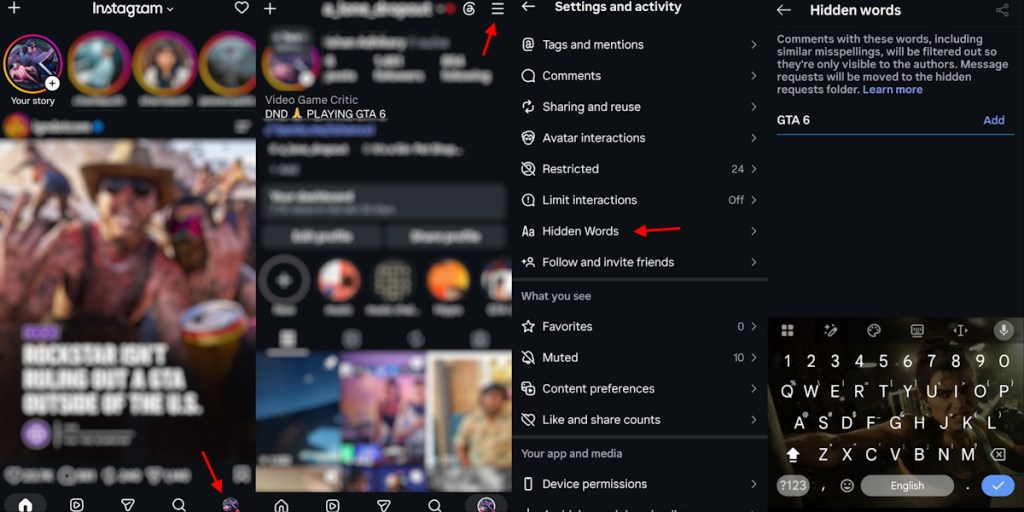
Finally, use Instagram’s Hidden Words feature to filter keywords such as GTA 6, Lucia, Jason, and GTA VI. This can help keep spoiler-related posts and comments out of your feed while you wait for the game. Here is how you can use the Instagram Hidden Words feature to avoid GTA 6 spoilers on the feed and reels:
- Click the profile button in the bottom right.
- Click the hamburger button on the top right.
- Scroll down and open the Hidden Words option.
- Type a word you want to mute and click Add.
How to Avoid GTA 6 Spoilers on TikTok
Just like Instagram, many users are attached to their TikTok scrolling routine that they can’t skip. Well, we can understand your situation. But if you want to ignore the flooding of GTA 6 spoilers, TikTok is another social media app you will need to ignore.
While that sounds simple, completely ignoring an app is not that easy. That is why we suggest you mute or block accounts that frequently share GTA 6 leaks, gameplay clips, and story details. You can also long-press videos containing spoilers and select Not Interested. This will train the algorithm to suggest you a lower number of such videos.
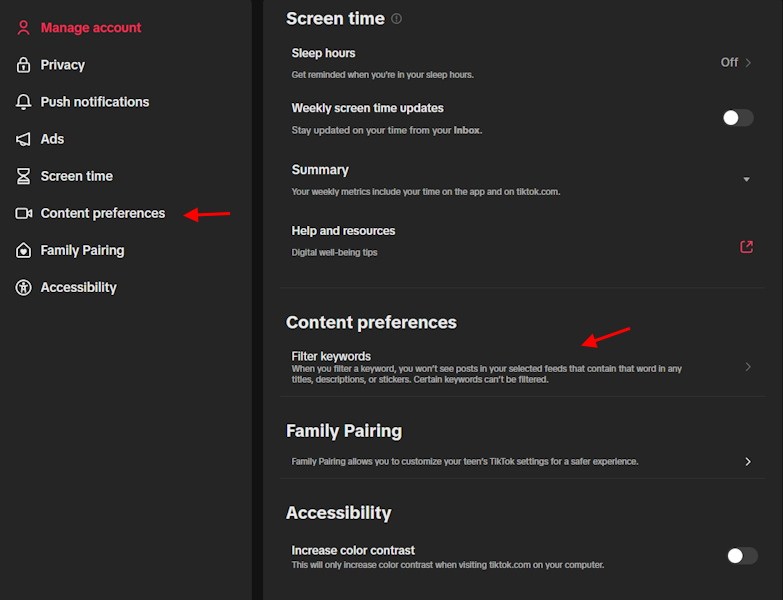
And similar to Instagram, TikTok also comes with a Filter video keywords feature. Here is how you can use the feature to reduce spoiler-related videos appearing in your feed:
- Open TikTok and go to your Profile.
- Select Settings and go to Content preferences.
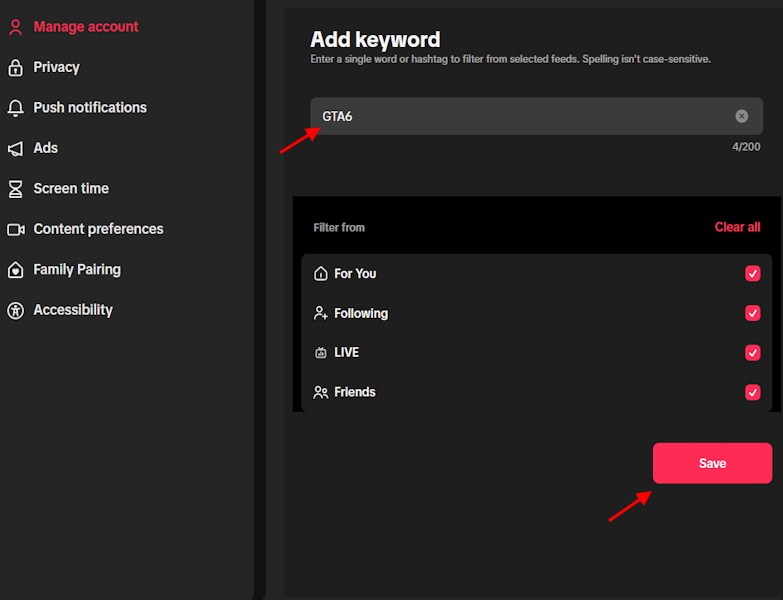
- Tap Filter video keywords and select Add keywords.
- Enter terms such as GTA 6, GTA VI, Lucia, Jason, leaks, and spoilers.
- Choose the feeds where you want these keywords filtered, such as For You and Following.
- Tap Save to apply the filters.
Avoiding GTA 6 Leaks on Reddit, Discord, and Google
Text filters cannot block uncaptioned screenshots or video clips posted across visual apps like TikTok, Instagram, and Facebook. Yes, it can get quite hard when there are no options to straight up block certain keywords for GTA 6 spoilers.
For Reddit users, you should temporarily unsubscribe from r/GTAVI and general gaming subreddits where memes might spoil events. On Discord, mute notifications for public gaming servers so random users cannot ruin the story in general chats. If you are on a mobile device, just turn off push notifications for these apps.
You should also avoid searching for anything related to the game on Google. Instead, find out about the game, especially the GTA 6 activities and the open world, by yourself. Search engine autocomplete suggestions and automated AI summaries at the top of results pages can accidentally reveal plot spoilers for GTA 6.
Skipping early game reviews of GTA 6 and gaming news sites is also a good choice. While Rockstar Games will ask the publications to keep things spoiler-free, when the game is out, very few will follow it.
While these digital barriers help tremendously, no automated social media filter is ever one hundred percent foolproof online. Taking a complete hiatus from social media during launch week remains the only guaranteed way to stay unspoiled.
Prepare your accounts today so you can explore Vice City on November 19 without a single ruined plot twist. And if you are lucky, you may explore GTA 6 without any spoilers, thanks to muting the right words.
Mute keywords such as GTA 6, GTA VI, Grand Theft Auto 6, Leonida, Vice City, Jason, Lucia, GTA 6 Ending, GTA 6 Leaks, and GTA 6 Story Spoilers. You should also include variations related to character deaths, final missions, and plot twists.
Keyword filters cannot catch every spoiler, especially those hidden in images, video thumbnails, or uncaptioned clips. Temporarily avoiding gaming communities, social media, and GTA 6 discussions is the safest approach during launch week.