A VPN aka Virtual Private Network can protect your privacy online by keeping you anonymous on the internet. The way a VPN works is by routing your network to different private networks and servers present at different locations across the globe, thereby making it harder to track your online activity. If you are on Linux, you’re already a privacy-conscious user, and you would want to use a VPN. In this guide, let’s look at the 5 best VPNs for Linux.
Overview of the Best Linux VPNs
There are plenty of VPNs for Linux but choosing the right one could go a long way to ensure your information remains private. You can take a quick look at the table below and find a suitable VPN for your Linux distro.
| Linux VPNs | Best Suited For | Limitations | Pricing |
|---|---|---|---|
| Mullvad VPN | Privacy-focused users who want complete anonymity, no-logs transparency | Only around 600 servers globally | Flat $5 per month |
| Nord VPN | 8,900 servers in 178 locations, great performance and speed, Strict no-log policy | 10 device limit | $4.89 per month on 1-year plan |
| Proton VPN | Privacy-conscious users, Swiss-based company, 15,000+ servers in 120 countries | No feature parity on Linux, compared to Windows and macOS | Free, $3.99 per month on 1-year plan |
| Windscribe VPN | Free VPN for Linux, Both GUI and CLI clients available, split tunneling support | 10GB limit under free plan | Free, $5.75 per month on 1-year plan |
| Surfshark | User-friendly GUI app, WireGuard support, Unlimited device connections | Alternative ID not available in Linux app | $3.19 per month on 1-year plan |
How We Tested the Best Linux VPNs?
To test and find the best Linux VPNs, first off, I looked for user-friendly GUI apps. While technical users can manually set up any VPN on Linux via OpenVPN, for general users, having a GUI client is very important. Next, I checked for the VPN’s jurisdiction and whether these companies follow strict no-log policy or not. Having a VPN company under the EU jurisdiction unlocks many privacy and security protections.
Besides that, I ensured that each VPN comes with a kill-switch, support for stringent protocols like WireGuard and OpenVPN, and DNS leak protection. Besides security, performance also matters. So, I tested Linux VPN apps which have servers globally with little to no downtime. And finally, I also picked VPNs which are open-source and audited by independent security researchers.
Best Linux VPNs Compared
In our testing, Mullvad came out to be the best VPN for Linux as it offers strong privacy protection, compared to other solutions. Along the same lines, Nord VPN has become a popular Linux VPN for those who want regional flexibility and better bandwidth. You can check out our curated list of all VPNs right below.
Mullvad VPN – Best Overall VPN for Linux
Mullvad is praised among Linux enthusiasts thanks to its open-source nature and a no-nonsense approach to virtual private networks. The service trolls other VPN services by having a fair subscription model of $5 regardless of if you opt in for a month, year, or decade, where most other services tend to confuse you.

As for the features, Mullvad claims to be a privacy-focused VPN and follows a no logging policy. It’s based out of Sweden, supports split tunneling, custom DNS server, and is externally audited. It also supports OpenVPN, WireGuard protocols and comes with DNS content blockers. There’s a GUI for Linux, which should make it easier to connect and use. Overall, it’s easily one of the best VPNs for Linux.
| Pros | Cons |
|---|---|
| Great Linux client | 5-device limit |
| Strong privacy protection | Banned IPs for certain services |
| Good pricing | |
| Multi-platform: Available on all platforms |
Price: $5/month
NordVPN – Best VPN for Streaming
NordVPN has been one of our personal favorites when it comes to the best VPNs for Linux. While it’s not free, it’s affordable at effectively $4.99 per month if you opt for a one-year plan. With over 8,900 servers around the globe and in popular locations such as America, Europe, and Asia, NordVPN is also one of the most expansive VPNs on this list.
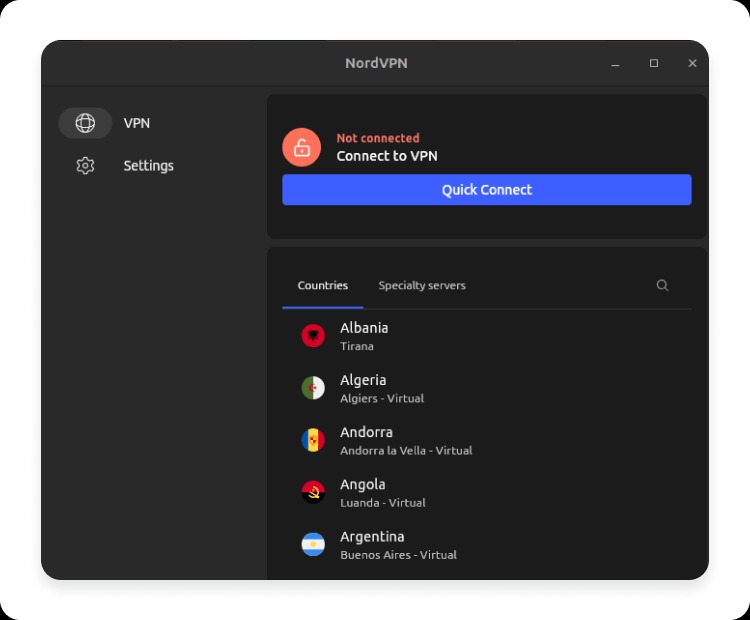
While the Windows client of NordVPN is easier to use, the Linux version isn’t bad either. It now comes with a GUI client so you no longer have to do everything inside the Terminal. Even if you prefer the CLI experience, the process of setting up the VPN is pretty intuitive if you have even the slightest bit of experience using the terminal. You won’t have much trouble starting a VPN connection.
I regularly use NordVPN for streaming and downloading content, and it’s fast; faster than most VPNs out there, which makes it one of the best VPNs for Linux.
| Pros | Cons |
|---|---|
| Over 8,900 servers across the globe | 10 device limit per account |
| Great upload and download speeds | |
| Decent pricing | |
| Multi-platform: Available on all platforms |
Price: $4.89/month (Effectively, 1-year plan)
Proton VPN – Best Free VPN for Linux
The Proton suite is quite popular among Linux enthusiasts, and Proton VPN is arguably the most popular app in the suite, besides Proton Mail. ProtonVPN is generally free to use, but the free version is limited to just 3 countries, and you don’t get many features. It’s also one of the best free VPNs for Chromebook‘s Linux container.

Proton does offer a subscription to use its VPN service and a 1-year plan costs $4 per month effectively, which is good. But, by paying $4 more, you could get subscription to Proton Unlimited, which gives you access to Proton VPN, Proton Mail, Calendar, and Drive with 500GB storage.
ProtonVPN has over 15,000 servers across 120 countries around the globe. The speeds that we experienced in the free version in the United States, Japan, and the Netherlands were only second to NordVPN. Yes, the free version offers three free server locations, although, the speeds might depend on how full the server is. The paid version offers an Ad-blocker, Tor over VPN, no data logging, Router support, Split tunneling, etc.
| Pros | Cons |
|---|---|
| Over 15,000 servers across the globe | Free version limited to 3 regions |
| Great upload and download speeds | |
| Tor over VPN and router support | |
| Multi-platform: Available on all platforms | |
| Great Linux client | |
| Free version is great |
Price: Free, $3.99 per month on 1-year plan
Windscribe VPN – Best Free Privacy-Focused VPN
If you’re looking for a free VPN for Linux that takes privacy seriously, Windscribe is a good option. Like Mullvad, it’s open-source and has one of the nicest GUI clients for Linux. It offers 10GB of data under the free tier. And for an asking price of $5.75 per month, it offers unlimited data across 69 countries and 115 cities. It doesn’t have a wider presence, but its features more than make up for the lack of thereof.

It supports OpenVPN, WireGuard, IKEv2, WSTunel, and Stealth, and can block ads, trackers, and malware from reaching you. Windscribe does offer a few free servers like the US, Canada, HongKong, and more, but Pro makes even more locations available. It also supports split tunneling, MAC address spoofing, and custom configurations.
Windscribe is also available as an extension on Firefox and Chrome, so you don’t need to be worried if the desktop client isn’t working. All in all, Windscribe is an excellent VPN service for Linux and is worth getting.
| Pros | Cons |
|---|---|
| Excellent GUI for Linux | 10GB limit under the free version |
| Good speeds | |
| Supports 5 protocols | |
| Has a free version |
Price: Free, $5.75 per month on 1-year plan
Surfshark – Most Budget VPN for Linux
Surfshark is one of the cheapest VPN service providers out there. With its presence in 100+ countries and with 4,500+ servers, it’s also one of the widest and most comprehensive VPN providers you can get on Linux. Surfshark offers a money-back guarantee, access to the VPN on unlimited devices, doesn’t log your data, and comes with a few other perks in the app that help you stay protected against attacks.

At $3.19 per month for a one-year plan, Surfshark has to be one of the cheapest VPN services you can subscribe to right now. The VPN also helps block ads and also brings 2FA to the table. However, its client is only available on Debian, Mint, and Ubuntu-based Linux distros.
If you’re running Fedora like us, you would need to use OpenVPN and Surfshark’s one-time credentials to connect to a server, and it might not be an easy process if you’re a beginner. The good news is, that Surfshark has a guide for Linux users for the same that you can follow on their website.
| Pros | Cons |
|---|---|
| Over 4,500 servers across the globe | Linux client is only available on Ubuntu, Debian, and Mint |
| Great upload and download speeds | |
| One of the most affordable VPNs out there | |
| Multi-platform | |
| No-log policy |
Price: $3.19 per month on 1-year plan
All things considered, Mullvad, ProtonVPN, and Windscribe are some of the best VPNs you can use on Linux. That’s followed by Surfshark if you have an ultra-low budget, followed by NordVPN, which is considered a good VPN service for streaming. What are your thoughts on this best Linux VPNs list? Which do you prefer the most out of all? Let us know in the comments.