

With streaming services completely engulfing the music listening experience on smartphones, we barely see anyone playing songs off a music player app. However, many people still carry music to listen to it offline, and they demand excellent, feature-rich music players. Thankfully, there’s no shortage of good music players on Android, and here are the 10 best music players you can use on Android in 2026.
What to Look for in a Music Player for Android?
Here’s the thing; not every music player is built the same. Some apps are great for casual users, while others are built for audiophiles who care deeply about sound quality. So, before you download your next music player for Android, here are the things you need to actually pay attention to:
- Audio Quality and Format Support: If you care about sound, look for apps that support high-quality formats like FLAC, WAV, and lossless audio. This makes a noticeable difference in sound quality if you have a good pair of noise-cancelling headphones.
- Ease of Use: The key highlight of any best music app is a clean, easy-to-navigate interface, which makes it simple to find songs, create playlists, and control playback quickly.
- Equalizer Controls: Some people want a built-in equalizer, bass boost, and presets that can help you fine-tune audio based on your preference.
- Ads and Pricing: Many apps are free but come with ads. If you want a clean experience, you should go for apps that have a one-time purchase or a premium version.
How We Tested the Best Music Player on Android
Now, I am already a big sound enthusiast and prefer to listen to FLAC files on my phone over most music streaming apps. And my go-to has been PowerAmp music player. But for this list, I looked into suggestions from other top online outlets, as well as Redditors and audiophiles on other forums. Based on that, I curated a list of apps available on the Play Store and from other sources.
So, I went on to test these on my Pixel 10 smartphone running on the latest Android 16 update. I listened to a few sets of songs and tried out the UI to get a feel of the general layout. I also checked whether each app supported advanced features, and if there were any roadblocks or push to move to their subscription model. And after extensive research, here are my best music players for Android.
Quick Comparison: Top Android Music Players at a Glance
| Music Apps on Android | FLAC/ Hi-Res File Support | Pricing |
|---|---|---|
| PowerAmp Music Player | Yes | Full digital license costs $10.66 |
| Musicolet | Yes | Completely free |
| Retro Music Player | Yes | Free, includes in-app purchases |
| Nuetron Music Player | Yes | Full digital license costs $12.99 |
| Namida | Yes | Completely free |
| FiiO Music | Yes | Free, includes in-app purchases |
| Oto Music | Yes | Free, includes in-app purchases |
| Frolomuse | Yes | Completely free |
| Salt Player | Yes | Free, Pro version costs $4.99 |
| Omnia Music Player | Yes | Free, includes in-app purchases |
| VLC Media Player | Yes | Completely free |
Best Android Music Players Reviewed
So now that I have tested out my favorite Android music players like PowerAmp, Musicolet, Retro Music player, and more, it is time we take a closer look at each one and discuss their pros and cons.
Best Overall — PowerAmp Music Player
PowerAmp is, hands down, one of the most powerful music players for every type of music listener out there. It’s fast and snappy, extremely customizable, and crowded with features that both regular listeners and audiophiles will love. It’s especially great for audiophiles thanks to the comprehensive audio customization features that can allow listeners to fine-tune their music.

Besides, it comes with a powerful built-in equalizer with multiple audio presets, which aren’t limited to the playback but also the audio equipment you’re using. It has presets from the likes of Crinacle, the most popular audio reviewer, and RTINGs, Super, and some of the other popular audio equipment reviewers. It does come at $4 but is fully worth it.
| Pros | Cons |
|---|---|
| The most powerful music player for Android | Requires subscription to use the app |
| Extensive theming options | |
| Powerful equalizer with tons of presets | |
| Supports Hi-Res playback |
Best Free Music Player — Musicolet
Musicolet is a neat music player for Android that’s packed with lots of customization options and features. It markets itself as an ad-free, privacy-focused music player, and delivers on the promises very well. I like it for its extreme customization and a feature that allows you to have multiple queues, which is pretty self-explanatory. Musicolet has a bunch of tiny but useful features that we could endlessly talk about.

Musicolet also has a built-in equalizer with lots of customizability. There are no ads in the free version, and there’s a pro tier that unlocks features like Crossfade, Chromecast, and Volume normalization. These are but a few perks, and it’s good to see essential features such as multiple queues not being locked behind the pro subscription. Overall, Musicolet is a neat little music player on Android.
| Pros | Cons |
|---|---|
| Great for playing music on the go | The UI could’ve been better |
| Multiple queues | Lacks extensive theming options |
| No Ads | |
| Completely free |
Best for Minimalists — Retro Music Player
Don’t let the name fool you. Absolutely nothing about this music player feels “Retro”, and the name feels more like a satirical term. It subjectively has one of the most beautiful user interfaces you will find in a music player, and with tons of customization options, you can customize it to suit your taste. Retro Music Player leverages Google’s Material You, with every UI element of the app tastefully designed and with on-point attention to detail.

However, UI and customization are where the show ends for the app. It lacks an equalizer and many audiophile-centric features. It’s open-source but hasn’t been updated in a year as the project is searching for maintainers. However, for what it is right now, it’s still an amazing music player app you can use on Android.
| Pros | Cons |
|---|---|
| Excellent user interface | Not suitable for audiophiles |
| Good theming options | The built-in equalizer is a miss most of the time |
| Free and open-source |
Best for Audiophiles — Neutron Music Player
Besides PowerAmp, Neutron is probably the second most powerful option if you’re looking for the best music players for Android for sound quality. This app feels built purely for audiophiles. It uses its own 32/64-bit audio engine instead of Android’s default system, which helps deliver cleaner and more accurate sound output.
You also get full manual control over audio tuning, including a highly detailed parametric equalizer, DSP effects, and even support for Hi-Res audio and external DACs. That said, it’s not the simplest app to use. The interface feels clunky, and options might be a little difficult to find at first, especially compared to simpler apps like Poweramp or Musicolet.
| Pros | Cons |
|---|---|
| Deep audio customization | Steep learning curve |
| Great for audiophiles and Hi-Res users | Requires one-time purchase to install the app |
| 32/64-bit custom audio engine |
Best UI / Visuals — Namida
The unfortunate thing about open-source projects is that they usually take time to be discovered. Namida is such an app that is built using Flutter and has some of the best UIs we have seen in a music player app. The candy-like UI combined with many customization features, Material3 design, and the overall flexibility in terms of minor features makes it one of the best Android music players you can use.

One of the highlights of Namida is its YouTube integration. You can listen to music directly from YouTube by searching or importing your playlists. There’s also support for video playback, just like YouTube Music. It’s not the best player for Audiophiles since it lacks many tweaking options, but it is a great option for daily listeners.
| Pros | Cons |
|---|---|
| An eye-candy user interface | Not great for audiophiles |
| Good theming options | |
| Free and open-source | |
| Built-in YouTube integration |
Best for FLAC and Hi-Res Audio — FiiO Music
Developed by the legendary audio firm FiiO itself, the FiiO music app is a great music player, especially if you have FiiO equipment or DAPs. It’s still pretty good for playing music; it has a good amount of customization features.

Some of the other features include a music transfer utility that works surprisingly well, a sleep timer, and a fully-blown equalizer that lets you adjust the gain and frequencies to fine-tune your listening experience. The UI is snappy, and I love the design of the player and how it shows the info about the track.
| Pros | Cons |
|---|---|
| Decent user interface | Not very customizable |
| Useful you have FiiO audio gear | |
| Music transfer utility is handy | |
| Excellent equalizer |
Best Lightweight Option — Oto Music
If you are after a simpler and lightweight music app, then Oto Music might be the one for you. It is clean, and the UI is very beginner-friendly. It follows a proper Material Design layout, and everything feels smooth and easy to navigate.
You get features like gapless playback, lyrics support, tag editing, and playlist management without any clutter. It even supports Chromecast and Android Auto, which is rare for a lightweight app. Compared to apps like Poweramp or Neutron, this is clearly more about simplicity. And that’s exactly why I liked it.
| Pros | Cons |
|---|---|
| Clean Material Design UI | Not great for audiophiles |
| Built-in equalizer | Customization is basic |
| Great for offline music listening |
Best Open-Source Pick — Frolomuse
Yet another no-frills music player that will appeal to people who like minimalism. It’s fast and snappy, has a few but plenty of customization options for minimalists, handy features like Lyrics, a pretty neat built-in equalizer, and an a sleep timer.

Overall, Frolomuse is a free and open source app, and it’s decent for what it offers. I felt the Equalizer to be a bit finicky as it acted funny sometimes, but you can disable it and use Frolomuse as a normal music player to jam.
| Pros | Cons |
|---|---|
| Great user interface | Equalizer is bad |
| Good theming options | Not for audiophiles |
| Great filters and sorting options | |
| Completely free to use app |
Best Music Interface App — Salt Player
Yet another beautiful open-source music player for Android. One of the best things you’ll notice about the app is how beautifully each UI element is placed to make it much less taxing on your brain to go where you want to. The hamburger menu houses all options, while the home screen is relatively clean with only your library visible.

The app also has a few perks that audiophiles would love, like a full-blown equalizer with many presets and output modes like OpenSL ES and AAudio. There’s also an option to adjust the DSD audio gain and select from a list of DSPs. Salt Player has a premium subscription, which unlocks support for 32-bit floating point decoding and a few UI perks. Overall, it’s one of the best open-source music players you can try on Android.
| Pros | Cons |
|---|---|
| Beautiful UI | Some of the app elements are still in Chinese |
| Decent number of options for audiophiles | |
| Customizations | |
| Built-in equalizer and effects works well | |
| Built-in presets |
Best Budget Pick — Omnia Music Player
Omnia Music Player is a bit old school, but the app still packs a lot of punch for a free app. For starters, it has a simple and easy-to-navigate interface, and your music is segregated nicely, making it easier to find.

The app does have a premium tier, which unlocks a few perks like Equalizer and presets, Reverb panel, and themes for a one-time fee. The price is a bit higher than I would’ve liked and doesn’t feel worth it for a few features. Besides, there are apps on this list with built-in equalizers that have more features than Omnia.
| Pros | Cons |
|---|---|
| Decent user interface | Not very customizable |
| Equalizer and customizations are locked behind a one-time paywall | |
| Not very feature-rich |
Best Free Pick — VLC Media Player
VLC Media Player is one of those apps that we all love cause it just works. I’ve used it for years and can easily vouch for it. The only reason it is so low is because it is not just a music player app, which kind of also gives it an unfair advantage. It can play almost any audio file you throw at it, including FLAC and other lossless formats, without needing extra codecs.
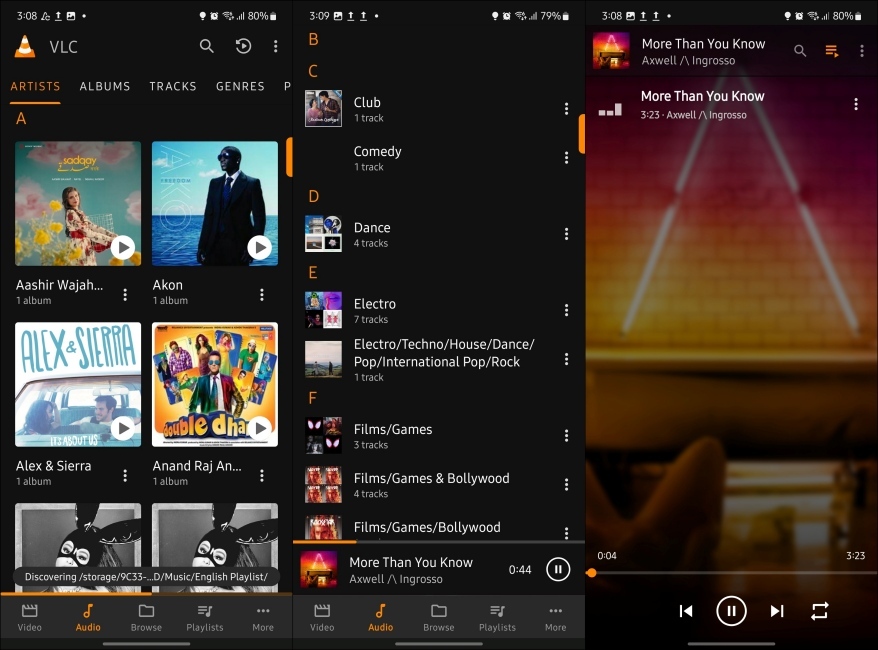
It’s completely free, open-source, and has no ads, which already makes it stand out from most Android apps. You also get a built-in equalizer and basic library management, but compared to apps like Poweramp or Neutron, it’s clearly more about convenience than deep customization.
| Pros | Cons |
|---|---|
| Supports almost all audio formats | Limited customization options |
| Offline playback | Manual controls are minimal |
| Network streaming support | |
| Completely free and ad-free |
Which Best Music Player on Android Should You Use? (Buyer’s Guide)
If you’re an audiophile, you cannot go wrong with PowerAmp. Music players like Aeon, Vanilla, Frolomuse, and Retro are great for all the minimalists out there. If you need a bit more features to alter audio playback to your liking, features like built-in YouTube playback, Namida, FiiO music, and Salt Player are all excellent music players. Here’s a simple decision tree.
- Best sound quality? > Go for feature-rich players with high-res audio support
- Ease of use? > Stick to simple, polished apps
- No distractions? > Choose minimal, lightweight music players
Do you know a music player that would make a great addition to this list? Do you still prefer listening to music offline? Let us know in the comments below.
Most open-source music players for Android, like VLC player and Musicolet, are the best free, ad-free music players with full offline playback support.
For audiophiles, PowerAmp and FiiO music are the best music players that you can get for Android if you want Hi-Res audio, FLAC file support, and advanced EQ options.
Yes, most Android music players like Poweramp, VLC, and Foobar2000 support FLAC and other lossless audio formats.
Yes, Poweramp is still one of the best Android music players in 2026, especially for audio quality and advanced controls, but if you are not much of an audiophile than this app might not be for you.
