- Game sharing is possible for GTA 6 on PS5 using Sony's console sharing and offline play feature.
- Enable console sharing on the friend's PS5 using the account that purchased GTA 6, then download the game and switch profiles.
- GTA 6 can be shared with only one PS5 at a time, while account-specific bonuses and rewards may not transfer.
The GTA 6 price tag may sound expensive to some people. But if you and your close friend both own a PS5 or PS5 Pro, it’s possible to share the game without buying two separate copies. PlayStation lets you share your digital game library with another player in a few simple steps. So, let’s learn whether you can game share GTA 6 on PS5 and how it works.
Is It Possible to Game Share GTA 6 on PS5?
Yes, you can share GTA 6 using the Console Sharing and Offline Play feature with friends on your PS5. This allows other users on a designated PS5 console to access and play games purchased or redeemed through your PlayStation account.
In fact, Sony’s official GTA 6 support page specifically mentions this feature. It confirms that players using an account that doesn’t own the game can access it if the purchasing account has enabled Console Sharing and Offline Play on their console.

So, you and your friend don’t need to purchase copies of GTA 6. Let’s say you’re loaded and buy the game. You can then log in and enable Console Sharing on your friend’s PS5 or PS5 Pro to allow them to download and play the game using their own profile.
Moreover, this feature works with the physical Edition of GTA 6 as well. However, remember that the physical edition contains a code inside the box. So, it stays linked to the account that redeems it. So, if your friend disables Console Sharing after redeeming the physical edition code, you won’t be able to access it.
How to Gameshare GTA 6 with Friends on PS5
Setting up GTA 6 game sharing is pretty simple. All you need is access to a PS5 console where you want to play the game and the PlayStation account that owns GTA 6. Now, you can follow the steps below:
- Turn on your PS5 console.
- Sign in using the PSN account that purchased the game.
- Go to Settings (cog icon at the top right) from the PS5 home screen.
- Navigate to Users and Accounts.
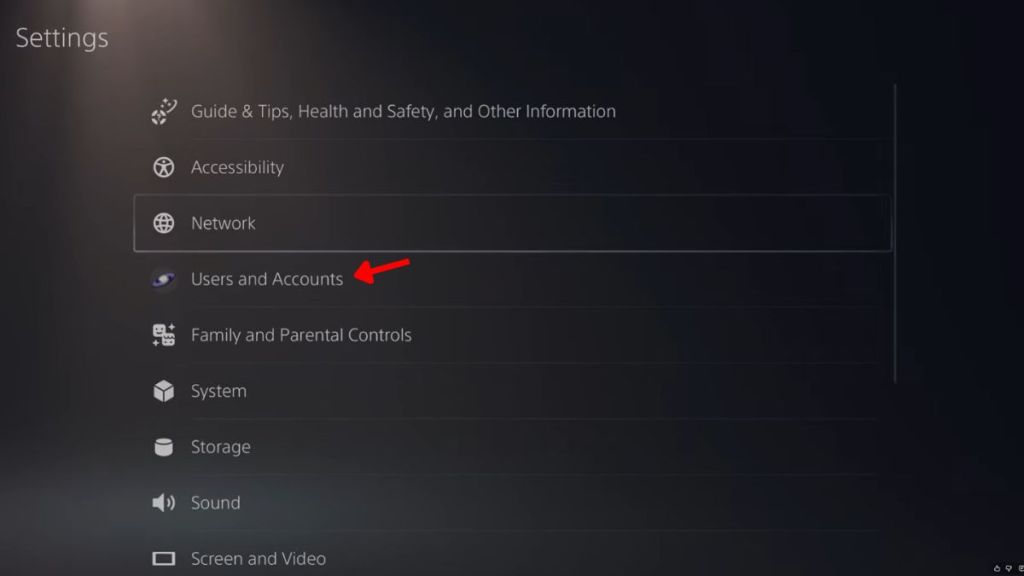
- Here, go to Others and select Console Sharing and Offline Play.
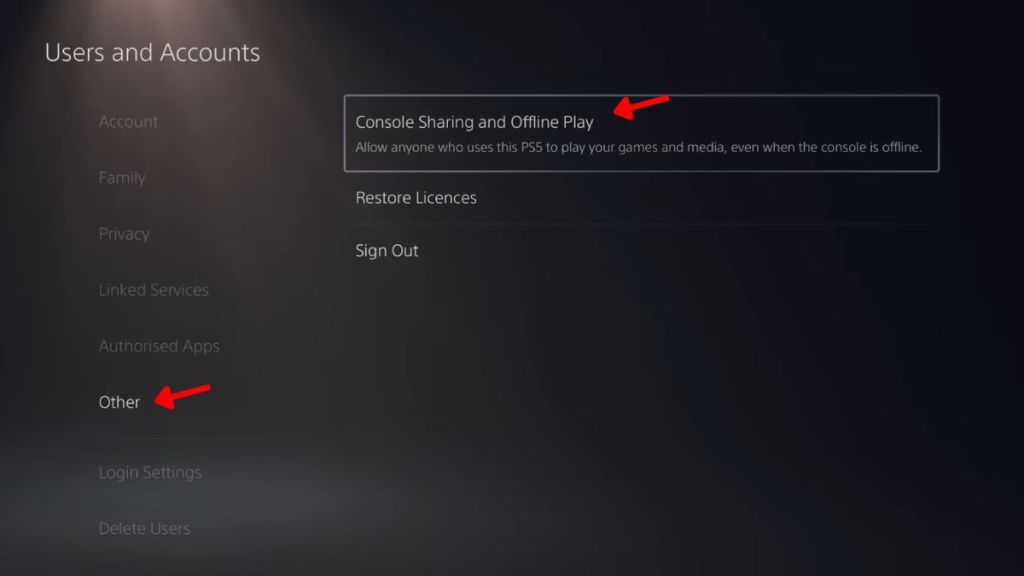
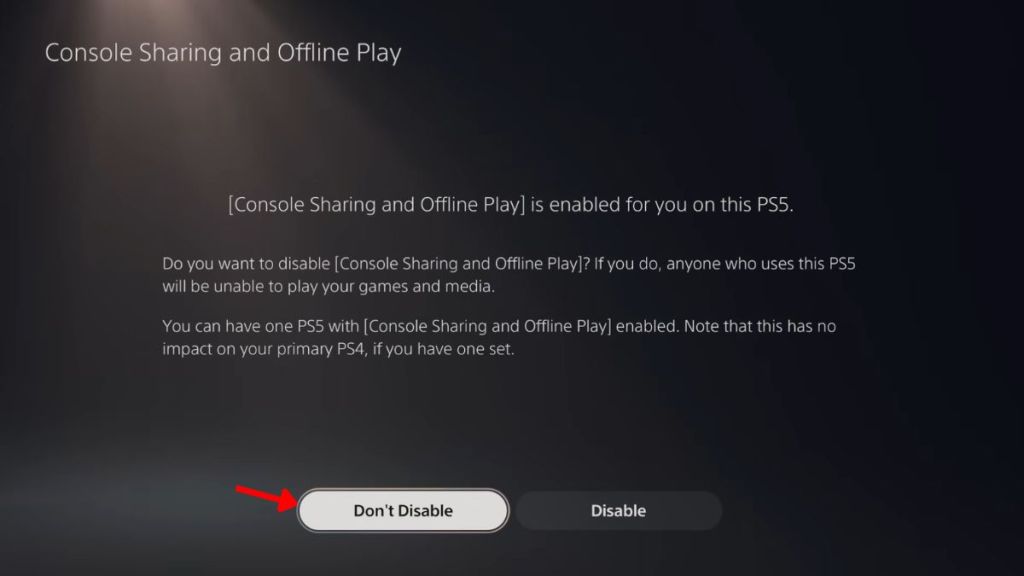
- Select Enable to activate the game share feature. If you already have it enabled, select the ‘Don’t Disable’ option.
- Now open your Game Library and download GTA 6 using the account that purchased the game.
- Once the download is complete, switch back to your original PlayStation profile, and GTA 6 will be ready to play.
That’s how you can share GTA 6 from your friend’s account to your own console without spending a penny. You can also play other purchased games on your PS5 from your friend’s account.
Since Rockstar has spent more than a decade on this title, you might want to check out new GTA 6 features and mechanics that separate it from the rest of the franchise. Perhaps you might even want to set the best TV settings for GTA 6 before jumping into the neon-soaked streets of Vice City.
Above all, remember that the game share feature is available for only 1 console per PSN account. So, choose your most trustworthy friend wisely who’s willing to share the GTA 6 price tag with you.
Are you hyped up for the first drive through Leonida? Tell us in the comments below.
















 Sanmay Chakrabarti