- Call of Duty Modern Warfare 4's online gameplay modes require Secure Boot and TPM 2.0.
- To enable Secure Boot and TPM 2.0, go to your PC's BIOS and enable the respective settings.
- TPM 2.0 can only be enabled if your system partition type is GPT and not MBR.
Call of Duty: Modern Warfare 4 has a peculiar requirement for PC players due to its anti-cheat. The game requires players to enable Secure Boot and TPM 2.0 to play the online modes. If players don’t enable these two features, the game won’t allow them to play the online mode. So, here is a quick guide on how to enable Secure Boot and TPM 2.0 for Call of Duty Modern Warfare 4.
What is Secure Boot and TPM 2.0?
Secure Boot is a Windows feature that helps your system stay safeguarded from malicious programs. This feature only allows trusted software to load during startup, preventing any malicious apps from launching at startup on their own.
This feature is combined with TPM 2.0, aka Trusted Platform Module, which provides hardware-based security. This adds another layer of protection to the system. Many modern anti-cheats rely on having both Secure Boot and TPM 2.0 enabled. This is also true for the RICOCHET Anti-Cheat, which is used by the Call of Duty Modern Warfare 4 Beta launcher.
Now that you have understood what Secure Boot and TPM 2.0 are and why it is required for Modern Warfare 4, let’s see how to enable them.
How to Check and Enable Secure Boot to Play Call of Duty Modern Warfare 4
Secure Boot can only be enabled from the PC’s BIOS setup menu. This means that the steps to enable it would be different for everyone. But before that, you will need to know whether the feature is enabled or not on your PC if you plan to preload Call of Duty Modern Warfare 4 beta and play it. Here is how you can check whether Secure Boot is enabled on your PC or not:
- Press Windows + R to open the Run command.
- Type ‘msinfo32‘ in the search box and press Enter.
- Look for the ‘Secure Boot State‘ option under ‘System Summary.’
- If it states ‘On,’ you don’t need to do anything else. If it is enabled, you don’t need to do anything else. However, if it is not, then you will need to enable it.

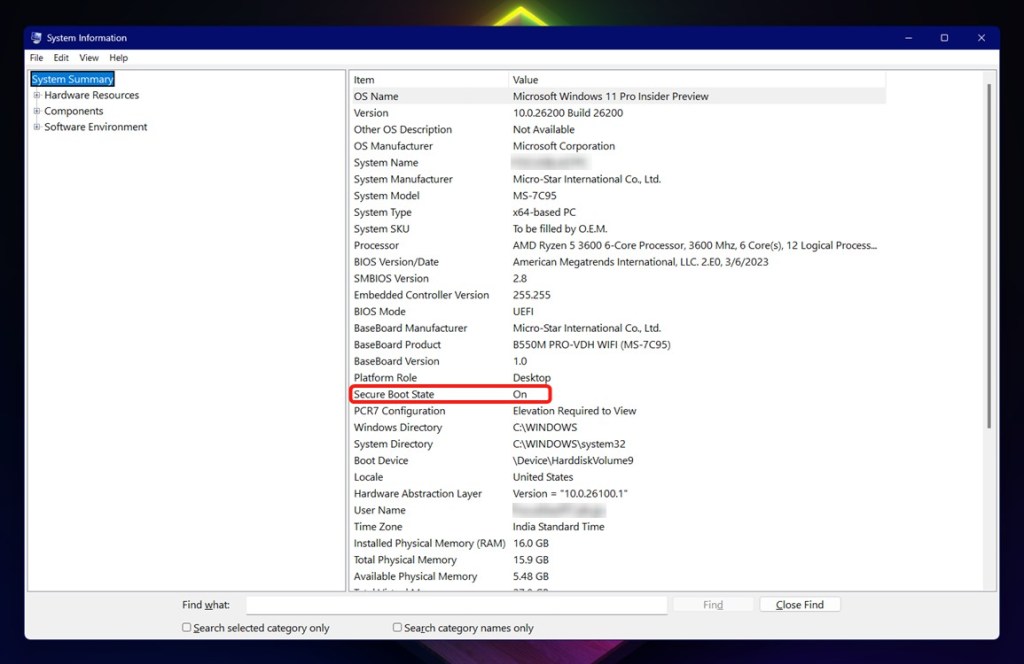
We have a complete guide on how to enable Secure Boot in Windows 11 that you can follow for detailed steps.
How to Enable TPM 2.0 to Play Call of Duty Modern Warfare 4
With Secure Boot enabled, you will also need to make sure TPM 2.0 is enabled on your PC. If you don’t have them both activated, you won’t be able to play or claim any free Call of Duty Modern Warfare 4 beta rewards. That said, here is how you can check whether it is enabled or not:
- Press Windows + R to open Run.
- Type ‘tpm.msc‘ and hit Enter.
- Check under the ‘Status’ section of the menu. If it reads, ‘The TPM is ready to use,’ it means that TPM 2.0 is enabled.

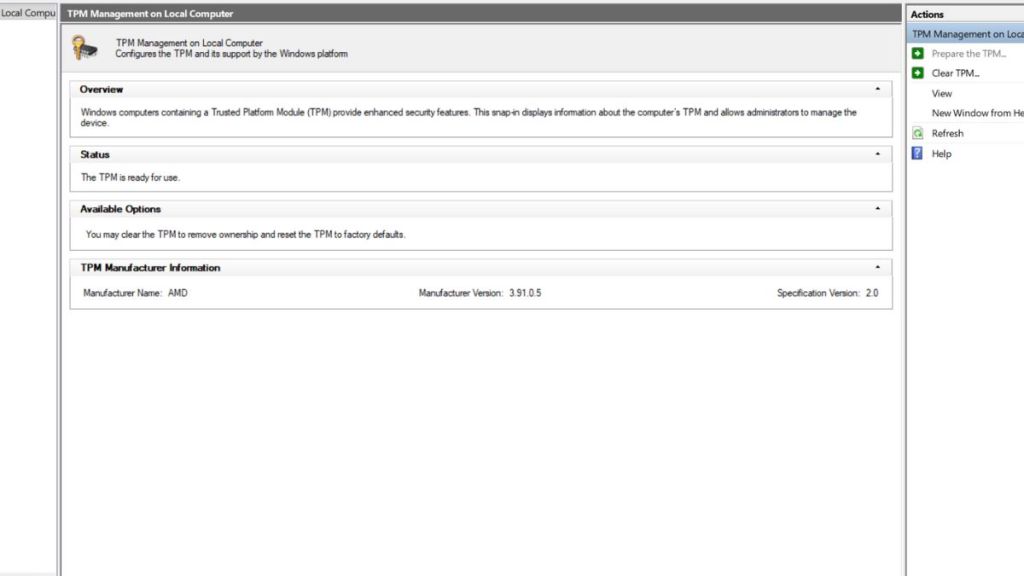
Now, if the status says ‘not ready to use,’ you will need to enable it. However, before you can do so, you will need to check the partition type of your system drive. This is important, as you can only enable TPM 2.0 in the GPT partition type. This option won’t be available for the MBR type, and here is how you can check it:
- Right-click on Start and select Disk Management.
- Right-click on the system drive, which should be the (C:) Drive for most users, and select Properties.
- Select the ‘Hardware‘ tab and click on Properties once again.
- Now, select the Volumes tab.
- Check whether the Partition Style is MBR or GPT.
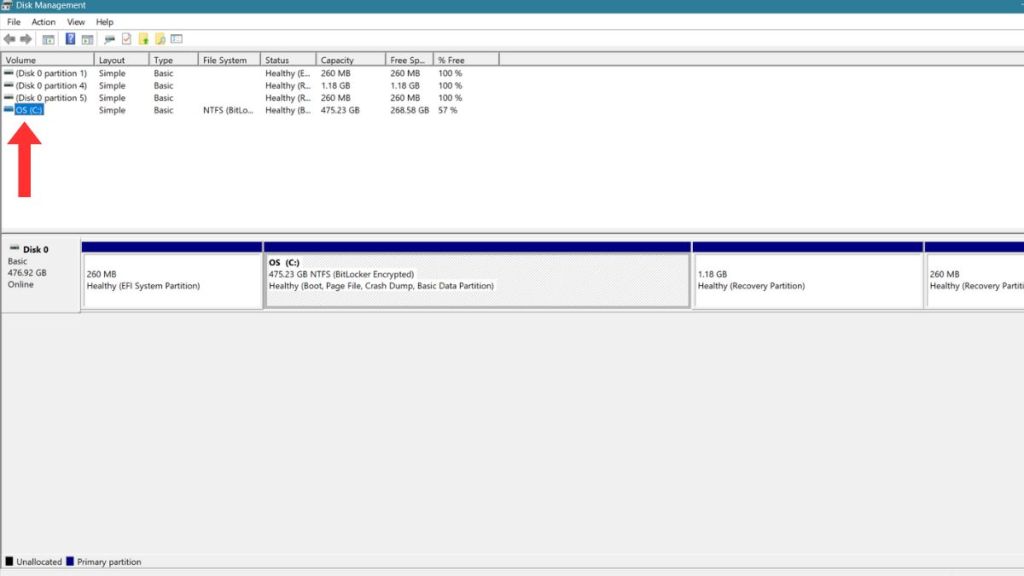
If the style is MBR and not GPT, you will need to format the drive into GPT. This is a long process, and we recommend that you follow a guide for converting a disk to GPT or MBR. Once the partition is converted to GPT, you will be able to enable TPM 2.0 from the BIOS.
Simply enter the BIOS after restarting your PC and look for Advanced Mode or System, and find the Intel PTT or AMD fTPM options. Enable them when you find them and restart the system.
Can I Play Call of Duty Modern Warfare 4 Without Secure Boot?
No, players cannot access the Call of Duty Modern Warfare 4 multiplayer and other online modes without enabling the TMP 2.0 and Secure Boot first. This was also the case for Black Ops 7 when its beta came out.
So, that’s it. Have any questions or doubts? Let us know in the comments below, and we will try to help you out.