Nova Launcher remains the best Android launcher even in 2026. However, its original creators have left the project, and its new owners are monetizing the app by showing ads. This led many dedicated users to seek alternatives to the app out of frustration. If you are in the same boat, or simply looking to give your phone’s homescreen a fresh makeover, then keep reading. We will go over 10 of the best Android launchers that are well worth using in 2026.
Our Top 3 Picks for the Best Android Launchers at a Glance
Among all the choices in this list, I have picked my top 3 favorite Android launchers that I would highly recommend to everyone.
| Our Android Launcher Picks | Why We Liked It |
|---|---|
| Niagra Launcher | I have been using Niagara Launcher since the Nokia launcher days because of its clean vertical app list, one-handed usability, and a distraction-free design. It looked modern then, and I can say the same in 2026. |
| Lawnchair Launcher | Besides Nova, Lawnchair is my best Android launcher pick given how close it sticks to the stock Android look. It offers a ton of customizations like Nova, without overcomplicating things. Plus, it runs buttery smooth on budget and old phones too. |
| Minimalist Phone: Launcher | Minimalist launcher is my most recommended pick to reduce phone usage. It replaces icons with a clean, text-focused layout, helping you use your phone less and more intentionally. It is one of the best Android launchers if you are going through a digital detox. |
Overview of the Best Android Launchers in 2026
Here is a quick overview of the best Android launchers that I have picked for this list, and for the enthusiasts out there, I have even mentioned their RAM Usage, battery drain, and pricing too.
| Android Launcher | RAM Usage (varies by setup) | Battery Drain (per hour) | Pricing |
|---|---|---|---|
| Niagra Launcher | 150–220 MB | 4% on average | Free, Pro subscription starts at $13.99/year or $42.99 perpetual |
| Nova Launcher | 330 MB | 4% on average | Free, Prime subscription available at $3.99 perpetual |
| Smart Launcher 6 | 260 MB | 3–5% on average | Free, Paid version available for $21 lifetime |
| Microsoft Launcher | 300 MB | 8% on average | Free |
| Lynx Launcher | 140–200 MB | 2–3% on average | Free, Paid version available for $3.99 lifetime |
| Lawnchair | 440 MB | 7% on average | Free |
| OLauncher | 220 MB | 6% on average | Free |
| Kvaeisitso | 120–190 MB | 2–3% on average | Free |
| Minimalist Launcher | 110–180 MB | 2% on average | Free, Paid version available for $5/month |
| Detox Launcher | 170 MB | 4% on average | Free, includes in-app purchases |
How We Tested the Best Android Launchers
To try out each one of these launchers, I picked a Pixel smartphone since it comes with the most baseline Android experience out of the box. I also wanted to check which launcher works best on a foldable phone. So, the most suitable candidate for this turned out to be the Pixel 10 Pro Fold.
It is running on Android 16 (which is the latest version at the time of writing). I also used my 5-year-old Redmi Note 10 Pro to test performance on older devices. I installed each launcher for a day or 2, seeing how much they affected my usage, how much battery they drain and how much RAM they consumed.
Best Android Launchers in 2026 Reviewed
With the formalities out of the way, let me take you through the best Android launchers in 2026, which include the obvious: Nova Launcher, Niagara Launcher, and Smart Launcher 6.
Nova Launcher
Nova Launcher has been here for a long time, and it has made sure that it remains relevant. It brings a stock interface, but there are tons of customization options to play with. There’s the ability to customize animations, icons, app drawer, widgets, grid layout, along with other handy features like gestures (Premium version), icon pack support, backup/restore, etc.
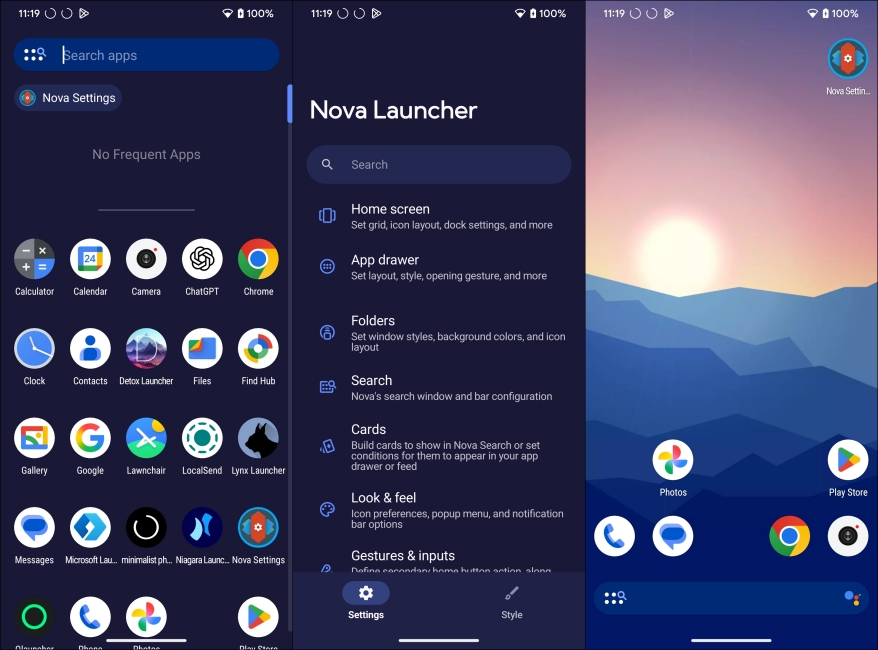
Nova Launcher is also fast & fluid, and while testing it, I did not feel any lag. However, the project has been abandoned by its original team and sold off to another company, which is now showing ads in the launcher. I encountered some too during my usage. So, while it does stand as one of the best Android launchers, its future is quite questionable.
| Pros | Cons |
|---|---|
| Extremely deep customization options | Some advanced features require Prime version |
| Gesture controls and backup support | Shows ads in free version |
| Works well across most Android devices | Project abandoned by creators |
Niagara Launcher
Niagara Launcher has lately become quite popular among Android users, and I have used it a lot last year. It is the best Android launcher if you prefer simplicity over heavy customization. It shows all your apps, neatly arranged in a vertical list. And you can scroll through them using the alphabet list, which makes one-handed use genuinely convenient, especially on larger phones.
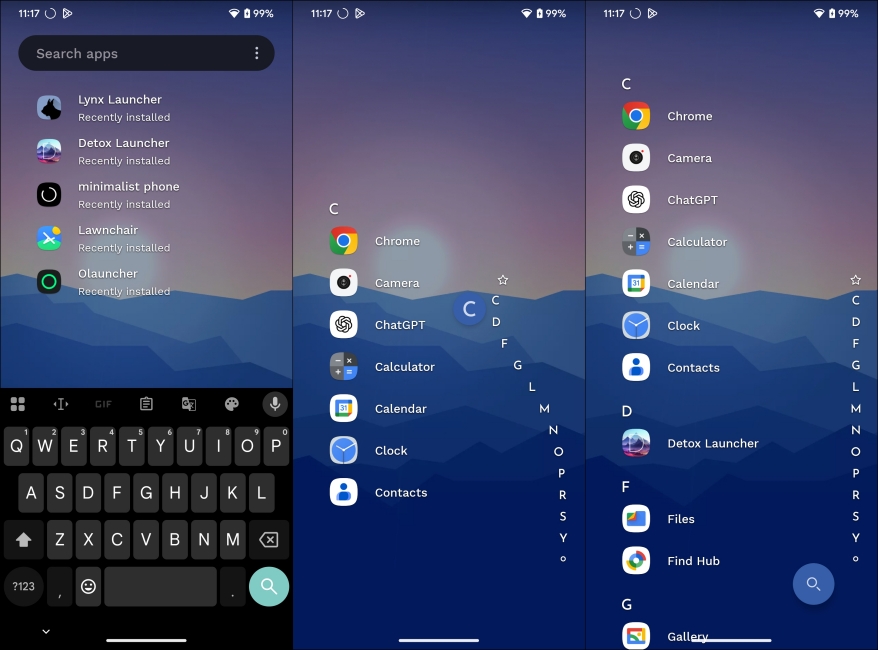
The overall experience feels distraction-free, which is exactly what the launcher aims to achieve. Niagara is also pretty lightweight and looks pretty modern. Though using heavier widgets can demand more system resources. You have to use it to know how intuitive and smart it is. Moreover, the launcher adapts over time and learns which apps you use when and most.
| Pros | Cons |
|---|---|
| Excellent one-handed usability | Limited customization options |
| Clean, distraction-free design | Some features locked behind Pro version |
| Easy to navigate vertical apps list |
Smart Launcher 6
Smart Launcher is another popular Android launcher, and as the name suggests, it lets you launch apps quickly and smartly. It intelligently organizes everything, and the automatic app categorization is genuinely useful. Instead of manually sorting apps into folders, the launcher groups them for you, similar to what we have seen in the latest iOS version.
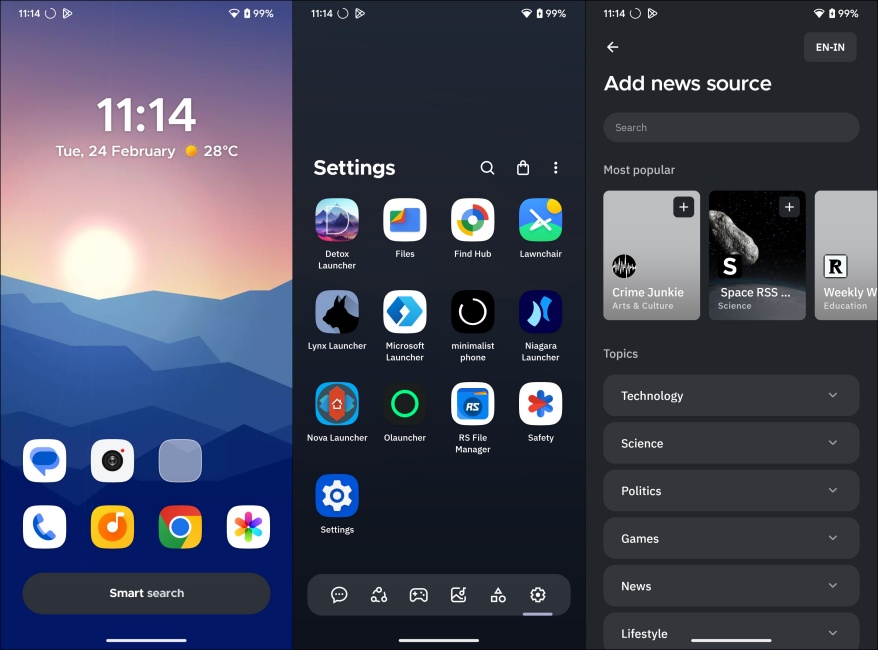
There’s also the ability to hide apps and edit icons, app grid, animations, search bar, lockscreen, and more. I also liked the adaptive theming that matches the UI colors to your wallpaper, along with the frosted glass-style visuals that give the interface a modern “Liquid Glass” feel, even if you have an older phone. In daily use, performance felt smooth with no noticeable lag. However, the free version is quite limited, and I would recommend upgrading to the Pro version to enjoy most of its features.
| Pros | Cons |
|---|---|
| Automatic app sorting | Many advanced features require a paid version |
| Smart search and gesture controls | Learning curve due to the unique layout |
| Good balance between customization and simplicity | Occasional issues with certain widgets |
Best Android Launcher for Foldables
If you have a foldable phone like the Pixel Fold or the Samsung Galaxy Z Fold, then you should go with the Microsoft or Lynx launcher. Let me explain why you should choose between the two.
Microsoft Launcher
You wouldn’t expect to see Microsoft in the list of best Android launchers. But the Microsoft launcher is genuinely a good option as it is. It offers a typical homescreen setup with an app drawer and a universal search that you can bring down from the top. It also features a personalized feed with calendar events, tasks, notes, and news, which is genuinely useful if you are already in the Microsoft ecosystem.
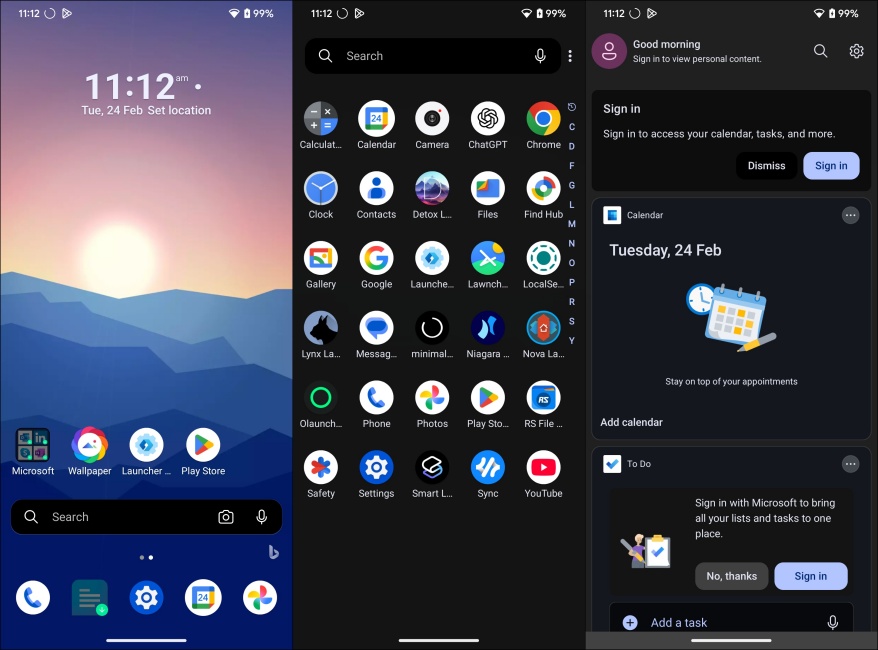
What is actually surprising is how well it fits the large screen of the unfolded Pixel 10 Pro Fold that I was using for the testing. The layout scales nicely, and the wide grid options make better use of screen space, which makes it a decent choice for foldables and large-screen phones, even though third-party launchers still cannot fully match the stock launcher.
| Pros | Cons |
|---|---|
| Works well on large displays and foldables | Some feature require existing Microsoft account |
| Customized feed of news, notes and events | Feed can feel cluttered if you do not use Microsoft services |
| Smooth performance with good customization | Updated less often |
Lynx Launcher
Lynx Launcher surprised me with how different it feels compared to most Android launchers. It takes inspiration from the Linux GNOME desktop style, which means you get a clean, minimal home screen with all your apps accessible from a right swipe. Swiping from left brings up your favorite contacts, and swiping down brings up search.
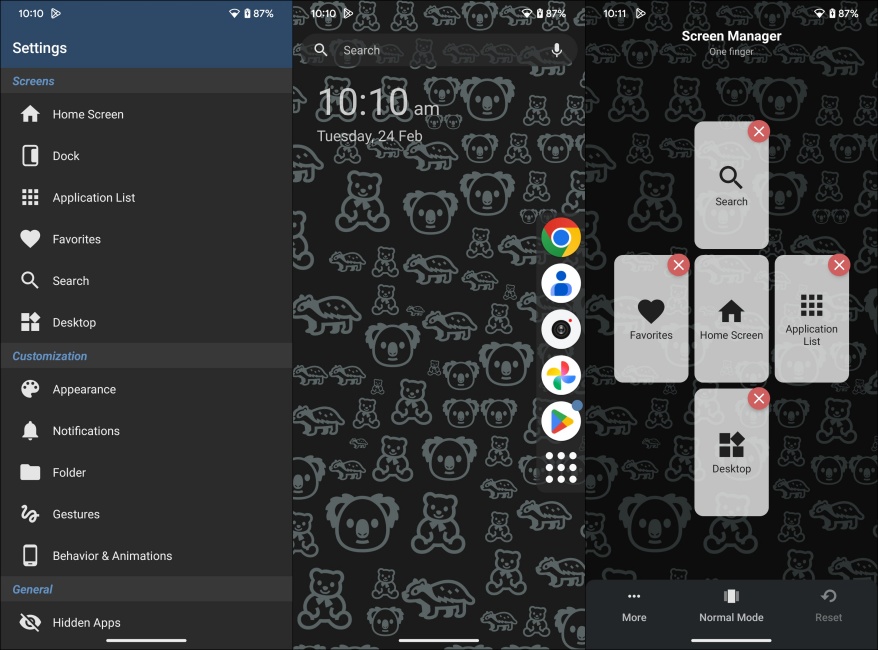
This is a unique layout that needs a little getting used to. But after the second day, it became second nature to swipe right to bring up the app drawer. It is also quite lightweight, and the customizations were better than I expected. You can tweak dock position, text size, grid layout, themes, and even hide unwanted system apps. It also plays pretty well on a large foldable display, which is also why I have added it as one of the best foldable Android launchers.
| Pros | Cons |
|---|---|
| Unique GNOME-style interface | Learning curve to understand its layout |
| Lightweight with smooth performance | Some advanced features require Pro version |
| Good customization and gesture controls |
Best FOSS Android Launchers
Most Android experiences prey on your privacy. So, if you are looking for some privacy-friendly options that are open-source, then you can try out Lawnchair, O Launcher, and Kvaeisitso.
Lawnchair Launcher
Lawnchair launcher has been one of my favorite options besides Nova because of its Pixel-style experience. Plus, it does not charge extra for some of the basic features that Nova locks behind a paywall. The interface feels clean and familiar, but you get plenty of customization options like grid control, icon packs, gesture tweaks, and Material theming that adapts to your wallpaper.
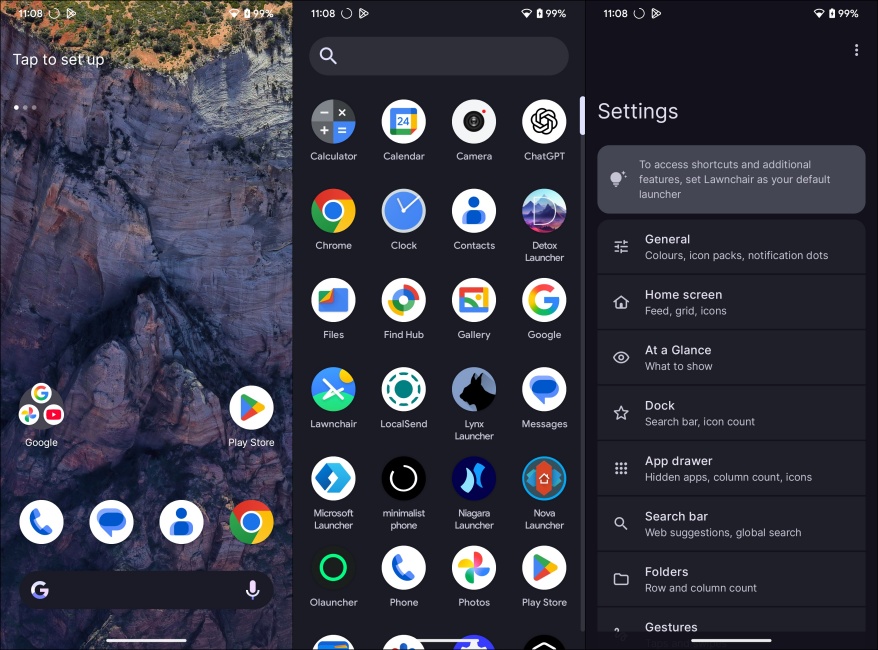
The built-in search is also quite fast, letting me find apps, contacts, and web results quickly from the home screen. Since it is open-source and based on Android’s Launcher3. In daily use, performance stayed consistent with no noticeable lag. I have used it across budget devices throughout the years, and it has managed to work quite seamlessly. So, I highly recommend it, not just as a FOSS launcher, but also one of the best Android launcher period.
| Pros | Cons |
|---|---|
| Pixel-like clean interface with deep customization | Play Store version receives older updates compared to the newest releases |
| Material theming support | Not as feature-packed as Nova for power users |
| Lightweight and smooth performance |
OLauncher (Minimal Text Launcher)
OLauncher is an open-source distraction-free launcher. It replaces icons and widgets with a clean text-based layout that only shows the apps you choose. During my time using it, the experience felt different from the typical Android setup as it removes the visual noise. You can launch apps quickly with gestures, and keep the interface minimal with almost zero setup. Since it is open-source and privacy-focused, there are no ads or tracking either, which adds to the appeal.
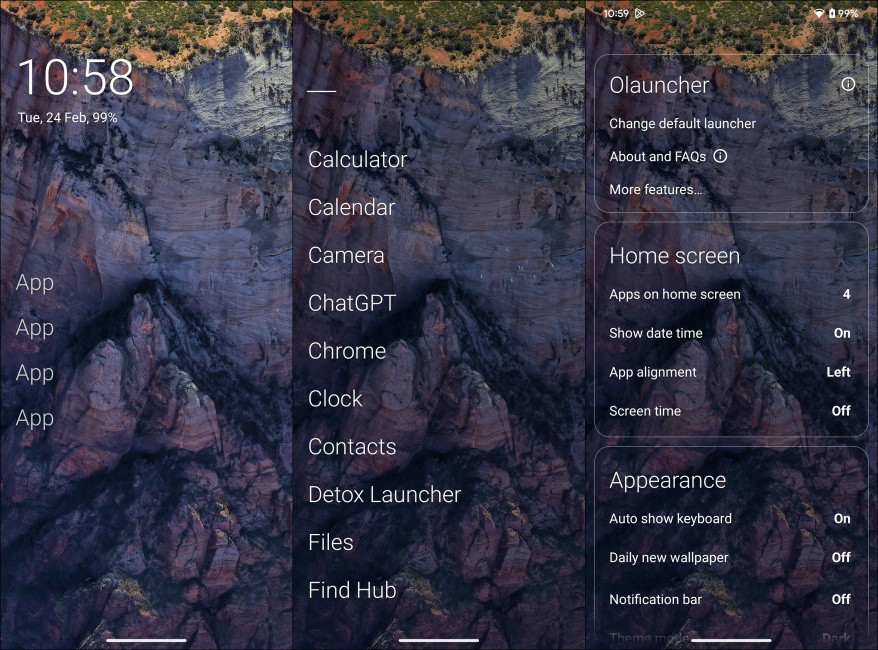
Performance is where Olauncher really shines. Because there are no heavy animations or background features, it works great on budget Android devices, too. Its minimal look also makes it one of the most efficient options to choose from the FOSS Android launchers. If your goal is digital minimalism or reducing phone addiction, this launcher does exactly what it promises.
| Pros | Cons |
|---|---|
| Great for reducing screen time habits | Very limited customization |
| Clean, distraction-free text interface | No traditional widgets or icon layouts |
| Open-source with no ads or tracking | Not ideal if you prefer visual home screens |
Kvaeisitso
Kvaesitso is easily one of the most unique Android launchers in this list, right next to Lynx. Instead of multiple pages and app grids, everything revolves around a universal search. I could quickly find apps, contacts, files, and even perform actions just by typing a few letters. You can bring up all the apps by swiping down on the home screen. But the entire point is to look up using its search function.

The gesture-first navigation also feels fast once you get used to it, and the widget stack system is surprisingly good, just like OneUI 7. Since it is open-source and privacy-focused, there are also no ads or tracking. If you want something modern, productivity-focused, and different from every other launcher, Kvaesitso is easily one of the best Android launcher options available right now.
| Pros | Cons |
|---|---|
| Lightweight with good performance | Limited customization |
| Clean, modern, and distraction-free design | Learning curve due to non-traditional layout |
| Universal search and gesture navigation |
Top Minimalist Android Launchers
Now, if you are serious about your smartphone addiction and want to get rid of it, then you should switch to Minimalist Phone: launcher or Detox launcher. These launchers offer a simple design language and could help you minimize your phone usage.
Minimalist Phone: Launcher
Minimalist Phone is not for the customization crowd. It is a launcher designed to change your phone habits. It replaces icons with a text interface similar to OLauncher. It also includes built-in productivity tools like app timers, notification filtering, focus mode, and screen time tracking, which help you keep track of your constant app usage.
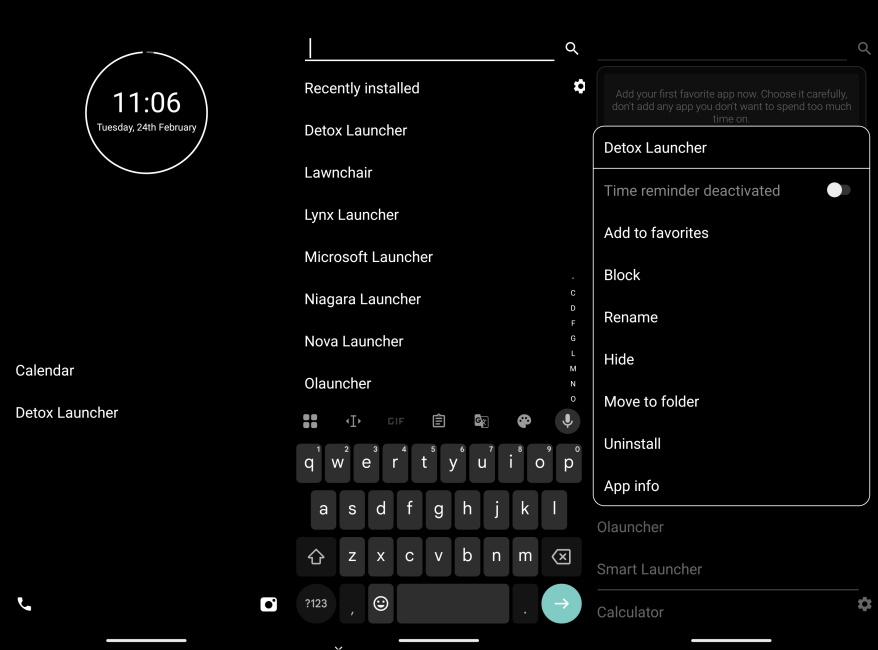
The goal of this Android launcher works surprisingly well if you are trying to cut down on mindless scrolling. Since the interface is lightweight and avoids heavy animations, performance stays pretty smooth. So, if your priority is healthier phone habits, then this is definitely out there as one of the best launcher options for Android phones right now.
| Pros | Cons |
|---|---|
| Clean text-based interface | Very limited customization |
| Built-in productivity and focus tools | Subscription required for advanced features |
| Excellent for reducing distractions and screen time | Not ideal for everyone |
Detox Launcher
Like Minimalist Phone and OLauncher, Detox Launcher is also built to help you reduce your phone usage. When I tried it, the interface immediately felt calmer since it highlights only the important apps. You get a minimal home screen, focus tools to hide apps, grayscale modes, and notes or to-do lists. The launcher also tracks usage to help reduce screen time.
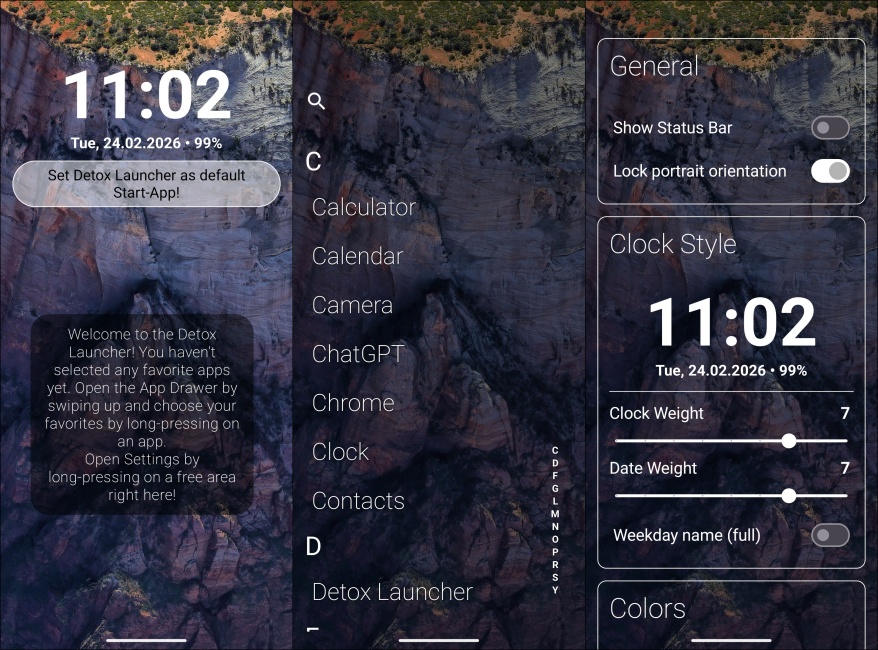
Performance is also quite lightweight, though features like screen monitoring or timers can demand more resources slightly. We at Beebom love this app so much that it has even featured in our best Android launcher video on YouTube. So, if your goal is to cut distractions and build healthier phone habits, Detox Launcher is easily one of the best launcher options for Android phones in 2026.
| Pros | Cons |
|---|---|
| Strong focus and digital detox features | Limited visual customization |
| Lightweight performance | |
| Clean, distraction-free interface |
Which is Better: Nova Launcher vs Niagara Launcher?
In case you are confused whether to switch from Nova Launcher to Niagara Launcher, or just can’t decide, then let me give you a breakdown between the 2 popular Android launchers.
| Feature | Nova Launcher | Niagara Launcher |
|---|---|---|
| User Experience | Traditional home screens with grid layouts, app drawer, and heavy customization | Minimalist interface with a vertical app list and one-handed friendly |
| Customization | Very high, as you can change icon packs, widgets anywhere, gestures, home screen/app drawer/dock layout and status bar icons | Moderate, you can only change themes, icons, and a few limited widgets |
| Performance | Smooth but can turn heavy with extreme customization preferences | Lightweight and feels faster for everyday use |
| Best For | Users who want most control over their Android homescreen | Users who prefer simplicity, speed, and distraction-free use |
| Learning Curve | Moderate: Takes time to master | Low: Minimal setup |
Verdict: Which is the better Android launcher?
- Nova Launcher is still a great choice if you want granular control over customizations and features that let you tailor every aspect of your Android home screen.
- Niagara Launcher stands out for users who want a clean, distraction-free experience with smart one-handed navigation and simplicity at its core.
Why Should You Replace Your Default Home Screen?
Most phones ship with a default launcher that gets the job done. But even after almost 2 decades, many of them don’t offer the level of customization that is possible on Android. Switching to another Android launcher can completely change how your phone feels to use.
From the layout, icon pack, gestures, to personalization. If you find your home screen boring, a third-party launcher can solve that in minutes. It is especially useful on budget or older phones, where a launcher can deliver smoother animations than the first-party stock launcher.
How to Choose the Right Android Launcher for You
The process of finding the best Android launcher for you depends on what you want to do on your phone and what you want from it. To make it easier for you to decide, here are the most important factors that you need to consider:
- Decide Your Priority: Choose whether you want heavy customization, better productivity, or a simple and clean interface before picking a launcher.
- Customization Options: If you want max customization, look for features like grid size control, icon packs, homescreen animation settings, app drawer, and dock changes.
- Performance and Lightweight: If you have an older phone, a lightweight launcher like Lawnchair or Niagra can offer responsiveness and smoothness.
- App Drawer Organization: Some of the best Android launchers offer smart sorting, app drawer folders, and advanced search features to provide better control to find apps.
- Updates and Developer Support: A launcher that receives regular updates is more likely to stay compatible with new and outdated Android versions than one that has been abandoned.
- Ease of Switching: Since most launchers are free to try, testing a few options is the best way to find the best launcher for your Android phone.
There are many more launchers available on Android since customization is one of the key features people love Android for. But we can say with enough confidence that these are no doubt the best Android launchers available! So, choose the one that fits your needs. Don’t forget to let us know about the Android launcher you are using in the comments section.