- Installing Hytale mods is simple, and players will require the game and the CurseForge app to be downloaded in their system,
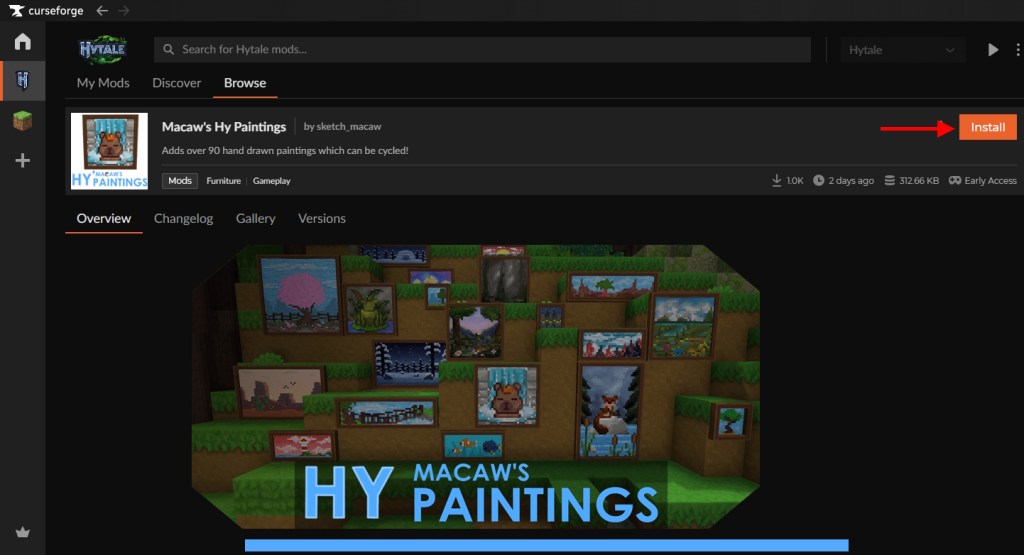
- On the CurseForge app, open Hytale, browse for the mod required, and press the install button.
- Once installed, launch Hytale, and on the world settings, toggle on the required mod and press play.
Hytale has just been released in the early access stage, and it has shown fabulous potential in becoming the next best RPG sandbox game. But even before its official launch, the game has attracted tons of creators and modders all around the community to build custom content for the game. Yes, I am talking about the mods in Hytale. So, if you are looking to experiment with the core gameplay right away and add a few extra items to interact with, here is a complete guide on how to install Hytale mods and what you can do with them.
How to Install Mods in Hytale
Installing mods in Hytale is extremely straightforward, and all you need is a trusted mod manager such as CurseForge. However, compared to other sandbox titles, do note that these are server-based mods and therefore, if all your friends have loaded up the same world as yours, they’ll see the mod’s effect as well. With that said, follow the steps given below to install the Hytale mods right now:
- Open the CurseForge App on your PC, and if you don’t have it, make sure to download it from the official CurseForge site.
- Also, make sure that you have already downloaded the Hytale Launcher and purchased the game for your system.
- After installing both of them, go to the CurseForge app and select Hytale from the games list.




- Then, click on the Browse for Mods button to check all the mods available on the app.
- Have a look at the mods available and select the one you wish to install.
- Now, click on the Install button on the right to start the installation process.
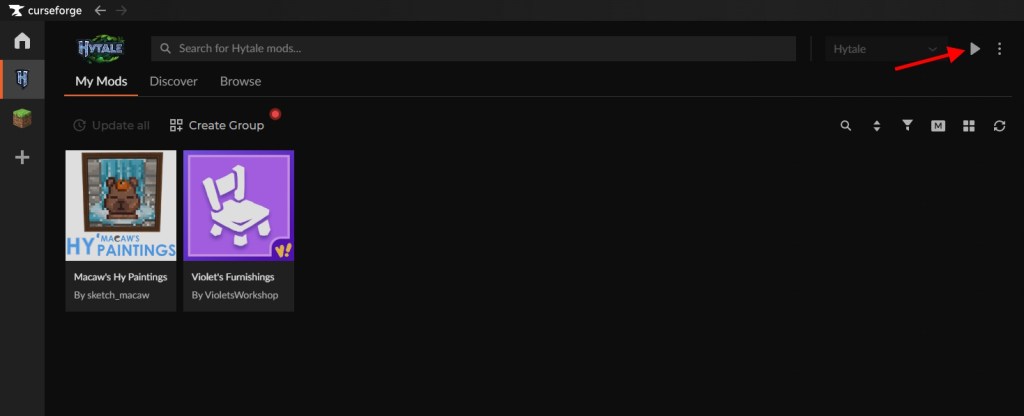
- Once done, return to the My Mods tab on the top left and press the Play button on the top right of the screen.


How to Run Mods in Hytale
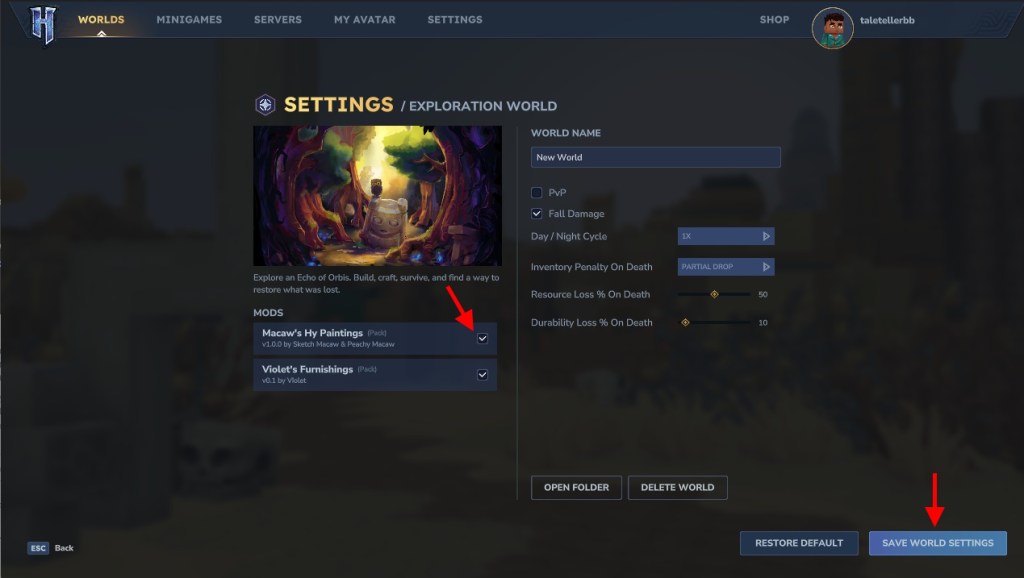
Having downloaded the mods, there is just a single step left for you to complete. You need to make sure that the mods are enabled in your world settings. For this, you can follow the given steps:
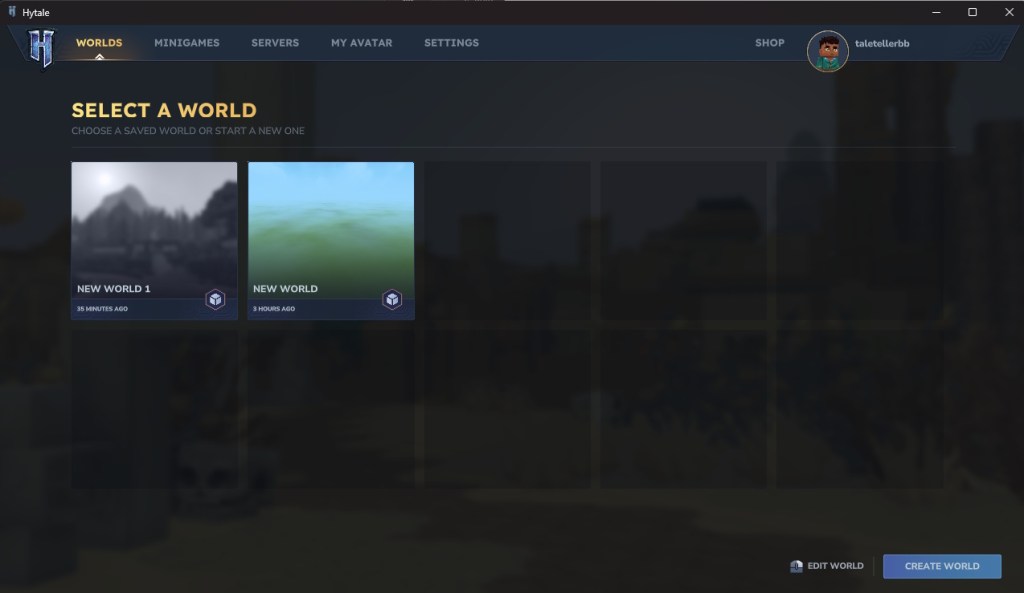
- Click on the Worlds tab after launching Hytale, where you can view all the pre-made worlds.
- If you don’t have any, press the Create World button on the bottom right to make one right away.
- Now, right-click on the world you wish to modify.

- Toggle on all the mods you wish to keep in this world and click the Save World Settings button below.
- Left-click on the same world, and it will start booting up the chunks. Now, you can enjoy your modded Hytale adventure.

What are Hytale Mods?
Hytale mods are modifications created by the community to expand or alter the base game. This can give players unlimited freedom or even introduce something that wasn’t intended to be there originally.
These mods generally fall into three main categories – packs, plugins, and early plugins. Packs focus on contents and assets, thereby introducing new blocks, items, animations, behaviors, and more. Plugins are more advanced mods written in Java that can introduce new systems, gameplay rules, or even some complex mechanics. Whereas the Early Plugins operate at a lower level to modify core systems, such as boosting the loading time of chunks, providing better performance, and so on.
So that is all about the Hytale mods and how you can install them on your PC. Have you played Hytale yet? What were the key differences in Hytale and Minecraft that you spotted easily? tell us in the comments below.
Some of the best Hytale mods include Lucky Minin, Advanced Item Info, Simple Claims, and many more.
On the CurseForge app and in the Hytale game, browse for the mods you want to install. Click the install button, and press play on the top right to add that mod to your Hytale world.
Yes, Hytale supports mods, and there are several available online for you to try out. Each mod can uniquely add new features to the game, such as increasing efficiency in mining, showing item information, and many more.