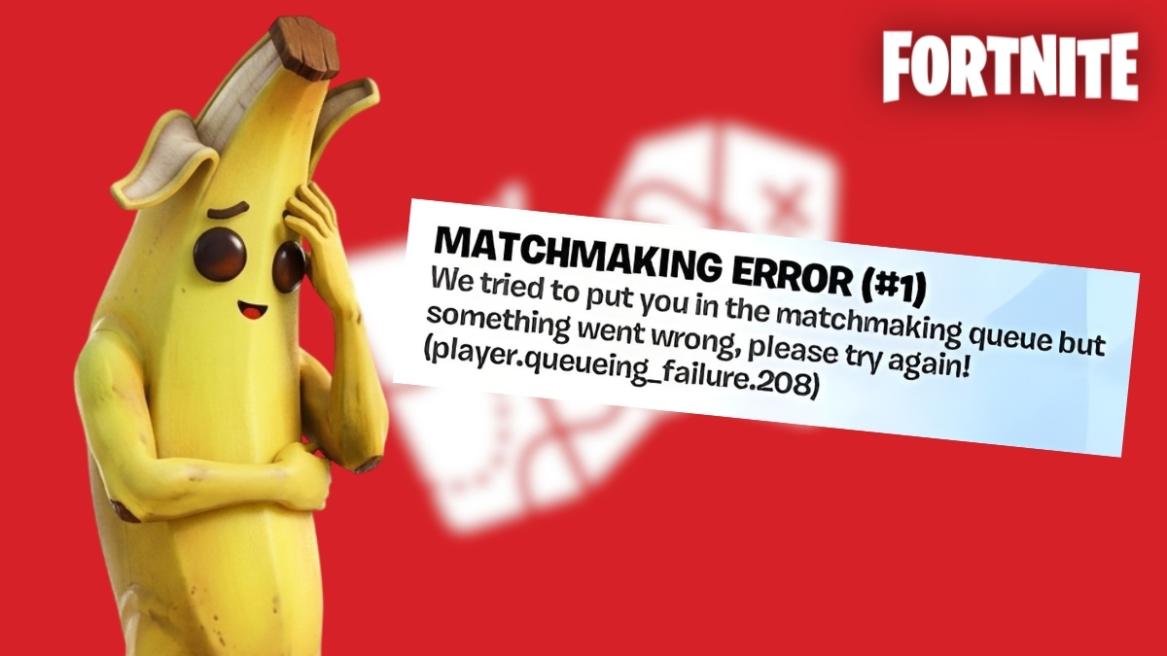
- Fortnite matchmaking error 1 prevents players from entering a match queue.
- The error often occurs during updates or patches and typically resolves within a few hours.
- Fixes include verifying file integrity, changing servers, restarting routers, reinstalling the launcher, or waiting for an official fix.
If you are a regular in Fortnite, you might face some common issues during matchmaking. While most of these issues get a fix within a minute, some can be slightly trickier to get around. One such painful issue is the Matchmaking Error #1 that reads “Unknown Error. Maybe try again?” and hinders your queue eligibility. If you’re also suffering from this pesky error, keep reading as we detail and show you how to fix Fortnite matchmaking error 1 in Chapter 7.
What is Fortnite Matchmaking Error 1?


Multiple errors in Fortnite mostly happen when Epic releases mid-season updates and patch fixes like the Fortnite 40.30 update in Chapter 7 Season 2. Fortnite matchmaking error 1 is one such error that prevents players from matchmaking. Once you try to enter matchmaking, the message pops up on the top left of the screen.
Although the error occurs mostly during a new update, here are all the possible reasons behind matchmaking error 1 in Fortnite:
- Corrupt Files
- Fortnite Matchmaking Server Down
- Internet Issues
- Epic Games Launcher Error
How to Fix Fortnite Matchmaking Error 1 in Chapter 7
If you are struggling with Fortnite matchmaking error 1, here is how you can fix it:
1. Check Fortnite Server Status
Before you mess around with your own settings, you should first check if Fortnite is down or not. If Epic’s servers are facing issues, then no amount of troubleshooting will be able to fix the Fortnite matchmaking error 1. You can visit the official Epic Games Server Status website to check whether the server is dealing with outages, leading to the error.
2. Verify Game Files
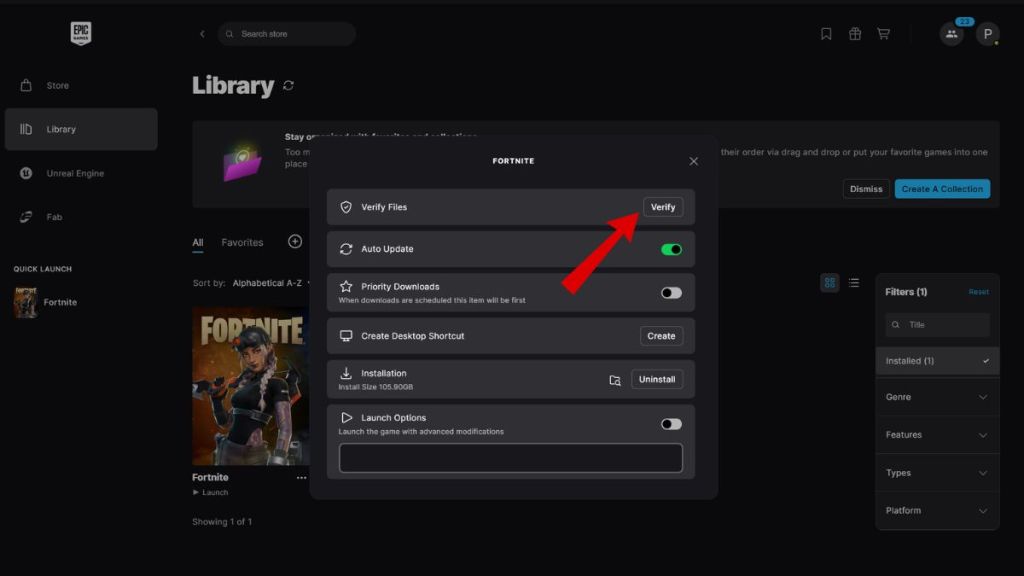
If the Fortnite servers are fine, a corrupted installation file might be causing the matchmaking error 1. Thankfully, there is a common and easy fix to this through the Epic Games Store:
- Open the Epic Games Launcher.
- Head to your Library.
- Click on the three dots under the Fortnite tile.
- Select Manage, then click the Verify button.
- Wait for the process to complete and then restart Fortnite.

3. Change Your Matchmaking Region
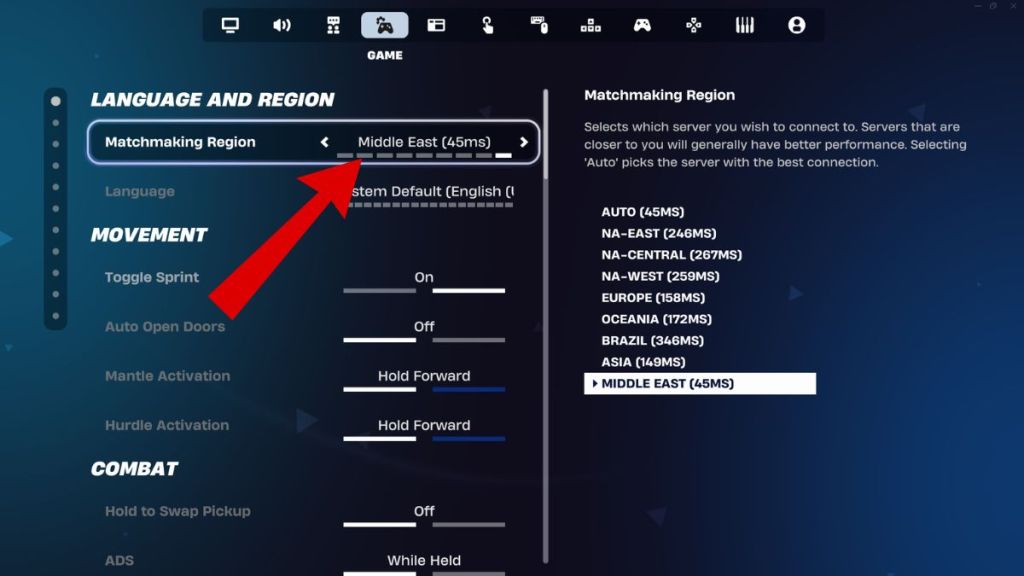
Sometimes, your specific matchmaking region or server node might be the one facing connectivity issues or high traffic, causing the Fortnite matchmaking error 1 and stopping you from hopping on the Battle Bus. You can follow these steps to tackle it:
- Go to the Settings menu in Fortnite.
- Navigate to the Language and Region section in the Game section.
- Change your Matchmaking Region from Auto to a specific region with low ping/MS.
- Apply changes, try to find a match, and then switch back to “Auto” if successful.
4. Reset Your Network
Another cause behind the Fortnite matchmaking error 1 is your router holding onto a stale connection. Thankfully, you can use a simple power cycle to try and clear this hurdle for yourself:
- Unplug your router and modem.
- Wait at least 30 seconds.
- Plug them back in and wait for the lights to stabilize.
- Restart your console or PC and try matchmaking in Fortnite again.
5. Re-Install Epic Games Launcher
Epic Games Launcher is notorious for its operation, so it may interfere with your game. You can simply uninstall and reinstall the Epic Games Launcher from your device and see if the issue is fixed. Otherwise, proceed to the next step.
6. Fix For Mobile Devices
If you are having Fortnite matchmaking error 1 on mobile devices such as iOS and Android, there are some fixes for it as well. For starters, make sure you have no rooting on your device. Otherwise, clear the cache of your Epic Games Launcher after an update. This will solve the issue for you.
7. Wait for the Official Fix
If none of the mentioned methods work, you must wait till an official fix is out. Once the problem is solved and Epic announces it, you just need to restart Fortnite to see the changes. After an official fix is out, it will also reflect on the Epic Games server status page.
Other Unknown Errors Explained in Fortnite
Apart from matchmaking error 1, you might also run into other ‘unknown errors’ when trying to play Fortnite. Here is a list of some of the most prominent unknown errors in Fortnite and what you can do to fix them:
“Successfully Logged Out” Error
When the “Successfully Logged Out” error occurs, Fortnite kicks you back to the start screen, even if you didn’t actually log out of the game. You can fix this issue by restarting your console or PC. This allows your system to clear the game’s cache and launch a new session. Additionally, you can try verifying your Fortnite files through the Epic Games Launcher to fix this issue.
Error Code 91
The Error Code 91 issue prevents you from joining a friend’s lobby, claiming that the party is not responding or is currently not joinable. You can try fixing this error by setting your party privacy to Public temporarily, joining your friend’s lobby, and then switching it back to Friends Only. Strangely enough, players have also reported that choosing different Fortnite skins can also help in fixing this error.
Error Code 93
Similar to Error Code 91, this error can prevent you from joining a friend’s lobby. However, Error Code 93 specifically occurs when you try to accept an invite from a friend, resulting in a connection timeout. To counter this, you can try joining your friend through the Epic Games Launcher list if you are on PC. You can also try switching to a different matchmaking region before switching back to ‘Auto’ as a fix.
Error Code 30005
Fortnite uses the Easy Anti-Cheat software to prevent players from cheating during matches, and this software being blocked or corrupted can lead to Fortnite failing to launch. You can fix this error by heading to your Fortnite installation folder and following this file path: FortniteGame > Binaries > Win64 > EasyAntiCheat. You can then run the EasyAntiCheat_Setup.exe and click Repair Service.
How to Fix Fortnite Matchmaking Error 1 on PS5, Xbox, and Nintendo Switch
While the fixes listed above could work if you are playing Fortnite on PC, you can also face the Fortnite matchmaking error 1 on PS5, Xbox, and Nintendo Switch as well. Running into this issue on consoles requires different fixes. Here are some of the steps you can take to fix the matchmaking error 1 on Nintendo Switch and other consoles:
1. Check for System Updates
Fortnite can run into the matchmaking error 1 due to an outdated system, which in turn prevents your console from establishing a stable connection with Fortnite’s matchmaking services. If you have any pending system updates on your console, you can try installing the updates and see if that fixes the matchmaking error.
2. Restoring Licenses on PS5
Restoring your licenses on your PlayStation 5 forces your console to re-verify your ownership of Fortnite and its contents with the PlayStation Network servers. If the files that enable you to play online are corrupted or out of sync, Fortnite may fail to authenticate your account, resulting in the Fortnite matchmarking error 1 on PS5. ‘
3. Check Cross-Play Settings
Having Fortnite cross-platform services disabled while trying to get into a match can also cause you to run into the Fortnite matchmaking error 1 on Xbox and other console platforms. This is because Fortnite struggles to find a “console-only” lobby fast enough without cross-play and ends up running into an error.
For this fix, follow these steps:
- Open Fortnite and go to Settings.
- Head to the Account and Privacy tab on the far right end of the top bar.
- Make sure you have “Allow Cross Platform Play” enabled.
And that is how you can fix the matchmaking error #1 in Fortnite. Do you think we missed a possible fix for the bug? Tell us in the comments below!
Fortnite Matchmaking Error 1 usually signifies a connection failure between your platform and the game’s servers.
No, matchmaking error 1 in Fortnite is not related to a ban and is largely a technical connection error.
This generic text appears because the Fortnite client, despite knowing that the matchmaking connection has failed, cannot pinpoint an exact reason behind the issue.
Yes, you can fix the Fortnite matchmaking error 1 on all consoles by taking steps like enabling cross-play and verifying file ownership.