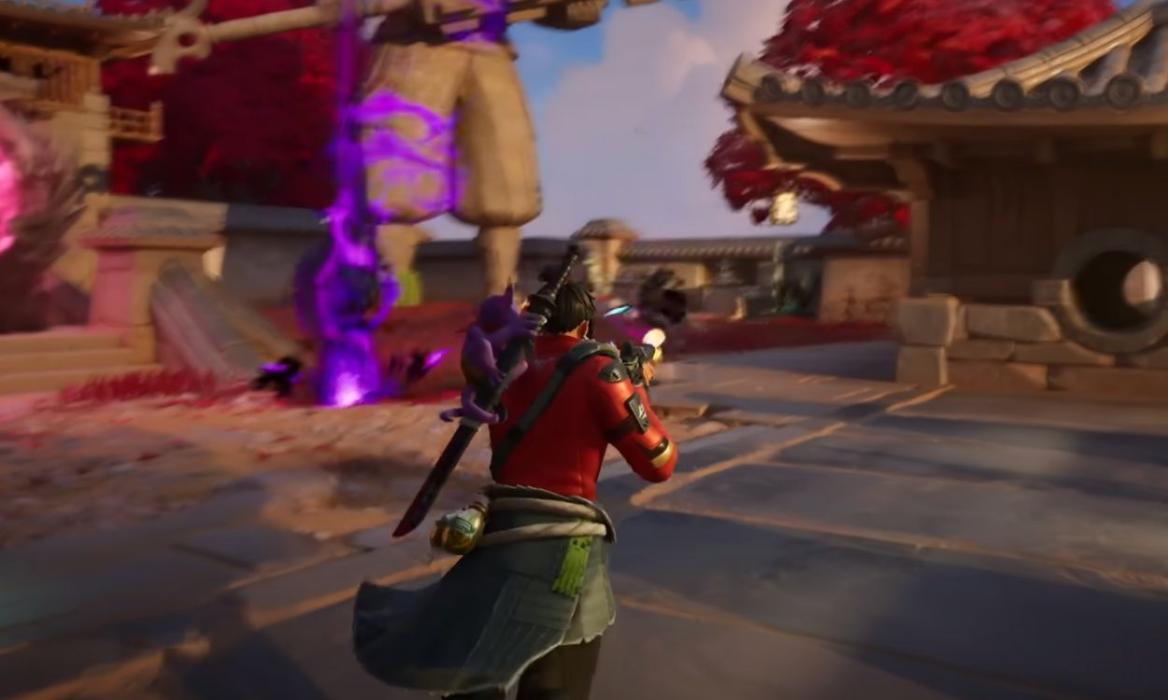
- The Fortnite reload glitch randomly forces weapons to reload instead of shooting during fights.
- Immediately switch to another weapon when the glitch occurs, or try resetting your controller binds to fix the Fortnite reload glitch.
- Epic Games typically patches these issues with a few updates whenever this glitch pops up again.
Have you ever been in the middle of a Fortnite battle only to watch your opponent kill you while you are reloading? This annoying glitch has been giving players headaches, and we hate it, too. So, if you’re someone who’s worried, keep reading as we show you how to fix the Fortnite Chapter 7 Season 1 reload glitch right here.
What Is the Fortnite Weapon Reload Glitch?
The reload glitch in Fortnite is one of those persistent bugs that keeps returning to haunt players. Instead of interacting with a chest or rebooting your teammate, your weapon suddenly decides it’s the perfect time for a reload – sometimes when you’re face-to-face with an enemy. It’s like your gun choosing the worst possible moment to betray you.
This isn’t a new problem in Fortnite. The glitch has been popping up on and off throughout different Fortnite seasons. What makes it particularly frustrating is that it can happen anytime during the match. Moreover, the glitch isn’t picky about game modes as it can appear in any of them.
How to Fix the Fortnite Reload Glitch
As of now, the best way to try to fix the Fortnite Reload Glitch is by altering your controller settings, specifically the ones that have to do with the Reload and Interact Settings. While initially the glitch could be fixed by switching to a different weapon, it was not a perfect fix. However, it is still a better option than standing there watching your gun reload while an enemy aims.
Apart from the controller fix, the only real fix for this glitch has to come from Epic Games themselves. They address these issues with priority! Remember, panicking when the glitch occurs will only make things worse. If it happens, stay cool, switch weapons, and keep fighting.
How to Fix Fortnite Reload Keybind Conflicts
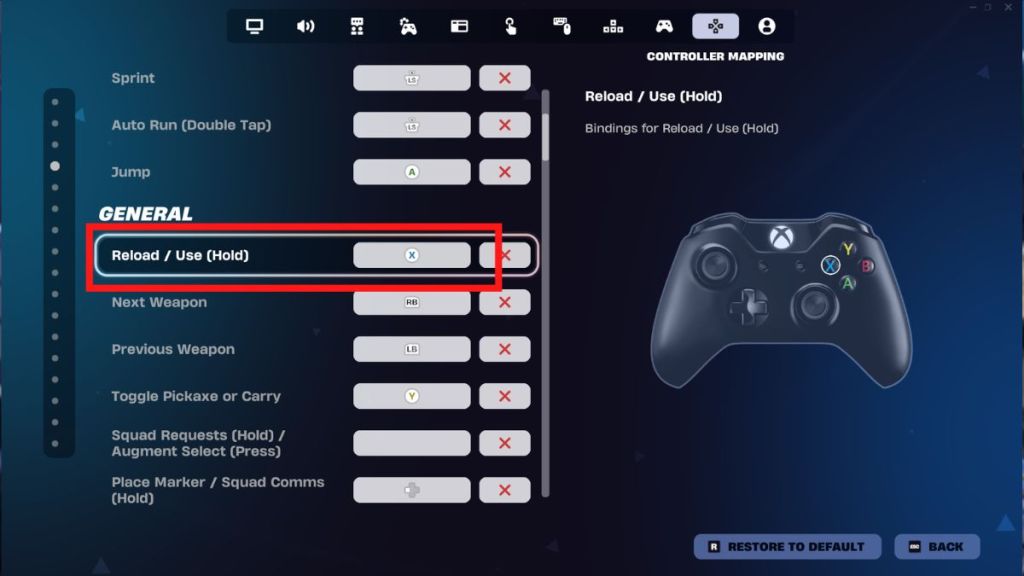
You can fix the Fortnite reload keybind conflict by updating your Interact setting. By default, Reload and Interact commands are often mapped to the same key or share the same setting. If you try to open a chest while your fun isn’t filled, the game is likely to prioritize the reload animation, which leads to canceling your attempt to search the chest. To fix this issue, you can follow these steps:
- Open Settings in Fortnite.
- Head to the Controller Mapping Setting.
- Restore your controller mapping to the default template.
- Re-assign the controller mapping to fit your usual keybinds.
Doing so can help you get rid of the Reload keybind conflict, and if the issue still persists, you can head to the Epic Games support to enquire about a fix.
Fortnite Reload Glitch: Controller vs. Keyboard & Mouse
The Fortnite reload glitch is not limited to just controllers, as it also occasionally affects Keyboard and Mouse players as well. Here are the differences in experiences for the Fortnite Reload glitch based on your input method:
| Controller | Keyboard & Mouse |
|---|---|
| Usually caused by the “Interact” and “Reload” functions being bound to the same button (e.g., Square/X). | Usually caused by server-side lag or “Sprint Cancels Reload” settings being toggled off. |
| You try to open a chest or revive a teammate, but your character starts reloading instead, canceling the action. | Your gun refuses to fire after a reload animation, or the reload starts automatically even if you have bullets left. |
| Due to limited buttons, the “Tap to Interact” and “Reload” commands frequently collide. | Less common unless the player is experiencing high “Packet Loss” or ping spikes. |
| Often forces you to hold the button to interact because a simple tap defaults to reloading. | Interactions are usually “Tap” by default and rarely overlap with the reload key (R). |
| Enable “Tap to Search/Interact” and consider unbinding “Reload” from your main interact button. | Ensure “Sprint Cancels Reload” is ON and check for any double-mapped keys in your software. |
| Switch to Pickaxe and back to your weapon to “force reset” the animation state. | Press your Map or Inventory key quickly to break the glitch loop. |
The reload glitch might be annoying, but it’s not the end of the world. You can minimize its impact on your gameplay by understanding how to work around it. So with that, we sure hope you’re able to get rid of this glitch easily.
Have you run into this frustrating bug in Fortnite? Tell us in the comments below!
This is a common bug where the game mistakenly prioritizes the reload command over the fire command, often triggered by server-side lag or interacting with objects while your magazine isn’t full.
You can temporarily bypass this by switching to your pickaxe or another weapon and then back again, or by resetting your keybinds to default in the settings menu.
Yes, while Epic Games frequently releases patches, the reload glitch has remained a persistent issue through Chapter 7 Season 1, with players still reporting it as recently as March 2026.


 Rishabh Sabarwal

 Ajith Kumar