
- Fortnite is introducing a Subregion Preference feature in the new v42.20 update.
- With this feature, players can select servers closer to them to lower ping.
- However, it doesn't guarantee a better ping and can increase queues or affect matchmaking fairness.
Epic is introducing a new Subregion Preference feature in the Fortnite v42.20 update, letting players choose a preferred subregion for matchmaking and connect to closer servers for lower ping. You can now choose a more specific location within your matchmaking region instead of sticking to a broader region such as Asia, Europe, or North America.
The closer you are to the region you select, the lower your ping and the lower your chances of facing a Fortnite matchmaking error. For example, if you’re in the NA-Central region, with the help of the new Fortnite Subregion Preference feature, you can select from either Iowa, Texas, or Mexico, whichever region you’re closer to. Here’s the full list:
- NA-East: Virginia, Ohio
- NA-Central: Iowa, Texas, Mexico
- NA-West: Northern California, Oregon
- Europe: Germany, UK, France
- Oceania: Sydney
- Brazil: São Paulo
- Asia: Tokyo
- Middle East: Bahrain, Mumbai
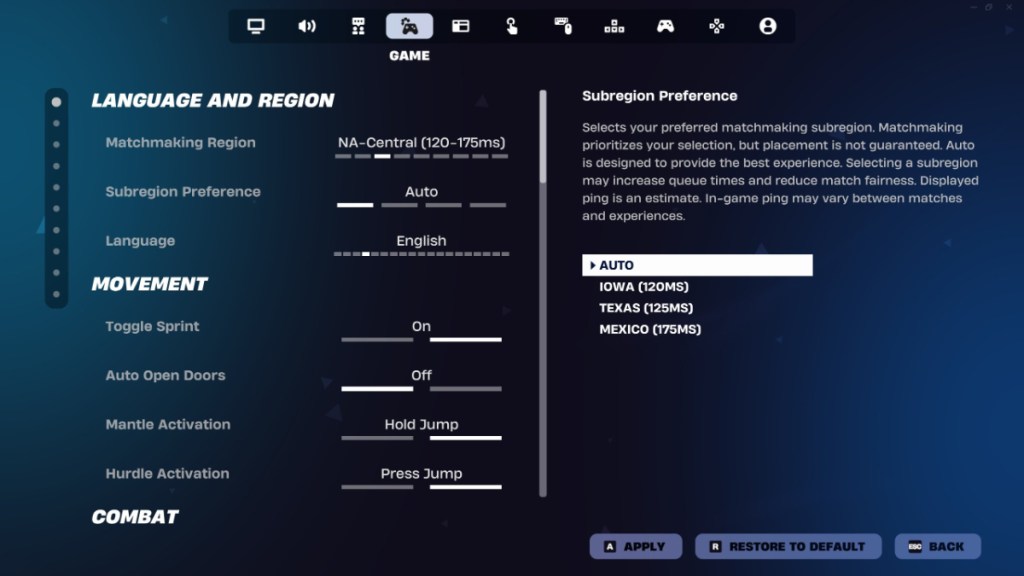
Previously, instead of the Subregion Preference, you had to pick a broader region such as Asia, Brazil, Europe, and more. For competitive players and those who constantly face high ping while doing Fortnite C7S4 Quests, Subregion Preference should be a significant change.
Epic has stated that while this matchmaking option prioritizes your selection, placement isn’t guaranteed. Meanwhile, it might increase queue times and affect matchmaking fairness. It also doesn’t guarantee lower ping across regions, matches, and Fortnite experiences, but you can experiment to see what works and what doesn’t.
This feature puts more control in your hands instead of forcing a predetermined subregion lock, helping you lower your ping in Fortnite Chapter 7 Season 4. You can find this option in the Settings, under the Game tab. It should be available in the Language and Region section.
Of course, if Fortnite goes offline, Epic disables matchmaking, so players cannot use Subregion Preference. That said, will you use the Fortnite Subregion Preference feature or stick to Auto? Tell us in the comments section below.


 Ajith Kumar


 Shubham Chaurasia



 Matthew Wilkins