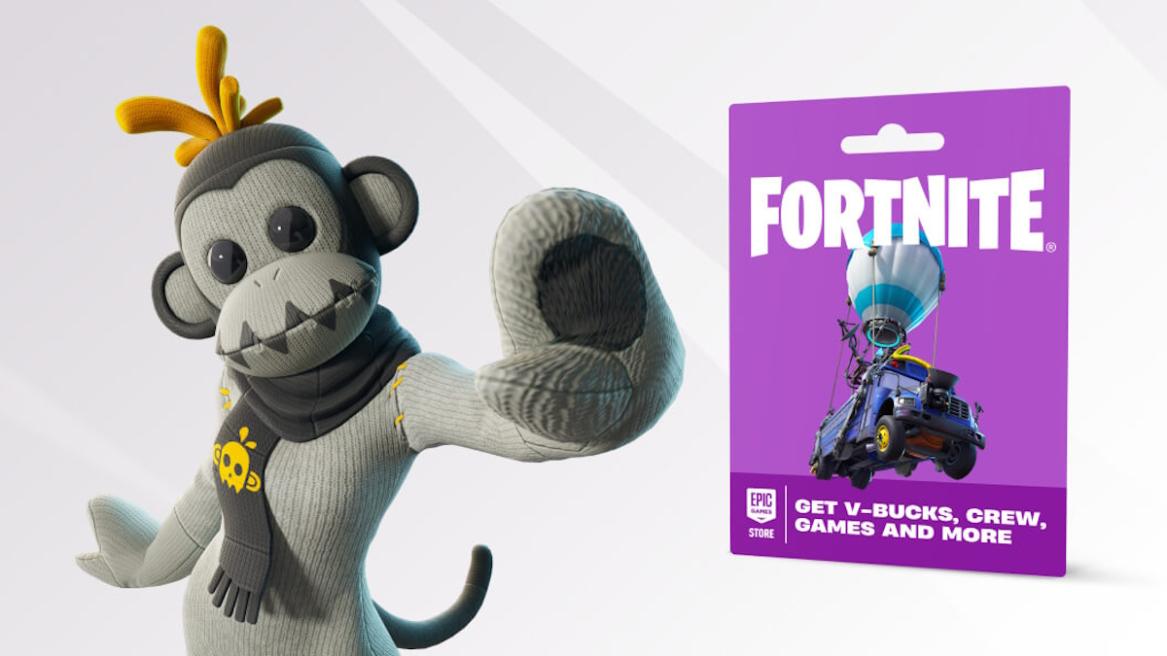
- Fortnite Gift Cards allow you to top up your Epic Games Wallet balance.
- You can use funds gained to purchase V-Bucks, Fortnite Crew, and even other products on the Epic Games Store.
- Gift Cards are currently limited to certain regions, with Epic Games gradually rolling them out worldwide.
With Epic Games constantly releasing new outfits and other cosmetics, every Fortnite player out there understands how valuable V-Bucks can be in the game. The developers have made this virtual currency quite accessible for players, allowing them to stock up before spending money in the Fortnite Item Shop. Nowadays, Epic Games has established Fortnite Gift Cards, which serve as one of the easiest ways players can load up on V-Bucks.
Fortnite Gift Cards provide a simple and secure way for you to acquire funds within your Epic Games account and are slowly taking over the role previously held by V-Bucks cards. In this article, we will walk you through the steps you need to follow to redeem Fortnite Gift Cards across all platforms.
What is a Fortnite Gift Card?
A Fortnite gift card is basically a prepaid card that you can use to add funds to your Epic Games account balance upon being redeemed. You can then use the redeemed balance to purchase V-Bucks, in-game starter packs, a Fortnite Crew subscription, and even other games in the Epic Games Store.


Unlike classic V-Bucks cards, your Epic wallet holds the funds from the gift cards. This allows you to access and use your Epic funds across supported platforms, provided you have your accounts linked. Some gift cards can even include exclusive bonuses.
How to Get Fortnite Gift Card
You can get your hands on a physical Fortnite gift card from eligible major retailers. This includes places like game stores and supermarkets. You can also find Fortnite gift cards on various digital stores, allowing you to receive your code through email.
However, it is important to remember that gift cards are slowly being rolled out region by region, and you might not find any gift cards in your country. We will discuss more about this later in the article.
How to Redeem a Fortnite Gift Card Easily
Redeeming a Fortnite gift card is a straightforward process and largely remains the same on every platform. This is because the gift cards top up your Epic account balance. Before you go on to redeem a gift card, make sure your PC or console profile is linked to your Epic Games account.


To redeem your Fortnite gift card, you can follow these steps:
- Scan the QR code on the back or visit epicgames.com/redeem to enter your PIN.
- If you scan the QR code, your information will automatically be filled out on the redemption page.
- After entering the 16-digit PIN into the field, click on redeem.
- Make sure you are using the right account before clicking continue on the next page.
- You can then click on the ‘Redeem Now’ button on the next page to complete the redemption process.
Upon claiming the gift card, you will see the amount reflected in your Epic Games balance. You can then use this amount to purchase items like V-Bucks and Fortnite Crew.
How to Redeem Fortnite Gift Card on Xbox
In order to use a gift card on Xbox, you need to first redeem it through the Epic Games website on your desktop or PC. You can follow these steps to redeem your Fortnite gift card on Xbox:
- Go to epicgames.com/redeem and make sure you have your Epic account linked to your Xbox profile.
- In the code field, enter the gift card code and confirm to add the funds to your Epic Games wallet.
- Once the amount from the gift card is reflected in your Epic account, you can then use it to purchase V-Bucks or Fortnite Crew on the Epic Games Store.
- Launch Fortnite on your Xbox to check if the purchase made through the gift card amount has reflected.
How to Redeem Fortnite Gift Card on PS5
To redeem your gift card of PS5, you need to, once again, head to the Epic Games Store or website on your PC. You can then follow these steps:
- Visit epicgames.com/redeem and ensure your PlayStation Network profile is linked to your Epic Games account.
- Enter the gift card code into its respective field and click on ‘Redeem’.
- Once your Epic wallet receives the amount from the gift card, you can use the funds to purchase packs or other cosmetics.
- Launch Fortnite on your PS5 to make sure you have received the benefits from the purchase.
How to Redeem Fortnite Gift Card on PC
Redeeming a gift card on PC is the most straightforward process. This is because your Epic Games wallet and Fortnite are on the same platform. You can follow these steps:
- Open a browser and head to epicgames.com/redeem.
- Enter your Fortnite gift card code and confirm to add the funds to your Epic wallet.
- Use the gift card amount to purchase V-Bucks or any other items through the Epic Game Store.
- When you launch Fortnite, you will find the purchased V-Bucks in your in-game account.
Where is the Fortnite Gift Card Available?
Fortnite Gift Cards are slowly being rolled out in different regions across the world, with the following countries first in line. You can get the cards physically or at select online retailers in the regions listed below:
- Australia
- Austria
- Belgium
- Canada
- Czech Republic
- Finland
- France
- Germany
- Ireland
- Italy
- Japan
- Mexico
- New Zealand
- Norway
- Poland
- Portugal
- Romania
- Spain
- Sweden
- Switzerland
- The Netherlands
- United Kingdom
- United States of America
Fortnite Gift Card Bonus Rewards
Redeeming a Fortnite Gift Card comes with its own share of benefits, including a free cosmetic. You can unlock the exclusive GHOST Monks Outfit for the first time you redeem a Fortnite Gift Card to your Epic account. The offer is available until Dec 31, 2026. Since the Gift Cards are the only way to acquire this skin, there is a chance the GHOST Monks outfit becomes a rare Fortnite skin down the line, giving players even more incentive to acquire it.

Additionally, for every purchase you make with your balance in Fortnite, Rocket League, or Fall Guys (on Epic’s payment systems), you get 20% back in Epic Rewards. After accumulating enough points, you can cash in the Epic Rewards in the store for games, in-game items, and more.
Fortnite Gift Card vs Fortnite V-Bucks Card
| Gift Cards | V-Bucks Cards |
| Adds general Epic Games account balance usable on Fortnite, Fortnite Crew, and other Epic Games Store content. | Adds a set amount of V-Bucks that are only usable on your Fortnite account. |
| Utilises Epic wallet and works across supported shared-wallet platforms, provided the accounts are linked. | Often platform-limited, which means some cards have to be used on a specific platform for redemption. |
| Newer system of cards that is rolling out globally and replacing older V-Bucks cards in various regions. | While it is an older system that is being phased out, you can still find and redeem them in some stores. |
What are your thoughts on the new gift cards introduced by Epic Games? Will you be getting the card for the free Fortnite skin? Let us know in the comments.