
- Arknights Endfield's AIC factory system has a blueprint mechanic that lets you save, obtain, and place them.
- Use the Bulk Action option in the AIC Top View to select your buildings and save them in the blueprint.
- Next, submit the blueprint and once it is approved, players can share it with their friends.
Arknights Endfield is one of the most complicated gacha games ever, but learning its mechanics is also highly satisfying. The most complex aspect of Endfield is AIC factories, which are the base building and resource management mechanics unique to this game. The AIC factories can take hours to set up by yourself, unless you use blueprints. So, here is a quick guide on how to create, save, obtain, and place Arknights Endfield Blueprints.
How To Create Your Arknights Endfield Blueprints
AIC Factory may be complex, but the game at least allows you to create and share blueprints. These Arknights Endfield blueprints can save you a ton of time. Instead of setting up your own base, you can simply use an optimized AIC base of one of your friends to have an optimized production chain. And you can also save your own blueprint, allowing you to tryout more variety without worrying about losing your first setup.
So, how to create these Arknights Endfield AIC blueprints? Here are the steps to do it:
Select the AIC Section You Want to Save
First, enter your AIC mode and then enter the Top View. Next, select Bulk Action and select the portion you want to save as a blueprint. Not all structures are supported in a blueprint, so make sure to double-check what you are missing out on after you have selected. Once you have selected the correct portion, click ‘Ctrl + S’ to save the blueprint.
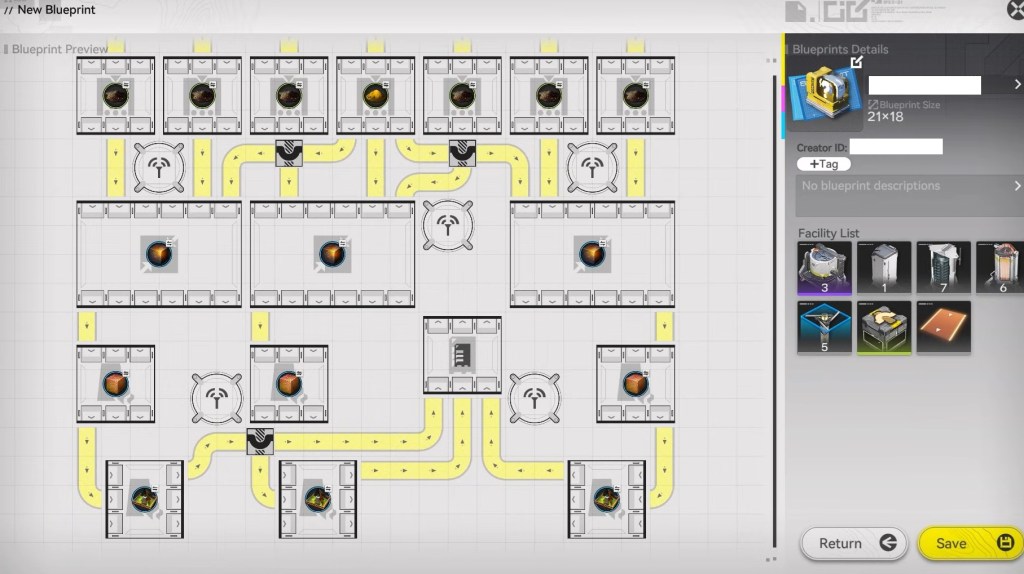
Add Name and Other Details
After saving the blueprint, you will have to give it a name and add a description. There are other options as well, like tags and icons that will help you identify your blueprint more accurately. This will save your blueprint, which you can access anytime now.
How to Share Your AIC Blueprints
After you have saved your blueprint, you can share it with your friends or others. To do it, click on the Submit it for Review option. Once the Blueprint is approved, you will see the Share button in place of the Submit for Review option. Now, click on it and you can either share it with your in-game friends or copy the blueprint code and share it outside.
How to Obtain and Place Arknights Endfield Blueprints?
There are various ways to obtain Arknights Endfield blueprints. The easiest way is to simply visit your friends’ AIC factory and copy their base’s blueprint. But if you don’t have any in-game friends, or none of them have good bases, you can always look for blueprint codes out in the community.
The Endfield subreddit is a great place to find such codes. Other than these, you should also check out Arknights Endfield codes from our dedicated list to get free rewards. Now, once you have the blueprint, head to the Shared Blueprints section and click on Import Blueprint. Enter the blueprint code to import it and then click Place or Construct to build it.
So, that’s it. Now you know how to create, obtain, and place Arknights Endfield blueprints. If you are still confused, clear your doubts with us using the comments section.





 Sanmay Chakrabarti

 Sanmay Chakrabarti