
The Forge has listened to player feedback and added support for private servers. If you have been battling with exploiters and hackers to mine and secure ores, that will be a thing of the past with private servers. The process to set up a private server on Roblox is straightforward. Still, if you’re new and want to learn how to get a private server in The Forge, we have detailed the step-by-step process below. We have also included all the free private servers you can join in The Forge in this guide.
All Free The Forge Private Server Links
The Forge private servers cost Robux, which is why it is always nice to find some free links. Wondering how to join a free private server in The Forge? Below, we have compiled all the free private server links for you can use:
Note: Servers can shut down due to no renewal or overcrowding. If you are unable to join one, please mention it in the comments.
How to Set up a Private Server in The Forge
To mine the best ores in The Forge in peace, make a private server using one of the two ways listed below.
You can either approach the setup from the ‘Servers’ tab on the game page on the Roblox website in a browser. Or you can open the game page in the Roblox app and scroll down to the ‘Servers’ option. The steps from there onwards remain the same and have been explained below.
- Under the Private Servers section, click the ‘Create Private Server’ button.
- Next, enter a ‘Server Name‘ in the pop-up window that opens.
- Click the ‘Subscribe‘ button at the bottom to make the server.

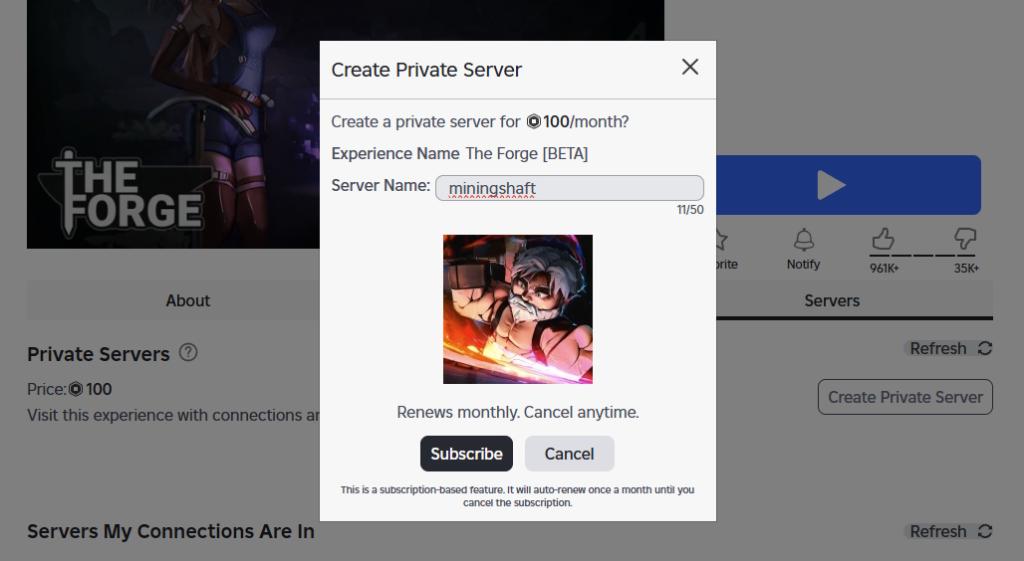
The required Robux, 100 Robux, will be deducted from your Roblox account on the creation of the server in The Forge.
Note that Roblox sets up a recurring monthly subscription for paid private servers. So, make sure you have enough Robux in your account if you want to use your private server regularly in the future.
The first thing you should do after setting up your server is redeem the latest The Forge codes to get free race rerolls in the game.
How to Invite Friends to Your The Forge Private Server
Once your server is set up, you can then choose who can and cannot join your private server in The Forge. To change that, follow the steps below.
- On the Servers page, click the three-dot icon next to your private server.
- Select the ‘Configure’ option from the three-dot menu.
- Now, you need to make sure the ‘Allow Joining’ toggle is enabled so your friends can join the private server.
- Moreover, you can either allow all your collections to be allowed to join the server, or you can choose to allow select people on the server by adding their names to the list, as shown below.

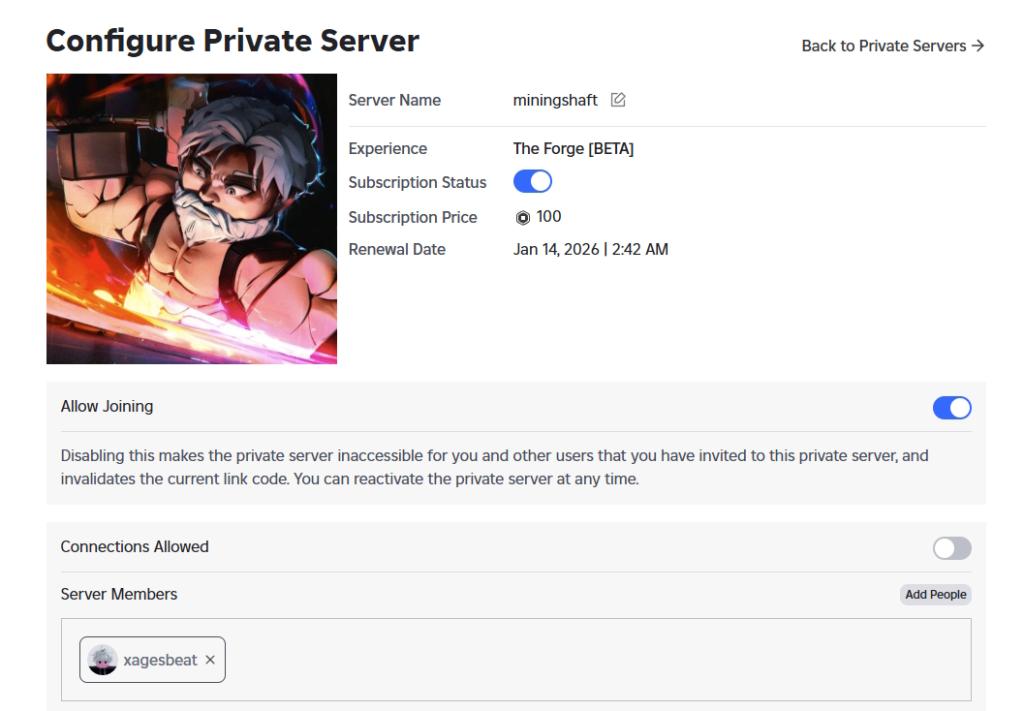
If you don’t wish to continue using your private server, make sure to cancel the subscription. You’ll just need to the ‘Configure Private Server’ page and turn off the toggle next to the ‘Subscription Status’ option.
Should You Get a Private Server in The Forge?
There is no doubt about it. Yes, you should definitely make a private server in The Forge. This will help you and your friends make the most of your time and maximize profits in the game by mining rare ores. You will no longer have to worry about other players or cheaters stealing your rocks and ores by flying around the map.
Yes, a private server is worth it if you want uninterrupted mining, better control over ore routes, and zero interference from exploiters or random players.
Yes, you can use shared private server links for free, though availability depends on whether the server is active, renewed, and not full.