NYT Midi Crossword (also known as The Midi) is the perfect balance between the traditional longer Crossword and the quicker Mini. It gives you enough challenge, while not taking too much time to solve. Like other NYT games, this daily puzzle also has its own set of rules and mechanics that one needs to master to become an expert. If you are still learning how to play the NYT Midi Crossword and want some quick tips and tricks, then we’ve got a complete guide for you right here.
NYT Midi Game Rules and Mechanics Explained
Before you can play today’s Midi Crossword, you need to understand the game’s basic rules and its mechanics. The following sections should help you understand how the game works:
Midi Crossword Theme
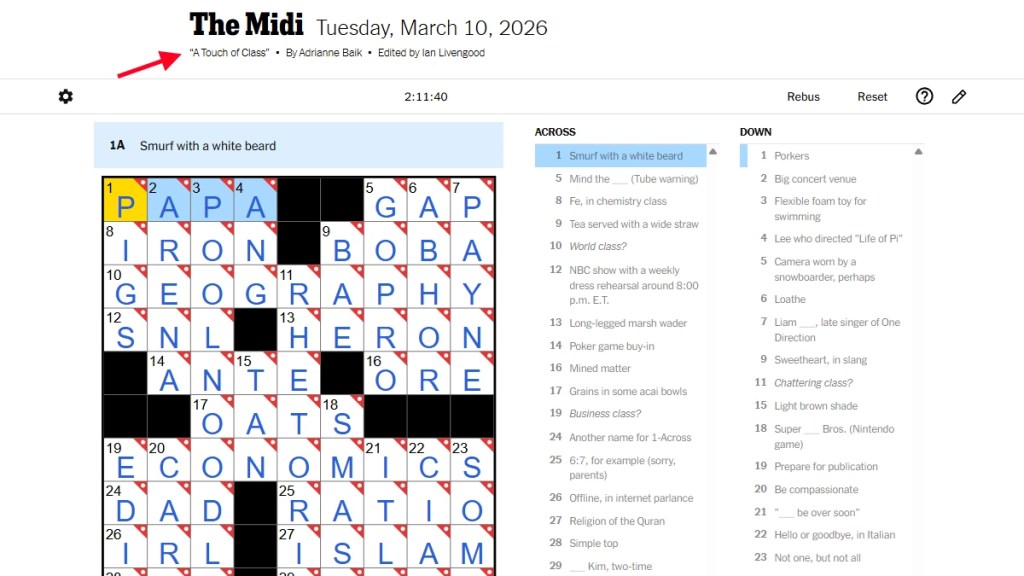
The NYT Midi Crossword will always have a different theme every day. This theme will outline the type of words you will have to find in today’s puzzle. The theme will be mentioned in the header, right next to the author’s name. The clues and words of the puzzle will be based on the theme, so don’t forget to check it out.
Keyboard Shortcuts
The Midi has a series of keyboard shortcuts that can be used to quickly navigate the grid. They are:
- Arrow keys: Use them to change direction within the same square, move in the direction of the arrow, jump back to the first blank in the word, or jump to the next clue.
- Spacebar: This shortcut toggles between Across and Down and clears the current square and advances.
- Backspace (Delete on Macs): Use it to remove words or letters from a word.
- Tab key: Jump to the next clue with this shortcut.
- Shift + Tab keys: Jump to the previous clue with this shortcut.
- Escape: This shortcut lets you enter Rebus mode.
Pen and Pencil Modes
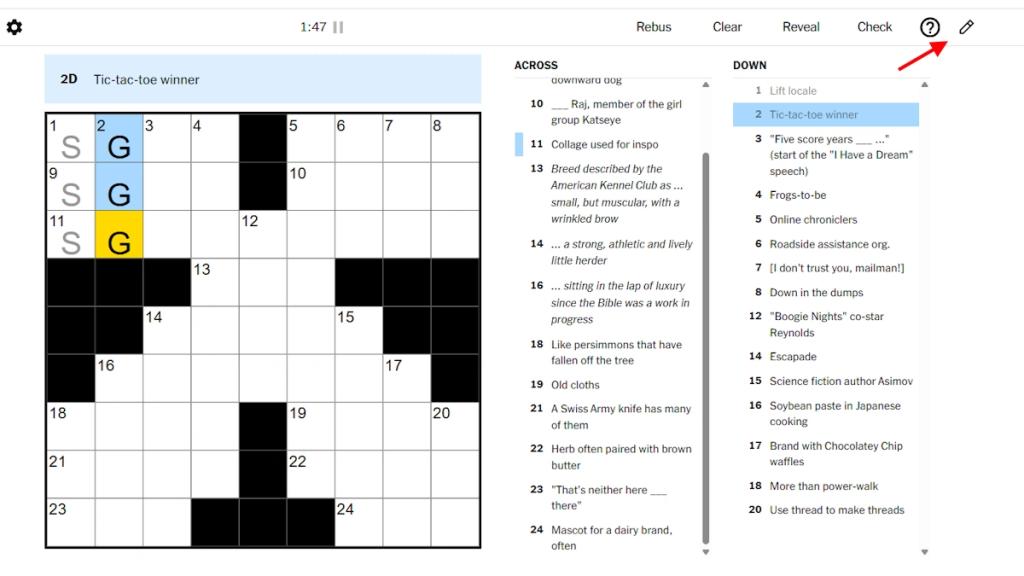
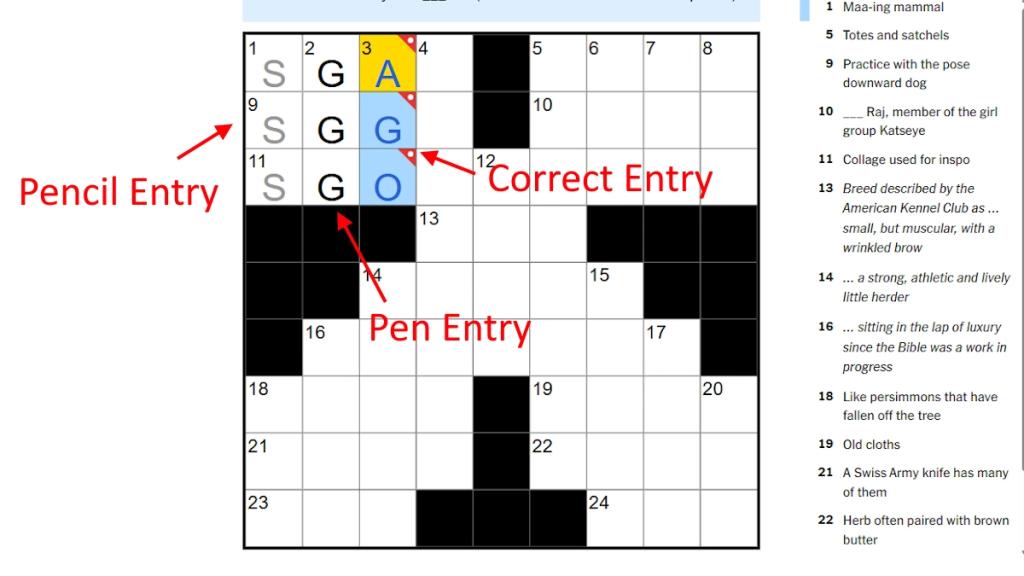
NYT Midi Crossword has a pen and pencil mode, which lets you enter letters with different colors. The Pen mode adds letters in black, while the Pencil mode adds them in grey. This tool is useful when you want to distinguish between the confirmed letters and those that you are guessing as you play.
To change between the modes, click on the Pencil icon on the top right, next to the Check option. When the icon is highlighted, it means the Pencil mode has been enabled. When it is not, the default Pen mode will be enabled.
Letter Colors in The Midi
Midi Crossword has three distinct letter colors, each meaning something different. Here is a quick overview of each of the colors:
- Black: This means the letter has been input using the Pen mode.
- Grey: This means the letter has been input using the Pencil mode.
- Blue: This only happens after the letter has been confirmed by Check. It means that the letter in the box is correct.
How Does The Midi Timer Work?
The Midi Crossword has a timer that lets you check the amount of time it takes to solve the puzzle. However, you don’t need to solve the puzzle within a specific time, as it’s more for checking your personal best.
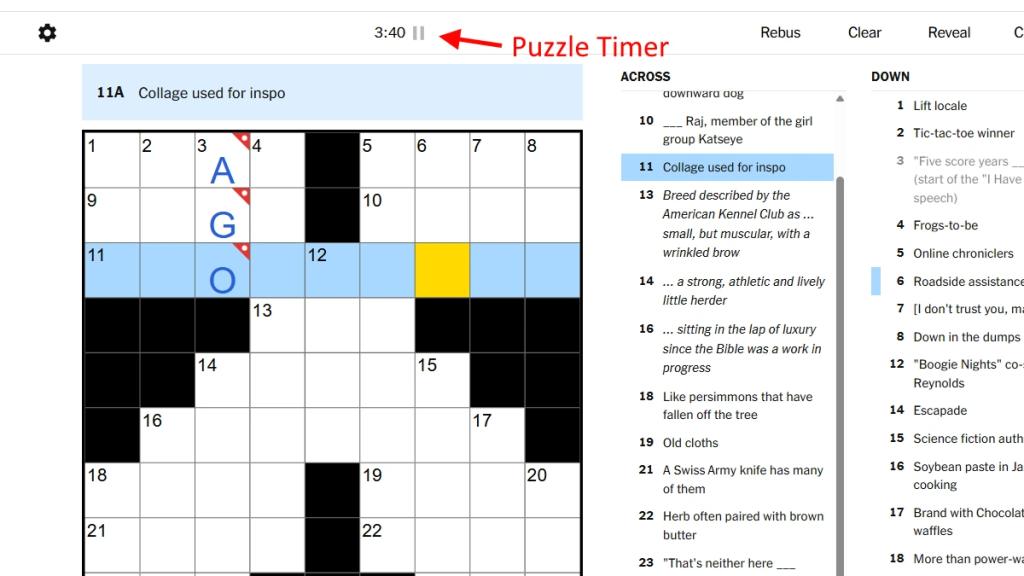
The timer can be paused, so you can step away whenever you’d like, and play it again once you get back to solving the puzzle. If you hit Clear the grid, the timer will restart. However, if you’re bothered by the timer, you can hide it by heading to the Puzzle settings and then disabling it using the Show Timer option.
Randomized Grids Every Day
The grid for the NYT Midi Crossword is randomized between a 9 x 9 and an 11 x 11 grid. This is not related to the puzzle’s difficulty, and changes for every puzzle. Moreover, the grid’s designs are also asymmetrical, and at least one weekly puzzle carries animations and colorful visual patterns.
Furthermore, there are both across and down clues for the NYT Midi Crossword. This makes the puzzle very flexible, allowing you to solve it in either direction. You can switch the grid by using the Space key on PC or Delete on Macs. This will change the orientation from across to down, and vice versa.
How Do Checks, Reveal, and Clear Work?
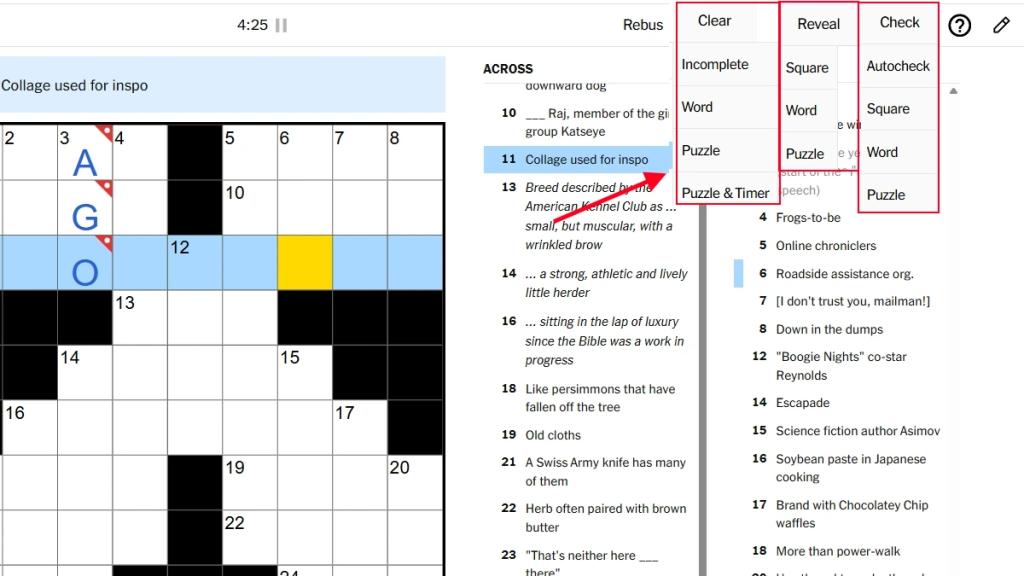
There are three different options in the Midi Crossword that can be found in the top bar. These are Checks, Reveal, and Clear. There is also a fourth feature called Rebus, which has been explained in detail in the next section, so you can read that if you want to learn what it does first. Here is a brief explanation of what Checks, Reveals, and Clear do in the NYT Midi Crossword:
- Checks: Checks allow you to check if the inputted entry is correct or not. You can check a word, a letter, or the entire puzzle together. There is also an option to Auto-check, which automatically checks any entry you enter. When the entered letter or word is correct, its color will be changed to blue. If they are incorrect, a slash will appear on them instead.
- Reveal: If you are stuck on a letter or word, or the entire puzzle, you can use the Reveal option to reveal the puzzle’s answer. This can be done for a letter, word, or the entire puzzle.
- Clear: Clear is a handy option that lets you delete letters or words with ease on the grid.
What is Rebus? Explained
Rebus is a special property unique to Crossword puzzles. If you have been thinking that you can only enter one letter in a grid, then you have been wrong. Multiple letters can be added in one grid using Rebus, and that is also part of the puzzle. If a word fits into a grid to make sense of the puzzle for that across or down section, then you can use Rebus to add it and check. Sometimes, two different words can be needed to answer both clues across and down.
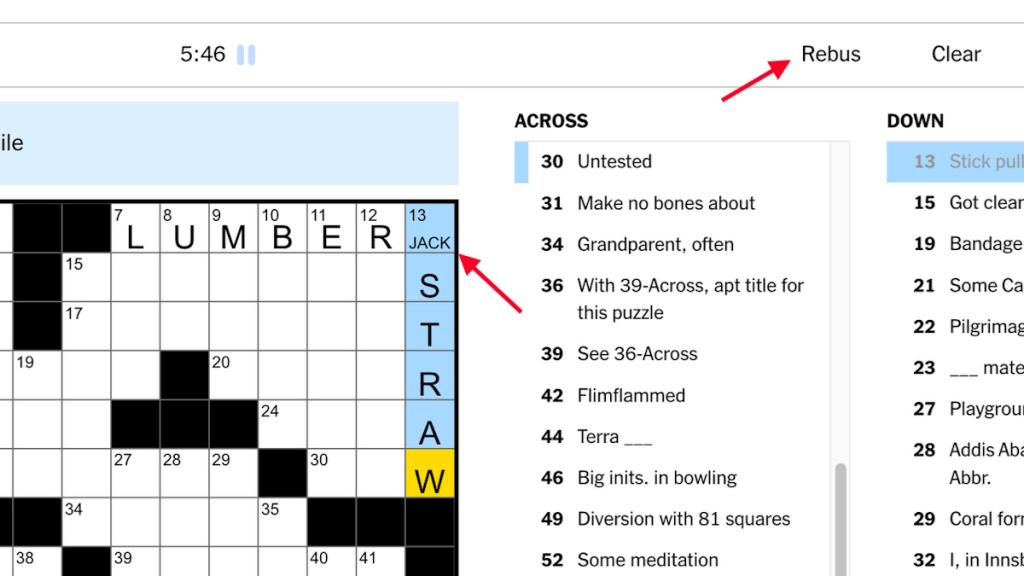
When that happens, you can use ‘/’ in between the words for the grid. The letters on the left of the slash will be considered for the across answer, while the latter will be considered for the down answer.
How can you know whether a puzzle has Rebus or not? You cannot, as there is no clue or indicator beforehand. You will have to read the clue and figure it out yourself. To use Rebus, click on it and then select the grid you want to add multiple letters to. Add the letters in the grid and turn off the Rebus mode.
How to Play The Midi Crossword: A Step-by-Step Guide
Now that you understand the mechanics and rules of Midi Crossword, here is how to play the game:
1. First, you will have to head to the NYT Midi official website and log in to your account. If you don’t have a subscription, the next you need to do is to subscribe to the puzzle. You won’t get access to the game without a subscription.
2. Now today’s grid will be on the screen. Hover over each of the grids to also get the clues for it marked on the right side. Look over all the clues and check the grid count for each one, and start adding the letters that you are sure about.
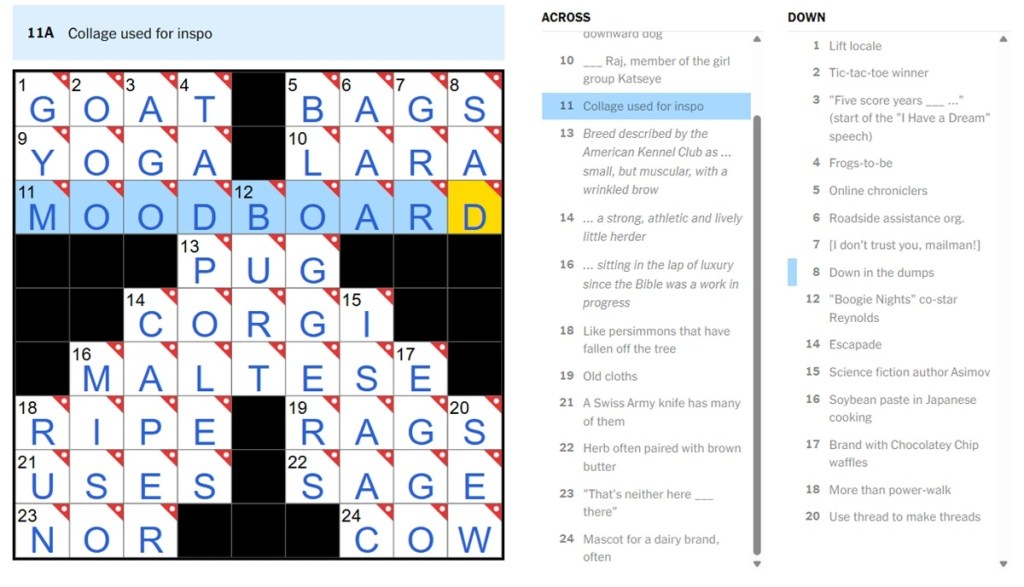
3. Once you have typed in the appropriate word that fits both the across and down clues, click on the Check option for the word and see if you are correct or not. If the word is correct, move to the next clue and continue the cycle.
4. If the word is incorrect, use the Clear button to remove it and head back to the thinking stage. Try again until you figure it out, or move on to a different clue.
5. Once you complete the whole puzzle, you will get a message congratulating you on completing it and revealing the time it took you to do so.
How to Play The Midi With Friends
There is no innate feature in the NYT Midi Crossword that can allow you to solve it with friends. But there are other ways that you can use instead:
1. First, you can share your screen with your friends while playing Midi. This can be done on both PC and mobile, and is one of the best methods for solving a puzzle together.
2. Next, you can share the puzzle with your friends by sending them the puzzle link. This way, both of you can start solving the puzzle at the same time and cooperate on the solutions. However, your friend also must have a NYT Game Plus subscription to play Midi.
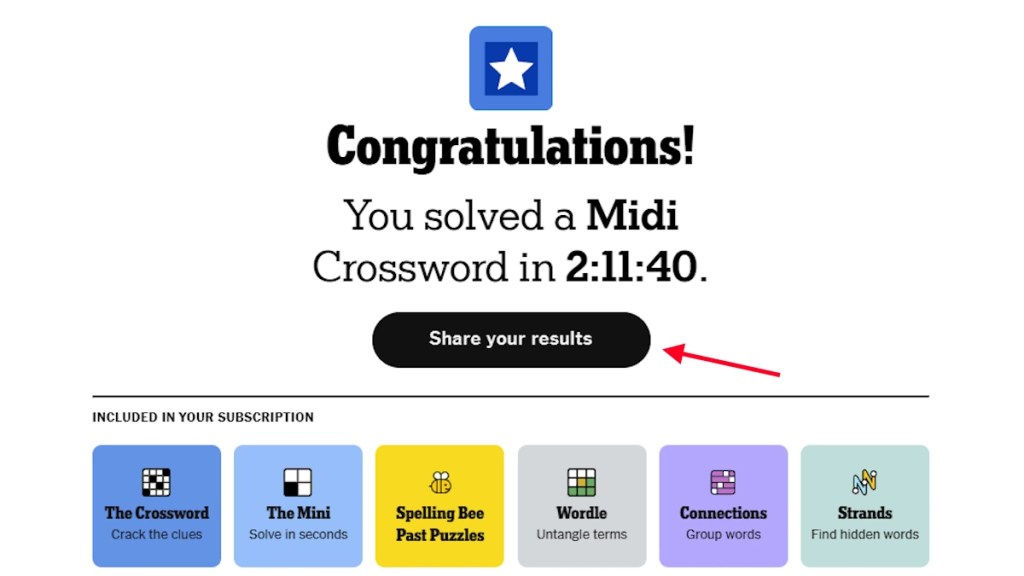
3. Another thing you can do to play together is share your result after completing the puzzle. Once you complete the Midi puzzle, it will give you an option to share it with your friends. Do it and compare the time it took both of you to solve the puzzle.
Can You Play Past Midi Crossword Puzzles?
Yes, you can play previous NYT Midi Crossword puzzles. This can be done in various ways, so here is everything you can do to play previous Midi Crossword puzzles:
1. The easiest method of playing previous Midi Crossword Puzzles is by using the Midi Archives. This is a complete record of all the Midi Crossword puzzles, allowing you to sort the date, month, and year. Navigate to the date you want to solve the puzzle and play it.
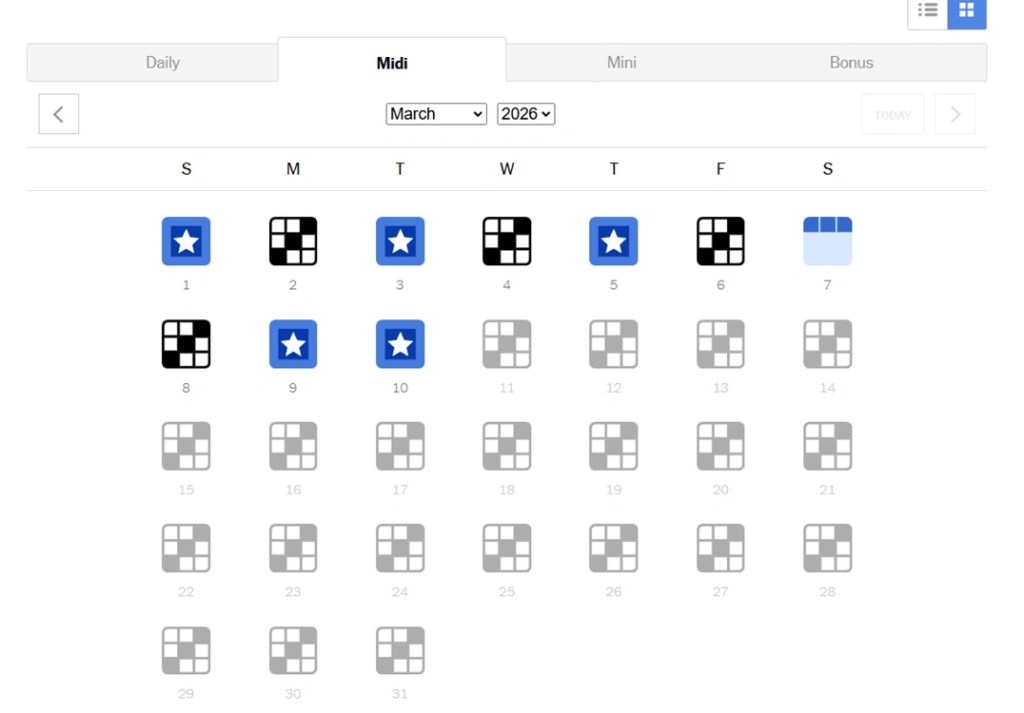
2. Another method you can use is to roll back your system’s date and time to a previous date. Doing this will actually let you play yesterday’s Midi Crossword puzzle.
NYT Midi Crossword Tips and Tricks
NYT Midi Crossword can be quite difficult to solve, even though it is shorter than the Crossword. But there are ways you can increase your chances of solving it daily. How? Check our NYT Midi Crossword tips and tricks given below to find out:
- Start with the easy clues: A smart way to start solving Midi is by completing the easy clues first and checking them to confirm their status. Once they are confirmed to be correct, you have a solid baseline for your other words.
- Check all nearby clues: If you are stuck on a clue, what you can do is check the clues for the words around it. Every down and across grids have different clues, so use them to figure out the word you are stuck on. Each letter you figure out around it would help you solve it.
- Ignore interchangeable letters or multiple clues: Oftentimes, the puzzle will include multiple clues denoted by arrows. These mean that the letters are swappable for the marked cells. Now, it’s best to ignore these clues at first and simply focus on the rest of the puzzle.
- Always check the theme: A common mistake many players make while solving Midi is ignoring the theme of the puzzle. Understanding the theme can give you additional clues, which will in turn help you solve the puzzle.
So, now you have a clear idea of how to play NYT Midi Crossword and its rules and mechanics. Keep playing Midi daily and level up your vocabulary and knowledge every day.
NYT Midi Crossword is generally between 9 x 9 and 11 x 11 grids, making it comparatively shorter than the normal Crossword puzzle but much larger than Mini.
Yes, the NYT Midi Crossword is available on the standard Games app.
Yes, you need to subscribe to NYT Games in order to play Midi Crossword.
Yes, the NYT Midi is considered much harder than Mini due to the larger size of the puzzle.
Tuesday through Saturday puzzles are available at 10 p.m. E.T. the previous day, and Sunday and Monday puzzles are available at 6 p.m. EST the previous day.